
Task Scheduler Gone A.W.O.L

Lasy B

Lager Member
Power User
Local time
6:13 AM
Messages
124
Location
Ma Shiptons Cave
I have a regularly scheduled program which saves a log to C:\ which I clear out every couple of weeks. I went to do it this morning and noticed the last entry was
(Before: 103.12 MB)(After: 560.00 KB) Date & Time: 10/08/2010 20:14:15
which means it hasn't run since Tuesday night. :shock:

I went to check Task Scheduler and was greeted with this:-
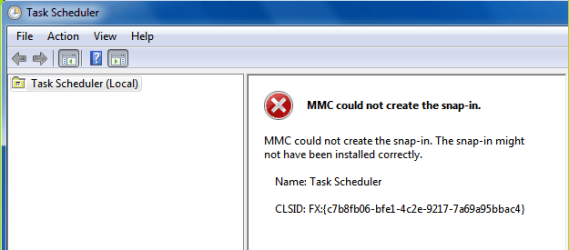
TaskSchedError.png
Its gone!! I ran sfc /scannow but that didn't fix it. It only changed my Imageres.dll and Shell32.dll back. :(

Does anybody know if I just replace the missing files things will return to normal?
Does anybody know what are the missing files I should be looking for?
 

My Computer My Computer

OS
Windows 7 x64

My Computer My Computer

Computer Manufacturer/Model Number
Proline
OS
Windows 7 Pro 64 bit
CPU
Intel(R) Core(TM) i7 CPU 870 @ 2.93GHz
Motherboard
H55-G43(MS-7638)
Memory
4GB
Graphics Card(s)
NVIDIA GeForce GTX 470
Sound Card
Onboard
Monitor(s) Displays
Proline LCD 19 inch
Screen Resolution
1280 x 1024
Hard Drives
2 x SATA 250 Gig 1 x External 2TB
PSU
RX 730 SS
Case
Proline
Cooling
Standard
Keyboard
PS2
Mouse
PS2
Internet Speed
To embarrassed to tell lol
Unless someone comes by with a better solution, I corrected that problem on my computer with System Restore.
 

My Computer My Computer

Computer type
PC/Desktop
Computer Manufacturer/Model Number
Dell XPS 420
OS
Windows 10, Home Clean Install
CPU
Intel Core2 processsor Q8200(2.33Ghz 1333FSB) Quad Core Tech
Motherboard
Dell
Memory
6 gb
Graphics Card(s)
ATI Radeon 256MB HD3650
Sound Card
Intergrated 7.1 Channel Audio
Monitor(s) Displays
Dell SP2009W 20"
Hard Drives
640 GB Serial ATA Hard drive
Cooling
Fan
Keyboard
Dell USB Keyboard
Mouse
Dell Premium Optical USB
Internet Speed
DSL 2.85
Thanks for the link, I'll have a look.

Unless someone comes by with a better solution, I corrected that problem on my computer with System Restore.
I've tried two System Restores (should of mentioned that!), One to before Black Tuesdays updates and the other to just after Black Tuesdays updates. Neither made any difference so undone them both.
I feel a repair install coming on but if I can get away with just replacing the missing files it'll be so much easier!
 

My Computer My Computer

OS
Windows 7 x64
Its my feeling that you did not go back far enough with the SR.
 

My Computer My Computer

Computer type
PC/Desktop
Computer Manufacturer/Model Number
Dell XPS 420
OS
Windows 10, Home Clean Install
CPU
Intel Core2 processsor Q8200(2.33Ghz 1333FSB) Quad Core Tech
Motherboard
Dell
Memory
6 gb
Graphics Card(s)
ATI Radeon 256MB HD3650
Sound Card
Intergrated 7.1 Channel Audio
Monitor(s) Displays
Dell SP2009W 20"
Hard Drives
640 GB Serial ATA Hard drive
Cooling
Fan
Keyboard
Dell USB Keyboard
Mouse
Dell Premium Optical USB
Internet Speed
DSL 2.85
Event Viewer I've just discovered is also missing. Think I'll do the repair install as the last entry in the log file was from just before I installed Black Tuesdays updates, so it must/should have been running then.
 

My Computer My Computer

OS
Windows 7 x64
Sounds like a repair would be the way to go as you are now finding other problems and who knows what you have not noticed yet :D
 

My Computer My Computer

Computer Manufacturer/Model Number
Proline
OS
Windows 7 Pro 64 bit
CPU
Intel(R) Core(TM) i7 CPU 870 @ 2.93GHz
Motherboard
H55-G43(MS-7638)
Memory
4GB
Graphics Card(s)
NVIDIA GeForce GTX 470
Sound Card
Onboard
Monitor(s) Displays
Proline LCD 19 inch
Screen Resolution
1280 x 1024
Hard Drives
2 x SATA 250 Gig 1 x External 2TB
PSU
RX 730 SS
Case
Proline
Cooling
Standard
Keyboard
PS2
Mouse
PS2
Internet Speed
To embarrassed to tell lol
Well, sometimes you just have to bite the bullet, grab the bull by the horns, etc. etc.
The repair install fixed it.
Had an error message at the end saying .NET framework 4.0 was missing essential files and it was being repaired.
I think that may have had something to do with my problem though how they went missing....... :huh:

Just for point of interest.
Update for Windows (KB971033) was automatically installed during the repair install and yet it's not supposed to be compulsory, Along with Update for Windows (KB958488).

Anyway. All's well that ends well. :D
 

My Computer My Computer

OS
Windows 7 x64
Glad that it all worked out.
 

My Computer My Computer

Computer type
PC/Desktop
Computer Manufacturer/Model Number
Dell XPS 420
OS
Windows 10, Home Clean Install
CPU
Intel Core2 processsor Q8200(2.33Ghz 1333FSB) Quad Core Tech
Motherboard
Dell
Memory
6 gb
Graphics Card(s)
ATI Radeon 256MB HD3650
Sound Card
Intergrated 7.1 Channel Audio
Monitor(s) Displays
Dell SP2009W 20"
Hard Drives
640 GB Serial ATA Hard drive
Cooling
Fan
Keyboard
Dell USB Keyboard
Mouse
Dell Premium Optical USB
Internet Speed
DSL 2.85
Back
Top