Task Scheduler Question - Auto Restart

Johnny5896

New member
Local time
9:41 AM
Messages
3
Hello everyone,

I would like to set up a public computer to automatically restart after an hour of use through Windows Task Scheduler. Any help on this matter would be greatly appreciated.

Thanks!
 

My Computer

OS
Windows 7 Ultimate x64
Does the computer automatically log on to a user limited account?
(e.g. not an admin account)

You might be interested in this post/thread.
 

My Computer

Computer type
Laptop
Computer Manufacturer/Model Number
Employer provided Dell Latitude
OS
W7 Pro SP1 64bit
CPU
i7
Memory
8GB
Graphics Card(s)
Intel HD Graphics
Hard Drives
crappy SSD
Antivirus
Employer mandated Symantec Endpoint Protection
Browser
Pale Moon 64bit, IE11 64bit & Chrome 64bit
You can try these settings:
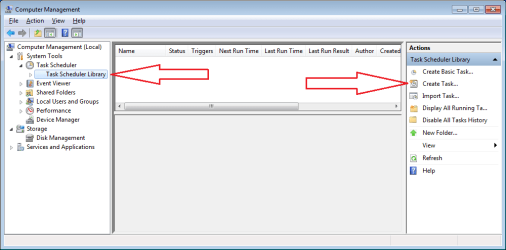
1-restart-create.png


2-restart-general.png


Since this type of restart can be canceled via...
shutdown -a
...it might be best to select a duration of Indefinitely.
The default setting of 1 day might be just as practical;
as I doubt that anyone would cancel the restart 24 times.
But if they did, the task would not try a 25th time...
...if a setting of 1 day is used; hence, my picking Indefinitely.
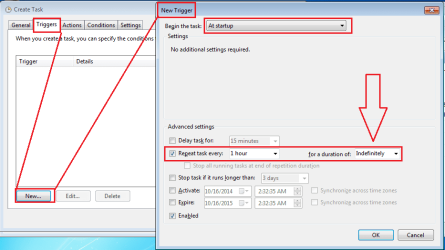
3-restart-trigger.png


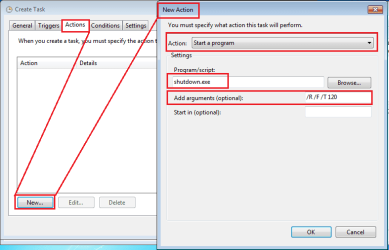
It does not matter if the switches are upper case letters:
/R /F /T 120
You can select a time longer than two minutes :-)
4-restart-action.png


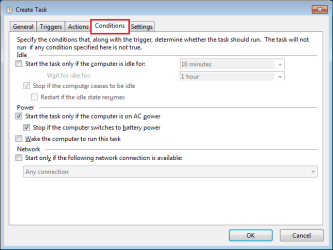
5-restart-conditions.png


For this task's setting...
"Stop the task if it runs longer than: (1 hour)"
...the terms "task" and "it" refer to the app named shutdown.
The task is not stopping or inactivating itself. In other words:
the task will still run the shutdown app again in an hour.
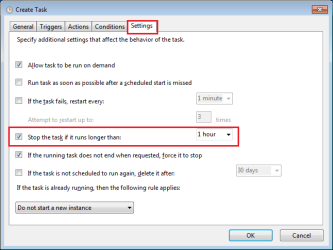
6-restart-settings.png

If you stick with the 1 hour interval as the trigger, then it really does not matter what value you set that highlighted setting to in the screen shown above. You could even deselect it. The /F switch on the shutdown should force the closure/ending of any previously hung app.

 
Last edited:

My Computer

Computer type
Laptop
Computer Manufacturer/Model Number
Employer provided Dell Latitude
OS
W7 Pro SP1 64bit
CPU
i7
Memory
8GB
Graphics Card(s)
Intel HD Graphics
Hard Drives
crappy SSD
Antivirus
Employer mandated Symantec Endpoint Protection
Browser
Pale Moon 64bit, IE11 64bit & Chrome 64bit
Hello UsernameIssues!

Thank you very much! It got me where I needed to be after a few modifications. I do IT work for a local library and several of their computers needed a 1 hour shutdown timer. Also, thank you for the links to ToolWize. I am currently using Drive Vaccine to revert the Patron's computers.

Warm regards,
Johnny5896
 

My Computer

OS
Windows 7 Ultimate x64
I'm glad that is worked for you...
...with a few modifications :-)

I could not tell your level of computer knowledge from your original post...
...so I went a bit overboard on illustrating where to click :-)
 

My Computer

Computer type
Laptop
Computer Manufacturer/Model Number
Employer provided Dell Latitude
OS
W7 Pro SP1 64bit
CPU
i7
Memory
8GB
Graphics Card(s)
Intel HD Graphics
Hard Drives
crappy SSD
Antivirus
Employer mandated Symantec Endpoint Protection
Browser
Pale Moon 64bit, IE11 64bit & Chrome 64bit
Back
Top