curiouso9 New member Member Local time 2:49 PM Messages 27 Mar 1, 2010 #1 Does anyone know how to make Taskbar always combine but not hide label.. My Computer My Computer OSWindows Seven
ryo New member Guru Gold Member VIP Local time 8:49 PM Messages 1,679 Location Indonesia Mar 1, 2010 #2 right click at taskbar....check the group similar taskbar buttons. My Computer My Computer Computer Manufacturer/Model Numberbuilt upOSwindows 7CPUPhenom II AMD Dragon 3.5GhzMemoryDDR3 4GBGraphics Card(s)ATI Radeon 512MbMonitor(s) DisplaysHP L1506Screen Resolution1152 x 864Hard DrivesWDC 1 TB SATA-II Green PowerKeyboardHP wireless keyboardMouseHP OpticInternet Speed1GB
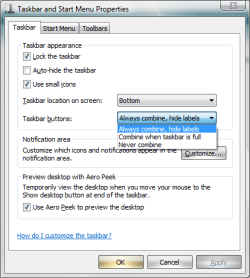
curiouso9 New member Member Thread Starter Local time 2:49 PM Messages 27 Mar 1, 2010 #3 ryo said: right click at taskbar....check the group similar taskbar buttons. Click to expand... what do you means actually, im using win7. there only 3 option, how can I make taskbar always combine but the label not hidden. Attachments Not Hide Label.png 16.3 KB · Views: 47 My Computer My Computer OSWindows Seven
ryo said: right click at taskbar....check the group similar taskbar buttons. Click to expand... what do you means actually, im using win7. there only 3 option, how can I make taskbar always combine but the label not hidden.
ryo New member Guru Gold Member VIP Local time 8:49 PM Messages 1,679 Location Indonesia Mar 1, 2010 #4 yah there just have 3 option,,and i think just only that.. because wins7 one of the addition is about the appear graphics. My Computer My Computer Computer Manufacturer/Model Numberbuilt upOSwindows 7CPUPhenom II AMD Dragon 3.5GhzMemoryDDR3 4GBGraphics Card(s)ATI Radeon 512MbMonitor(s) DisplaysHP L1506Screen Resolution1152 x 864Hard DrivesWDC 1 TB SATA-II Green PowerKeyboardHP wireless keyboardMouseHP OpticInternet Speed1GB
yah there just have 3 option,,and i think just only that.. because wins7 one of the addition is about the appear graphics.