Never combine, hide labels when taskbar is full?

Nysos

Banned
Local time
7:26 PM
Messages
7
Pretty much the title. I know there's a way to make the taskbar buttons not combine and not show labels, but I figured there's no need to hide those labels until I have no more room left in the taskbar.

So, does anyone know if this is possible? Thanks.
 

My Computer

Computer type
PC/Desktop
OS
Windows 7 Ultimate x64
CPU
Intel Core i5-4670K
Motherboard
ASUS MAXIMUS VI GENE
Memory
G.SKILL Ripjaws Z Series 16GB (2 x 8GB)
Graphics Card(s)
2x EVGA GeForce GTX 770 SC w/ ACX Cooler (SLI)
Monitor(s) Displays
ASUS VG248QE
Screen Resolution
1920x1080
Hard Drives
Samsung 840 PRO 256GB SSD,
HSGT 7K1000
PSU
SeaSonic X Series X650 Gold
Case
Corsair Obsidian 350D
Cooling
Corsair SP120 PWM Quiet Edition, Cooler Master Hyper 212 EVO
Keyboard
CM Storm Quick Fire Rapid
Mouse
Razer DeathAdder 2013
Internet Speed
30Mbit/s
Antivirus
MSSE
Browser
Chrome
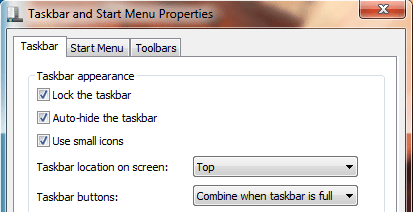
If I understood you correctly:
Capture.PNG
Its in the start menu (taskbar) properties
 

My Computer

Computer type
PC/Desktop
Computer Manufacturer/Model Number
Custom Asus Build
OS
Microsoft Windows 8.1 Pro 64-bit
CPU
Intel(R) Core(TM) i3-4130 CPU @ 3.40GHz
Motherboard
B85M-E
Memory
8.00 GB
Graphics Card(s)
None
Sound Card
Realtek High Definition Audio
Monitor(s) Displays
Asus 23.6" Monitor
Screen Resolution
1920 x 1080 x 32 bits (4294967296 colors) @ 60 Hz
Hard Drives
INTEL SSDSC2BW180A4
Samsung SSD 840 PRO Series
PSU
Seasonic S12II-380Bronze
Case
Lian Li
Cooling
Fan, Passive
Keyboard
Logitech K120
Mouse
Microsoft Touch Mouse
Internet Speed
4ms Ping, 19.0 Mbps Download, 19.0 Mbps Upload
Antivirus
Eset Endpoint
Browser
Internet Explorer, Chrome
You didn't understand me correctly. Read the title again as it's as clear as I can possibly make it.
 

My Computer

Computer type
PC/Desktop
OS
Windows 7 Ultimate x64
CPU
Intel Core i5-4670K
Motherboard
ASUS MAXIMUS VI GENE
Memory
G.SKILL Ripjaws Z Series 16GB (2 x 8GB)
Graphics Card(s)
2x EVGA GeForce GTX 770 SC w/ ACX Cooler (SLI)
Monitor(s) Displays
ASUS VG248QE
Screen Resolution
1920x1080
Hard Drives
Samsung 840 PRO 256GB SSD,
HSGT 7K1000
PSU
SeaSonic X Series X650 Gold
Case
Corsair Obsidian 350D
Cooling
Corsair SP120 PWM Quiet Edition, Cooler Master Hyper 212 EVO
Keyboard
CM Storm Quick Fire Rapid
Mouse
Razer DeathAdder 2013
Internet Speed
30Mbit/s
Antivirus
MSSE
Browser
Chrome
maybe this? :confused:
 
Last edited:

My Computer

Computer type
PC/Desktop
Computer Manufacturer/Model Number
Self assembled
OS
Windows 10 Home 64Bit
CPU
Intel Core i5 10400 @ 2.90GHz
Motherboard
Intel Corporation DG41WV (PROCESSOR)
Memory
8.00GB Single-Channel Unknown @ 1329MHz (16-20-20-38)
Sound Card
Realtek High Definition Audio
Monitor(s) Displays
DELL E170S
Screen Resolution
1280x1024 pixels
Hard Drives
931GB TOSHIBA DT01ACA100 (SATA)
238GB TEAM TM8PS7256G (SATA SSD)
Case
Nothing Fancy
Cooling
Fans
Keyboard
A4 Tech Co LTD
Mouse
A4 Tech Co Ltd/Logitech
Internet Speed
25 Mbps
Can I get help from someone whose reading capacity isn't limited to the last 4 words or the first 2 words of a topic title?

What part of "hide labels when taskbar is full" don't you understand? It's simple English. I want to know if it's possible to set the labels of the taskbar buttons to be hidden when the taskbar is full and before the buttons are combined. Please stop suggesting the obvious options in the Taskbar Properties. If it were as simple as using those, I wouldn't be posting in forums.
 
Last edited:

My Computer

Computer type
PC/Desktop
OS
Windows 7 Ultimate x64
CPU
Intel Core i5-4670K
Motherboard
ASUS MAXIMUS VI GENE
Memory
G.SKILL Ripjaws Z Series 16GB (2 x 8GB)
Graphics Card(s)
2x EVGA GeForce GTX 770 SC w/ ACX Cooler (SLI)
Monitor(s) Displays
ASUS VG248QE
Screen Resolution
1920x1080
Hard Drives
Samsung 840 PRO 256GB SSD,
HSGT 7K1000
PSU
SeaSonic X Series X650 Gold
Case
Corsair Obsidian 350D
Cooling
Corsair SP120 PWM Quiet Edition, Cooler Master Hyper 212 EVO
Keyboard
CM Storm Quick Fire Rapid
Mouse
Razer DeathAdder 2013
Internet Speed
30Mbit/s
Antivirus
MSSE
Browser
Chrome
my post was wrong,but i think you should re read Dust Sailor's post again. cause according to me he gave the right one. so set your properties to that, and click open many windows/folders etc and check if it does what you want.

ps: if you noticed your title 'Never combine, hide labels when taskbar is full' has the exact reverted meaning of 'combine when task bar is full' :geek:
 

My Computer

Computer type
PC/Desktop
Computer Manufacturer/Model Number
Self assembled
OS
Windows 10 Home 64Bit
CPU
Intel Core i5 10400 @ 2.90GHz
Motherboard
Intel Corporation DG41WV (PROCESSOR)
Memory
8.00GB Single-Channel Unknown @ 1329MHz (16-20-20-38)
Sound Card
Realtek High Definition Audio
Monitor(s) Displays
DELL E170S
Screen Resolution
1280x1024 pixels
Hard Drives
931GB TOSHIBA DT01ACA100 (SATA)
238GB TEAM TM8PS7256G (SATA SSD)
Case
Nothing Fancy
Cooling
Fans
Keyboard
A4 Tech Co LTD
Mouse
A4 Tech Co Ltd/Logitech
Internet Speed
25 Mbps
Look, I know exactly what each of those options does, because in 2 years of owning Windows 7 I've had ample time to mess around with them, and I'd never start a forum thread about it if I hadn't.

"Combine when taskbar is full" is what I've been using for as long as I can remember, and it definitely does NOT hide the labels before it combines the buttons. Also, I'm not entirely sure what you mean by your latter comment, but if you're claiming that "combine when task bar is full" is the opposite of "Never combine, hide labels when taskbar is full," you're right. In other words, it's the opposite of what I need.
 

My Computer

Computer type
PC/Desktop
OS
Windows 7 Ultimate x64
CPU
Intel Core i5-4670K
Motherboard
ASUS MAXIMUS VI GENE
Memory
G.SKILL Ripjaws Z Series 16GB (2 x 8GB)
Graphics Card(s)
2x EVGA GeForce GTX 770 SC w/ ACX Cooler (SLI)
Monitor(s) Displays
ASUS VG248QE
Screen Resolution
1920x1080
Hard Drives
Samsung 840 PRO 256GB SSD,
HSGT 7K1000
PSU
SeaSonic X Series X650 Gold
Case
Corsair Obsidian 350D
Cooling
Corsair SP120 PWM Quiet Edition, Cooler Master Hyper 212 EVO
Keyboard
CM Storm Quick Fire Rapid
Mouse
Razer DeathAdder 2013
Internet Speed
30Mbit/s
Antivirus
MSSE
Browser
Chrome
Can I get help from someone whose reading capacity isn't limited to the last 4 words or the first 2 words of a topic title?
Perhaps if you improved your own English (rather, expounded on what you are saying), we might be able to make out what you are after. From my point of view, two people have been misled by your 'perfect' English. Usually, when someone doesn't understand what another means to say, that person takes it upon themselves to clarify. You seem only to be mocking the very people trying to help you. Who here would read what you wrote just now and care to offer you a solution (albit that may be a bit hard, because, once again, you seem sort of stuck on the fact that you cannnot explain something any more than those "4 words")?

Now, if you could please clarify, it would be oh so appreciated.

PS According to what your original post asks (oh yes, including the title and its last 4 words), my first response is EXACTLY the answer to your problem
 
Last edited:

My Computer

Computer type
PC/Desktop
Computer Manufacturer/Model Number
Custom Asus Build
OS
Microsoft Windows 8.1 Pro 64-bit
CPU
Intel(R) Core(TM) i3-4130 CPU @ 3.40GHz
Motherboard
B85M-E
Memory
8.00 GB
Graphics Card(s)
None
Sound Card
Realtek High Definition Audio
Monitor(s) Displays
Asus 23.6" Monitor
Screen Resolution
1920 x 1080 x 32 bits (4294967296 colors) @ 60 Hz
Hard Drives
INTEL SSDSC2BW180A4
Samsung SSD 840 PRO Series
PSU
Seasonic S12II-380Bronze
Case
Lian Li
Cooling
Fan, Passive
Keyboard
Logitech K120
Mouse
Microsoft Touch Mouse
Internet Speed
4ms Ping, 19.0 Mbps Download, 19.0 Mbps Upload
Antivirus
Eset Endpoint
Browser
Internet Explorer, Chrome
I'm not entirely sure what you mean by your latter comment, but if you're claiming that "combine when task bar is full" is the opposite of "Never combine, hide labels when taskbar is full," you're right. In other words, it's the opposite of what I need.
if you noticed your title 'Never combine, hide labels when taskbar is full' has the exact reverted meaning of 'combine when task bar is full' :geek:
He is saying that if you select the option to "combine when task bar is full", it will Never combine or hide labels until the taskbar gets full. There are a grand total of three options, and your choice to choose one. Unless you are explaining to us how you want something completely different in a much kinder fashion?
 

My Computer

Computer type
PC/Desktop
Computer Manufacturer/Model Number
Custom Asus Build
OS
Microsoft Windows 8.1 Pro 64-bit
CPU
Intel(R) Core(TM) i3-4130 CPU @ 3.40GHz
Motherboard
B85M-E
Memory
8.00 GB
Graphics Card(s)
None
Sound Card
Realtek High Definition Audio
Monitor(s) Displays
Asus 23.6" Monitor
Screen Resolution
1920 x 1080 x 32 bits (4294967296 colors) @ 60 Hz
Hard Drives
INTEL SSDSC2BW180A4
Samsung SSD 840 PRO Series
PSU
Seasonic S12II-380Bronze
Case
Lian Li
Cooling
Fan, Passive
Keyboard
Logitech K120
Mouse
Microsoft Touch Mouse
Internet Speed
4ms Ping, 19.0 Mbps Download, 19.0 Mbps Upload
Antivirus
Eset Endpoint
Browser
Internet Explorer, Chrome
You know what? Just drop it. You obviously don't have an answer to my question, or you'd know what I'm talking about off the bat, regardless of how well I worded it. What I'm asking—if even possible—would probably require some kind of registry hack, and judging from your comment "there are a grand total of three options, and your choice to choose one," it's obvious you wouldn't know anything about that. Just so you know, there is at least a fourth choice.

Plus, if you'd actually bothered to read the posts, you'd notice I already "clarified" twice, so there's clearly a problem on your end, which is confirmed by your apparent belief that "combine" and "never combine" mean the same thing, hence your response that I should choose the option to "combine when..." when in the topic title it says "never combine." Truly fascinating.

You don't have to reply—I'm moving on to other forums.
 

My Computer

Computer type
PC/Desktop
OS
Windows 7 Ultimate x64
CPU
Intel Core i5-4670K
Motherboard
ASUS MAXIMUS VI GENE
Memory
G.SKILL Ripjaws Z Series 16GB (2 x 8GB)
Graphics Card(s)
2x EVGA GeForce GTX 770 SC w/ ACX Cooler (SLI)
Monitor(s) Displays
ASUS VG248QE
Screen Resolution
1920x1080
Hard Drives
Samsung 840 PRO 256GB SSD,
HSGT 7K1000
PSU
SeaSonic X Series X650 Gold
Case
Corsair Obsidian 350D
Cooling
Corsair SP120 PWM Quiet Edition, Cooler Master Hyper 212 EVO
Keyboard
CM Storm Quick Fire Rapid
Mouse
Razer DeathAdder 2013
Internet Speed
30Mbit/s
Antivirus
MSSE
Browser
Chrome

My Computer

Computer type
Laptop
Computer Manufacturer/Model Number
Sager NP9170
OS
Win 7 Pro x64 / Win 10 Pro
CPU
Intel(R) Core(TM) i7-3630QM CPU @ 2.40GHz
Motherboard
CLEVO P170EM
Memory
12 GB
Graphics Card(s)
(1) Intel(R) HD Graphics 4000 (2) NVIDIA GeForce GTX 675M
Sound Card
(1) Realtek High Definition Audio (2) Intel(R) Display Aud
Monitor(s) Displays
17.3
Screen Resolution
1920x1080
Hard Drives
(1) Samsung 860 EVO 500GB(OS) (1) Samsung 860 EVO 500GB(Data)
Keyboard
Backlite
Antivirus
MSE, Malwarebytes Pro
Browser
Firefox
Other Info
DESKTOP: Custom-built.
OS: Win 10 Pro x64.
CASE: Rosewill R5.
CPU: Intel I5 4670K CPU @ 3.40GHz.
CPU COOLER: Cool Master Hyper 212 EVO.
MOTHERBOARD: Asus Z87-A.
MEMORY: Kingston HyperX 2x4 GB.
GPU: Nvidia Geforce 650 TI.
PSU: Corsair TX750.
DRIVES: (1) Samsung 840 120 GB SSD (2) Western Digital blue 500 GB 7200 RPM.
You obviously don't have an answer to my question, or you'd know what I'm talking about off the bat, regardless of how well I worded it.
Perhaps, but isn't that the point I'm trying to make? If you worded it differently, perhaps then I'd be able to know what you were talking about...
What I'm asking—if even possible—would probably require some kind of registry hack, and judging from your comment "there are a grand total of three options, and your choice to choose one," it's obvious you wouldn't know anything about that..
You're right. I do not often recommend registry hacks because it could potentially mess up the whole computer. There are those warnings all over the place. Without knowing how adapt at computers you are, how can I offer advice dealing with the registry? Therefore I did not offer a registry hack as an option.

Just so you know, there is at least a fourth choice.
That is an example of someone explaining what they were after, yes. But that hardly applies to what you've asked in your first post, or made clear to me in subsequent posts.

Plus, if you'd actually bothered to read the posts, you'd notice I already "clarified" twice, so there's clearly a problem on your end, which is confirmed by your apparent belief that "combine" and "never combine" mean the same thing, hence your response that I should choose the option to "combine when..." when in the topic title it says "never combine." Truly fascinating..
Perhaps losing the messed up attitude (I don't even know why you are angry with us for trying to help you, still makes no sense) would go a long way. I still wasn't sure what you were asking, as there is no windows option to do whatever it is you want to do (besides a registry hack, but this forum doesn't often offer advice for the registry unless Requested, and you have not. You've only managed to yell at and berate us for our attempt to do you a favor).

You don't have to reply—I'm moving on to other forums.
Bye
I agree, it is probably for the best

I guess I did reply after all
 
Last edited:

My Computer

Computer type
PC/Desktop
Computer Manufacturer/Model Number
Custom Asus Build
OS
Microsoft Windows 8.1 Pro 64-bit
CPU
Intel(R) Core(TM) i3-4130 CPU @ 3.40GHz
Motherboard
B85M-E
Memory
8.00 GB
Graphics Card(s)
None
Sound Card
Realtek High Definition Audio
Monitor(s) Displays
Asus 23.6" Monitor
Screen Resolution
1920 x 1080 x 32 bits (4294967296 colors) @ 60 Hz
Hard Drives
INTEL SSDSC2BW180A4
Samsung SSD 840 PRO Series
PSU
Seasonic S12II-380Bronze
Case
Lian Li
Cooling
Fan, Passive
Keyboard
Logitech K120
Mouse
Microsoft Touch Mouse
Internet Speed
4ms Ping, 19.0 Mbps Download, 19.0 Mbps Upload
Antivirus
Eset Endpoint
Browser
Internet Explorer, Chrome
You know what? Just drop it. You obviously don't have an answer to my question, or you'd know what I'm talking about off the bat, regardless of how well I worded it. What I'm asking—if even possible—would probably require some kind of registry hack, and judging from your comment "there are a grand total of three options, and your choice to choose one," it's obvious you wouldn't know anything about that. Just so you know, there is at least a fourth choice.

Plus, if you'd actually bothered to read the posts, you'd notice I already "clarified" twice, so there's clearly a problem on your end, which is confirmed by your apparent belief that "combine" and "never combine" mean the same thing, hence your response that I should choose the option to "combine when..." when in the topic title it says "never combine." Truly fascinating.

You don't have to reply—I'm moving on to other forums.
Mac user? :sarc:
At least he did use our search function.
 

My Computer

Computer type
PC/Desktop
Computer Manufacturer/Model Number
Home Built Desktop By DataTech
OS
Windows 7 Ultimate X64 SP1
CPU
Intel i5-2550K, Differing ~4.4-4.8GHz No built in GPU
Motherboard
ASUS P8Z68-V PRO/GEN3
Memory
16GB G.Skill Sniper 1866MHz @ 2133MHz 2x8GB
Graphics Card(s)
ASUS GTX650TIB-DC2OC-2GD5, (650TI Boost)
Sound Card
Onboard Realtek 5-1
Monitor(s) Displays
Samsung P2570HD
Screen Resolution
1920x1080
Hard Drives
Samsung 840 Pro 256GB SSD for OS, 500GB Seagate Constellation (Enterprise drive) for Data
PSU
Corsair HX650W
Case
Inwin Dragon Rider
Cooling
Hyper 212 EVO w/two Noctua fans, push-pull, @1300 RPM
Keyboard
E-Z Eyes, bright yellow keys with large characters
Mouse
steelseries SENSEI Laser Pro Gaming
Internet Speed
48-51Mbs Mbs down, 11 Mbs up Xfinity Cable
Antivirus
Norton Internet Security 2013
Browser
IE 10, Opera, Pale Moon if needed
Other Info
4 case fans, LG BluRay-RE, ASUS DVD-RW, Mr. Fusion power supply, 1.21 gigawatts.
Here's how to 'never combine, hide labels'. I'm not sure how to hide only when full, especially since the act of hiding labels would in most cases cause the taskbar to not be full again.

1. Go to your taskbar properties and set Taskbar Buttons to "Never Combine".

2. Launch REGEDIT and navigate to HKEY_CURRENT_USER\ControlPanel\Desktop\WindowMetrics

3. Create a new String Value and call it MinWidth.

4. Modify the string properties and set the value to 56.

5. Restart your computer, and now Windows 7 will never combine icons, but it will also hide the labels.
 

My Computer

OS
Windows 7 Ultimate x64
Here's how to 'never combine, hide labels'. I'm not sure how to hide only when full, especially since the act of hiding labels would in most cases cause the taskbar to not be full again.

1. Go to your taskbar properties and set Taskbar Buttons to "Never Combine".

2. Launch REGEDIT and navigate to HKEY_CURRENT_USER\ControlPanel\Desktop\WindowMetrics

3. Create a new String Value and call it MinWidth.

4. Modify the string properties and set the value to 56.

5. Restart your computer, and now Windows 7 will never combine icons, but it will also hide the labels.
Yes, that's the tweak I linked earlier in this thread, and I'd already been using it, but I'd prefer the labels be shown when the taskbar isn't full. Indeed, hiding the labels would cause it to not be full again, but I hoped it would take into account "full with labels" rather than just "full." Thanks for trying anyway—the request was a long shot, but I asked just in case someone had figured it out.
 

My Computer

Computer type
PC/Desktop
OS
Windows 7 Ultimate x64
CPU
Intel Core i5-4670K
Motherboard
ASUS MAXIMUS VI GENE
Memory
G.SKILL Ripjaws Z Series 16GB (2 x 8GB)
Graphics Card(s)
2x EVGA GeForce GTX 770 SC w/ ACX Cooler (SLI)
Monitor(s) Displays
ASUS VG248QE
Screen Resolution
1920x1080
Hard Drives
Samsung 840 PRO 256GB SSD,
HSGT 7K1000
PSU
SeaSonic X Series X650 Gold
Case
Corsair Obsidian 350D
Cooling
Corsair SP120 PWM Quiet Edition, Cooler Master Hyper 212 EVO
Keyboard
CM Storm Quick Fire Rapid
Mouse
Razer DeathAdder 2013
Internet Speed
30Mbit/s
Antivirus
MSSE
Browser
Chrome
Back
Top