Taskbar customization in Windows 7

Customods

New member
Local time
10:49 AM
Messages
7
Hello,

In Windows 7 Ultimate 64-bit whenever i open more than 13 windows within an application,
in this case Mozilla Firefox, the windows become condensed vertically, no longer showing the
pages themselves, only the title of each window. Is it possible to customize it so that it
shows up to 26 windows on two horizontal rows (13 on each row)?

See photoshopped examples below to see what I mean:


Thanks
 

My Computer

OS
Windows 7
Welcome!

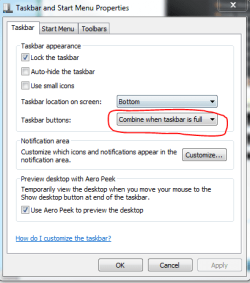
I believe there is. Right-click on the taskbar and select Properties. Tell it to Never Combine in the resulting window.

Capture.PNG
 

My Computer

Computer Manufacturer/Model Number
Custom
OS
Windows 7 Professional x64
CPU
Intel i7 2600K OC'd @ 4620 MHz
Motherboard
Asus P8Z68-V Pro
Memory
16GB GSkill Sniper 2133 Mhz (4x4GB)
Graphics Card(s)
EVGA GeForce GTX 480 SuperClocked+
Sound Card
Realtek High Definition Audio
Monitor(s) Displays
2x Acer S273HLbmii 27"
Screen Resolution
2 x 1920x1080
Hard Drives
64GB Crucial M4 SSD

Storage: Hitachi 1TB 5400RPM, Samsung 1.5TB 5400RPM
PSU
Corsair HW Series 750w (modular)
Case
Cooler Master HAF 932 Advanced Blue Edition
Cooling
CM Hyper 212+ CPU cooler, 3x 230mm + 1x 140mm case fans
Keyboard
Logitech MK320 (wireless)
Mouse
Logitech MK320 (wireless)
Internet Speed
30 Mb/s : 2 Mb/s
Hi Jonathan_King,

Unfortunately that has no effect on increasing the number of horizontal rows. All it does is expand each window to it's own taskbar tab as opposed to having them all grouped together for each individual application. As soon as 14 Firefox windows are opened the arrangement changes from horizontal to vertical and the little thumbnails for each window are condensed into just the title names.

Is it at all possible? If not, is there any way to modify it myself? I don't have any programming knowledge...
 

My Computer

OS
Windows 7

My Computer

Computer Manufacturer/Model Number
Novatech (UK) iRush Pro
OS
MSDN Home Premium
CPU
Intel i5
Motherboard
Intel DP55WB
Memory
4Gb
Graphics Card(s)
ATI Radeon HD 5770
Sound Card
On Board
Monitor(s) Displays
Philips 170B
Hard Drives
1 x 1Tb
(7 Partitions)
PSU
750W
Case
Antec 300
Cooling
Tricool Fans
Keyboard
Microsoft 3000 Wireless
Mouse
Microsoft 5000 Wireless BlueTrack
Internet Speed
6.1 Mbps
Not really, but it's a step in the right direction. I suppose the solution to my problem is to modify the registry? I'd contact the OP there on how to do this but it seems he doesn't frequent this forum :(

Is there anyone on this forum i could get in touch with that would know how to do this?
 

My Computer

OS
Windows 7
The maximum number of thumbnails that are displayed for any given application in the taskbar is directly proportionate to the screen resolution Windows 7 is running at. So in my case i'm running at a maximum resolution of 1680X1050 which currently nets me a maximum of 13 viewable thumbnails per application. If I exceed that amount, like i said, the arrangement is then automatically changed to a scrunched vertical list without the thumbnails present. I've also tested this on my HDTV capable of 1920X1080, and the maximum was 15 thumbnails. My goal is 25+ on two rows @ a resolution of 1680X1050.

After a couple hours of googling around the net i came across a thread that explains how windows does this. I don't know if i'm allowed to post the link, so i'll just quote the OP:

"every time your mouse hovers over a button, explorer makes some calculations based on your resolution, and makes a second value of maximum thumbnails to show (which is 10 on a 1280x1024 resolution). Then it takes the smaller of the two, and if you have more buttons than this value, it shows a list instead.

To change the default value, which is 16, create the following value in your registry:
NumThumbnails as a DWORD in:
HKEY_CURRENT_USER\Software\Microsoft\Windows\CurrentVersion\Explorer\Taskband

And set it to the desired maximum number of thumbnails to show."


I've created that value in the registry, set it to 24, rebooted and still no dice, stuck on 13. Anyone here got any ideas?
 

My Computer

OS
Windows 7
You might also need to adjust this setting in firefox to allow more tabs. I believe firefox will only allow 20 as the default. To change this follow these steps:

1. Open up firefox
2. Type in the address bar "about:config"
3. Click "I will be careful, I promise"
4. Type in the filter bar "browser.taskbar.previews.max"
5. Right click on "browser.taskbar.previews.max" and select modify
6. Set it to the max amount of previews you want.
7. Close and restart firefox.
 
Last edited:

My Computer

Computer Manufacturer/Model Number
acer timeline 3810t
OS
Windows 7 64-bit Windows 7 32-bit
CPU
Intel Core 2 Solo (1.4 GHz)
Memory
4 GB DDR3 SDRAM - 1066 MHz SO DIMM 204-pin
Graphics Card(s)
Intel GMA 4500MHD Dynamic Video Memory Technology 5.0
Monitor(s) Displays
Widescreen 13.3 in TFT active matrix
Hard Drives
# 250 GB - Serial ATA-150 - 5400 rpm
Case
# Ultraportable (Under 4 lbs.) , Budget
Hmmm I checked that registry edit I don't think its correct, but can someone double check that.
 

My Computer

Computer Manufacturer/Model Number
acer timeline 3810t
OS
Windows 7 64-bit Windows 7 32-bit
CPU
Intel Core 2 Solo (1.4 GHz)
Memory
4 GB DDR3 SDRAM - 1066 MHz SO DIMM 204-pin
Graphics Card(s)
Intel GMA 4500MHD Dynamic Video Memory Technology 5.0
Monitor(s) Displays
Widescreen 13.3 in TFT active matrix
Hard Drives
# 250 GB - Serial ATA-150 - 5400 rpm
Case
# Ultraportable (Under 4 lbs.) , Budget
So i tried both my self, it might have to do with there being a minimum resolution to the previews. In other words the more previews you have the smaller they get, and windows wont allow them to get smaller than a certain size. That's just my guess.
 

My Computer

Computer Manufacturer/Model Number
acer timeline 3810t
OS
Windows 7 64-bit Windows 7 32-bit
CPU
Intel Core 2 Solo (1.4 GHz)
Memory
4 GB DDR3 SDRAM - 1066 MHz SO DIMM 204-pin
Graphics Card(s)
Intel GMA 4500MHD Dynamic Video Memory Technology 5.0
Monitor(s) Displays
Widescreen 13.3 in TFT active matrix
Hard Drives
# 250 GB - Serial ATA-150 - 5400 rpm
Case
# Ultraportable (Under 4 lbs.) , Budget
i can't think of a single instance where this could be a problem for me. why would you need that many instances of any program open?
 

My Computer

Computer Manufacturer/Model Number
Custom
OS
Windows 7 Ultimate Signature Edition
CPU
Intel Core i7 Extreme 3.33GHz
Motherboard
EVGA X-58 SLI Classified
Memory
12GB DDR3
Graphics Card(s)
2x EVGA 285 2GB in SLI
Sound Card
Creative Labs X-Fi ExtremeGamer
Monitor(s) Displays
30" Viewsonic
Hard Drives
2x1TB Western Digital 7200RPM in RAID 0/1TB WD My Book External HDD
PSU
Thermaltake 1000w supporting quad SLI
Case
Thermaltake Armor Full Tower
Cooling
Thermaltake V1 CPU+DIY Liquid cooling
its not instances of the program, its firefox's tabs. It displays them in the preview. so if you have 12 tabs open it will show all 12 tabs in the preview
 

My Computer

Computer Manufacturer/Model Number
acer timeline 3810t
OS
Windows 7 64-bit Windows 7 32-bit
CPU
Intel Core 2 Solo (1.4 GHz)
Memory
4 GB DDR3 SDRAM - 1066 MHz SO DIMM 204-pin
Graphics Card(s)
Intel GMA 4500MHD Dynamic Video Memory Technology 5.0
Monitor(s) Displays
Widescreen 13.3 in TFT active matrix
Hard Drives
# 250 GB - Serial ATA-150 - 5400 rpm
Case
# Ultraportable (Under 4 lbs.) , Budget
@kookster, No, IT IS instances of a program, NOT firefox tabs. I hope we're all clear on that. I'm just using firefox as an example.

@valtonray, I play online poker and i need to be able to preview all 24 tables at the same time as thumbnails so that i know when i'm sitting out at certain tables, waiting in line, no longer sitting, etc. And scrolling thru 24 tables one by one is time consuming and tedious.
 

My Computer

OS
Windows 7
Simple solution for that: Don't play 24 tables. Other than that, hope you figure it out, I personally think it's impossible... Good luck.
 

My Computer

Computer type
PC/Desktop
Computer Manufacturer/Model Number
Custom built
OS
Windows 8 Pro 64-bit
CPU
Intel Core i7 950 @4.4GHz
Motherboard
EVGA 131-GT-E767
Memory
12GB DDR3 1333MHz @1400 (9-9-9-24)
Graphics Card(s)
2x AMD Radeon HD 6770
Sound Card
Sound Blaster Audigy
Monitor(s) Displays
Acer S231HL + Acer E19T5W
Screen Resolution
1920x1080 + 1440x900
Hard Drives
128GB Samsung 840 Pro
1TB Seagate Barracuda 7200RPM 64mb
500GB Seagate Barracuda 7200RPM 16mb
PSU
Corsair GS800
Case
Custom-made
Cooling
CM Hyper212+, lots of fans
Keyboard
NMB RT8255C+
Mouse
Func MS-3
Internet Speed
30/1.5
Antivirus
Microsoft Security Essentials/Spybot SD/Malwarebytes
Browser
Google Chrome
Other Info
Onkyo TX-27 receiver & two Realistic Optimus T100s.
I think the registry key is just for the default max number of preview screens. this number is diregarded if the resolution calculation says to change to list after 13. I dont know if any developers here know how to edit the explorer.exe so I don't know if you can change this.
 

My Computer

Computer type
Laptop
Computer Manufacturer/Model Number
ASUS G60-RBBX05
OS
Win7 Home Premium 64x
CPU
Intel Core 2 Duo P7450 / 2.13 GHz (2.29 with Extreme Turbo)
Memory
4 GB PC-6400 Hyundai (2X2) at 800Mhz
Graphics Card(s)
NVIDIA GeForce GTX 260M 1GB DDR3 VRAM
Monitor(s) Displays
16" LED Backlit
Screen Resolution
1366 x 768 on laptop 1600x1050 max res on 22" external mon
Hard Drives
OCZ Agility 3 60GB SSD / 320 GB - Serial ATA-150 - 7200 rpm
PSU
6-cell Lithium ion { lasts 1.5 hours }
Case
ASUS G60 Laptop
Keyboard
Chicklet type back-lit (white light) keyboard
Mouse
Logitech G9 Laser Mouse 3200dpi and 1000 reports per minute
Internet Speed
Comcast 8.60mb/s up - 3.11mb/s down
Antivirus
MSE
Browser
Firefox
Other Info
General mid-budget gaming Comp. Low batterylife - High FrameRates - currently overheating problems :(

2nd Rig: Case: Rosewill BLACKHAWK Gaming ATX Mid Tower Computer Case

Mobo: GIGABYTE GA-990FXA-UD3
CPU: AMD FX-6200 Zambezi 3.8GHz (4.1GHz Turbo)
Heatsink: COOLER MASTER V8 CPU Cooler
RAM: Patriot Viper 3 8GB (2 x 4GB) 240-Pin DDR3 SDRAM 1866 (PC3 15000)
GPU: SAPPHIRE Radeon HD 6850 1GB 2
Oh btw...If you are playing 24 tables for Money and making a living doing that then mad props. If you are just playing for fun, then you my friend are an expert at multislacking
 

My Computer

Computer type
Laptop
Computer Manufacturer/Model Number
ASUS G60-RBBX05
OS
Win7 Home Premium 64x
CPU
Intel Core 2 Duo P7450 / 2.13 GHz (2.29 with Extreme Turbo)
Memory
4 GB PC-6400 Hyundai (2X2) at 800Mhz
Graphics Card(s)
NVIDIA GeForce GTX 260M 1GB DDR3 VRAM
Monitor(s) Displays
16" LED Backlit
Screen Resolution
1366 x 768 on laptop 1600x1050 max res on 22" external mon
Hard Drives
OCZ Agility 3 60GB SSD / 320 GB - Serial ATA-150 - 7200 rpm
PSU
6-cell Lithium ion { lasts 1.5 hours }
Case
ASUS G60 Laptop
Keyboard
Chicklet type back-lit (white light) keyboard
Mouse
Logitech G9 Laser Mouse 3200dpi and 1000 reports per minute
Internet Speed
Comcast 8.60mb/s up - 3.11mb/s down
Antivirus
MSE
Browser
Firefox
Other Info
General mid-budget gaming Comp. Low batterylife - High FrameRates - currently overheating problems :(

2nd Rig: Case: Rosewill BLACKHAWK Gaming ATX Mid Tower Computer Case

Mobo: GIGABYTE GA-990FXA-UD3
CPU: AMD FX-6200 Zambezi 3.8GHz (4.1GHz Turbo)
Heatsink: COOLER MASTER V8 CPU Cooler
RAM: Patriot Viper 3 8GB (2 x 4GB) 240-Pin DDR3 SDRAM 1866 (PC3 15000)
GPU: SAPPHIRE Radeon HD 6850 1GB 2
Quote: "every time your mouse hovers over a button, explorer makes some calculations based on your resolution, and makes a second value of maximum thumbnails to show (which is 10 on a 1280x1024 resolution). Then it takes the smaller of the two, and if you have more buttons than this value, it shows a list instead."

This calc. might be made to prevent the previews from running off the page and is not programmed to show rows of previews so you cant have 13-wide\2-tall you would just be capped at 13....even if you get it to force show 24 previews, it might center them all on one row and you will still see only 13 of then as those fit on the screen the first 5½ and last 5½ of previews will run of screen
 

My Computer

Computer type
Laptop
Computer Manufacturer/Model Number
ASUS G60-RBBX05
OS
Win7 Home Premium 64x
CPU
Intel Core 2 Duo P7450 / 2.13 GHz (2.29 with Extreme Turbo)
Memory
4 GB PC-6400 Hyundai (2X2) at 800Mhz
Graphics Card(s)
NVIDIA GeForce GTX 260M 1GB DDR3 VRAM
Monitor(s) Displays
16" LED Backlit
Screen Resolution
1366 x 768 on laptop 1600x1050 max res on 22" external mon
Hard Drives
OCZ Agility 3 60GB SSD / 320 GB - Serial ATA-150 - 7200 rpm
PSU
6-cell Lithium ion { lasts 1.5 hours }
Case
ASUS G60 Laptop
Keyboard
Chicklet type back-lit (white light) keyboard
Mouse
Logitech G9 Laser Mouse 3200dpi and 1000 reports per minute
Internet Speed
Comcast 8.60mb/s up - 3.11mb/s down
Antivirus
MSE
Browser
Firefox
Other Info
General mid-budget gaming Comp. Low batterylife - High FrameRates - currently overheating problems :(

2nd Rig: Case: Rosewill BLACKHAWK Gaming ATX Mid Tower Computer Case

Mobo: GIGABYTE GA-990FXA-UD3
CPU: AMD FX-6200 Zambezi 3.8GHz (4.1GHz Turbo)
Heatsink: COOLER MASTER V8 CPU Cooler
RAM: Patriot Viper 3 8GB (2 x 4GB) 240-Pin DDR3 SDRAM 1866 (PC3 15000)
GPU: SAPPHIRE Radeon HD 6850 1GB 2
Well this may seem obvious, but Alt+Tab allows me to view as many thumbnailed windows as my heart desires performing the function i was looking for.:rolleyes: I also came across a free application called WinExposé which is a windows clone of a Mac OS X feature that allows you to view all your opened windows as thumbnails in one neatly arranged full-screen page.
 

My Computer

OS
Windows 7
Have you tried the windows-key + Tab ? it is awesome....
 

My Computer

Computer type
Laptop
Computer Manufacturer/Model Number
ASUS G60-RBBX05
OS
Win7 Home Premium 64x
CPU
Intel Core 2 Duo P7450 / 2.13 GHz (2.29 with Extreme Turbo)
Memory
4 GB PC-6400 Hyundai (2X2) at 800Mhz
Graphics Card(s)
NVIDIA GeForce GTX 260M 1GB DDR3 VRAM
Monitor(s) Displays
16" LED Backlit
Screen Resolution
1366 x 768 on laptop 1600x1050 max res on 22" external mon
Hard Drives
OCZ Agility 3 60GB SSD / 320 GB - Serial ATA-150 - 7200 rpm
PSU
6-cell Lithium ion { lasts 1.5 hours }
Case
ASUS G60 Laptop
Keyboard
Chicklet type back-lit (white light) keyboard
Mouse
Logitech G9 Laser Mouse 3200dpi and 1000 reports per minute
Internet Speed
Comcast 8.60mb/s up - 3.11mb/s down
Antivirus
MSE
Browser
Firefox
Other Info
General mid-budget gaming Comp. Low batterylife - High FrameRates - currently overheating problems :(

2nd Rig: Case: Rosewill BLACKHAWK Gaming ATX Mid Tower Computer Case

Mobo: GIGABYTE GA-990FXA-UD3
CPU: AMD FX-6200 Zambezi 3.8GHz (4.1GHz Turbo)
Heatsink: COOLER MASTER V8 CPU Cooler
RAM: Patriot Viper 3 8GB (2 x 4GB) 240-Pin DDR3 SDRAM 1866 (PC3 15000)
GPU: SAPPHIRE Radeon HD 6850 1GB 2
Never tried that b4, thx. Pretty cool for browsing through a photo album. I'm still learning my way around Windows 7, very different from XP.
 

My Computer

OS
Windows 7
Ok so I switched to 64x so some of my stuff didn't work I am lining up a whole new list here is what I am keeping from my last list of progs:

Autoruns
Process Explorer
Eraser
Firefox
Winamp
ALZip
ALShow
ALSee
WoW!!!!! lol
CCleaner
SuperAntiSpyware <--recently replaced with MSE
 

My Computer

Computer type
Laptop
Computer Manufacturer/Model Number
ASUS G60-RBBX05
OS
Win7 Home Premium 64x
CPU
Intel Core 2 Duo P7450 / 2.13 GHz (2.29 with Extreme Turbo)
Memory
4 GB PC-6400 Hyundai (2X2) at 800Mhz
Graphics Card(s)
NVIDIA GeForce GTX 260M 1GB DDR3 VRAM
Monitor(s) Displays
16" LED Backlit
Screen Resolution
1366 x 768 on laptop 1600x1050 max res on 22" external mon
Hard Drives
OCZ Agility 3 60GB SSD / 320 GB - Serial ATA-150 - 7200 rpm
PSU
6-cell Lithium ion { lasts 1.5 hours }
Case
ASUS G60 Laptop
Keyboard
Chicklet type back-lit (white light) keyboard
Mouse
Logitech G9 Laser Mouse 3200dpi and 1000 reports per minute
Internet Speed
Comcast 8.60mb/s up - 3.11mb/s down
Antivirus
MSE
Browser
Firefox
Other Info
General mid-budget gaming Comp. Low batterylife - High FrameRates - currently overheating problems :(

2nd Rig: Case: Rosewill BLACKHAWK Gaming ATX Mid Tower Computer Case

Mobo: GIGABYTE GA-990FXA-UD3
CPU: AMD FX-6200 Zambezi 3.8GHz (4.1GHz Turbo)
Heatsink: COOLER MASTER V8 CPU Cooler
RAM: Patriot Viper 3 8GB (2 x 4GB) 240-Pin DDR3 SDRAM 1866 (PC3 15000)
GPU: SAPPHIRE Radeon HD 6850 1GB 2
Back
Top