JavaScript is disabled. For a better experience, please enable JavaScript in your browser before proceeding.
You are using an out of date browser. It may not display this or other websites correctly.
You should upgrade or use an
alternative browser .
Solved Taskbar/desktop problem, unkown origin
My problem is that yesterday evening i turned my computer off as normal, then went to bed, today however after returning from work i noticed a serious change in my desktop/taskbar.
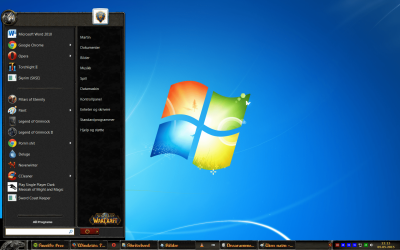
basically it is now a World of Warcraft Taskbar which i have not approved or installed and i have not played WoW in 4 years or so.
i have done 4 virus scans and 1 bootscan and i have no idea the reason for this change weather it is a virus or god knows what.
Also sorry for any bad grammar as English is not my main language
as you can see below this is my problem, the computer runs like it always does.
The only problem is the desktop/taskbar.
please help.
Computer type PC/Desktop OS Windows 7 Ultimate x64
americancritic2
Power User
VIP
Hello and welcome to the sevens forum, have you tried to do a simple restore point or have you tried it I don't see it in your post.
Computer type PC/Desktop Computer Manufacturer/Model Number Lenovo OS Windows 7 Home Premium 64-Bit SP1 CPU Intel Core i7 2600 Motherboard Lenovo Memory 8.00 GB Dual-Channel DDR3 Graphics Card(s) 1024MB GeForce GT 420 Sound Card Intergrated Realtex ALC888S Monitor(s) Displays LG W40 series Widescreen Screen Resolution 1920 by 1080 widescreen Hard Drives 932GB Hitachi HDS TB PSU 300W Case Tower Cooling yes came installed Keyboard Lenovo Mouse Laser wirless 5000 Antivirus MBAM / Superantispyware pro paid for. Browser Google / Other Info PLDS DVD-RW DH16ABSH
New member
Thread Starter
The first restore point did not work for some reason the second did, thanks a bunch!
Computer type PC/Desktop OS Windows 7 Ultimate x64
New member
Thread Starter
The first restore point did not work for some reason the second did, thanks a bunch!
Computer type PC/Desktop OS Windows 7 Ultimate x64
americancritic2
Power User
VIP
Computers are funny sometimes, I am very glad you have your system back running like it should...
Computer type PC/Desktop Computer Manufacturer/Model Number Lenovo OS Windows 7 Home Premium 64-Bit SP1 CPU Intel Core i7 2600 Motherboard Lenovo Memory 8.00 GB Dual-Channel DDR3 Graphics Card(s) 1024MB GeForce GT 420 Sound Card Intergrated Realtex ALC888S Monitor(s) Displays LG W40 series Widescreen Screen Resolution 1920 by 1080 widescreen Hard Drives 932GB Hitachi HDS TB PSU 300W Case Tower Cooling yes came installed Keyboard Lenovo Mouse Laser wirless 5000 Antivirus MBAM / Superantispyware pro paid for. Browser Google / Other Info PLDS DVD-RW DH16ABSH
americancritic2
Power User
VIP
Hi if you have not done so but on your end would you please mark it solved.
Computer type PC/Desktop Computer Manufacturer/Model Number Lenovo OS Windows 7 Home Premium 64-Bit SP1 CPU Intel Core i7 2600 Motherboard Lenovo Memory 8.00 GB Dual-Channel DDR3 Graphics Card(s) 1024MB GeForce GT 420 Sound Card Intergrated Realtex ALC888S Monitor(s) Displays LG W40 series Widescreen Screen Resolution 1920 by 1080 widescreen Hard Drives 932GB Hitachi HDS TB PSU 300W Case Tower Cooling yes came installed Keyboard Lenovo Mouse Laser wirless 5000 Antivirus MBAM / Superantispyware pro paid for. Browser Google / Other Info PLDS DVD-RW DH16ABSH