Solved Taskbar disappears whenever I maximize any program

kananga

New member
Local time
11:29 AM
Messages
6
My taskbar disappears whenever I maximize any program. In other words, whenever I maximize any program, such as Outlook or Internet Explorer, for example, either the bottom of the window is covering the taskbar, or the taskbar is disappearing ... in any case, the taskbar becomes no longer visible. Any idea how to fix this?
 

My Computer

OS
Windows 7
Hi kananga and welcome to the forum!

Can you possible provide a screenshot of a before and after of taskbar?
Does it happen on all programs maximized?

Cheers ;)
 

My Computer

Computer Manufacturer/Model Number
Custom Build
OS
Windows 7 Build 7048 x64
CPU
Athlon 64 X2 Dual Core 4600+
Motherboard
EMX-AMD750G-PRO
Memory
4 x 1GB Kingston 400MHz 6-6-6-18 (800MHz)
Graphics Card(s)
ATI Radeon 3650
Sound Card
Realtek HD Audio
Monitor(s) Displays
22" AOC 2216Vw
Screen Resolution
1680x1050
Cooling
Arctic Cooling Freezer 64 Pro PWM
Keyboard
Generic Enhanced Natural Keyboard
Mouse
Logitech VX Nano
Other Info
Edifier M1550
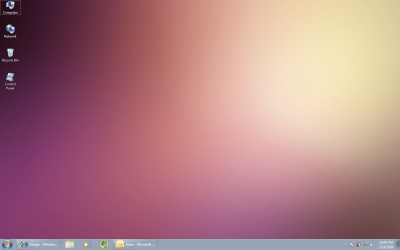
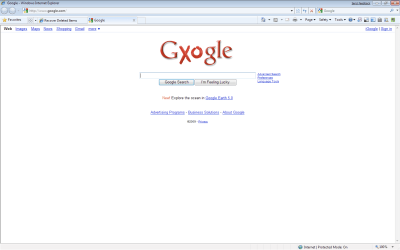
Yes, it does happen with all programs maximized. I've attached a "before" screenshot with IE and Outlook minimized, and an "after" screenshot with IE maximized.
 

Attachments

  • before.png
    before.png
    317.2 KB · Views: 107
  • after.png
    after.png
    24.4 KB · Views: 195

My Computer

OS
Windows 7

My Computer

Computer Manufacturer/Model Number
Custom Build
OS
Windows 7 Build 7048 x64
CPU
Athlon 64 X2 Dual Core 4600+
Motherboard
EMX-AMD750G-PRO
Memory
4 x 1GB Kingston 400MHz 6-6-6-18 (800MHz)
Graphics Card(s)
ATI Radeon 3650
Sound Card
Realtek HD Audio
Monitor(s) Displays
22" AOC 2216Vw
Screen Resolution
1680x1050
Cooling
Arctic Cooling Freezer 64 Pro PWM
Keyboard
Generic Enhanced Natural Keyboard
Mouse
Logitech VX Nano
Other Info
Edifier M1550
I'll check these out. Thanks!

UPDATE:
Neither of these fixes solved it for me. Any other suggestions?
 

My Computer

OS
Windows 7
Hello Kananga, and welcome to Seven Forums.

It looks like you may be in F11 full screen mode when maximized.

Hope this helps,
Shawn
 

My Computer

Computer type
PC/Desktop
Computer Manufacturer/Model Number
Self built custom
OS
64-bit Windows 11 Pro for Workstations
CPU
Intel i7-8700K OC'd to 5 GHz
Motherboard
ASUS ROG Maximus XI Formula Z390
Memory
64 GB (4x16GB) G.SKILL TridentZ RGB DDR4 3600 MHz
Graphics Card(s)
ASUS ROG-STRIX-GTX1080TI-O11G-GAMING
Sound Card
Integrated
Monitor(s) Displays
2 x Samsung Odyssey G7 27"
Screen Resolution
2560x1440
Hard Drives
1TB Samsung 990 PRO M.2,
4TB Samsung 990 PRO PRO M.2,
TerraMaster F8 SSD Plus NAS
PSU
Seasonic Prime Titanium 850W
Case
Thermaltake Core P3
Cooling
Corsair Hydro H115i
Keyboard
Logitech wireless K800
Mouse
Logitech MX Master 4
Internet Speed
2 Gb/s Download and 100 Mb/s Upload
Antivirus
Malwarebyte Anti-Malware Premium
Browser
Google Chrome
Other Info
Logitech Z625 speaker system,
Logitech BRIO 4K Pro webcam,
HP Color LaserJet Pro MFP M477fdn,
APC SMART-UPS RT 1000 XL - SURT1000XLI,
Galaxy S23 Plus phone
Thanks for the additional suggestion, but that doesn't solve it either. Any other ideas?
 

My Computer

OS
Windows 7
Curious.

Was this the case when you first installed windows 7? When did this start happening? Did you use the remove watermark patch?
 

My Computer

Computer Manufacturer/Model Number
Custom Build
OS
Windows 7 Build 7048 x64
CPU
Athlon 64 X2 Dual Core 4600+
Motherboard
EMX-AMD750G-PRO
Memory
4 x 1GB Kingston 400MHz 6-6-6-18 (800MHz)
Graphics Card(s)
ATI Radeon 3650
Sound Card
Realtek HD Audio
Monitor(s) Displays
22" AOC 2216Vw
Screen Resolution
1680x1050
Cooling
Arctic Cooling Freezer 64 Pro PWM
Keyboard
Generic Enhanced Natural Keyboard
Mouse
Logitech VX Nano
Other Info
Edifier M1550
I think it has been this way ever since I installed Windows 7. I have not installed any watermark patch (don't even know what this patch does).
 

My Computer

OS
Windows 7
Well, there's actually one more thing left to try - Repair Install short of re-installing everything :(
 

My Computer

Computer Manufacturer/Model Number
Custom Build
OS
Windows 7 Build 7048 x64
CPU
Athlon 64 X2 Dual Core 4600+
Motherboard
EMX-AMD750G-PRO
Memory
4 x 1GB Kingston 400MHz 6-6-6-18 (800MHz)
Graphics Card(s)
ATI Radeon 3650
Sound Card
Realtek HD Audio
Monitor(s) Displays
22" AOC 2216Vw
Screen Resolution
1680x1050
Cooling
Arctic Cooling Freezer 64 Pro PWM
Keyboard
Generic Enhanced Natural Keyboard
Mouse
Logitech VX Nano
Other Info
Edifier M1550
Hmmm. Thanks. I'll have to decide whether it's worth it.
 

My Computer

OS
Windows 7
Just unlock the taskbar and start moving it around. I don't know why, but when I put it back in place, I didn't have any more problems.
 

My Computer

OS
Windows 7 Ultimate x64
I FIXED IT! :party: After reading this post I tried F11 which did not work, but on my computer it made the screen darker. I then tried (Fn) + F11 and it corrected the hidden taskbar when windows are maximized. This issue was unrelated to the "hide the taskbar" function. I only signed up for this forum to post this in hopes that it will help someone else.

I have now discovered this function is great when watching a movie to get rid of the taskbar.
 
Last edited:

My Computer

Computer Manufacturer/Model Number
Gateway NV55S05u
OS
Windows 7 Home Premium
CPU
AMD Quad-Core A8 3500M
Memory
6GB
Graphics Card(s)
AMD Radeon 6620G
Monitor(s) Displays
15.6" 16:9 LED LCD
Hard Drives
640GB HDD
Hey guys! I registered here just to post a method I discovered. None of ur above suggestions helped, so I found a video on Youtube: Windows 7 taskbar disappearing problem SOLVED! - YouTube.

Just in case if it ever gets deleted,here are the steps to follow:

1. Start your Task Manager by either CTRL+ALT+DELETE or by right-clicking on the taskbar and choosing "Start Task Bar" option on the Menu that appears.

2. In the Processes find explorer.exe, click on it and click "End Process"
3. Click on FILE, choose "New Task" and in the box that appears type explorer.exe and click "OK".

After I have done this the task bar appeared and stopped disappearing whenever I maximised any program.

Hope this helps! :)
 

My Computer

OS
Windows 7

My Computer

Computer type
Laptop
Computer Manufacturer/Model Number
Lenovo
OS
Windows 7 Home Premium 32bit
Yes, it does happen with all programs maximized. I've attached a "before" screenshot with IE and Outlook minimized, and an "after" screenshot with IE maximized.

i have the same problem on windows xp. :confused:
do you find any problem solution??
 

My Computer

Computer type
PC/Desktop
Computer Manufacturer/Model Number
hp
OS
Windows7
Antivirus
eset
Browser
google chrome
I fixed my disappearing taskbar too...

1. From the desktop right-click on the taskbar
2. Select Properties
3. Change any of the settings or all of them. You'll change them back to how you want it later. (For example, I selected "auto-hide" even though I don't like that feature.)
4. Apply those changes you've made.
5. Open a program and maximize it. (At this point my auto-hide taskbar was working correctly OVER the maximized program.)
6. Right-Click on taskbar again - Select Properties - Reset settings the way you want them.
7. Applied changes then verify it works by opening some programs.

I haven't lost my taskbar since.
 

My Computer

Computer type
PC/Desktop
Computer Manufacturer/Model Number
Dell
OS
CA
Back
Top