Taskbar disappears

Retiredbill

New member
Member
VIP
Local time
12:22 PM
Messages
247
I am running Win 7 home premium on both my laptop and my desktop. The laptop has a unique problem. When I boot up, the task bar is not visible. I can move my mouse pointer down to the bottom of the screen and it appears and stays that way until I reboot. I have right clicked on the task bar and clicked on "freeze task bar" but that does not cure the problem. Any suggestions on how I can view the task bar every time I reboot?
 

My Computer

Computer Manufacturer/Model Number
Gateway SX 2841
OS
Win7, home premium, 64 bit
CPU
2.9 GHZ
Memory
6 Gbytes
Hard Drives
1 terra byte
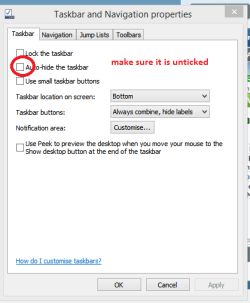
hi Bill, when you get the taskbar in view, right click on it and then "uncheck" auto hide.
good luck
jim
 

My Computer

Computer type
Laptop
Computer Manufacturer/Model Number
dell d610
OS
win 7 pro 32 bit
CPU
2.13
Motherboard
915 chipset
Memory
3 GB
Graphics Card(s)
ati 300
Hard Drives
Wester Digital 80 gb 5400rpm
Mouse
touch
Antivirus
avast free
Browser
chrome
Other Info
index performance 3.4...not too bad for 10 yr old system
Bill mate get the taskbar up and right click on the taskbar > Properties and see if the auto hide is ticked see my pic
 

Attachments

  • TASKY.PNG
    TASKY.PNG
    8.6 KB · Views: 20

My Computer

Computer type
PC/Desktop
Computer Manufacturer/Model Number
Own build (new) Desk1 / Asus ROG Win 7 / Desk2 1st build
OS
Desk1 7 Home Prem / Desk2 10 Pro / Main lap Asus ROG 10 Pro 2 laptop Toshiba 7 Pro Asus P2520 7 & 10
CPU
Desk1 i5 3750K / Laptop i7 GTX 860M / Desk2 i5 2500
Motherboard
Desk1 Asus P877-V / Desk2 Gigabyte H67 UD3H / Laptop ?
Memory
Desk1 8GB (1866) / Desk2 16GB (1333) / Laptop 8Gb DDR3
Graphics Card(s)
Desk 1& 2NVidia GTX 650 & Laptops on board Intel
Sound Card
Desk 1 & 2 -XONAR DG Realtek High Def audio Laptop
Monitor(s) Displays
Desk 1 Benq HD 2450 / Desk2 Philips 24" / Laptop 17.5"
Screen Resolution
1920x1080 D1 & D2 & Laptop 1
Hard Drives
Desk1 Samsung 120GB 830 SSD
Asus ROG 256GB 850 Pro SSD
Desk2 Samsung 840 256 SSD
Toshiba 120GB EVO
PSU
Desk 1 Corsair HX 1050/ Laptop ? / Desk 2 Corsair HX 650
Case
Desk 1 Cooler HAF XM ? Toshiba laptop / Desk2 Coolermaster
Cooling
Fans on all Desk1 -2 Desk2 - all Coolermasters 5 Laptop ?
Keyboard
Desk 1 MS Sidewinder X6 Desk 2 MS Sidewinder X 4
Mouse
Desk 1&2 - Gigabyte MS 900 gamer - laptop - Logitec wireless
Internet Speed
ADSL2+
Other Info
One other Desktop (tester) and spare Toshba laptop both with SSD's
Running Kaspersky 2016 ISS on all machines config'd identically
Logitec audio stereo systems on each machine (x3)
Canon MG5250MFC
Router/modem TP-Link running WPA2SK
HA HA HA HA HA HA On my notebook with win 7 the bleedin stinkin taskbar got moved all the hell over the place - it wouldn't hold still - then finally I figured out that the controls were in properties.
 

My Computer

Computer type
PC/Desktop
Computer Manufacturer/Model Number
Home built
OS
ASUS X79 DELUXE LGA 2011 Intel X79 SATA 6Gb/s USB 3.0 ATX
CPU
Intel Core i7-4930K Ivy Bridge-E 3.4GHz LGA 2011 130W 6-Core
Motherboard
ASUS X79 DELUXE LGA 2011 Intel X79 SATA 6Gb/s USB 3.0 ATX
Memory
CORSAIR Dominator Platinum 16GB (4 x 4GB) 240-Pin DDR3 SDRAM
Graphics Card(s)
ASUS EAH6450 Silent/DI/1GD3(LP) Radeon HD 6450 1GB 64-bit DD
Sound Card
onboard
Monitor(s) Displays
Dell lcd 32"
Hard Drives
1tb SATA, 2tb SATA, 500 gig SATA, 500 Gig SATA, 500 Gig IDE
PSU
CORSAIR HX Series HX750 750W ATX12V 2.3 / EPS12V 2.91 SLI Re
Case
something colored black
Cooling
Cooler Master Seidon 120XL
Keyboard
this thing with buttons on it
Mouse
a tailed devil
Internet Speed
whizzing along
Antivirus
KASPERSKY
Browser
Firefox. Opra, Explorer.
Other Info
I am naked and outside your window shouting Non Sequiturs in a loony high pitched voice.
Hi CITide task... The properties had the hide task bar checked. Now it works. Thanks, much
 

My Computer

Computer Manufacturer/Model Number
Gateway SX 2841
OS
Win7, home premium, 64 bit
CPU
2.9 GHZ
Memory
6 Gbytes
Hard Drives
1 terra byte
Back
Top