
joshsimmons
New member
I first noticed this issue when I disabled shadows under the cursor and other screen elements, after which I resized the taskbar to test my theory of what was going on.
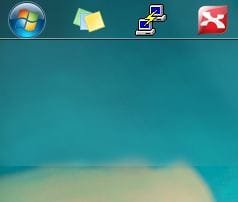
In the attached screenshot, you'll notice that the transparent background of the taskbar extends far beyond the taskbar itself. I resized the taskbar up to that point, then brought it back down to its original size.
Sort of confuddling... and this seems to persist through restarts, desktop refreshes, etc.
PS. Hello everyone and thanks for the valuable resource that is Seven Forums! I've been lurking and using them for some time now This is the first time I've had a problem that seems to be unique
In the attached screenshot, you'll notice that the transparent background of the taskbar extends far beyond the taskbar itself. I resized the taskbar up to that point, then brought it back down to its original size.
Sort of confuddling... and this seems to persist through restarts, desktop refreshes, etc.
PS. Hello everyone and thanks for the valuable resource that is Seven Forums! I've been lurking and using them for some time now
This is the first time I've had a problem that seems to be uniqueAttachments
Last edited:
My Computer
- OS
- Windows 7
- CPU
- AMD Athlon 64 3400+
- Motherboard
- Asus K8V SE Deluxe
- Memory
- 1GB SDRAM
- Graphics Card(s)
- ATI Radeon X800 Pro
- Screen Resolution
- 1680x1050
- Keyboard
- Logitech Wave
- Mouse
- Logitech MX Revolution
