Taskbar Full Transparency

Rand Marks

Banned
Local time
9:03 AM
Messages
96
Hi,

Is it possible to make the taskbar fully transparent?

(Brink’s Enable Full Clear Glass Transparency method has no effect on the taskbar.)

Rand Marks
 

My Computer

OS
Windows 7 Ultimate SP1 64-bit

My Computer

Computer type
Laptop
Computer Manufacturer/Model Number
Dell Insperon N5010
OS
Windows 7 Ultimate x64
CPU
i3 M380 2.53GHz
Motherboard
TOSHIBA MK5076GSX
Memory
4 Gb
Graphics Card(s)
intel HD
Sound Card
IDT
Screen Resolution
1366x768
Keyboard
Standerd PS2
Antivirus
ESET Smart Security 7
Browser
Google Chrome

My Computer

OS
Windows 7 Ultimate SP1 64-bit
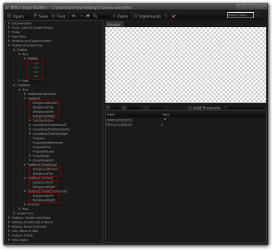
Rand you can use Windows Style Builder and edit all the taskbar images so they are transparent and that will be the best you can get there, will be a slight faint line at the top edge of the taskbar which nobody that I know of has been able to get rid of.

Jerry
Win7 Style Builder.png
 

My Computer

Computer type
Laptop
Computer Manufacturer/Model Number
Sager NP9170
OS
Win 7 Pro x64 / Win 10 Pro
CPU
Intel(R) Core(TM) i7-3630QM CPU @ 2.40GHz
Motherboard
CLEVO P170EM
Memory
12 GB
Graphics Card(s)
(1) Intel(R) HD Graphics 4000 (2) NVIDIA GeForce GTX 675M
Sound Card
(1) Realtek High Definition Audio (2) Intel(R) Display Aud
Monitor(s) Displays
17.3
Screen Resolution
1920x1080
Hard Drives
(1) Samsung 860 EVO 500GB(OS) (1) Samsung 860 EVO 500GB(Data)
Keyboard
Backlite
Antivirus
MSE, Malwarebytes Pro
Browser
Firefox
Other Info
DESKTOP: Custom-built.
OS: Win 10 Pro x64.
CASE: Rosewill R5.
CPU: Intel I5 4670K CPU @ 3.40GHz.
CPU COOLER: Cool Master Hyper 212 EVO.
MOTHERBOARD: Asus Z87-A.
MEMORY: Kingston HyperX 2x4 GB.
GPU: Nvidia Geforce 650 TI.
PSU: Corsair TX750.
DRIVES: (1) Samsung 840 120 GB SSD (2) Western Digital blue 500 GB 7200 RPM.
Rand you can use Windows Style Builder and edit all the taskbar images so they are transparent and that will be the best you can get there, will be a slight faint line at the top edge of the taskbar which nobody that I know of has been able to get rid of.

Jerry
View attachment 251457
Hi, Jerry,

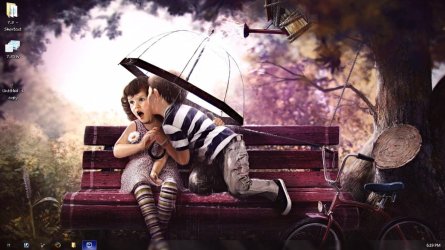
I replaced all of those images you indicated with a fully transparent PNG, and this is the result. Have I done something wrong? :confused:

shot1.jpg
 

My Computer

OS
Windows 7 Ultimate SP1 64-bit
No you did not do nothing wrong, you are going to have that slight blur that cannot be removed.
I did notice a white stripes still on the taskbar, make this image transparent to Windows and Caption Buttons > Aero > Dwm Window > Reflections > Main

Jerry
 

My Computer

Computer type
Laptop
Computer Manufacturer/Model Number
Sager NP9170
OS
Win 7 Pro x64 / Win 10 Pro
CPU
Intel(R) Core(TM) i7-3630QM CPU @ 2.40GHz
Motherboard
CLEVO P170EM
Memory
12 GB
Graphics Card(s)
(1) Intel(R) HD Graphics 4000 (2) NVIDIA GeForce GTX 675M
Sound Card
(1) Realtek High Definition Audio (2) Intel(R) Display Aud
Monitor(s) Displays
17.3
Screen Resolution
1920x1080
Hard Drives
(1) Samsung 860 EVO 500GB(OS) (1) Samsung 860 EVO 500GB(Data)
Keyboard
Backlite
Antivirus
MSE, Malwarebytes Pro
Browser
Firefox
Other Info
DESKTOP: Custom-built.
OS: Win 10 Pro x64.
CASE: Rosewill R5.
CPU: Intel I5 4670K CPU @ 3.40GHz.
CPU COOLER: Cool Master Hyper 212 EVO.
MOTHERBOARD: Asus Z87-A.
MEMORY: Kingston HyperX 2x4 GB.
GPU: Nvidia Geforce 650 TI.
PSU: Corsair TX750.
DRIVES: (1) Samsung 840 120 GB SSD (2) Western Digital blue 500 GB 7200 RPM.
Nothing I edit seems to produce the result I have in mind. Thanks anyway!
 

My Computer

OS
Windows 7 Ultimate SP1 64-bit
You're welcome, I think I know what kind of results you're after at one time I was trying to do the same thing.

Jerry
 

My Computer

Computer type
Laptop
Computer Manufacturer/Model Number
Sager NP9170
OS
Win 7 Pro x64 / Win 10 Pro
CPU
Intel(R) Core(TM) i7-3630QM CPU @ 2.40GHz
Motherboard
CLEVO P170EM
Memory
12 GB
Graphics Card(s)
(1) Intel(R) HD Graphics 4000 (2) NVIDIA GeForce GTX 675M
Sound Card
(1) Realtek High Definition Audio (2) Intel(R) Display Aud
Monitor(s) Displays
17.3
Screen Resolution
1920x1080
Hard Drives
(1) Samsung 860 EVO 500GB(OS) (1) Samsung 860 EVO 500GB(Data)
Keyboard
Backlite
Antivirus
MSE, Malwarebytes Pro
Browser
Firefox
Other Info
DESKTOP: Custom-built.
OS: Win 10 Pro x64.
CASE: Rosewill R5.
CPU: Intel I5 4670K CPU @ 3.40GHz.
CPU COOLER: Cool Master Hyper 212 EVO.
MOTHERBOARD: Asus Z87-A.
MEMORY: Kingston HyperX 2x4 GB.
GPU: Nvidia Geforce 650 TI.
PSU: Corsair TX750.
DRIVES: (1) Samsung 840 120 GB SSD (2) Western Digital blue 500 GB 7200 RPM.


Hi! I know this topic is sliiightly abandoned (the last post has been posted just 725 days ago) but I found a way to do it, after hours of searching on the internet. As I have often stumbled across forum topics like this which led to nothing, I wanted to share the solution I found with other people so they may be spared from utter frustration.

It seriously only involves running this program:
Taskbar Blur Toggle 0.2.0 by DBlake1 on DeviantArt

to remove the blur (put it in a place where it won't be scared of being devoured and tick the "run at start up" box) and install a theme like this one:
Windows 7 Everest Aero - invisible taskbar theme by Dave2399 on DeviantArt

to remove the translucent borders of the taskbar.

I hope this helps people who also want to make their taskbar completely translucent :P.
 

My Computer

Computer type
PC/Desktop
Computer Manufacturer/Model Number
Custom Build
OS
Windows 7 Home Premium x64
Back
Top