
Taskbar icons not working

lovatscout

New member
Local time
11:41 AM
Messages
6
I have an issue with certain icons on my task bar not maximising this problem has just started and its on a brand new PC,the icons were maximising but all of a sudden my media player icon and my computer icon stopped maximising.
I have tried system restore and I have done a registry clean but to no avail.
I think its something really silly but its got me beat just now :mad:
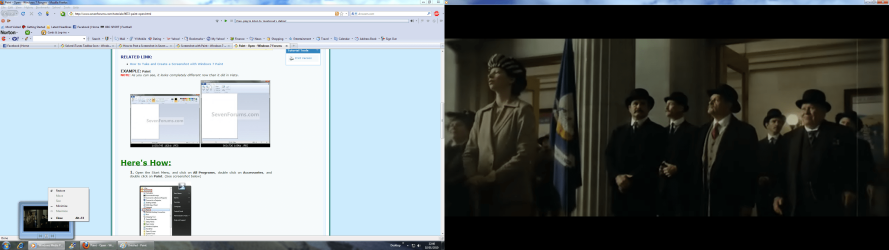
Here is a screen shot of what happens when I right click over the problem icon.

I must add that on my screen I can not see the enlarged video shot on the right hand side of the screen capture shot that I have included

I posted this on the de-bugging forum but got no replies so I take it I should have posted on here.Ooops

Thanks for any help
 

Attachments
  • Screen shot.png
    Screen shot.png
    690.6 KB · Views: 420

My Computer

Computer Manufacturer/Model Number
Packard bell
OS
windows 7
If you have 2 monitors (as it looks) then it will only maximize on one monitor

~Lordbob
 

My Computer

Computer Manufacturer/Model Number
Hera
OS
Windows 7 Ultimate x64, Mint 9
CPU
Intel i5-2500k
Motherboard
ASUS P8P67 Pro
Memory
2x 4Gb Corsair VENGEANCE DDR3-1600
Graphics Card(s)
NVidia GeForce N260GTX Twin Frozr
Sound Card
Realtek HD OnBoard Audio
Monitor(s) Displays
ASUS 24" Monitor
Screen Resolution
1920x1080
Hard Drives
G.SKILL Phoenix Series 60GB SATA II MLC Internal Solid State Drive (SSD)
SAMSUNG Spinpoint F3R 1TB 7200 RPM 32MB Cache SATA II
PSU
Cooler Master Real Power Pro 750W
Case
Cooler Master Haf 932
Cooling
Fans
Keyboard
Razer Tarantula
Mouse
Razer Lachesis
Internet Speed
not fast enough
I guess, you have enabled the option "stay on top" in a particular application that runs in your PC. You should analyze, when you were unable to maximize the icons. i.e., while running a specific program or it occurs all the time.

So it would seem like the icons aren't maximizing. But it should be happening behind the current explorer.

If you can list the running/opened applications, it would be possible to assist you in disabling the option I have mentioned. :)
 

My Computer

Computer Manufacturer/Model Number
Dell Inspiron N5010
OS
Windows 7 Ultimate x64 SP1
CPU
Intel Core i3
Memory
4 GB DDR3
Screen Resolution
1366 X 768
Hard Drives
Seagate 500 GB
Internet Speed
4 MBPS
No I only have one monitor and its only certain icons I have problems with ie Media player,my computer and photoshop is another I can now add to the list
 

My Computer

Computer Manufacturer/Model Number
Packard bell
OS
windows 7
Hey lovatscout;

I had the same problem. It all started when I assigned the application/utility to run as "Administrator" in the properties window. When I disabled (unchecked) this feature at the properties window, the application/utilities open from the Taskbar without any problem.

Don't know the reason but this worked for me.

Try it and see what happens.

Happy 2010!!
 

My Computer

Computer type
PC/Desktop
Computer Manufacturer/Model Number
DIY Re-built.
OS
Windows 7 Home Premium 64Bits SP1
CPU
Intel i7-920
Motherboard
ASUS P6TD Deluxe
Memory
12 Gb (6x2GB Corsair XMS TR3X3G1600C9 G) Tri Channels
Graphics Card(s)
ASUS GTX-970 Turbo
Sound Card
ASUS On Board SoundMax
Monitor(s) Displays
Samsung UN46D6500 46" TV
Screen Resolution
1920x1080
Hard Drives
1 OCZ SSD Agility Sata III 120Gb
1 Samsung 1Tb
1 Samsung 750Gb
1 Western Digital 500Gb(Mounted in ext eSata case)
PSU
Enermax CUG-950W
Case
Full ATX (Generic)
Cooling
Fans (6) 80mm
Keyboard
Saitek Eclipse II
Mouse
Cyborg R.A.T-5
Internet Speed
Comcast 105.0 MBPS
Antivirus
AVG
Browser
Waterfox v40.02(x64)
Other Info
- Logitech X-530 5.1 Sound speakers.
- APC ES-1300.
- Arris TG862G/CT Modem/Router.
- Samsung BD-083A Blue Ray Player
- Lite On iHBS212 Blue Ray Burner
- Nippon Labs All-In-One Card Reader/Writer W/USB & eSata
I'm not sure I see the problem here... Why did you use a right click on the thumb preview?
From this screenshot it's logical to see that the Maximize option is grayed out since WMP is already maximized...
How come you can't see the video on the right? How did you get a screenshot of it then?

EDIT - Okay I need to start replying faster XD... nevermind
 

My Computer

Computer type
Laptop
Computer Manufacturer/Model Number
Custom
OS
Windows 7 Home Premium x64
CPU
Intel Core i5 2500K
Motherboard
MSI MS-7750
Memory
8GB DDR3
Graphics Card(s)
nVidia GeForce GTX650 Ti BOOST
Sound Card
Realtek
Monitor(s) Displays
21' Philips
Screen Resolution
Full HD
Hard Drives
1TB
PSU
500W
Hi Manigue I tried what you said but still the same problem,thanks for your input though
 

My Computer

Computer Manufacturer/Model Number
Packard bell
OS
windows 7
Sopolias Fast thats the strange thing when I took the screen capture I was surprised to see the video portion on the right hand side as it definetely was not on my screen
 

My Computer

Computer Manufacturer/Model Number
Packard bell
OS
windows 7
I don't know if this will help but its a brand new PC and the all the icons on the task bar were working perfectly at first and its only after a couple of days of use that this issue has occured.
 

My Computer

Computer Manufacturer/Model Number
Packard bell
OS
windows 7
Well, if you don't have multiple displays, did you by any chance set up multiple desktops? That may be the source of your problems.
 

My Computer

Computer type
Laptop
Computer Manufacturer/Model Number
Custom
OS
Windows 7 Home Premium x64
CPU
Intel Core i5 2500K
Motherboard
MSI MS-7750
Memory
8GB DDR3
Graphics Card(s)
nVidia GeForce GTX650 Ti BOOST
Sound Card
Realtek
Monitor(s) Displays
21' Philips
Screen Resolution
Full HD
Hard Drives
1TB
PSU
500W
You have your video card setup to run in multiple monitor mode.

Change the display preferences to run in single monitor mode.

If you actually plugged in another monitor into the second video card port, you would see the output that was captured in your screen shot.

This is a configuration issue, which is controlled by the end user.
 

My Computer

OS
All Versions of Windows
A quick way to check this is to hit Win+P. If an alt-tab looking window comes up with "Extend" highlighted just switch it over to "Duplicate".
 

My Computer

OS
7
taskbar items won't maximize

wow!!! I've had this problem in various forms for months. the win+P did the trick. It seems to have corrected many problems. thanks!!!!
 

My Computer

Computer Manufacturer/Model Number
hp
OS
windows 7
Back
Top