Taskbar is transparent

jaknb

New member
Local time
8:48 PM
Messages
21
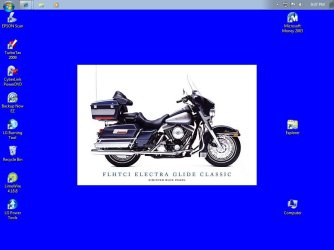
I just pruchase a new PC with Windows 7. All was going great until I notice that the task bar is transparent and unusable. It seems that the last time I saw it was when I dragged it up to the very top of the screen to get it out of view. The space on the desk top is there for the task bar but there is nothing in the space except the start button. I can drag the space back down to the bottom of the desk top and the start button will move to the bottom but the task bar itself is invisible.

Any suggestions?
Thanks,
John
 

My Computer

OS
Windows 7
Right click your desktop>Personalize>Windows Colour>turn Colour Intensity up.

If that doesnt work could you post a screenshot of the problem?
 

My Computer

Computer Manufacturer/Model Number
Blue Shards 1.0
OS
Windows 7 Ultimate 64bit
CPU
AMD Phenom II 555 Black Edition Quad Core OC'd to 4.0GHz
Motherboard
ASUS M4A88T-M
Memory
G Skill RipJaw 1333MHz 4GB
Graphics Card(s)
ATI raideon 4250 HD/XFX ATI Radeon 1GB HD4650
Sound Card
Realteck HD Audio
Monitor(s) Displays
2x 22" Widescreen HD Monitors
Hard Drives
500GB Sata 7500RPM
80GB IDE
PSU
850W OCUK Modular
Case
Antec Dark Fleet DF-30
Cooling
Titan Fenrir Pro (CPU)
Keyboard
Logitech Wireless
Mouse
Logitech Wireless
Internet Speed
24Meg
Other Info
Getting soon-
2TB 7200RPM HDD
+8GB RAM
30GB SSD
HD6950/70
How do I post a screen shot?
 

My Computer

OS
Windows 7
How do I post a screen shot?
Open the Snipping tool (type snip into search in the start menu and it should show up)
Take a capture>Save it.
Then when replying click the little paper clip above where your typing and add it as an attacment.

Dan
 

My Computer

Computer Manufacturer/Model Number
Blue Shards 1.0
OS
Windows 7 Ultimate 64bit
CPU
AMD Phenom II 555 Black Edition Quad Core OC'd to 4.0GHz
Motherboard
ASUS M4A88T-M
Memory
G Skill RipJaw 1333MHz 4GB
Graphics Card(s)
ATI raideon 4250 HD/XFX ATI Radeon 1GB HD4650
Sound Card
Realteck HD Audio
Monitor(s) Displays
2x 22" Widescreen HD Monitors
Hard Drives
500GB Sata 7500RPM
80GB IDE
PSU
850W OCUK Modular
Case
Antec Dark Fleet DF-30
Cooling
Titan Fenrir Pro (CPU)
Keyboard
Logitech Wireless
Mouse
Logitech Wireless
Internet Speed
24Meg
Other Info
Getting soon-
2TB 7200RPM HDD
+8GB RAM
30GB SSD
HD6950/70

My Computer

Computer type
PC/Desktop
Computer Manufacturer/Model Number
Lenovo IdeaCenter 450
OS
Windows 10 Pro X64
CPU
Intel Quad Core i7-4770 @ 3.4Ghz
Memory
16.0GB PC3-12800 DDR3 SDRAM 1600 MHz
Graphics Card(s)
Intel Integrated HD Graphics
Sound Card
Realtek HD Audio
Monitor(s) Displays
HP 22" LCD
Screen Resolution
1680 x 1050
Hard Drives
250GB Samsung EVO SATA-3 SSD
2TB Seagate ST2000DM001 SATA-2
1.5TB Seagate ST3150041AS SATA
Keyboard
Dell USB
Mouse
Lenovo USB
Internet Speed
Cable via Road Runner 3MB Upload, 30MB Download
Antivirus
Windows Defender, MBAM Pro, MBAE
Browser
Seamonkey
Other Info
UEFI/GPT
PLDS DVD-RW DH16AERSH
Screen Shot

Hope this works,

It should show my desk top with a Harley in the center and icons along the side. You should also be able to the start button in the upper left hand corner.

Thanks,
John
 

Attachments

  • Capture.JPG
    Capture.JPG
    57.5 KB · Views: 72

My Computer

OS
Windows 7
Install the latest drivers with the guide in my sig and fill in your system specs.
 

My Computer

Computer Manufacturer/Model Number
Sony Vaio Z46GDU
OS
Windows 7 Ultimate x86-64
CPU
[email protected] 1066MHz FSB
Motherboard
Sony branded
Memory
6GB DDR3 1066MHz
Graphics Card(s)
9300M GS 256MB Dedicated (Speed) + Intel4500MHD (Stamina)
Sound Card
Realtek HD Audio
Monitor(s) Displays
13.1' WXGA
Screen Resolution
1600x900
Hard Drives
320GB 7200RPM w/ 16MB cache
Internet Speed
1MB/s
Some how it is back. What I did is change the screen resolution to a couple of different settings and then returned to the original setting. Task bar was still gone. I then shut down and rebooted. Which I did try before posting to the forum. Now after the reboot the task bar is back as is seen with the new screen shot. Don't know what or how but at least it is back and I now know how to use screen shots!
Thanks,
John
 

Attachments

  • Capture 2.JPG
    Capture 2.JPG
    60.9 KB · Views: 23
Last edited:

My Computer

OS
Windows 7
After reading other posts, this problem may be caused by installing a screen saver. The post is entitled,Taskbar disappears after sleep mode. After installing a screen saver my system went into sleep mode. When it returned the task bar was gone.
John
 

My Computer

OS
Windows 7
Back
Top