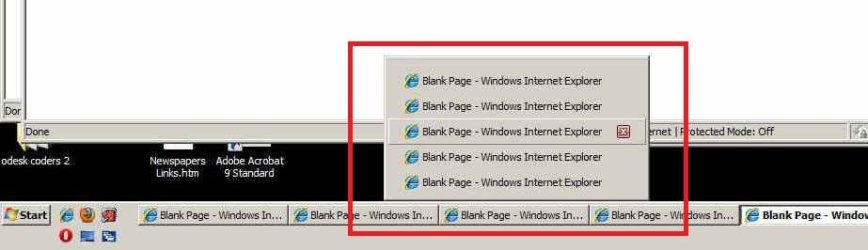
M muddy7 New member Local time 2:19 PM Messages 2 Nov 23, 2010 #1 I turned the taskbar thumbnails off but when move the mouse over the taskbar butons the area I drew a red line around pops up which I dont want, please see the attached image I dont want this, how can I fix this? Attachments new_pa2a.jpg 26 KB · Views: 23 My Computer OSwindows7
I turned the taskbar thumbnails off but when move the mouse over the taskbar butons the area I drew a red line around pops up which I dont want, please see the attached image I dont want this, how can I fix this?
N Nahtimu New member Member Local time 4:19 PM Messages 45 Location Melbourne Nov 23, 2010 #2 Hi, I believe that's the default under Win7 - this link should assist to disable that feature: http://www.sevenforums.com/tutorials/496-taskbar-button-grouping-enable-disable.html Cheers... My Computer OSWindows 7 Professional 64BitCPUIntel® Core i7-930 - 8M Cache, 2.80 GHz, 4.80 GT/sMotherboardASROCK X58 Extreme 3Memory6Gb DDR3 1600MHzGraphics Card(s)Gigabyte GeForce GTX 470 1280MB - NVIDIASound CardOn Board Realtek HD AudioMonitor(s) DisplaysHP L1950g LCDScreen Resolution1280x1024Hard Drives2 x SATAII C:500Gb D:1TbPSU750W Antec TruePowerCaseZALMANCoolingairInternet Speed6 Mb/s
Hi, I believe that's the default under Win7 - this link should assist to disable that feature: http://www.sevenforums.com/tutorials/496-taskbar-button-grouping-enable-disable.html Cheers...
M muddy7 New member Thread Starter Local time 2:19 PM Messages 2 Nov 23, 2010 #3 no, that didnt help My Computer OSwindows7
N Nahtimu New member Member Local time 4:19 PM Messages 45 Location Melbourne Nov 25, 2010 #4 maybe if you said something like "thanks anyway", then others might be inclined to assist you My Computer OSWindows 7 Professional 64BitCPUIntel® Core i7-930 - 8M Cache, 2.80 GHz, 4.80 GT/sMotherboardASROCK X58 Extreme 3Memory6Gb DDR3 1600MHzGraphics Card(s)Gigabyte GeForce GTX 470 1280MB - NVIDIASound CardOn Board Realtek HD AudioMonitor(s) DisplaysHP L1950g LCDScreen Resolution1280x1024Hard Drives2 x SATAII C:500Gb D:1TbPSU750W Antec TruePowerCaseZALMANCoolingairInternet Speed6 Mb/s
NoN New member Guru Gold Member VIP Local time 10:19 PM Messages 4,101 Location LostInSpace, Vol15 - Cool It Nov 25, 2010 #5 Saw you're using the classic/basic windows 7 theme...a clue? My Computer Computer typePC/DesktopComputer Manufacturer/Model NumberCustom BuildOSWindows 7 Professional SP1 - x64 [Non-UEFI Boot]CPUIvy Bridge Core i5 3570K (Delidded)MotherboardAsus P8Z77-V LE PLUSMemoryG.Skill "Ares" DDR3 PC3-12800 - 1600MHz (16Gb)Graphics Card(s)Asus Dual-RX480-O4GSound CardCreative Sound Blaster Z w/5.1 sound systemMonitor(s) DisplaysAsus IPS 23"Screen Resolution16/9Hard DrivesInternal: 500Go Sata 6Gb/s (x2) 500Go Sata 3Gb/s (x2) SSD 60Go Sata 6Gb/sPSUIn Win C 900W Series 80+ PlatinumCaseThermaltake Chaser A71CoolingCustom Water Cooling LoopKeyboardCooler Master QuickFire XTiMouseRazer Imperator 2012 (4G)AntivirusMSEBrowserIE 11.0.xxx RtmOther Info"Raid0" with Intel Smart Response Technology (HDD/SSD)