frasej
New member
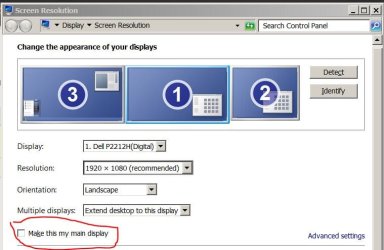
I've seen various conversations on the taskbar moving around, but none seem to fit my situation. I have 4 monitors in the following configuration:
3
4 1 2
My taskbar is on the left side of screen one. If an application causes a screen refresh (presumably a driver refresh of some sort) the taskbar will move from screen 1 to the left side of screen 4. Screen 4 is slightly narrower than screen 1, so moving my cursor to the left edge of the screen does not cause the taskbar to pop up. Only hitting the Windows key works, and then only the "Start" flyout pops up. I have to do a screen resolution change, setting screen 4 to be primary, then back to screen 1, in order to get the taskbar back where it belongs. Then its size is also screwed up. Anyone know how to keep it lock onto screen 1?
3
4 1 2
My taskbar is on the left side of screen one. If an application causes a screen refresh (presumably a driver refresh of some sort) the taskbar will move from screen 1 to the left side of screen 4. Screen 4 is slightly narrower than screen 1, so moving my cursor to the left edge of the screen does not cause the taskbar to pop up. Only hitting the Windows key works, and then only the "Start" flyout pops up. I have to do a screen resolution change, setting screen 4 to be primary, then back to screen 1, in order to get the taskbar back where it belongs. Then its size is also screwed up. Anyone know how to keep it lock onto screen 1?
My Computer
- Computer type
- PC/Desktop
- Computer Manufacturer/Model Number
- custome build
- OS
- Windows 7 Ultimage 64
- CPU
- i7 quad core
- Motherboard
- Asus P8Z68V-LE
- Memory
- 32GB
- Graphics Card(s)
- AMD Radeon HD 5700 Series + onboard video
- Hard Drives
- A: 1.81TB
B: 1.81TB
C: 931GB
D: 931GB
- Antivirus
- Norton
- Browser
- Firefox