Taskbar only partially visible

pinkunicorn

New member
Local time
6:58 PM
Messages
7
I have a new HP Pavilion Elite computer and I am using a new 24" flatscreen tv for my monitor.

The problem I have is that my taskbar is only partially visible. My buttons at the top of my screen, minimize and maximize as well as the X button are not seen at all.

And some of my web pages are cut off on the left side. I have used WinXP for years and still use my Sony Vaio.

I just needed a bigger hard drive and more Ram and I had to purchase a new computer b/c Sony doesn't allow upgrades to their products.

I have tried going through the rudimentary changes Win7 offers but nothing addresses my problem.

Can someone out there help me, please.

Lisa :confused:
 

My Computer

Computer Manufacturer/Model Number
Hewlett Packard Pavilion Elite
OS
windows 7 home premium 32bit

My Computer

Computer type
PC/Desktop
Computer Manufacturer/Model Number
Dell XPS 420
OS
Windows 10, Home Clean Install
CPU
Intel Core2 processsor Q8200(2.33Ghz 1333FSB) Quad Core Tech
Motherboard
Dell
Memory
6 gb
Graphics Card(s)
ATI Radeon 256MB HD3650
Sound Card
Intergrated 7.1 Channel Audio
Monitor(s) Displays
Dell SP2009W 20"
Hard Drives
640 GB Serial ATA Hard drive
Cooling
Fan
Keyboard
Dell USB Keyboard
Mouse
Dell Premium Optical USB
Internet Speed
DSL 2.85
2 choices

Rich,

I did what the tutorial said and it seems I have 2 choices from win7, either 1920x1080 or 1280x720.

The tutorial says for a 24" monitor it should be 1920x1200.

I changed to the lowest setting and I can see about 2/3 of the taskbar items.

The min and max and Xclose buttons are gone completely.

I'm not sure but win7 seems not to give the user many options. I could change whatever I want in XP to suit my needs.

I am beyond aggravated, I really thought win7 would be better than xp but so far I am dancing to microsoft's tune, lol

Lisa :rolleyes:
 

My Computer

Computer Manufacturer/Model Number
Hewlett Packard Pavilion Elite
OS
windows 7 home premium 32bit
Lisa,
Did you restore the resolution to the suggested and try DPI?
 

My Computer

Computer type
PC/Desktop
Computer Manufacturer/Model Number
Dell XPS 420
OS
Windows 10, Home Clean Install
CPU
Intel Core2 processsor Q8200(2.33Ghz 1333FSB) Quad Core Tech
Motherboard
Dell
Memory
6 gb
Graphics Card(s)
ATI Radeon 256MB HD3650
Sound Card
Intergrated 7.1 Channel Audio
Monitor(s) Displays
Dell SP2009W 20"
Hard Drives
640 GB Serial ATA Hard drive
Cooling
Fan
Keyboard
Dell USB Keyboard
Mouse
Dell Premium Optical USB
Internet Speed
DSL 2.85
Try 1680X1050. That works well on my 22" screens.
 

My Computer

Computer Manufacturer/Model Number
HP, Dell, Gateway, Toshiba - 4 laptops and 2 desktops
OS
Vista, Windows7, Mint Mate, Zorin, Windows 8
CPU
from 1.6GHz Duo to i7
Monitor(s) Displays
2x HP w2207
Hard Drives
5x HDD, 7x SSD, 12x Externals
Keyboard
with trackball - no mices
Mouse
Trackball mice
Internet Speed
DSL 6000
I had a problem like that once. I solved it by using the buttons on the monitor.

Press the button that brings up the monitor menu options on screen.

On my monitor their is a input select option, in their I switched it from HDMI: AV to HDMI PC. Switching the input source to HDMI: PC brought everything back into normal viewing.
 

My Computer

Computer Manufacturer/Model Number
HP DV6 1330sa
OS
Windows 7 Professional 64 Bit SP1
CPU
INTEL DUAL CORE 2.1Ghz
Motherboard
N/A
Memory
4GB DDR3
Graphics Card(s)
INTEL
Sound Card
LAPTOP
Monitor(s) Displays
2
Screen Resolution
3200x1080
Hard Drives
250GB
PSU
LAPTOP
Case
LAPTOP
Cooling
LAPTOP
Keyboard
SOLID YEAR 260U
Mouse
USB
Internet Speed
20 MB/S
I had a problem like that once. I solved it by using the buttons on the monitor.

Press the button that brings up the monitor menu options on screen.

On my monitor their is a input select option, in their I switched it from HDMI: AV to HDMI PC. Switching the input source to HDMI: PC brought everything back into normal viewing.

+1 Rei.
Some monitors also have an auto adjust button on the monitor.

Richard - could this also be an issue if she has not installed the monitor driver and/or graphics driver?
Regards
 

My Computer

Computer Manufacturer/Model Number
Custom
OS
Win7 HP (x64)/Win7 Ultimate (x64)
CPU
Core i7 920
Motherboard
Intel X58
Memory
6 x 2GB Corsair XMS3
Graphics Card(s)
CF HD4890
Sound Card
Asus Xonar
Monitor(s) Displays
Dell 2408WFP
Screen Resolution
1920 x 1200
Hard Drives
2 x 150GB WDC Velociraptors (Raid 0)
1 x 1TB Seagate
1 x 1.5TB Seagate
PSU
Corsair HX1000W
Case
Antec 1200
Keyboard
Razer Lycosa/N52te
Mouse
Razer Lachesis
I had a problem like that once. I solved it by using the buttons on the monitor.

Press the button that brings up the monitor menu options on screen.

On my monitor their is a input select option, in their I switched it from HDMI: AV to HDMI PC. Switching the input source to HDMI: PC brought everything back into normal viewing.

+1 Rei.
Some monitors also have an auto adjust button on the monitor.

Richard - could this also be an issue if she has not installed the monitor driver and/or graphics driver?
Regards

Good point. The driver may be corrupted. A check of the device manager, for any yellow warning is advisible
 

My Computer

Computer type
PC/Desktop
Computer Manufacturer/Model Number
Dell XPS 420
OS
Windows 10, Home Clean Install
CPU
Intel Core2 processsor Q8200(2.33Ghz 1333FSB) Quad Core Tech
Motherboard
Dell
Memory
6 gb
Graphics Card(s)
ATI Radeon 256MB HD3650
Sound Card
Intergrated 7.1 Channel Audio
Monitor(s) Displays
Dell SP2009W 20"
Hard Drives
640 GB Serial ATA Hard drive
Cooling
Fan
Keyboard
Dell USB Keyboard
Mouse
Dell Premium Optical USB
Internet Speed
DSL 2.85
Updated driver

I updated the driver, if I keep the resolution at 1280x720 I can see about 2/3 of the icons in the task bar.

I still can't access min, max or X buttons.

If I use the reccmnd resolution according to win7, everything is really tiny and I can barely see the task bar buttons??

By the way, how do I access the Device Manager in win7? :cry:

Lisa
 

My Computer

Computer Manufacturer/Model Number
Hewlett Packard Pavilion Elite
OS
windows 7 home premium 32bit
how do I access the Device Manager in Windows 7
Type DEV into the Start/ search box. The link will appear above.

Btw: did you try 1680x1050
 

My Computer

Computer Manufacturer/Model Number
HP, Dell, Gateway, Toshiba - 4 laptops and 2 desktops
OS
Vista, Windows7, Mint Mate, Zorin, Windows 8
CPU
from 1.6GHz Duo to i7
Monitor(s) Displays
2x HP w2207
Hard Drives
5x HDD, 7x SSD, 12x Externals
Keyboard
with trackball - no mices
Mouse
Trackball mice
Internet Speed
DSL 6000
2 ways to get Device Manager up. Click Start, right click computer, select properties and the screen that comes up on the top left will say Device Manager. Or, click Start, type Device Manager into Search Programs and Files and it will be right on top of the search. I'm afraid I can't quite follow your original problem. I hope this isn't considered highjacking but Lisa did ask. Good Luck

Or just do what whs above says.
 

My Computer

Computer Manufacturer/Model Number
Acer Aspire 5532
OS
Windows 7 Home Premium 64 bit SP1
CPU
AMD Athlon 64 processor TF-20 1.6 GHz. 1 Core
Motherboard
MB.PGY02.001/MBPGY02001
Memory
3 GB (2.75 available)
Graphics Card(s)
ATI Radion HD 3200
Sound Card
Realtek High Definition Audio
Monitor(s) Displays
Generic PnP 15.6"
Screen Resolution
1366 x 768
Hard Drives
250 GB HDD (220 available)
PSU
?
Case
?
Cooling
Single cycling fan, on cooling stand
Keyboard
PNP Device ID ACPI\PNP0303\4&12734F14&0
Mouse
Microsoft Laser 7000
Internet Speed
Ultra high speed download 2500 kb/s upload 720 kb/s
Other Info
Norton Internet Security 2011
Sorry but this is the best I could do.
I used the tutorial for finding the missing info but still could not find it. Special Thanks to PooMan UK and DocBrown for their help in filling out these specs.
Oh please I appreciate any help

2 ways to get Device Manager up. Click Start, right click computer, select properties and the screen that comes up on the top left will say Device Manager. Or, click Start, type Device Manager into Search Programs and Files and it will be right on top of the search. I'm afraid I can't quite follow your original problem. I hope this isn't considered highjacking but Lisa did ask. Good Luck

Or just do what whs above says.

Thank you..if I click in the middle of the resolution bar it defaults to either the high end or the low end.

Just got back from B&N, bought 6 diff manuals, hope I can find something in one of them. Thanks all whom tried to help me. Really appreciated.

Lisa
 

My Computer

Computer Manufacturer/Model Number
Hewlett Packard Pavilion Elite
OS
windows 7 home premium 32bit
I think that this is an issue for your TV/Monitor. Many flat screen TVs have a number of picture zoom modes, including 16:9, 4:3, and others. One of the modes is typically Zoom, whereby the central portion of the image is enlarged to fit the whole screen. I don't know whether or not this setting applies to the PC input though. What is the make and full model number of the monitor, and I'll have a look to see if I can find anything?
 

My Computer

Computer type
PC/Desktop
Computer Manufacturer/Model Number
Dwarf Dwf/11/2012 r09/2013
OS
Windows 8.1 Pro RTM x64
CPU
Intel Core-i5-3570K 4-core @ 3.4GHz (Ivy Bridge) (OC 4.4GHz)
Motherboard
ASRock Z77 Extreme4-M
Memory
4 x 4GB DDR3-1600 Corsair Vengeance CMZ8GX3M2A1600C9B (16GB)
Graphics Card(s)
MSI GeForce GTX770 Gaming OC 2GB
Sound Card
Realtek High Definition on board solution (ALC 898)
Monitor(s) Displays
ViewSonic VA1912w Widescreen (VGA)
Screen Resolution
1440x900
Hard Drives
OCZ Agility 3 SSD 120GB SATA III x2 (RAID 0)
Samsung HD501LJ 500GB SATA II x2
Hitachi HDS721010CLA332 1TB SATA II
Iomega 1.5TB Ext USB 2.0
WD 2.0TB Ext USB 3.0
PSU
XFX Pro Series 850W Semi-Modular
Case
Gigabyte IF233
Cooling
1 x 120mm Front Inlet 1 x 120mm Rear Exhaust
Keyboard
Microsoft Comfort Curve Keyboard 3000 (USB)
Mouse
Microsoft Comfort Mouse 3000 for Business (USB)
Internet Speed
NetGear DG834Gv3 ADSL Modem/Router (Ethernet) ~4.0 Mb/s (O2)
Antivirus
Avast! 8.0.1497
Browser
IE 11
Other Info
Optical Drive: HL-DT-ST BD-RE BH10LS30 SATA Bluray
Lexmark S305 Printer/Scanner/Copier (USB)
WEI Score: 8.1/8.1/8.5/8.5/8.25
Asus Eee PC 1011PX Netbook (Windows 7 x86 Starter)
Flat screen tv

It's the Best Buy brand Dynex, model #DX-24L150A11 :)
 

My Computer

Computer Manufacturer/Model Number
Hewlett Packard Pavilion Elite
OS
windows 7 home premium 32bit

My Computer

Computer type
PC/Desktop
Computer Manufacturer/Model Number
Dwarf Dwf/11/2012 r09/2013
OS
Windows 8.1 Pro RTM x64
CPU
Intel Core-i5-3570K 4-core @ 3.4GHz (Ivy Bridge) (OC 4.4GHz)
Motherboard
ASRock Z77 Extreme4-M
Memory
4 x 4GB DDR3-1600 Corsair Vengeance CMZ8GX3M2A1600C9B (16GB)
Graphics Card(s)
MSI GeForce GTX770 Gaming OC 2GB
Sound Card
Realtek High Definition on board solution (ALC 898)
Monitor(s) Displays
ViewSonic VA1912w Widescreen (VGA)
Screen Resolution
1440x900
Hard Drives
OCZ Agility 3 SSD 120GB SATA III x2 (RAID 0)
Samsung HD501LJ 500GB SATA II x2
Hitachi HDS721010CLA332 1TB SATA II
Iomega 1.5TB Ext USB 2.0
WD 2.0TB Ext USB 3.0
PSU
XFX Pro Series 850W Semi-Modular
Case
Gigabyte IF233
Cooling
1 x 120mm Front Inlet 1 x 120mm Rear Exhaust
Keyboard
Microsoft Comfort Curve Keyboard 3000 (USB)
Mouse
Microsoft Comfort Mouse 3000 for Business (USB)
Internet Speed
NetGear DG834Gv3 ADSL Modem/Router (Ethernet) ~4.0 Mb/s (O2)
Antivirus
Avast! 8.0.1497
Browser
IE 11
Other Info
Optical Drive: HL-DT-ST BD-RE BH10LS30 SATA Bluray
Lexmark S305 Printer/Scanner/Copier (USB)
WEI Score: 8.1/8.1/8.5/8.5/8.25
Asus Eee PC 1011PX Netbook (Windows 7 x86 Starter)
pinkunicorn,
2010-10-25_1118dw.png

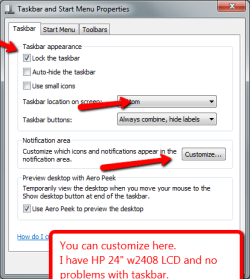
Here is how mine is set up with 1920 x 1080
 

My Computer

Computer Manufacturer/Model Number
HP M9077c
OS
Windows 7 Home Premium 64bit
CPU
Intel(R)Core(TM)2 quad [email protected] 2.39GHz
Motherboard
ASUSeK
Memory
6GB DDR2 6400
Graphics Card(s)
GeForce 8500/512MB
Sound Card
Realtek High Def Audio
Monitor(s) Displays
HP w2408 LCD 24" widescreen
Screen Resolution
1920x1200
Cooling
6 pack of Bud
Keyboard
MS wireless Inteli
Mouse
MS wireless Inteli
In case you haven't got the manual: http://www.dynexproducts.com/cms/documents/DX-24L150A11_10-0317_WEB_ENG_V1_Final lr.pdf

See the section about VGA Settings

My computer doesn't have VGA port, I use HDM1 to connect flat panel tv to HP Pavillion Elite computer.

I did use my remote to go through settings which were normal, cinerama and zoom and the icons on taskbar are still not completely visible in all but the normal setting which simulated a square ugly screen, lol
 

My Computer

Computer Manufacturer/Model Number
Hewlett Packard Pavilion Elite
OS
windows 7 home premium 32bit
What is your GFX card?

When you download drivers from a manufacturer website, it install it's own GX control panel which can allow you to set zoom functions etc.


OS
 

My Computer

Computer Manufacturer/Model Number
Compaq Desktop
OS
Windows 7 Ultimate x64
CPU
AMD Sempron Dual Core
Memory
3GB
Graphics Card(s)
NVIDIA GeForce 6150SE nForce 430
Screen Resolution
1024x768
Hard Drives
150GB Sata
Shrinking icons

pinkunicorn,
View attachment 107682

Here is how mine is set up with 1920 x 1080

If I use the recommended setting of 1920 x 1080, the taskbar icsons shrink so that I can only see the tip of them.

I unchecked lock task bar and moved it up, now I can see all the icons except for the start orb which is partially hidden to the left of the screen.

The taskbar is now about 1.5" high which isn't what I would like but at least I can now see the icons and notifications.

Thank you to everyone for your time and kind attention to my problem.

Lisa:)
 

My Computer

Computer Manufacturer/Model Number
Hewlett Packard Pavilion Elite
OS
windows 7 home premium 32bit
In case you haven't got the manual: http://www.dynexproducts.com/cms/documents/DX-24L150A11_10-0317_WEB_ENG_V1_Final lr.pdf

See the section about VGA Settings

My computer doesn't have VGA port, I use HDM1 to connect flat panel tv to HP Pavillion Elite computer.

I did use my remote to go through settings which were normal, cinerama and zoom and the icons on taskbar are still not completely visible in all but the normal setting which simulated a square ugly screen, lol

You may also have to switch from 4:3 aspect ratio (square ugly screen) to a 16:9 aspect ratio (rectangular screen) then retry the normal, cinerama and zoom.

I have found it useful when getting a new TV or other electronic item to read the whole manual and familiarize yourself with all of it's settings, sometimes there is a hidden sub menu that provides a solution found only by reading the manual thoroughly.
 

My Computer

Computer type
PC/Desktop
Computer Manufacturer/Model Number
My own abomination, I call it the Money Pit
OS
Windows 10 Pro x 2/Windows 11 Home
CPU
Intel i7 2600K @ 3.40 GHz
Motherboard
ASUS Sabertooth P67
Memory
Corsair Vengeance 16GB DDR3 1600MHz CL8 Dual Channel Kit
Graphics Card(s)
EVGA GeForce RTX 3080 XC3 ULTRA GAMING 10GB GDDR6X
Sound Card
Onboard Realtek or Nvidia High Definition Audio (HDMI)
Monitor(s) Displays
Samsung JS7000 50" SUHD TV or Samsung 27" FHD 60Hz 8ms GTG V
Screen Resolution
1920 x 1080
Hard Drives
1 x Samsung 870 EVO 250 GB SSD (Windows 10 Pro), 1 x Samsung 850 EVO 250 GB SSD (Windows 10 Pro)
PSU
Corsair AX860 - 860W Modular Power Supply
Case
Phanteks Enthoo Luxe Full Tower Case - Black
Cooling
CORSAIR Hydro Series H150i PRO RGB 360mm Liquid CPU Cooler
Keyboard
Logitech K830 Illuminated Living-Room Keyboard
Mouse
Logitech MX Anywhere 2S Wireless Mouse
Internet Speed
100 Mbps
Antivirus
ESET Internet Security
Browser
Latest Version Of Firefox & Microsoft Edge Chromium Stable
Other Info
LG Super Multi Blue Internal Blu-ray Disk Rewriter - BH10LS30
6x2 HDMI Switcher (6 inputs, 2 outputs) so I can send the output of my Cable Box, Roku, or any my 4 computers to either my TV or Monitor separately or simultaneously.
Back
Top