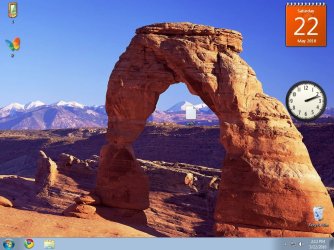
Taskbar options

john2010

New member
Local time
3:55 PM
Messages
8

Attachments

  • 1.JPG
    1.JPG
    147.6 KB · Views: 9
  • 2.JPG
    2.JPG
    131.3 KB · Views: 14
  • 3.JPG
    3.JPG
    109.9 KB · Views: 19

My Computer

OS
Windows 7
CPU
Intel(R) Pentium(R)
Graphics Card(s)
Standard VGA Graphics Adapter ATI Radeon Xpress200 Series
i think your pc doesn't support aero. check you WEI either the scores higher than 3

check out this thread
 

My Computer

OS
window's 7
CPU
core 2 quad
Motherboard
gigabyte
Memory
2gb corsair
Graphics Card(s)
ati hd4850
Monitor(s) Displays
lg
Screen Resolution
1600 X 900
Case
power logic
Other Info
none of the spec above is accurate
is there any way to enable aero in my pc?
 

My Computer

OS
Windows 7
CPU
Intel(R) Pentium(R)
Graphics Card(s)
Standard VGA Graphics Adapter ATI Radeon Xpress200 Series
original post by Brink


  • Aero is not available in Windows 7 Starter edition.
  • 1 GHz 32-bit or 64-bit processor
  • 1 GB of system memory
  • A graphics card with support for DirectX 9 graphics with at least 128 MB of memory.
  • The graphics card must support Pixel Shader 2.0 and the Windows Display Driver Model (WDDM).
  • Aero theme used.
  • The Desktop Window Manager Session Manager and Themes Services need to be set as Started and Automatic.
  • You must be have True Color (32 bit) set instead of High Color (16 bit).
  • Desktop composition needs to be enabled (checked) in Visual Effects.
  • Refresh or update your WEI score.

have you check the thread link that i posted earlier?
 

My Computer

OS
window's 7
CPU
core 2 quad
Motherboard
gigabyte
Memory
2gb corsair
Graphics Card(s)
ati hd4850
Monitor(s) Displays
lg
Screen Resolution
1600 X 900
Case
power logic
Other Info
none of the spec above is accurate
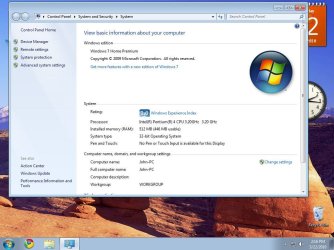
im using windows 7 home premium. 512mb ram and 64mb video card. directx10. bt the thing is that wen i first installed it on "e" drive it worked. windows xp ws running on "c" drive at that time. then i formatted it. after that aero stopped working:cry: pls help!! sum1
 

My Computer

OS
Windows 7
CPU
Intel(R) Pentium(R)
Graphics Card(s)
Standard VGA Graphics Adapter ATI Radeon Xpress200 Series

My Computer

Computer Manufacturer/Model Number
packard bell IXTREME M5722
OS
Operating System : Windows 7 Home Premium Edition 6.01.7600 SP1 (x64)
CPU
Processor : Intel Core 2 Quad Q8300 @ 2500 MHz
Motherboard
Mainboard : Packard Bell (Acer EG43M )
Memory
Physical Memory :8GB Corsair4x 2GB 800MHz C5 DDR2
Graphics Card(s)
Video Card : XFX 6700 AMD
Monitor(s) Displays
Maestro 234DL - BenQ V2220 - BenQ VW2420H
Screen Resolution
Current Display :1920x1080p pixels at 60 Hz in HD LED
Hard Drives
Hard Disks : WDC (1000 GB)
Drive C: (Hard Disk) : 428 GB available on 491 GB
Drive D: (Hard Disk) : 426 GB available on 492 GB
SAMSUNG spinpoint HD103SJ 1000.2 GB
(X 2) KINGSTON SSD NOW V 30GB
PSU
XFX ProSeries 550W PSU
Case
PACKARD BELL IXTREME
Cooling
System Blower Current: 150mA Air Flow16CFM ;Akasa 90mm rear
Keyboard
Gigabyte Aivia K8100
Mouse
TRUST-Wireless Laser Mouse - Carbon edition MI-7770C
Internet Speed
TP-LINK > TL-WN951N / AV500 Gigabit Powerline Adapters
Browser
chrome dev
Other Info
EXTRA COOLING>(FAN CONTROLLER) PC Bay Cooler 3 x 40mm fans; Akasa AK-HD-BL Blue hard drive cooler 2 x 40 mm fan 4500 rpm 29.7 dBA
Bios> American Megatrends Inc.
Version : P01-A1
Date : 08/31/2009
thx, bt doesnt help. i need sum suggestion so that i can force 2 run aero in windows 7 with a unsopportable video card. any idea?
 

My Computer

OS
Windows 7
CPU
Intel(R) Pentium(R)
Graphics Card(s)
Standard VGA Graphics Adapter ATI Radeon Xpress200 Series
thx, bt doesnt help. i need sum suggestion so that i can force 2 run aero in windows 7 with a unsopportable video card. any idea?

Try right click on Taskbar then click on properties and at the bottom of the page is a box
for you to check or uncheck "Use Aero to preview the desktop.
 

My Computer

Computer Manufacturer/Model Number
HP M9077c
OS
Windows 7 Home Premium 64bit
CPU
Intel(R)Core(TM)2 quad [email protected] 2.39GHz
Motherboard
ASUSeK
Memory
6GB DDR2 6400
Graphics Card(s)
GeForce 8500/512MB
Sound Card
Realtek High Def Audio
Monitor(s) Displays
HP w2408 LCD 24" widescreen
Screen Resolution
1920x1200
Cooling
6 pack of Bud
Keyboard
MS wireless Inteli
Mouse
MS wireless Inteli

My Computer

Computer Manufacturer/Model Number
packard bell IXTREME M5722
OS
Operating System : Windows 7 Home Premium Edition 6.01.7600 SP1 (x64)
CPU
Processor : Intel Core 2 Quad Q8300 @ 2500 MHz
Motherboard
Mainboard : Packard Bell (Acer EG43M )
Memory
Physical Memory :8GB Corsair4x 2GB 800MHz C5 DDR2
Graphics Card(s)
Video Card : XFX 6700 AMD
Monitor(s) Displays
Maestro 234DL - BenQ V2220 - BenQ VW2420H
Screen Resolution
Current Display :1920x1080p pixels at 60 Hz in HD LED
Hard Drives
Hard Disks : WDC (1000 GB)
Drive C: (Hard Disk) : 428 GB available on 491 GB
Drive D: (Hard Disk) : 426 GB available on 492 GB
SAMSUNG spinpoint HD103SJ 1000.2 GB
(X 2) KINGSTON SSD NOW V 30GB
PSU
XFX ProSeries 550W PSU
Case
PACKARD BELL IXTREME
Cooling
System Blower Current: 150mA Air Flow16CFM ;Akasa 90mm rear
Keyboard
Gigabyte Aivia K8100
Mouse
TRUST-Wireless Laser Mouse - Carbon edition MI-7770C
Internet Speed
TP-LINK > TL-WN951N / AV500 Gigabit Powerline Adapters
Browser
chrome dev
Other Info
EXTRA COOLING>(FAN CONTROLLER) PC Bay Cooler 3 x 40mm fans; Akasa AK-HD-BL Blue hard drive cooler 2 x 40 mm fan 4500 rpm 29.7 dBA
Bios> American Megatrends Inc.
Version : P01-A1
Date : 08/31/2009

My Computer

Computer Manufacturer/Model Number
packard bell IXTREME M5722
OS
Operating System : Windows 7 Home Premium Edition 6.01.7600 SP1 (x64)
CPU
Processor : Intel Core 2 Quad Q8300 @ 2500 MHz
Motherboard
Mainboard : Packard Bell (Acer EG43M )
Memory
Physical Memory :8GB Corsair4x 2GB 800MHz C5 DDR2
Graphics Card(s)
Video Card : XFX 6700 AMD
Monitor(s) Displays
Maestro 234DL - BenQ V2220 - BenQ VW2420H
Screen Resolution
Current Display :1920x1080p pixels at 60 Hz in HD LED
Hard Drives
Hard Disks : WDC (1000 GB)
Drive C: (Hard Disk) : 428 GB available on 491 GB
Drive D: (Hard Disk) : 426 GB available on 492 GB
SAMSUNG spinpoint HD103SJ 1000.2 GB
(X 2) KINGSTON SSD NOW V 30GB
PSU
XFX ProSeries 550W PSU
Case
PACKARD BELL IXTREME
Cooling
System Blower Current: 150mA Air Flow16CFM ;Akasa 90mm rear
Keyboard
Gigabyte Aivia K8100
Mouse
TRUST-Wireless Laser Mouse - Carbon edition MI-7770C
Internet Speed
TP-LINK > TL-WN951N / AV500 Gigabit Powerline Adapters
Browser
chrome dev
Other Info
EXTRA COOLING>(FAN CONTROLLER) PC Bay Cooler 3 x 40mm fans; Akasa AK-HD-BL Blue hard drive cooler 2 x 40 mm fan 4500 rpm 29.7 dBA
Bios> American Megatrends Inc.
Version : P01-A1
Date : 08/31/2009
using force?
 

My Computer

OS
window's 7
CPU
core 2 quad
Motherboard
gigabyte
Memory
2gb corsair
Graphics Card(s)
ati hd4850
Monitor(s) Displays
lg
Screen Resolution
1600 X 900
Case
power logic
Other Info
none of the spec above is accurate
doesnt help:cry: I tried aero hack, still doesnt work.:cry:
 

My Computer

OS
Windows 7
CPU
Intel(R) Pentium(R)
Graphics Card(s)
Standard VGA Graphics Adapter ATI Radeon Xpress200 Series
sorry to say but to me,doing something by force wont bring any good. Maybe upgrading gpu with more memory can help. :)
 

My Computer

OS
window's 7
CPU
core 2 quad
Motherboard
gigabyte
Memory
2gb corsair
Graphics Card(s)
ati hd4850
Monitor(s) Displays
lg
Screen Resolution
1600 X 900
Case
power logic
Other Info
none of the spec above is accurate
i will try that!! btw thx 2 all who tried 2 help;)
 

My Computer

OS
Windows 7
CPU
Intel(R) Pentium(R)
Graphics Card(s)
Standard VGA Graphics Adapter ATI Radeon Xpress200 Series
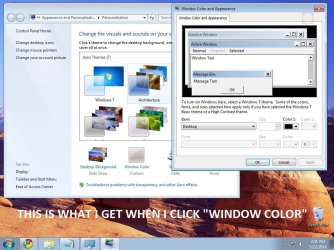
Hey i am having exactly the same problem it never used to happen but pops up with the same window as your second photo. :L

also, i dont think it has anything to do with reinstalling stuff because i havn't installed a think since i got it and never stopped aero, it just happened one day.
 
Last edited:

My Computer

OS
windows 7

My Computer

OS
window's 7
CPU
core 2 quad
Motherboard
gigabyte
Memory
2gb corsair
Graphics Card(s)
ati hd4850
Monitor(s) Displays
lg
Screen Resolution
1600 X 900
Case
power logic
Other Info
none of the spec above is accurate
@Jocat, wt is ur video card and ram memory nd which version of windows 7 r u using?
 

My Computer

OS
Windows 7
CPU
Intel(R) Pentium(R)
Graphics Card(s)
Standard VGA Graphics Adapter ATI Radeon Xpress200 Series
umm....

well i dont exactly know what this means but my laptop is a think pad mini 10" and its using the latest version of windows 7, its brand new and didnt come up with the window when i got it until now
 

My Computer

OS
windows 7
@jocat 2 know the version of windows 7 and ram click start, right click my computer and then properties. juz go through it u will come 2 know. nd 4 video card memory right click desktop, screen resolutions, then look 4 advanced setting nd click it. a box will open nd there will b a line called "total available graphics card memory". thats ur graphics/video card memory. after finding these thing pls post so that i also will try 2 help.
 

My Computer

OS
Windows 7
CPU
Intel(R) Pentium(R)
Graphics Card(s)
Standard VGA Graphics Adapter ATI Radeon Xpress200 Series
it will be easy if you fill your system specs jocat? typing dxdiag in run can helps too :)
 
Last edited:

My Computer

OS
window's 7
CPU
core 2 quad
Motherboard
gigabyte
Memory
2gb corsair
Graphics Card(s)
ati hd4850
Monitor(s) Displays
lg
Screen Resolution
1600 X 900
Case
power logic
Other Info
none of the spec above is accurate
Back
Top