Taskbar preview issue

Rudy

New member
Local time
7:27 PM
Messages
4
My problem's a little unique from the issues others are having. I'm trying to get Aero Peek to turn off such that when I roll over the taskbar, the contents of every single IE page open don't flash up, engulfing the screen when I have a lot of web sites open. I typically have 4 IE pages running (and one Firefox), with 7-10 tabs open on each instance. Every other taskbar element (including Firefox) just shows the upmost tab, but IE shows all the tabs open in all IE pages. Blots out the screen when I roll on the taskbar.

I ran the download for disabling Aero Peek, and sure enough, that got the grayed-out checkbox to go from checked to unchecked in the taskbar/start menu properties, but Aero Peek is still operating. Ran it again, rebooted, and even waited a day, to no avail. Peek is also unchecked/grayed out in the show desktop square. I also have all the animating/fading visual effects turned off in performance options (top 6 boxes).

Any other possibilities, or am I mistaken that this screen-hogging behavior is an Aero Peek feature?
 
Last edited by a moderator:

My Computer

OS
Windows 7
My problem's a little unique from the issues others are having. I'm trying to get Aero Peek to turn off such that when I roll over the taskbar, the contents of every single IE page open don't flash up, engulfing the screen when I have a lot of web sites open. I typically have 4 IE pages running (and one Firefox), with 7-10 tabs open on each instance. Every other taskbar element (including Firefox) just shows the upmost tab, but IE shows all the tabs open in all IE pages. Blots out the screen when I roll on the taskbar.

I ran the download for disabling Aero Peek, and sure enough, that got the grayed-out checkbox to go from checked to unchecked in the taskbar/start menu properties, but Aero Peek is still operating. Ran it again, rebooted, and even waited a day, to no avail. Peek is also unchecked/grayed out in the show desktop square.

Any other possibilities, or am I mistaken that this screen-hogging behavior is an Aero Peek feature?


That is odd, but once aero peak is disabled (unticked), you should no longer get the popups in full size at least. You should still get the little popup previews though. Also check in the "performance/visual effects area to see what effects there may help on or off.
 

My Computer

OS
win7
My problem's a little unique from the issues others are having. I'm trying to get Aero Peek to turn off such that when I roll over the taskbar, the contents of every single IE page open don't flash up, engulfing the screen when I have a lot of web sites open. I typically have 4 IE pages running (and one Firefox), with 7-10 tabs open on each instance. Every other taskbar element (including Firefox) just shows the upmost tab, but IE shows all the tabs open in all IE pages. Blots out the screen when I roll on the taskbar.

I ran the download for disabling Aero Peek, and sure enough, that got the grayed-out checkbox to go from checked to unchecked in the taskbar/start menu properties, but Aero Peek is still operating. Ran it again, rebooted, and even waited a day, to no avail. Peek is also unchecked/grayed out in the show desktop square. I also have all the animating/fading visual effects turned off in performance options (top 6 boxes).

Any other possibilities, or am I mistaken that this screen-hogging behavior is an Aero Peek feature?

Hello Rudy, and welcome to Seven Forums.

Do you mean the taskbar thumbnail previews of the pinned IE8 icon when you hover the mouse point over it? If you do, then this is not Aero Peek, but just the taskbar thumbnails. Unfortunately, this cannot be disabled in Windows 7 anymore.

Aero Peek is just the Show Desktop feature when you hover over the far right button on the taskbar instead.

Hope this helps,
Shawn
 

My Computer

Computer type
PC/Desktop
Computer Manufacturer/Model Number
Self built custom
OS
64-bit Windows 11 Pro for Workstations
CPU
Intel i7-8700K OC'd to 5 GHz
Motherboard
ASUS ROG Maximus XI Formula Z390
Memory
64 GB (4x16GB) G.SKILL TridentZ RGB DDR4 3600 MHz
Graphics Card(s)
ASUS ROG-STRIX-GTX1080TI-O11G-GAMING
Sound Card
Integrated
Monitor(s) Displays
2 x Samsung Odyssey G7 27"
Screen Resolution
2560x1440
Hard Drives
1TB Samsung 990 PRO M.2,
4TB Samsung 990 PRO PRO M.2,
TerraMaster F8 SSD Plus NAS
PSU
Seasonic Prime Titanium 850W
Case
Thermaltake Core P3
Cooling
Corsair Hydro H115i
Keyboard
Logitech wireless K800
Mouse
Logitech MX Master 4
Internet Speed
2 Gb/s Download and 100 Mb/s Upload
Antivirus
Malwarebyte Anti-Malware Premium
Browser
Google Chrome
Other Info
Logitech Z625 speaker system,
Logitech BRIO 4K Pro webcam,
HP Color LaserJet Pro MFP M477fdn,
APC SMART-UPS RT 1000 XL - SURT1000XLI,
Galaxy S23 Plus phone
Hello Rudy, and welcome to Seven Forums.

Do you mean the taskbar thumbnail previews of the pinned IE8 icon when you hover the mouse point over it? If you do, then this is not Aero Peek, but just the taskbar thumbnails. Unfortunately, this cannot be disabled in Windows 7 anymore.

Aero Peek is just the Show Desktop feature when you hover over the far right button on the taskbar instead.

Hope this helps,
Shawn

Thanks for the greeting. I was under the impression that Aero Peek was more than just that far right box to show desktop, and that the thumbnails were part of it. Even that isn't going away when I run the Aero Peek disable program, just graying out the peek at desktop line.

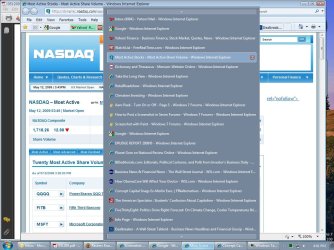
I don't get the thumbnails of web pages upon rollover, just a laundry list of all the open web pages, akin to when opening my favorites menu. So, when I roll over one of the various IE windows I have open, the only thing that changes is to highlight the the decription of the web page in that particular window among the laundry list items.

I should add that my hardware is XP-era, with 845G internal graphics, so I don't expect performance wow. Fortunately, Win7 bought into all of the hardware and latest drivers, and it runs well on this inferior hardware once tweaked to lose the CPU drain.

Hopefully, this will only be a temporary annoyance while they work out the bugs, not one that will constantly bother anyone who keeps a lot of web pages open and inadvertantly triggers the blotting out effect. The only other real annoyance I've had so far that I've not seen mentioned is that the taskbar icons occasionally shuffle up, and the four IE windows I keep open can't be slid back into their proper order.
 

My Computer

OS
Windows 7
Well, the thumbnails is just one part of the total Aero features as is Aero Peek.

Could you post a screenshot of the feature you want disabled just so that I'm certain of which one you meant?
 

My Computer

Computer type
PC/Desktop
Computer Manufacturer/Model Number
Self built custom
OS
64-bit Windows 11 Pro for Workstations
CPU
Intel i7-8700K OC'd to 5 GHz
Motherboard
ASUS ROG Maximus XI Formula Z390
Memory
64 GB (4x16GB) G.SKILL TridentZ RGB DDR4 3600 MHz
Graphics Card(s)
ASUS ROG-STRIX-GTX1080TI-O11G-GAMING
Sound Card
Integrated
Monitor(s) Displays
2 x Samsung Odyssey G7 27"
Screen Resolution
2560x1440
Hard Drives
1TB Samsung 990 PRO M.2,
4TB Samsung 990 PRO PRO M.2,
TerraMaster F8 SSD Plus NAS
PSU
Seasonic Prime Titanium 850W
Case
Thermaltake Core P3
Cooling
Corsair Hydro H115i
Keyboard
Logitech wireless K800
Mouse
Logitech MX Master 4
Internet Speed
2 Gb/s Download and 100 Mb/s Upload
Antivirus
Malwarebyte Anti-Malware Premium
Browser
Google Chrome
Other Info
Logitech Z625 speaker system,
Logitech BRIO 4K Pro webcam,
HP Color LaserJet Pro MFP M477fdn,
APC SMART-UPS RT 1000 XL - SURT1000XLI,
Galaxy S23 Plus phone
Screenshot shows how the laundry list of web pages open via rollover obliterates being able to read most of the screen.

sshot51209.jpg
 

My Computer

OS
Windows 7
Rudy,

You might see how you like having taskbar button grouping enabled. This way you will have all of the IE8 instances grouped to one icon instead of several buttons on the taskbar. It can help cut down on the tasbar's clutter, but you still cannot stop the list with that may opened windows or tabs for that program. :(
 

My Computer

Computer type
PC/Desktop
Computer Manufacturer/Model Number
Self built custom
OS
64-bit Windows 11 Pro for Workstations
CPU
Intel i7-8700K OC'd to 5 GHz
Motherboard
ASUS ROG Maximus XI Formula Z390
Memory
64 GB (4x16GB) G.SKILL TridentZ RGB DDR4 3600 MHz
Graphics Card(s)
ASUS ROG-STRIX-GTX1080TI-O11G-GAMING
Sound Card
Integrated
Monitor(s) Displays
2 x Samsung Odyssey G7 27"
Screen Resolution
2560x1440
Hard Drives
1TB Samsung 990 PRO M.2,
4TB Samsung 990 PRO PRO M.2,
TerraMaster F8 SSD Plus NAS
PSU
Seasonic Prime Titanium 850W
Case
Thermaltake Core P3
Cooling
Corsair Hydro H115i
Keyboard
Logitech wireless K800
Mouse
Logitech MX Master 4
Internet Speed
2 Gb/s Download and 100 Mb/s Upload
Antivirus
Malwarebyte Anti-Malware Premium
Browser
Google Chrome
Other Info
Logitech Z625 speaker system,
Logitech BRIO 4K Pro webcam,
HP Color LaserJet Pro MFP M477fdn,
APC SMART-UPS RT 1000 XL - SURT1000XLI,
Galaxy S23 Plus phone
I deliberately have the IE buttons ungrouped on the taskbar so that I can view each "set" of web pages by shifting among the icons on the task bar to bring up the appropriate group. That way, it is easier to manage the positioning of having many web pages open rather than having to have them all bundled together. It's not clutter on the taskbar, it's systemic organization.

Such a methodology has always worked well for me in the past; it's surprising that MS is putting in a roadblack to hamper its effectiveness now. I'm hoping this is just an artifact of them not having though it through yet, or not recognizing that the new "feature" is unwieldy obstruction for power users. You probably also noticed on the screen shot that the laundry list was in no particular oder, so it's worthless to use for navigation. At the very least, I hope they create a way to neuter it.
 

My Computer

OS
Windows 7
Yeah, it would be nice to have that option.

Could it be in order of last visited?
 

My Computer

Computer type
PC/Desktop
Computer Manufacturer/Model Number
Self built custom
OS
64-bit Windows 11 Pro for Workstations
CPU
Intel i7-8700K OC'd to 5 GHz
Motherboard
ASUS ROG Maximus XI Formula Z390
Memory
64 GB (4x16GB) G.SKILL TridentZ RGB DDR4 3600 MHz
Graphics Card(s)
ASUS ROG-STRIX-GTX1080TI-O11G-GAMING
Sound Card
Integrated
Monitor(s) Displays
2 x Samsung Odyssey G7 27"
Screen Resolution
2560x1440
Hard Drives
1TB Samsung 990 PRO M.2,
4TB Samsung 990 PRO PRO M.2,
TerraMaster F8 SSD Plus NAS
PSU
Seasonic Prime Titanium 850W
Case
Thermaltake Core P3
Cooling
Corsair Hydro H115i
Keyboard
Logitech wireless K800
Mouse
Logitech MX Master 4
Internet Speed
2 Gb/s Download and 100 Mb/s Upload
Antivirus
Malwarebyte Anti-Malware Premium
Browser
Google Chrome
Other Info
Logitech Z625 speaker system,
Logitech BRIO 4K Pro webcam,
HP Color LaserJet Pro MFP M477fdn,
APC SMART-UPS RT 1000 XL - SURT1000XLI,
Galaxy S23 Plus phone
Rudy,

i think we need to swop! I know exactly what you want. At this stage my IE8 shows only the current tab as an AeroPeek preview whent I hover over the taskbar icon. Now, I don't use more than 4 websites at a time so I would like to show all the tabs that is in use. The laundry list shows once you have too many sites open and your screen is not wide enought to show thumbnails of each tab.

I also had the screenshot you showed, but now that I upgraded to RTM version, I get only one thumbnail even if there are several tabs open in IE. If you switch to Chrome or Mozilla you will have only one tab showing. But I want to turn the function ON for IE to show me all the tabs as thumbnails on the taskbar. Have you found the solution yet?
 

My Computer

OS
Windows 7
Taskbar Button Greyed out

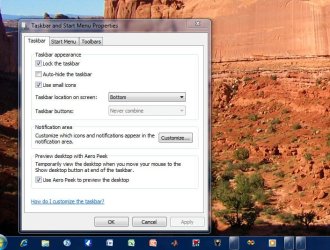
Okay, so here is my issue. I recently installed Windows 7 Ultimate x64 on my desktop. I noticed that when I open an item pinned to my taskbar, it turns the icon into a "glass" box. I went into taskbar and start menu properties and noticed that the taskbar buttons option is greyed out. Below is a picture of what I'm talking about. I want the button to keep showing the icon when the program is open. I have a different version of windows 7 on my laptop and it has that feature already enabled. Thanks for any help
 

Attachments

  • Taskbar.jpg
    Taskbar.jpg
    76 KB · Views: 121

My Computer

OS
Windows 7 Ultimate x64
CPU
Intel i7 920
Motherboard
EVGA x58 SLI
Memory
6Gb Triple Channel
Graphics Card(s)
EVGA GTX 285
Sound Card
integrated
Monitor(s) Displays
Dual 22" Gateway Monitors (1680x1050)
Hard Drives
1Tb Samsung Spinpoint
80Gb Seagate
250 Gb Seagate
Cooling
Thermaltake A1
If you don't want multiple internet explorer tabs previewing in the taskbar, go to internet explorer's Tools, Internet Options, on the General tab you'll see the Tabs section, click on it's settings and uncheck the "Show previews for individual tabs in the taskbar*" option. You'll need to restart internet explorer for changes to kick in hence the astrix.

http://www.sevenforums.com/tutorials/78687-ie8-individual-taskbar-previews-enable-disable.html

This is Internet Explorer 8 on Windows 7 Ultimate with Aero enabled by the way.
 
Last edited by a moderator:

My Computer

OS
Windows 7 Ultimate x64
CPU
Intel Core i7 920 @2.67 GHz
Motherboard
ASUS P6T-Deluxe
Memory
Corsair 6GB 1333 Mhz
Graphics Card(s)
ASUS Radeon TOP 4870X2 2GB
Sound Card
Sound Blaster Audigy 4
Monitor(s) Displays
Fujitsu 50" plasma P50XHA40US
Hard Drives
Western Digital 2 x 160GB drives in RAID-0 (Windows drive)
Western Digital 1TB storage drive
Western Digital 1.5TB storage drive
PSU
Thermaltake Truepower 750W
Case
Thermaltake Shark
Back
Top