Solved Taskbar problems

MiserySyndrome

New member
Member
Local time
1:06 AM
Messages
47
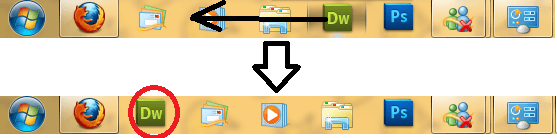
Today I just had this strange thing happening to my taskbar..
Whenever i try to move a pinned item to another position. it kinda "jumps" to another positon and another pinned one takes it place. I hope the picture kinda explains what i mean, it's kinda hard to explain.

When logging into my guest account. I don't have this problem. so it's definitly user-based problem. also no virusses were detected. scanned with several computers. reboot my computer.Still had the same problem..

I also noticed that locking/unlocking has the same view, while normally unlocked looks a little different. I still can resize the bar when unlocked, however it doesn't look like being unlocked when it is. I just see when it is or not by right clicking it.

Does anybody know how I can fix this? this is really annoying me.. I did upgraded to SP1 yesterday.. but because I don't have this problem it on guest account. I don't really think that has something to do with it.

Thanks
 

Attachments
  • Naamloos.png
    Naamloos.png
    20.9 KB · Views: 8

My Computer

Computer Manufacturer/Model Number
Dell Vostro 3700
OS
Microsoft Windows 7 Professional (x64) 6.1.7601
CPU
Intel(R) Core(TM) i5 CPU M 520 @ 2.40GHz (4 CPUs), ~2
Memory
4096MB RAM
Graphics Card(s)
NVIDIA GeForce GT 330M
Sound Card
nVIDIA GT216 - High Definition Audio Controller
Monitor(s) Displays
Integrated 17"
Screen Resolution
1600 x 900
Hard Drives
OS (C:) 451,07 GB
Recovery: 14,65 GB
Case
Standard
Keyboard
integrated
Internet Speed
2.4 Mbps
The upgrade to SP1 seems too coincidental to ignore. Why don't you try a System Restore to just before the install, see if the problem still exists, and if not, try installing SP1 again.
 

My Computer

Computer Manufacturer/Model Number
HP Pavillion dv5t (generation 1)
OS
Vista 64 bit and 32 bit (SP2)
CPU
Intel(R) Core(TM)2 Duo Processor T9400 (2.53 GHz
Memory
4GB DDR2 System Memory (2 Dimm)
Graphics Card(s)
512 MB NVIDIA GeForce 9600M GT
Monitor(s) Displays
15.4" diagonal WSXGA+ High-Definition HP BrightView Widescre
Screen Resolution
1680 x 1050
Hard Drives
320GB 5400RPM SATA Hard Drive with HP ProtectSmart Hard Drive Protection
Keyboard
Built-in HP
Mouse
Built in - Synaptics TouchPad V6.5 on PS/2 Port
Internet Speed
Max
Other Info
~ Intel Next-Gen Wireless-N Mini-card w/Bluetooth ~ Blu-Ray ROM DVD+/-R/RW ~ Integ. HDTV Hybrid Tuner ~ 12 Cell Battery ~ MS Office (Home Premium) 2007 ~
The upgrade to SP1 seems too coincidental to ignore. Why don't you try a System Restore to just before the install, see if the problem still exists, and if not, try installing SP1 again.
I just put a copy of my C drive over my C drive and now they don't jump anymore. Problem still is, however, that the bar locked and unlocked still look the same. also, with SP1 installed I didn't had the problem of these jumping icons on the guest account. does this mean I have to make a new user name, and delete this one, and then remake and put everything back?
 

My Computer

Computer Manufacturer/Model Number
Dell Vostro 3700
OS
Microsoft Windows 7 Professional (x64) 6.1.7601
CPU
Intel(R) Core(TM) i5 CPU M 520 @ 2.40GHz (4 CPUs), ~2
Memory
4096MB RAM
Graphics Card(s)
NVIDIA GeForce GT 330M
Sound Card
nVIDIA GT216 - High Definition Audio Controller
Monitor(s) Displays
Integrated 17"
Screen Resolution
1600 x 900
Hard Drives
OS (C:) 451,07 GB
Recovery: 14,65 GB
Case
Standard
Keyboard
integrated
Internet Speed
2.4 Mbps
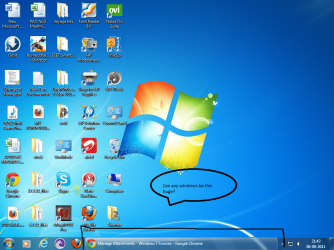
i have a problem with my task bar all windows on it appar too big
i have attached my picture please i need some fix for this
 

Attachments

  • Untitled.png
    Untitled.png
    256.8 KB · Views: 6

My Computer

OS
Windows 7 Ultimate 32bit
You can change the size of your Desktop icons and your Taskbar icons:

ICONS - DESKTOP ICONS - CHANGE SIZE
Right-click an area open on the Desktop, click View, select Icon Size + choose Small Icons.
How to Easily Change the Windows Desktop Icons Size
HowToInWindows.com
AveDesk - A Desktop Enhancer


ICONS - TASKBAR ICONS - CHANGE SIZE
How to Use Small or Large Icons on the Windows 7 Taskbar
How to Change the Windows 7 Taskbar Icon Width Size
Change Taskbar Icon Size in Windows 7 | Windows 7 Themes
Change Taskbar Icon Size via Windows 7 Settings
Change Taskbar Icon Size via Registry

PS kaushiksharma, Welcome to the forum. As a suggestion, you'll get more help for your problems if, in the future, you start a new thread for your specific problem.


My Computer

Computer Manufacturer/Model Number
HP Pavillion dv5t (generation 1)
OS
Vista 64 bit and 32 bit (SP2)
CPU
Intel(R) Core(TM)2 Duo Processor T9400 (2.53 GHz
Memory
4GB DDR2 System Memory (2 Dimm)
Graphics Card(s)
512 MB NVIDIA GeForce 9600M GT
Monitor(s) Displays
15.4" diagonal WSXGA+ High-Definition HP BrightView Widescre
Screen Resolution
1680 x 1050
Hard Drives
320GB 5400RPM SATA Hard Drive with HP ProtectSmart Hard Drive Protection
Keyboard
Built-in HP
Mouse
Built in - Synaptics TouchPad V6.5 on PS/2 Port
Internet Speed
Max
Other Info
~ Intel Next-Gen Wireless-N Mini-card w/Bluetooth ~ Blu-Ray ROM DVD+/-R/RW ~ Integ. HDTV Hybrid Tuner ~ 12 Cell Battery ~ MS Office (Home Premium) 2007 ~
Back
Top