taskbar showing just two icons; help!

yihwan

New member
Local time
3:56 PM
Messages
3
After changing my keyboard settings, something happened with my taskbar so that it only shows two pinned icons, and I have to use these up and down arrow keys to scroll through the rest. This is incredibly annoying, as I can't figure out how to make it show all the icons again. My ThinkCentre button is hogging up the whole task bar, and any right clicks in the giant empty spaces right next to it will bring up options for the ThinkCentre.

See image: http://img27.imageshack.us/img27/1720/problemka.png

Help is appreciated!
 

My Computer

OS
Windows 7 Home Premium 64-bit
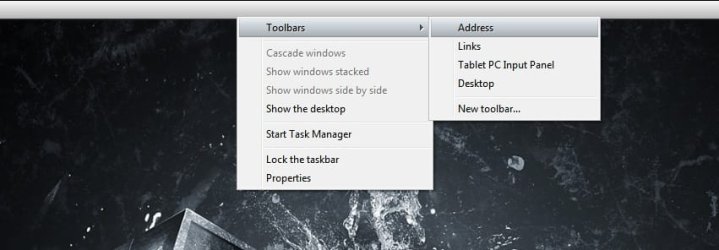
Right click the left-very down corner (where it is the taskbar again under the start button) and uncheck 'Lock taskbar'.
Now u should be able to reduce the size of that toolbar.
If you can't right click again > toolbars then uncheck the specific toolbars.
 

My Computer

Computer type
PC/Desktop
Computer Manufacturer/Model Number
Custom Built PC
OS
Windows 7 Ultimate 64 bit SP1
CPU
Intel(R) Core(TM) i5-2500K
Motherboard
Gigabyte Technology Co., Ltd. Z68X-UD3-B3
Memory
12GB Kingston Hyperx 1600MHz
Graphics Card(s)
Asus GTS 450
PSU
500W Coolink
Other Info
Genius G-Pen F610 (PenPad)
You may have to undo the keyboard change either by an uninstall process (if that's relevant) or perhaps a System Restore. Once done, if the problem is solved, you can try the keyboard change again, in the hope that it was just a corrupted change that will work properly next time.
 

My Computer

Computer Manufacturer/Model Number
HP Pavillion dv5t (generation 1)
OS
Vista 64 bit and 32 bit (SP2)
CPU
Intel(R) Core(TM)2 Duo Processor T9400 (2.53 GHz
Memory
4GB DDR2 System Memory (2 Dimm)
Graphics Card(s)
512 MB NVIDIA GeForce 9600M GT
Monitor(s) Displays
15.4" diagonal WSXGA+ High-Definition HP BrightView Widescre
Screen Resolution
1680 x 1050
Hard Drives
320GB 5400RPM SATA Hard Drive with HP ProtectSmart Hard Drive Protection
Keyboard
Built-in HP
Mouse
Built in - Synaptics TouchPad V6.5 on PS/2 Port
Internet Speed
Max
Other Info
~ Intel Next-Gen Wireless-N Mini-card w/Bluetooth ~ Blu-Ray ROM DVD+/-R/RW ~ Integ. HDTV Hybrid Tuner ~ 12 Cell Battery ~ MS Office (Home Premium) 2007 ~
May I see this snipshot from your computer ?

Untitled.jpg

Right click on the taskbat .... and place the pointer on Toolbar . It seems to be a process on centering taskbar icons or something similar .... but incomplete.
 

My Computer

Computer type
PC/Desktop
Computer Manufacturer/Model Number
Self Assembled
OS
Microsoft Windows 10 Pro Insider Preview 64-bit
CPU
Intel(R) Core(TM) i3-4130 CPU @ 3.40GHz
Motherboard
Gigabyte Technology Co., Ltd. B85M-D3H
Memory
Corsair Vengence 4GB x2 (8.00GB Dual-Channel DDR3 @ 798MHz)
Graphics Card(s)
2047MB GeForce GTS 450 (ZOTAC International)
Sound Card
Onboard (Realtek High Definition Audio)
Monitor(s) Displays
LG Flatron E2040T
Screen Resolution
1600x900
Hard Drives
Western Digital 1 TB
Seagate 500 GB
PSU
Corsair VS550
Case
Cooler Master K380
Cooling
Cooler Master Seidon 120V Plus
Keyboard
Logitech MK260r
Mouse
Logitech MK260r
Internet Speed
PMPL Broadband
Antivirus
Windows Defender + MBAM
Browser
Firefox
Other Info
Dell Studio 15" Laptop
Back
Top