Taskbar shows no internet connection but it's working (except for Inte

Nick79

New member
Local time
6:59 AM
Messages
12
Hello,

My desktop computer with just one wired network connector has developed a strange problem.

When I turn it on the taskbar internet icon shows no connection. For a while it just displays a spinning circle then either shows a yellow exclamation sign or more often a red cross.

However, e-mail, Onedrive, Firefox and Chrome work OK.

Strangely though clicking on Internet Explorer does nothing - it does not run or even attempt to as far as I can see.

Attempting to access Network and Sharing Centre from the Control Panel fails - the program does not start and I just get a spinning circle.

When I shut down the computer I get the message that otther programs are running, but task manager does not show any.

When I select force shut down the screen clears but the computer does not shut down, so I have to use the reset button on the computer.

The next time I start the computer I get the message that Windows did not shut down correctly, so start it in Safe Mode with Networking.

Initially the internet icon shows a Yellow exclamation mark, but this clears after a few seconds.

When I shut down the computer and re-start it normally (i.e. not in Safe Mode) it works correctly, i.e. the network icon in the taskbar is OK and Internet Explorer works OK as does the Network and Sharing Centre.

However, when it is shut down and re-started the problem come back and the only way to clear it is to do another start in Safe Mode with Networking and then re-start normally.

Any advice on curing this would be appreciated.


Regards,

Nick.
 

My Computer My Computer

At a glance

Window 7 64 bit ProfessionalIntel I7 Bloomfield Core6 GByte triple channel
Computer type
PC/Desktop
Computer Manufacturer/Model Number
Custom
OS
Window 7 64 bit Professional
CPU
Intel I7 Bloomfield Core
Motherboard
Asus
Memory
6 GByte triple channel
Antivirus
Kaspersky
Browser
IE8, Chrome, Firefox
Hi Nick79,

Try these first . . .

[1] Download and run Malwarebytes [FREE] from here => Malwarebytes => Restart.

[2] Please run MS_Info32_Find_Problem_Devices.bat [Option [2]] from here => BATCH PROGRAMS [Standalone] and then upload the results using the tutorial at the bottom of the above link [Upload to SevenForums . . .] and someone will look at it for you.

[3] Please run IP_Config_All.bat [Option [2]] from here => BATCH PROGRAMS [Standalone] and then upload the results using the tutorial at the bottom of the above link [Upload to SevenForums . . .] and someone will look at it for you.

I hope this helps!
 

My Computer My Computer

At a glance

Win 7 HP SP1 64-bit Vista HB SP2 32-bit Linux...Intel(R) Pentium(R) CPU P6200 @ 2.13GHz4.00 GBIntel(R) Graphics Media Accelerator HD
Computer type
Laptop
Computer Manufacturer/Model Number
Fujitsu LIFEBOOK
OS
Win 7 HP SP1 64-bit Vista HB SP2 32-bit Linux Mint 18.3
CPU
Intel(R) Pentium(R) CPU P6200 @ 2.13GHz
Motherboard
FUJITSU FJNBB06
Memory
4.00 GB
Graphics Card(s)
Intel(R) Graphics Media Accelerator HD
Sound Card
[1] Realtek High Definition Audio [2] Intel(R) Display Audio
Screen Resolution
1366 x 768 x 32 bits (4294967296 colors) @ 59 Hz
Hard Drives
TOSHIBA MK5076GSX
Antivirus
AVG FREE
Thanks for the reply.

Malwarebytes found some PUP's which were removed, A full scan by Kaspersky found nothing.

Now for the two batch files.

While they will run when the computer shows no issues on the network icon, they will not run when the network icon is showing the spinning circle.

All that happens is that I get another spinning circle when I click on them in the download folder.

Furthermore, I can not then open any other explorer windows and have to go through the reset button and re-start in safe mode again to clear the problem.


Have attached the two files when there is no problem with the computer for info.


Regards,

Nick.
 

Attachments

My Computer My Computer

At a glance

Window 7 64 bit ProfessionalIntel I7 Bloomfield Core6 GByte triple channel
Computer type
PC/Desktop
Computer Manufacturer/Model Number
Custom
OS
Window 7 64 bit Professional
CPU
Intel I7 Bloomfield Core
Motherboard
Asus
Memory
6 GByte triple channel
Antivirus
Kaspersky
Browser
IE8, Chrome, Firefox
Hi Nick79,

Malwarebytes found some PUP's which were removed, A full scan by Kaspersky found nothing.

Now for the two batch files.

While they will run when the computer shows no issues on the network icon, they will not run when the network icon is showing the spinning circle.

All that happens is that I get another spinning circle when I click on them in the download folder.

Furthermore, I can not then open any other explorer windows and have to go through the reset button and re-start in safe mode again to clear the problem.

Have attached the two files when there is no problem with the computer for info.

[1] Well the two files look OK!
[2] Have you installed any new hardware or software prior to this issue?
[2] Have you got a system restore point prior to this issue that you can use?
 

My Computer My Computer

At a glance

Win 7 HP SP1 64-bit Vista HB SP2 32-bit Linux...Intel(R) Pentium(R) CPU P6200 @ 2.13GHz4.00 GBIntel(R) Graphics Media Accelerator HD
Computer type
Laptop
Computer Manufacturer/Model Number
Fujitsu LIFEBOOK
OS
Win 7 HP SP1 64-bit Vista HB SP2 32-bit Linux Mint 18.3
CPU
Intel(R) Pentium(R) CPU P6200 @ 2.13GHz
Motherboard
FUJITSU FJNBB06
Memory
4.00 GB
Graphics Card(s)
Intel(R) Graphics Media Accelerator HD
Sound Card
[1] Realtek High Definition Audio [2] Intel(R) Display Audio
Screen Resolution
1366 x 768 x 32 bits (4294967296 colors) @ 59 Hz
Hard Drives
TOSHIBA MK5076GSX
Antivirus
AVG FREE
Thanks for reply - at least I know what the files should look like when it's working OK.


I believe I have only installed 3 programs recently, but can't recall when the problem started.


The programs are software for a USB microscope, software for monitoring my UPS external power supply, and software for a SDR receiver which I finally got set up last night.


There should be restore points, but as the computer is not working correctly at the moment I can't view them so will have to go through the re-start in Safe Mode again to check.


Regards,


Nick.
 

My Computer My Computer

At a glance

Window 7 64 bit ProfessionalIntel I7 Bloomfield Core6 GByte triple channel
Computer type
PC/Desktop
Computer Manufacturer/Model Number
Custom
OS
Window 7 64 bit Professional
CPU
Intel I7 Bloomfield Core
Motherboard
Asus
Memory
6 GByte triple channel
Antivirus
Kaspersky
Browser
IE8, Chrome, Firefox
Hi Nick,

next 2 things to run
from an elevated command mode - sfc/scannow
KB947821.

Note
if your system specs are correct re IE8 then i suspect that Kapersky is blocking it - way outta date
turn it of in programs/features then features (top left)


Roy
 

My Computer My Computer

At a glance

W7 home premium 32bit/W7HP 64bit/w10 tp insid...E5300 dual core3gbNvidia Geforce 7100 Nforce 630i
Computer type
PC/Desktop
Computer Manufacturer/Model Number
medionl/Aspire 6930G/acer x55a
OS
W7 home premium 32bit/W7HP 64bit/w10 tp insider ring
CPU
E5300 dual core
Motherboard
medion MS7366
Memory
3gb
Graphics Card(s)
Nvidia Geforce 7100 Nforce 630i
Monitor(s) Displays
avixc
Internet Speed
n (isp resticted to 72)
Antivirus
mse/pands
Browser
palemoon
Other Info
Belkin Fd7050 n USB using Railink RT2870 drivers, more upto date
Hi Nick79,

The easiest way to run these [KB947821 is SURT] and upload the results is . . .

Run SFC.bat [Options [2] and [4]] from here => BATCH PROGRAMS [Standalone] and then upload the results using the tutorial at the bottom of the above link [Upload to SevenForums . . .].

Download and run SURT [64-bit download] from here => SURT for Windows 7 x64-based Systems (KB947821) [October 2014].

Run SURT.bat [Option [2]] from here => BATCH PROGRAMS [Standalone]. The batch file will copy the CheckSUR.log to the desktop ready to upload to the forum using the tutorial at the bottom of the above link [Upload to SevenForums . . .].

SUGGESTION: It is advisable to turn off the power options for sleep etc while SURT is running because it will take a while to complete [so be patient!].

I hope this helps!
 

My Computer My Computer

At a glance

Win 7 HP SP1 64-bit Vista HB SP2 32-bit Linux...Intel(R) Pentium(R) CPU P6200 @ 2.13GHz4.00 GBIntel(R) Graphics Media Accelerator HD
Computer type
Laptop
Computer Manufacturer/Model Number
Fujitsu LIFEBOOK
OS
Win 7 HP SP1 64-bit Vista HB SP2 32-bit Linux Mint 18.3
CPU
Intel(R) Pentium(R) CPU P6200 @ 2.13GHz
Motherboard
FUJITSU FJNBB06
Memory
4.00 GB
Graphics Card(s)
Intel(R) Graphics Media Accelerator HD
Sound Card
[1] Realtek High Definition Audio [2] Intel(R) Display Audio
Screen Resolution
1366 x 768 x 32 bits (4294967296 colors) @ 59 Hz
Hard Drives
TOSHIBA MK5076GSX
Antivirus
AVG FREE
Hi all,

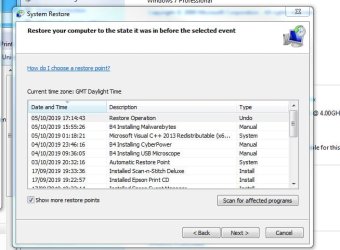
Done a System Restore to a point before I installed the three programs mentioned above.

On completion System Restore reported that the restore had failed and nothing was removed.

Looking at the Restore option it still shows the programs listed - see attached image - I selected to restore to when the USB Microscope was installed, so expected every thing above this to have been deleted.

However, as far as I can see they have been removed, at least from the Desktop.....

Anyway, whether the Restore operation completed successfully or not, the problem seems to have been cured.

I have re-started the computer about 6 times so far and the network icon in the taskbar shows with no errors at any time so far.

Internet Explorer (Version 11) starts every time as does the Network and Sharing Centre.

I will re-install the programs one at a time over the next few days and check after each install the problem does not reappear. Hopefully this will show me which one was causing the problem....

Regards,

Nick.
 

Attachments

  • After Restore.jpg
    After Restore.jpg
    77.2 KB · Views: 6

My Computer My Computer

At a glance

Window 7 64 bit ProfessionalIntel I7 Bloomfield Core6 GByte triple channel
Computer type
PC/Desktop
Computer Manufacturer/Model Number
Custom
OS
Window 7 64 bit Professional
CPU
Intel I7 Bloomfield Core
Motherboard
Asus
Memory
6 GByte triple channel
Antivirus
Kaspersky
Browser
IE8, Chrome, Firefox
Hi Nick79,

Anyway, whether the Restore operation completed successfully or not, the problem seems to have been cured.

I have re-started the computer about 6 times so far and the network icon in the taskbar shows with no errors at any time so far.

I will re-install the programs one at a time over the next few days and check after each install the problem does not reappear. Hopefully this will show me which one was causing the problem...

That sounds promising!
Good idea installing the programs one at a time, that will distinguish which program [if any] is causing the error. It might well be that the problem is completely resolved [hopefully]!
 

My Computer My Computer

At a glance

Win 7 HP SP1 64-bit Vista HB SP2 32-bit Linux...Intel(R) Pentium(R) CPU P6200 @ 2.13GHz4.00 GBIntel(R) Graphics Media Accelerator HD
Computer type
Laptop
Computer Manufacturer/Model Number
Fujitsu LIFEBOOK
OS
Win 7 HP SP1 64-bit Vista HB SP2 32-bit Linux Mint 18.3
CPU
Intel(R) Pentium(R) CPU P6200 @ 2.13GHz
Motherboard
FUJITSU FJNBB06
Memory
4.00 GB
Graphics Card(s)
Intel(R) Graphics Media Accelerator HD
Sound Card
[1] Realtek High Definition Audio [2] Intel(R) Display Audio
Screen Resolution
1366 x 768 x 32 bits (4294967296 colors) @ 59 Hz
Hard Drives
TOSHIBA MK5076GSX
Antivirus
AVG FREE
Back
Top