Thank you for answering @Teerex 
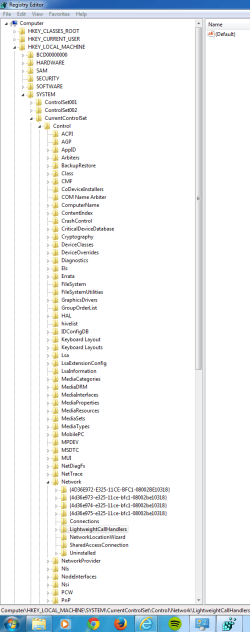
Due to my lack of experience with 7, I do not know where the HKEY_LOCAL_MACHINE\SYSTEM\CurrentControlSet\Control\Network is
Could you assist me, giving a more step->step way to go there?
Thank you in advance
Due to my lack of experience with 7, I do not know where the HKEY_LOCAL_MACHINE\SYSTEM\CurrentControlSet\Control\Network is
Could you assist me, giving a more step->step way to go there?
Thank you in advance
My Computer
At a glance
Windows 7 Professional 64bit OEM SP1 Bootcamp...3.4GHz Quad-core Intel Core i7, Turbo Boost u...NVIDIA GeForce GTX 680MX 2GB GDDR5
- Computer type
- PC/Desktop
- Computer Manufacturer/Model Number
- Macintosh
- OS
- Windows 7 Professional 64bit OEM SP1 Bootcamp on OSX Mountain Lion
- CPU
- 3.4GHz Quad-core Intel Core i7, Turbo Boost up to 3.9GHz
- Motherboard
- iMac
- Graphics Card(s)
- NVIDIA GeForce GTX 680MX 2GB GDDR5
- Hard Drives
- 1TB Serial ATA Drive @ 7200 rpm
-> 800 GB Macintosh
-> 200 GB Bootcamp Windows
- Case
- i Mac 27"
- Keyboard
- Apple Wireless Keyboard
- Mouse
- Sandstrøm Wireless
- Internet Speed
- 100mbps/10mbps
- Antivirus
- Avast (PC) / None (Mac)
- Browser
- Chrome/Firefox/IE10