taskbar start menu transparent glass

r600mura

New member
Local time
1:27 AM
Messages
29
First of all y does the admin keep deleting all my posts??????????????


Anyways does anyone know how i can make the taskbar fully transparent????
anybody ever get this done???????? plz help me I have been trying all day yesterday and today!!! Thankyou!!!
 

My Computer

Computer Manufacturer/Model Number
HP D530 SFF GHETTO
OS
Windows 7
CPU
POS ! Pentium 4 3.0 HT
Memory
1.25GB
Graphics Card(s)
xfx 6200 256
Sound Card
STOCK ///////Bose
Monitor(s) Displays
Samsung
Hard Drives
Eide 250 GB
Sata 90 GB Laptop HD
PSU
185 !!!!!!!! WATTS
Case
Chllin
Cooling
NOT VERY
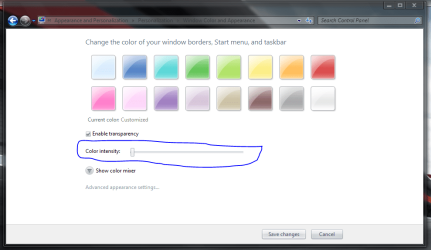
Go to Personalize, then go to Windows Color, and drag the Color Intensity to the left (see pic below). You also need to check the box saying 'Enable Transparency'.
It cant get more transparent without applying a custom theme (Which requires UxTheme Patcher)

If you feel like giving that a go, you might want to check this dude's work on DA. alkhan on deviantART

UxTheme Patcher: Uxtheme Patch for Windows 7 RTM 7600 - WinMatrix
 

Attachments

  • Capture.PNG
    Capture.PNG
    40.7 KB · Views: 655
ok i already have the blurred transparency but thats not good enough.

and i tried to do that Uxtheme Patch for Windows 7 RTM 7600 - WinMatrix and it gave me an error while trying to patch the downloaded .dll Files

does anyone know why i got these errors????
 

My Computer

Computer Manufacturer/Model Number
HP D530 SFF GHETTO
OS
Windows 7
CPU
POS ! Pentium 4 3.0 HT
Memory
1.25GB
Graphics Card(s)
xfx 6200 256
Sound Card
STOCK ///////Bose
Monitor(s) Displays
Samsung
Hard Drives
Eide 250 GB
Sata 90 GB Laptop HD
PSU
185 !!!!!!!! WATTS
Case
Chllin
Cooling
NOT VERY
First of all y does the admin keep deleting all my Anyways does anyone know how i can make the taskbar fully transparent????


Well, because you keep making new threads on the same subject. Making duplicate threads on the same subject just confuses and wastes people time in trying to help. If you don't want your threads to be deleted or merged together, please stop doing it.
http://www.sevenforums.com/customization/28192-transparent-my-computer-window.html#post301918
 

My Computer

Computer type
PC/Desktop
Computer Manufacturer/Model Number
Airbot 2.0
OS
Windows 7 Ultimate x64 SP1
CPU
Core i7 920 (D0) @ 4Ghz, *26c idle *65c full load on air
Motherboard
Asus P6X58D Premium - Sata 6Gb/s - USB 3.0
Memory
12GB DDR3 Corsair Dominator -CMD12GX3M6A1600C8 at 1600MHz
Graphics Card(s)
Zotac Geforce GTX 770
Sound Card
ASUS Xonar D2X
Monitor(s) Displays
1 LG 24" Flatron W2453V-PF 1 Samsung 24" P2450H both 2ms RT
Screen Resolution
1920x1080@60hz
Hard Drives
1 Samsung 250GB 840 Evo SSD
1 OCZ Vertex2 180GB SSD
1 TB Samsung Spinpoint F1 7200RPM 32MB cache
2 500GB WD Caviar Blacks 7200RPM 32MB cache (WD5001AALS)

Pioneer DVD Burner DVR-S18M
PSU
Corsair HX1000W
Case
Cooler Master HAF 932
Cooling
Case Fans *3 230mm, *1 140mm/CPU - *Tuniq Tower 120 Extreme
Keyboard
Logitech Wireless MK700
Mouse
Logitech Wireless MK700
Internet Speed
DL 15 Mbps UL 0.98 Mbps
Antivirus
None
Browser
Firefox Nightly
Other Info
Processor-7.7 *RAM- 7.9 *Graphics-7.9 *Gaming Graphics- 7.9 *SSD- 7.8 W.E.I final score= 7.7
*Phone- LG Nexus 5
OK sorry airbot ,u can delete all my other post.But can u help me figure this out?
 

My Computer

Computer Manufacturer/Model Number
HP D530 SFF GHETTO
OS
Windows 7
CPU
POS ! Pentium 4 3.0 HT
Memory
1.25GB
Graphics Card(s)
xfx 6200 256
Sound Card
STOCK ///////Bose
Monitor(s) Displays
Samsung
Hard Drives
Eide 250 GB
Sata 90 GB Laptop HD
PSU
185 !!!!!!!! WATTS
Case
Chllin
Cooling
NOT VERY
ok i already have the blurred transparency but thats not good enough.

and i tried to do that Uxtheme Patch for Windows 7 RTM 7600 - WinMatrix and it gave me an error while trying to patch the downloaded .dll Files

does anyone know why i got these errors????

You may need to take ownership of the files to be overwritten. You can install the take ownership registry entry that will add take ownership to your right click context menu. You can download it here: RapidShare: 1-CLICK Web hosting - Easy Filehosting

Then you just need to right click on the files to be overwritten, click on Take Ownership, and then try rerunning the UxTheme Patch.

Edit: or you can try Sergio's method above. :)
 

My Computer

Computer type
PC/Desktop
Computer Manufacturer/Model Number
SuperBeast
OS
Windows 10 Tech Preview 9926 x64
CPU
AMD FX-8350
Motherboard
Gigabyte GA-990FXA-UD3
Memory
16GB DDR3 1333
Graphics Card(s)
Asus R9 290 DirectCU II OC, Gigabyte Windforce R9 290 OC
Sound Card
Integrated w/ Creative A250 2.1 speakers
Monitor(s) Displays
Main: Asus VN289H 28" Secondary: Acer G246HL 24"
Screen Resolution
1920x1080
Hard Drives
128 GB SanDisk Ultra Plus (Windows drive)

240 GB Crucial M500 SSD (Games drive)

1 TB WDC WD10EACS 7200RPM HDD (Data drive)

2 TB Seagate Expansion Desktop external HDD (Backup drive)
PSU
900w Antec HCG-900
Case
Raidmax Agusta Full ATX
Cooling
Corsair H80
Keyboard
Cooler Master Devastator MB24
Mouse
Cooler Master Devastator MS2K 1000/1600/2000 DPI
Internet Speed
100Mbps cable
Antivirus
Avast!
Browser
Chrome
Hey sergiogarcia thanks for the help but the x86 link does not work

Can u try to send it again???
 

My Computer

Computer Manufacturer/Model Number
HP D530 SFF GHETTO
OS
Windows 7
CPU
POS ! Pentium 4 3.0 HT
Memory
1.25GB
Graphics Card(s)
xfx 6200 256
Sound Card
STOCK ///////Bose
Monitor(s) Displays
Samsung
Hard Drives
Eide 250 GB
Sata 90 GB Laptop HD
PSU
185 !!!!!!!! WATTS
Case
Chllin
Cooling
NOT VERY
start menu and taskbar transparent bar..
can it be done manually?
without 3rd person software..
i mean with using registry..can anyone tell me how?:geek:
 

My Computer

Computer Manufacturer/Model Number
GantZ™
OS
Windows 7 Eternity™ 2009
CPU
Boing-boing Inside™
If you have transparency enabled, your windows should be somewhat transparent already.

I know you can make the windows seem more or less transparent by tweaking the hue and saturation sliders under the Color Mixer menu.
 

My Computer

Computer Manufacturer/Model Number
HP Pavilion dv6815nr Notebook
OS
7 Home Premium x86
CPU
AMD Turion 64 X2 Mobille Technology TL-60 2.0GHz
Memory
3GB
Graphics Card(s)
NVIDIA GeForce 7150M / nForce630M
Sound Card
Conexant High Definition SmartAudio 221
Screen Resolution
1280 x 800
Hard Drives
Samsung 147GB
Mouse
Synaptics TouchPad
Other Info
Norton Security Suite (360)
i know that............we need more on this.......................
 

My Computer

Computer Manufacturer/Model Number
HP D530 SFF GHETTO
OS
Windows 7
CPU
POS ! Pentium 4 3.0 HT
Memory
1.25GB
Graphics Card(s)
xfx 6200 256
Sound Card
STOCK ///////Bose
Monitor(s) Displays
Samsung
Hard Drives
Eide 250 GB
Sata 90 GB Laptop HD
PSU
185 !!!!!!!! WATTS
Case
Chllin
Cooling
NOT VERY

My Computer

OS
Win 7 x64
First of all y does the admin keep deleting all my posts??????????????


Anyways does anyone know how i can make the taskbar fully transparent????
anybody ever get this done???????? plz help me I have been trying all day yesterday and today!!! Thankyou!!!

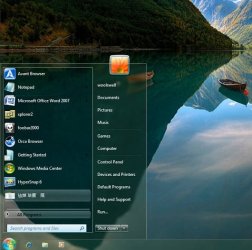
Something like this?
ttl trans-3.jpg
 

My Computer

OS
Server 2008 R2 SP1, Win7 x64 Pro SP1
CPU
Intel Core 2 Duo E6700 @3.3GHz
Motherboard
ASUS P5W DH DELUXE
Memory
Transcend DDRII 800 4GB (2 x 2GB )
Graphics Card(s)
GeForce 7950GX2
Sound Card
Realtek ALC882M Integrated on board
Monitor(s) Displays
ACER AL2723 27" LCD
Screen Resolution
1920x1200
Hard Drives
WD 6401 AALS 640G x 1
Seagate 160 GB (Barracuda 7200.7) x 2
PSU
Zippy PSL-6720P(G1)720W
Case
Thermaltake Kandalf VA9000SWA
Cooling
Zalman CNPS9500
Keyboard
Standard
Mouse
Standard
Internet Speed
10M, Cable
Other Info
Above is one of my desktops.
great info..

is info like this stickied somewhere on the threads? Newbie here.. :P
 

My Computer

OS
windows 7

My Computer

Computer type
Laptop
Computer Manufacturer/Model Number
Sager NP9170
OS
Win 7 Pro x64 / Win 10 Pro
CPU
Intel(R) Core(TM) i7-3630QM CPU @ 2.40GHz
Motherboard
CLEVO P170EM
Memory
12 GB
Graphics Card(s)
(1) Intel(R) HD Graphics 4000 (2) NVIDIA GeForce GTX 675M
Sound Card
(1) Realtek High Definition Audio (2) Intel(R) Display Aud
Monitor(s) Displays
17.3
Screen Resolution
1920x1080
Hard Drives
(1) Samsung 860 EVO 500GB(OS) (1) Samsung 860 EVO 500GB(Data)
Keyboard
Backlite
Antivirus
MSE, Malwarebytes Pro
Browser
Firefox
Other Info
DESKTOP: Custom-built.
OS: Win 10 Pro x64.
CASE: Rosewill R5.
CPU: Intel I5 4670K CPU @ 3.40GHz.
CPU COOLER: Cool Master Hyper 212 EVO.
MOTHERBOARD: Asus Z87-A.
MEMORY: Kingston HyperX 2x4 GB.
GPU: Nvidia Geforce 650 TI.
PSU: Corsair TX750.
DRIVES: (1) Samsung 840 120 GB SSD (2) Western Digital blue 500 GB 7200 RPM.
First of all y does the admin keep deleting all my posts??????????????


Anyways does anyone know how i can make the taskbar fully transparent????
anybody ever get this done???????? plz help me I have been trying all day yesterday and today!!! Thankyou!!!

Something like this?
View attachment 41376

Link to theme Please
Hi, Bongo,

I declared some ten hours ago that I would post how to run the Simplified Chinese program which would enable the clean transparent start menu.

There was too much addive device to install that program as well as after being installed. For this reason, I deleted my original reply.

After some research, I found that it should be very simple for us to have that effect:
1. Extract the transparent theme from:
C:\Windows\Resources\Themes
2. Remove the additive device in the .theme file, then save it.

I will try it with a "Clean Windows 7", if it works, I will upload the theme as soon as possible.
 
Last edited:

My Computer

OS
Server 2008 R2 SP1, Win7 x64 Pro SP1
CPU
Intel Core 2 Duo E6700 @3.3GHz
Motherboard
ASUS P5W DH DELUXE
Memory
Transcend DDRII 800 4GB (2 x 2GB )
Graphics Card(s)
GeForce 7950GX2
Sound Card
Realtek ALC882M Integrated on board
Monitor(s) Displays
ACER AL2723 27" LCD
Screen Resolution
1920x1200
Hard Drives
WD 6401 AALS 640G x 1
Seagate 160 GB (Barracuda 7200.7) x 2
PSU
Zippy PSL-6720P(G1)720W
Case
Thermaltake Kandalf VA9000SWA
Cooling
Zalman CNPS9500
Keyboard
Standard
Mouse
Standard
Internet Speed
10M, Cable
Other Info
Above is one of my desktops.
The following is my way to apply the totally transparent start menu:

1. Adjust "for best performance" of the Visual Effects in the Performance Option.

2. Disable UAC in the Control Panel.

3. Take ownership of the C:\Windows\Resources.

4. Run the UniversalThemePatcher as sergiogarcia9's tutorial "Theme - How to Apply Custom Themes" , then restart the computer.

5. Download the "start menu transparent theme.rar" from my SkyDrive. (I hope the link works....:shock:)

6. Extract the rar file, and copy the AaeroA file folder and the AaeroA.theme into the file folder of C:\Windows\Resources\Themes

7. Go back to the Performance Option to set the Visual Effects back to "Let Windows choose what's best for my computer",

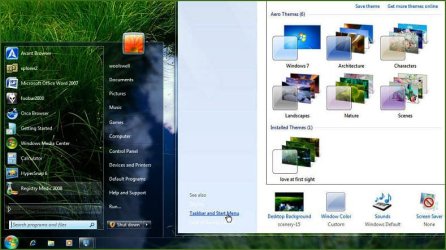
8. Go to C:\Windows\Resources\Themes, and click the "AaeroA.theme ". OK, the transparent startmenu will appear right away, and we can customize our theme now.

For example:
70.jpg

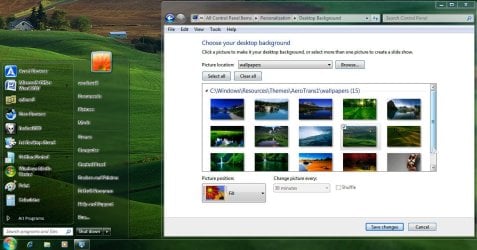
And with some modfication, we can have better effect, certainly:
Snap1.jpg


Hope it works for you, too.
 
Last edited:

My Computer

OS
Server 2008 R2 SP1, Win7 x64 Pro SP1
CPU
Intel Core 2 Duo E6700 @3.3GHz
Motherboard
ASUS P5W DH DELUXE
Memory
Transcend DDRII 800 4GB (2 x 2GB )
Graphics Card(s)
GeForce 7950GX2
Sound Card
Realtek ALC882M Integrated on board
Monitor(s) Displays
ACER AL2723 27" LCD
Screen Resolution
1920x1200
Hard Drives
WD 6401 AALS 640G x 1
Seagate 160 GB (Barracuda 7200.7) x 2
PSU
Zippy PSL-6720P(G1)720W
Case
Thermaltake Kandalf VA9000SWA
Cooling
Zalman CNPS9500
Keyboard
Standard
Mouse
Standard
Internet Speed
10M, Cable
Other Info
Above is one of my desktops.
Back
Top