Solved Taskbar takes up half my page (autohide right side)

freerider4life

New member
Local time
12:50 PM
Messages
7
2 minute hang when wake+BlurayDD SSD swap help

I'm doing some thread cycling, new questions for all you nice people out there.

Whenever I open my laptop back up, and hit the power button, it takes about 60 seconds to reach the password page. Once I type in my password, my computer hangs for about 2 minutes.

I had a Vaio VGN-NW265D laptop, with a bluray drive. I've used my bluray drive a handful of times within the last 1.5 years, and I'd rather have the performance. How would I go about putting in a SSD and installing windows 7 on that? I'm somewhat new to mods, but I'm affluent with computers.
 
Last edited:

My Computer My Computer

At a glance

win 7 home premium 64bitPentium Dual-Core CPU T4300 @ 2.10GHz, 2 Logi...4.0 gb
Computer Manufacturer/Model Number
VAIO VGN-NW265D
OS
win 7 home premium 64bit
CPU
Pentium Dual-Core CPU T4300 @ 2.10GHz, 2 Logical Processors
Memory
4.0 gb
Rightclick in the taskbar and make sure "Lock the taskbar" isn't selected.
Now go to the borderline between desktop and taskbar until that little Arrow left/right appears.
Hold down the left mouse button and pull the task bar back to the size you desire.
Rightclick the taskbar and select "Lock the Taskbar"

-DG
 

My Computer My Computer

At a glance

Windows 7 Ultimate x86DualCore AMD Athlon 64 X2, 2600 MHz 5200+Samsung 2GB DDR2Onboard NVIDIA GeForce 6150SE nForce 430
Computer Manufacturer/Model Number
HP m8000n
OS
Windows 7 Ultimate x86
CPU
DualCore AMD Athlon 64 X2, 2600 MHz 5200+
Motherboard
Asus M2N68-LA (Narra)
Memory
Samsung 2GB DDR2
Graphics Card(s)
Onboard NVIDIA GeForce 6150SE nForce 430
Sound Card
Onboard nVIDIA nForce 6100-430 (MCP61P)
Monitor(s) Displays
Westinghouse 19" LED
Screen Resolution
1280x1024
Hard Drives
SATA II Seagate Barracuda 500GB
USB II WD Elements 500GB
USB II WD My Book 1TB
USB II WD My Book 2TB
PSU
Stock (HP)
Case
Stock (HP)
Cooling
Stock
Keyboard
Logitech Classic KB 200
Mouse
Standard HP opticle USB mouse
thanks!

dang, i feel like a noob.
 

My Computer My Computer

At a glance

win 7 home premium 64bitPentium Dual-Core CPU T4300 @ 2.10GHz, 2 Logi...4.0 gb
Computer Manufacturer/Model Number
VAIO VGN-NW265D
OS
win 7 home premium 64bit
CPU
Pentium Dual-Core CPU T4300 @ 2.10GHz, 2 Logical Processors
Memory
4.0 gb
You're very welcome. It's no big deal tho you must have dragged the bar out by pressing the left mouse button just at the right time :D (propbably in an attempt to move some icon around) That's why I have my taskbar always locked ;)

As for your speed up goal: you could try running msconfig, go to the Startup tab and uncheck everything that's not Antivirus, Firewall or otherwise crucial to your Installation.

-DG
 

My Computer My Computer

At a glance

Windows 7 Ultimate x86DualCore AMD Athlon 64 X2, 2600 MHz 5200+Samsung 2GB DDR2Onboard NVIDIA GeForce 6150SE nForce 430
Computer Manufacturer/Model Number
HP m8000n
OS
Windows 7 Ultimate x86
CPU
DualCore AMD Athlon 64 X2, 2600 MHz 5200+
Motherboard
Asus M2N68-LA (Narra)
Memory
Samsung 2GB DDR2
Graphics Card(s)
Onboard NVIDIA GeForce 6150SE nForce 430
Sound Card
Onboard nVIDIA nForce 6100-430 (MCP61P)
Monitor(s) Displays
Westinghouse 19" LED
Screen Resolution
1280x1024
Hard Drives
SATA II Seagate Barracuda 500GB
USB II WD Elements 500GB
USB II WD My Book 1TB
USB II WD My Book 2TB
PSU
Stock (HP)
Case
Stock (HP)
Cooling
Stock
Keyboard
Logitech Classic KB 200
Mouse
Standard HP opticle USB mouse
You could also try using "Hide Labels", which will leave it just the width of the icon, assuming you don't need the labels.
 

My Computer My Computer

At a glance

Main - Windows 7 Pro SP1 64-Bit; 2nd - Window...Main - Core i7 2600K; 2nd - Core i7 920Main - 16GB Corsair Vengeance; 2nd - 12GB Cor...Main - XFX Radeon 6870 1GB; 2nd - XFX Radeon ...
Computer Manufacturer/Model Number
Self
OS
Main - Windows 7 Pro SP1 64-Bit; 2nd - Windows Server 2008 R2
CPU
Main - Core i7 2600K; 2nd - Core i7 920
Motherboard
Main - Asus P8Z68-V Pro/Gen3; 2nd - Gigabyte GA-EX58-UDR3
Memory
Main - 16GB Corsair Vengeance; 2nd - 12GB Corsair Vengeance
Graphics Card(s)
Main - XFX Radeon 6870 1GB; 2nd - XFX Radeon 4870 1GB
Sound Card
Both: Onboard Realtek Azalia
Monitor(s) Displays
Main - Hann 25" + I-INC 25" + Acer 23"; 2nd - Upgrading Soon
Screen Resolution
Main - 1920x1080 (All Three Monitors); 2nd - Upgrading Soon
Hard Drives
Main - (1) Crucial M4 128GB (Boot)
Main - (1) Seagate 2TB 64MB Cache (Data)
Main - (1) Seagate 2TB 64MB Cache (Data Backup)
2nd - (1) Intel X25-M SSD 80GB (Boot)
2nd - (3) Seagate 1TB 32MB Cache (Data Backup)
2nd - (1) Seagate 320GB (Because)
PSU
Main - OCZ 600W Modular; 2nd - OCZ 600W
Case
Main - Thermaltake Element G; 2nd - NZXT something or other
Cooling
Main - Corsair H80; 2nd - Prolimatech Megahalems
Keyboard
Main - Razer Reclusa; 2nd - Old MS Keyboard
Mouse
Main - Logitech MX Revolution; 2nd - Old MS Mouse
Internet Speed
20Mbps Time-Warner Cable
I did the startup programs, but it still takes a solid 4 - 5 minutes before I feel that it's completely finished starting up. random updates and junk seem to be overwhelming.
 

My Computer My Computer

At a glance

win 7 home premium 64bitPentium Dual-Core CPU T4300 @ 2.10GHz, 2 Logi...4.0 gb
Computer Manufacturer/Model Number
VAIO VGN-NW265D
OS
win 7 home premium 64bit
CPU
Pentium Dual-Core CPU T4300 @ 2.10GHz, 2 Logical Processors
Memory
4.0 gb
Post a screenshot of all the running processes you have on startup. :)
 

My Computer My Computer

At a glance

Main - Windows 7 Pro SP1 64-Bit; 2nd - Window...Main - Core i7 2600K; 2nd - Core i7 920Main - 16GB Corsair Vengeance; 2nd - 12GB Cor...Main - XFX Radeon 6870 1GB; 2nd - XFX Radeon ...
Computer Manufacturer/Model Number
Self
OS
Main - Windows 7 Pro SP1 64-Bit; 2nd - Windows Server 2008 R2
CPU
Main - Core i7 2600K; 2nd - Core i7 920
Motherboard
Main - Asus P8Z68-V Pro/Gen3; 2nd - Gigabyte GA-EX58-UDR3
Memory
Main - 16GB Corsair Vengeance; 2nd - 12GB Corsair Vengeance
Graphics Card(s)
Main - XFX Radeon 6870 1GB; 2nd - XFX Radeon 4870 1GB
Sound Card
Both: Onboard Realtek Azalia
Monitor(s) Displays
Main - Hann 25" + I-INC 25" + Acer 23"; 2nd - Upgrading Soon
Screen Resolution
Main - 1920x1080 (All Three Monitors); 2nd - Upgrading Soon
Hard Drives
Main - (1) Crucial M4 128GB (Boot)
Main - (1) Seagate 2TB 64MB Cache (Data)
Main - (1) Seagate 2TB 64MB Cache (Data Backup)
2nd - (1) Intel X25-M SSD 80GB (Boot)
2nd - (3) Seagate 1TB 32MB Cache (Data Backup)
2nd - (1) Seagate 320GB (Because)
PSU
Main - OCZ 600W Modular; 2nd - OCZ 600W
Case
Main - Thermaltake Element G; 2nd - NZXT something or other
Cooling
Main - Corsair H80; 2nd - Prolimatech Megahalems
Keyboard
Main - Razer Reclusa; 2nd - Old MS Keyboard
Mouse
Main - Logitech MX Revolution; 2nd - Old MS Mouse
Internet Speed
20Mbps Time-Warner Cable
bump, new questions

edit: threadcycling didn't work the way i intended.. should I make a new thread? it'd be nice to have the appropriate title.
 

My Computer My Computer

At a glance

win 7 home premium 64bitPentium Dual-Core CPU T4300 @ 2.10GHz, 2 Logi...4.0 gb
Computer Manufacturer/Model Number
VAIO VGN-NW265D
OS
win 7 home premium 64bit
CPU
Pentium Dual-Core CPU T4300 @ 2.10GHz, 2 Logical Processors
Memory
4.0 gb
Sure go ahead and open a new thread with the app. title and have this one marked as solved (click the red triangle top right and just send the word solved)
Not only does it make more sense but almost nobody would expect (and thus look at) your new question here
Edit: I see it's already marked as solved..good!
-DG
 

My Computer My Computer

At a glance

Windows 7 Ultimate x86DualCore AMD Athlon 64 X2, 2600 MHz 5200+Samsung 2GB DDR2Onboard NVIDIA GeForce 6150SE nForce 430
Computer Manufacturer/Model Number
HP m8000n
OS
Windows 7 Ultimate x86
CPU
DualCore AMD Athlon 64 X2, 2600 MHz 5200+
Motherboard
Asus M2N68-LA (Narra)
Memory
Samsung 2GB DDR2
Graphics Card(s)
Onboard NVIDIA GeForce 6150SE nForce 430
Sound Card
Onboard nVIDIA nForce 6100-430 (MCP61P)
Monitor(s) Displays
Westinghouse 19" LED
Screen Resolution
1280x1024
Hard Drives
SATA II Seagate Barracuda 500GB
USB II WD Elements 500GB
USB II WD My Book 1TB
USB II WD My Book 2TB
PSU
Stock (HP)
Case
Stock (HP)
Cooling
Stock
Keyboard
Logitech Classic KB 200
Mouse
Standard HP opticle USB mouse
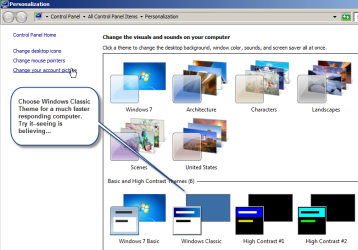
To begin with, you really don't need AERO. All slower computers benefit greatly from using Classic Theme Mode. My PC is very fast, but I still use it in Classic Theme Mode because I want it to be, well, lightning fast. Always keep in mind that your pictures, movies, games etc. ALWAYS look as good as they would if you use AERO, but your computer will respond 25% faster without AERO enabled.
 

Attachments

  • 6-7-2011 10-53-38 AM.png
    6-7-2011 10-53-38 AM.png
    45.9 KB · Views: 8

My Computer My Computer

At a glance

W7 64 BitAMD Phenom x4 4000Mhz8 GB DDR-2PNY-NVIDIA GeForce GTX 460 1GB GDDR5 PCI-e
Computer Manufacturer/Model Number
My own Custom Build: Asus, Corsair, Transcend, AMD, PNY, Ultra
OS
W7 64 Bit
CPU
AMD Phenom x4 4000Mhz
Memory
8 GB DDR-2
Graphics Card(s)
PNY-NVIDIA GeForce GTX 460 1GB GDDR5 PCI-e
Monitor(s) Displays
Dual: Flatron L1942T
Hard Drives
C: Drive (Agility 2 Solid State Drive 60 GB)
D: Drive (HDD Internal Western Digital 640 GB)
PSU
650 Watt
Cooling
Corsair Hydro H6 Liquid Cooler
Internet Speed
25 mbps down - 3 mbps up
40% of percentages are made up on the spot.
 

My Computer My Computer

At a glance

XP / Win7 x64 ProIntel Quad-Core Q9450 @ 3.2GHz2x2GB GSkill DDR2NVIDIA GeForce 8600 GTS (EVGA)
OS
XP / Win7 x64 Pro
CPU
Intel Quad-Core Q9450 @ 3.2GHz
Motherboard
Asus P5-E
Memory
2x2GB GSkill DDR2
Graphics Card(s)
NVIDIA GeForce 8600 GTS (EVGA)
Monitor(s) Displays
Dell 2408WFP
Screen Resolution
1920x1200
hiding taskbar

Rightclick in the taskbar and make sure "Lock the taskbar" isn't selected.
Now go to the borderline between desktop and taskbar until that little Arrow left/right appears.
Hold down the left mouse button and pull the task bar back to the size you desire.
Rightclick the taskbar and select "Lock the Taskbar"

-DG
I was going to ask a question about not being able to hide the task bar (could n't get it unlocked by simply right clicking the bar). I just right clicked the bar and select properties, then checked the box "hide the task bar" and applied (lock the taskbar was left unchecked). This is what I wanted to do since I like to have a full screen sometimes. (BTW, I found that if a program (antivirus in this case) wants to do update, the "hide" change didn't work until I closed the program requesting it.)

I thought I'd post this in case it helps someone else.

Steve Win7 Pro, HP Dv7
 

My Computer My Computer

At a glance

windows 7 pro 64, hp dv7 t
OS
windows 7 pro 64, hp dv7 t
bump, new questions

edit: threadcycling didn't work the way i intended.. should I make a new thread? it'd be nice to have the appropriate title.
Always make a new thread with a new question or problem.
 

My Computer My Computer

At a glance

Windows 7 Ultimate X64 SP1Intel i5-2550K, Differing ~4.4-4.8GHz No buil...16GB G.Skill Sniper 1866MHz @ 2133MHz 2x8GBASUS GTX650TIB-DC2OC-2GD5, (650TI Boost)
Computer type
PC/Desktop
Computer Manufacturer/Model Number
Home Built Desktop By DataTech
OS
Windows 7 Ultimate X64 SP1
CPU
Intel i5-2550K, Differing ~4.4-4.8GHz No built in GPU
Motherboard
ASUS P8Z68-V PRO/GEN3
Memory
16GB G.Skill Sniper 1866MHz @ 2133MHz 2x8GB
Graphics Card(s)
ASUS GTX650TIB-DC2OC-2GD5, (650TI Boost)
Sound Card
Onboard Realtek 5-1
Monitor(s) Displays
Samsung P2570HD
Screen Resolution
1920x1080
Hard Drives
Samsung 840 Pro 256GB SSD for OS, 500GB Seagate Constellation (Enterprise drive) for Data
PSU
Corsair HX650W
Case
Inwin Dragon Rider
Cooling
Hyper 212 EVO w/two Noctua fans, push-pull, @1300 RPM
Keyboard
E-Z Eyes, bright yellow keys with large characters
Mouse
steelseries SENSEI Laser Pro Gaming
Internet Speed
48-51Mbs Mbs down, 11 Mbs up Xfinity Cable
Antivirus
Norton Internet Security 2013
Browser
IE 10, Opera, Pale Moon if needed
Other Info
4 case fans, LG BluRay-RE, ASUS DVD-RW, Mr. Fusion power supply, 1.21 gigawatts.
Last edited:

My Computer My Computer

At a glance

W7 64 BitAMD Phenom x4 4000Mhz8 GB DDR-2PNY-NVIDIA GeForce GTX 460 1GB GDDR5 PCI-e
Computer Manufacturer/Model Number
My own Custom Build: Asus, Corsair, Transcend, AMD, PNY, Ultra
OS
W7 64 Bit
CPU
AMD Phenom x4 4000Mhz
Memory
8 GB DDR-2
Graphics Card(s)
PNY-NVIDIA GeForce GTX 460 1GB GDDR5 PCI-e
Monitor(s) Displays
Dual: Flatron L1942T
Hard Drives
C: Drive (Agility 2 Solid State Drive 60 GB)
D: Drive (HDD Internal Western Digital 640 GB)
PSU
650 Watt
Cooling
Corsair Hydro H6 Liquid Cooler
Internet Speed
25 mbps down - 3 mbps up
Back
Top