Taskbar / Task Tray icons

bbqbrisket

New member
Local time
12:12 AM
Messages
26
Soooooooooooooo, I have designated these as different even though they both go at the bottom of the screen.
The ones on the left seem to be known as icons in the "Taskbar" but the ones on the right when installed usually say they they can be put in the "Tray". What makes them different (at least on my both my Vista and 7 OS's) is that the ones on the left, in the Taskbar, are large and the ones on the right, in the Tray, are small.
Soooooooooooooooooooooooooooooooooooooooo,
Is there anyway to make them all the same uniform pixel size?

(I dun't care about Vista anymore, Lucy)

thanks for the help.
 
Last edited:

My Computer

Computer type
PC/Desktop
Computer Manufacturer/Model Number
lenovo
OS
windows 7 64 Pro
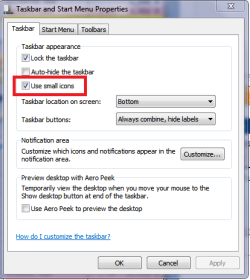
If using small icons is ok with you, you can set that in taskbar properties.
Then they should all be the same size - small icons.
Right click on the Taskbar and click Properties.

http://www.sevenforums.com/tutorials/741-taskbar-use-small-large-icons.html

TBPSP04.PNG

If you want large icons in the Notification Area I don't think you can do that.
Here is an old SF Thread about this:
http://www.sevenforums.com/customization/190304-notification-area-icons-date-time-font-sizes.html

If you're adventurous you can play with customizations and see if you can find something you prefer:
http://www.sevenforums.com/tutorials/126435-notification-area-icons-customize.html
 
Last edited by a moderator:

My Computer

Computer type
PC/Desktop
Computer Manufacturer/Model Number
home built
OS
Multi-Boot W7_Pro_x64 W8.1_Pro_x64 W10_Pro_x64 +Linux_VMs +Chromium_VM
CPU
AMD Athlon II x4 620
Motherboard
Gigabyte GA-MA785G-UD3H
Memory
6GB GSkill DDR2 800
Graphics Card(s)
AMD 4670 GPU + AMD 4200 IGP
Sound Card
on board Realtek ALC889A
Monitor(s) Displays
RCA 40" LCD TV, Insignia 32" LCD TV, HP 15" LCD monitor
Screen Resolution
1680 x 1050
Hard Drives
OCZ Vertex 3 120GB,
Samsung F3 1TB (3),
Several others - WD, Seagate, Hitachi, ...
PSU
Corsair 500 W
Case
Rosewill mid tower
Cooling
CM 90mm rifle
Keyboard
Gyration wireless, Logitech wireless, Dell USB wired
Mouse
Gyration wireless, Logitech wireless, V7 USB wired
Internet Speed
Spectrum - 100Mbps D / 10Mbps U
Antivirus
Avast, MBAM3, EMET, WinPatrol
Browser
Pale Moon, Firefox, IE
Other Info
2 multi-boot PC's
Mainly HTPC/Office/Gen purpose (no gaming).
Trendnet USB KVM.
LG DVD burner/Blue Ray Player.
Tray system for removable SATA backup drives.

Not currently OCd, under-volted.
I use Hybrid sleep, rarely re-boot or shutdown.

Hauppauge HD-PVR, Avermedia PCIe TV Tuner, Hauppauge PCI TV Tuner.
David is right you cannot change the size of the Notification icons, I have tried and it does not work.

Jerry
 

My Computer

Computer type
Laptop
Computer Manufacturer/Model Number
Sager NP9170
OS
Win 7 Pro x64 / Win 10 Pro
CPU
Intel(R) Core(TM) i7-3630QM CPU @ 2.40GHz
Motherboard
CLEVO P170EM
Memory
12 GB
Graphics Card(s)
(1) Intel(R) HD Graphics 4000 (2) NVIDIA GeForce GTX 675M
Sound Card
(1) Realtek High Definition Audio (2) Intel(R) Display Aud
Monitor(s) Displays
17.3
Screen Resolution
1920x1080
Hard Drives
(1) Samsung 860 EVO 500GB(OS) (1) Samsung 860 EVO 500GB(Data)
Keyboard
Backlite
Antivirus
MSE, Malwarebytes Pro
Browser
Firefox
Other Info
DESKTOP: Custom-built.
OS: Win 10 Pro x64.
CASE: Rosewill R5.
CPU: Intel I5 4670K CPU @ 3.40GHz.
CPU COOLER: Cool Master Hyper 212 EVO.
MOTHERBOARD: Asus Z87-A.
MEMORY: Kingston HyperX 2x4 GB.
GPU: Nvidia Geforce 650 TI.
PSU: Corsair TX750.
DRIVES: (1) Samsung 840 120 GB SSD (2) Western Digital blue 500 GB 7200 RPM.
Back
Top