
taskbar thumbnail real time preview

madunlop

New member
Local time
6:25 AM
Messages
4
i love the taskbar thumbnail preview but i have one problem.
It's not real time, I will explain.

I run What's up Gold on my windows 7 computer.
I normally have it minimized so i can work on other things.
Now if i want to check to see if all my server are up and running
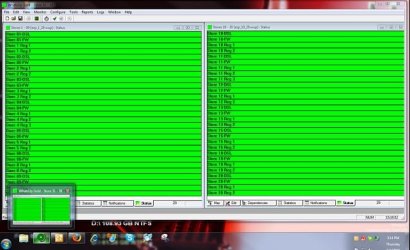
i will hover over my WUG icon in the taskbar and the preview window comes up. If i then hover over the little preview window then i get a full screen
view of WUG. One problem It's stuck in time. meaning what i am looking at in the preview and even the full screen preview is not what the program is
displaying right at this moment. What it is showing me is what was going on in WUG the last time it was opened fully and then minimized. So if i minimized it at 8:30am and it's now 4:00pm what i am seeing in the preview is from 8:30am. If i click on the preview and open WUG again it displays what is going on in real time.

I will include some screen shots.

The only thing i can think of is that i am running dual screens.
 

Attachments
  • screen1.jpg
    screen1.jpg
    50.7 KB · Views: 49

My Computer

OS
Windows 7 Ultimate 64 Bit RC Build 7100
You have to occasionally reopen it to get a new preview. I noticed that sometimes when i am download things and i start doing other things, the preview will say like 85% downloaded, but when i go to the actual window it is done. Not sure how to make it be real time all the time, or why it even stops sometimes.
 

My Computer

Computer Manufacturer/Model Number
Custom Made
OS
Windows 7 Build 7600|16384- 64bit
CPU
AMD Phenom II X4 810 - 2.61ghz Deneb
Motherboard
Asus M4A79T Deluxe
Memory
4GB DDR3 Mushkin (1600 O.C. Rated)
Graphics Card(s)
ATI HD Radeon 4890 1GB
Sound Card
Realtek HD Onboard Audio
Monitor(s) Displays
AOC 912vwa-1
Screen Resolution
1440x900 (Max Monitor)
Hard Drives
10000RPM 150GB Western Digital Velociraptor
PSU
Corsair TSX750W
Case
Antec Nine Hundred
Cooling
Air Cooled
Keyboard
Logitech Elite
Mouse
Logitech MX518
Internet Speed
Comcast High-Speed (+Powerboost)
Yes, this is a pet peeve of mine, I wish they would fix it already, or make it work like I think it should. You only get a live preview if the application is maximized, if it's running and minimized to the taskbar, it won't be a live preview. :mad:
 

My Computer

Computer type
PC/Desktop
Computer Manufacturer/Model Number
Airbot 2.0
OS
Windows 7 Ultimate x64 SP1
CPU
Core i7 920 (D0) @ 4Ghz, *26c idle *65c full load on air
Motherboard
Asus P6X58D Premium - Sata 6Gb/s - USB 3.0
Memory
12GB DDR3 Corsair Dominator -CMD12GX3M6A1600C8 at 1600MHz
Graphics Card(s)
Zotac Geforce GTX 770
Sound Card
ASUS Xonar D2X
Monitor(s) Displays
1 LG 24" Flatron W2453V-PF 1 Samsung 24" P2450H both 2ms RT
Screen Resolution
1920x1080@60hz
Hard Drives
1 Samsung 250GB 840 Evo SSD
1 OCZ Vertex2 180GB SSD
1 TB Samsung Spinpoint F1 7200RPM 32MB cache
2 500GB WD Caviar Blacks 7200RPM 32MB cache (WD5001AALS)

Pioneer DVD Burner DVR-S18M
PSU
Corsair HX1000W
Case
Cooler Master HAF 932
Cooling
Case Fans *3 230mm, *1 140mm/CPU - *Tuniq Tower 120 Extreme
Keyboard
Logitech Wireless MK700
Mouse
Logitech Wireless MK700
Internet Speed
DL 15 Mbps UL 0.98 Mbps
Antivirus
None
Browser
Firefox Nightly
Other Info
Processor-7.7 *RAM- 7.9 *Graphics-7.9 *Gaming Graphics- 7.9 *SSD- 7.8 W.E.I final score= 7.7
*Phone- LG Nexus 5
Anybody report this problem to Microsoft?
 

My Computer

Computer Manufacturer/Model Number
Custom Made
OS
Windows 7 Build 7600|16384- 64bit
CPU
AMD Phenom II X4 810 - 2.61ghz Deneb
Motherboard
Asus M4A79T Deluxe
Memory
4GB DDR3 Mushkin (1600 O.C. Rated)
Graphics Card(s)
ATI HD Radeon 4890 1GB
Sound Card
Realtek HD Onboard Audio
Monitor(s) Displays
AOC 912vwa-1
Screen Resolution
1440x900 (Max Monitor)
Hard Drives
10000RPM 150GB Western Digital Velociraptor
PSU
Corsair TSX750W
Case
Antec Nine Hundred
Cooling
Air Cooled
Keyboard
Logitech Elite
Mouse
Logitech MX518
Internet Speed
Comcast High-Speed (+Powerboost)
i would if

i know where to report it. I still have not found any good place to report bugs. i mean this is Beta.
I have a printing issue also but that is for another thread.
 

My Computer

OS
Windows 7 Ultimate 64 Bit RC Build 7100
Just sent feedback to Microsoft, hopefully they'll take an interest :p
 

My Computer

Computer Manufacturer/Model Number
Compaq Desktop
OS
Windows 7 Ultimate x64
CPU
AMD Sempron Dual Core
Memory
3GB
Graphics Card(s)
NVIDIA GeForce 6150SE nForce 430
Screen Resolution
1024x768
Hard Drives
150GB Sata

My Computer

Computer Manufacturer/Model Number
Compaq Desktop
OS
Windows 7 Ultimate x64
CPU
AMD Sempron Dual Core
Memory
3GB
Graphics Card(s)
NVIDIA GeForce 6150SE nForce 430
Screen Resolution
1024x768
Hard Drives
150GB Sata
I am not sure where exactly to go to send them a bug report, and I think that is what mad was asking as well.
 

My Computer

Computer Manufacturer/Model Number
Custom Made
OS
Windows 7 Build 7600|16384- 64bit
CPU
AMD Phenom II X4 810 - 2.61ghz Deneb
Motherboard
Asus M4A79T Deluxe
Memory
4GB DDR3 Mushkin (1600 O.C. Rated)
Graphics Card(s)
ATI HD Radeon 4890 1GB
Sound Card
Realtek HD Onboard Audio
Monitor(s) Displays
AOC 912vwa-1
Screen Resolution
1440x900 (Max Monitor)
Hard Drives
10000RPM 150GB Western Digital Velociraptor
PSU
Corsair TSX750W
Case
Antec Nine Hundred
Cooling
Air Cooled
Keyboard
Logitech Elite
Mouse
Logitech MX518
Internet Speed
Comcast High-Speed (+Powerboost)
I have a link for the Feedback tool, so i still use it.
 

My Computer

Computer Manufacturer/Model Number
Compaq Desktop
OS
Windows 7 Ultimate x64
CPU
AMD Sempron Dual Core
Memory
3GB
Graphics Card(s)
NVIDIA GeForce 6150SE nForce 430
Screen Resolution
1024x768
Hard Drives
150GB Sata
Type

rundll32.exe FeedbackTool.dll,ShowWizard

into a cmd prompt and hit enter, that's all you need to do. ;)
 

My Computer

Computer type
PC/Desktop
Computer Manufacturer/Model Number
Airbot 2.0
OS
Windows 7 Ultimate x64 SP1
CPU
Core i7 920 (D0) @ 4Ghz, *26c idle *65c full load on air
Motherboard
Asus P6X58D Premium - Sata 6Gb/s - USB 3.0
Memory
12GB DDR3 Corsair Dominator -CMD12GX3M6A1600C8 at 1600MHz
Graphics Card(s)
Zotac Geforce GTX 770
Sound Card
ASUS Xonar D2X
Monitor(s) Displays
1 LG 24" Flatron W2453V-PF 1 Samsung 24" P2450H both 2ms RT
Screen Resolution
1920x1080@60hz
Hard Drives
1 Samsung 250GB 840 Evo SSD
1 OCZ Vertex2 180GB SSD
1 TB Samsung Spinpoint F1 7200RPM 32MB cache
2 500GB WD Caviar Blacks 7200RPM 32MB cache (WD5001AALS)

Pioneer DVD Burner DVR-S18M
PSU
Corsair HX1000W
Case
Cooler Master HAF 932
Cooling
Case Fans *3 230mm, *1 140mm/CPU - *Tuniq Tower 120 Extreme
Keyboard
Logitech Wireless MK700
Mouse
Logitech Wireless MK700
Internet Speed
DL 15 Mbps UL 0.98 Mbps
Antivirus
None
Browser
Firefox Nightly
Other Info
Processor-7.7 *RAM- 7.9 *Graphics-7.9 *Gaming Graphics- 7.9 *SSD- 7.8 W.E.I final score= 7.7
*Phone- LG Nexus 5
found the feedback tool

if you want to add the feedback tool create a shortcut on your desktop and add C:\Windows\System32\rundll32.exe FeedbackTool.dll,ShowWizard

:D
 

My Computer

OS
Windows 7 Ultimate 64 Bit RC Build 7100
Back
Top