FoxForceFive
New member
- Local time
- 8:50 PM
- Messages
- 2
Hi guys, first post here so be gentle please!
I currently use a basic theme with white transparency, the taskbar is transparent when on 'autohide' & I hover the cursor over it, but as soon as I move off it it will hide, which isnt ideal.
But if I switch autohide off, the taskbar is no longer transparent anywhere but the desktop, where it simply appears transparent as it matches the bottom part of the wallpaper.
Here's a shot with auto hide on & the cursor over it:
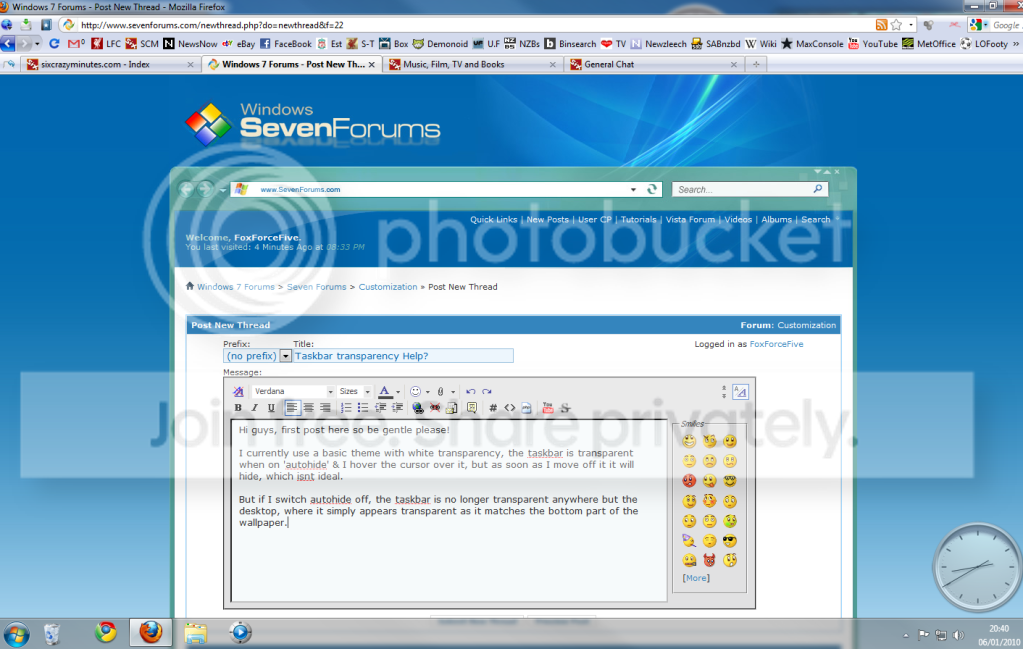
And here's a shot with the autohide off:

I want it on the desktop all the time, not on auto hide, but transparent in the same way it does when auto hide is selected & I hover over it.
Is this possible in any way?
I currently use a basic theme with white transparency, the taskbar is transparent when on 'autohide' & I hover the cursor over it, but as soon as I move off it it will hide, which isnt ideal.
But if I switch autohide off, the taskbar is no longer transparent anywhere but the desktop, where it simply appears transparent as it matches the bottom part of the wallpaper.
Here's a shot with auto hide on & the cursor over it:
And here's a shot with the autohide off:
I want it on the desktop all the time, not on auto hide, but transparent in the same way it does when auto hide is selected & I hover over it.
Is this possible in any way?
My Computer
- Computer Manufacturer/Model Number
- Own Build
- OS
- Windows 7 Ultimate
- CPU
- AMD Athlon 64x2 6000+ 3.11ghz
- Motherboard
- Gigabyte GA-MA770-DS3
- Memory
- 4gb (3.25 used as only 32bit OS)
- Graphics Card(s)
- Nvidia GeForce 9500GT 1GB
- Sound Card
- On board 7.1
- Monitor(s) Displays
- Phillips 19" 190SW & Samsung 32" LCD
- Hard Drives
- 2x1TB Samsung Spinpoint F1
1x500gb Western Digital
1x500GB Hitachi Deskstar
- PSU
- EarthWatts 500 Watt
- Case
- Antec Sonata III
- Cooling
- Stock fans -whisper quiet & cool enough!