
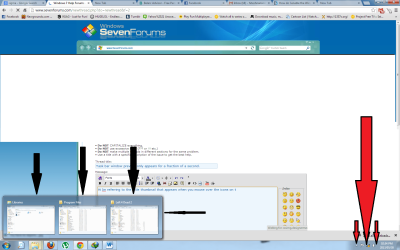
Hi. I'm new here and I need help with this problem.The little thumbnail that appears when you mouse over the icons on the taskbar (see black arrows in image 1) only appears for a fraction of second when I hover the cursor over them. In the past, they would stay there until i move the mouse away or click on them like any normal windows 7 taskbar.
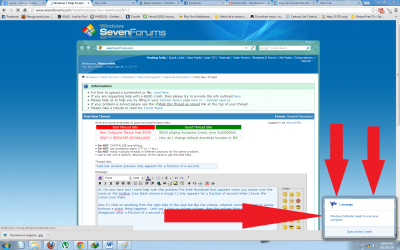
Also if I click on anything from the right side of the task bar like the volume, internet connection,and pc issues buttons a similar thing happens. Lets say I click on volume volume, then the volume thing pops us and disappears after a fraction of a second (see red arrows in image 2). I had to perfectly time the crtl+print screen
buttons to get the images while typing this.
I think is was caused by this:
Last night, I was trying out applications on my samsung galaxy s4 that allow it to control the vlc player on the pc. I tried two programs. Both required me to download the program both on the pc and my phone to set them up.These are the two programs i tried: "VLC Direct Pro Free" and "Remote for VLC". So for each of these programs I have one part on my phone and the corresponding part on the pc. They required me to download a little thing called vlcdirect.ok. I think it put something in my registry, i'm not sure.
Since that was the last thing I did before the problem started, I suspect that that is the cause. I'm worried about getting the vlcdirect.ok thing out of my registry without messing things up more.
Also if I click on anything from the right side of the task bar like the volume, internet connection,and pc issues buttons a similar thing happens. Lets say I click on volume volume, then the volume thing pops us and disappears after a fraction of a second (see red arrows in image 2). I had to perfectly time the crtl+print screen
buttons to get the images while typing this.
I think is was caused by this:
Last night, I was trying out applications on my samsung galaxy s4 that allow it to control the vlc player on the pc. I tried two programs. Both required me to download the program both on the pc and my phone to set them up.These are the two programs i tried: "VLC Direct Pro Free" and "Remote for VLC". So for each of these programs I have one part on my phone and the corresponding part on the pc. They required me to download a little thing called vlcdirect.ok. I think it put something in my registry, i'm not sure.
Since that was the last thing I did before the problem started, I suspect that that is the cause. I'm worried about getting the vlcdirect.ok thing out of my registry without messing things up more.
Attachments
My Computer
At a glance
Kwa Zulu NatalIntel Core i5-2500K
- Computer type
- PC/Desktop
- Computer Manufacturer/Model Number
- Gigabyte Technology Co., Ltd. Z68XP-UD3 Enclosure Type: Desktop
- OS
- Kwa Zulu Natal
- CPU
- Intel Core i5-2500K
- Antivirus
- South Africa


