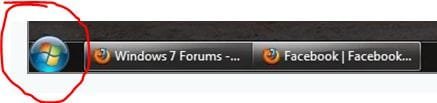
Taskbar won't change colour

jonnyweir

New member
Local time
3:39 PM
Messages
15
Hey guys,

I'm running Windows 7 7100 RC on a Dell XPS M1330. I'm able to run aero no problems at all, but for some reason I can't change the colour of the taskbar?

I can change the window title bar colours in the Personalize section of Control Pannel, but it has no effect on the Taskbar (even when transparency is turned on). As a consequence of this, all the items on my taskbar appear in white against a black background - it's high contrast and really annoying. Can anybody help me?


10320_261220835452_865390452_8836484_1144692_n.jpg


As an additional to this problem, for some reason the taskbar only becomes transparent when I set it to auto-hide. When it's sitting there normally at the bottom of the screen, it's opaque like the screenshot I posted. Any ideas?

Cheers,

Jonny
 
Last edited by a moderator:

My Computer

Computer Manufacturer/Model Number
Dell XPS M1330
OS
Windows 7 7100 RC
CPU
No idea
Motherboard
No idea
Memory
No idea
Well, as far as I'd go, I'd do these things.

1. Check to make sure I haven't hit the high contrast theme button.
2. Try another aero theme.
3. If that doesn't work, try a non-aero theme, such as Win7 Basic
4. Click on the Windows color button and mess around with the settings there.
5. If that doesn't work, then check to make sure you have the latest graphics drivers that are compatible with Windows 7.
6. Baring that, mess around with the screen settings for your graphics card and see if that resolves anything.
7. Get frustrated and toss it out your window.
 

My Computer

Computer Manufacturer/Model Number
Zen Productions
OS
Windows 7 Ultimate x64
CPU
Intel i7-860
Motherboard
Gigabyte GA-P55A-UD4P
Memory
Corsair Dominator 1600Mhz, 8-8-8-24 1.65v 2x2GB
Graphics Card(s)
ATI Radeon 5770 HD
Sound Card
Intel High Definition Sound
Monitor(s) Displays
Samsung P2570HD
Screen Resolution
1920x1080
Hard Drives
Western Digital Caviar Black 500gb
PSU
Corsair CMPSU-750HX 750W
Case
Antec p183
Cooling
Corsair H50 Water Cooler
Keyboard
Logitech G110
Mouse
Logitech MX Revolution
Internet Speed
768 mb/s
When I tried Vista basic, I wasn't able to change window or taskbar colour at all - just got stuck on the default powder blue setting
 

My Computer

Computer Manufacturer/Model Number
Dell XPS M1330
OS
Windows 7 7100 RC
CPU
No idea
Motherboard
No idea
Memory
No idea

My Computer

Computer Manufacturer/Model Number
Gateway GT5692
OS
Windows 7 Ulti. x64
CPU
AMD Phenom 8450 triple-core 2.10 ghz
Memory
4GB
Graphics Card(s)
ATI Radion HD 3200
Monitor(s) Displays
Gateway FPD1775W
Screen Resolution
1280x720
Hard Drives
465.6613 Gibibytes
Welcome to SevenForums Jonnywier
Do you have aero turned on because the icons are not the default? What tweek did you use to make them look that way? Have a look at this Tut
http://www.sevenforums.com/tutorials/432-taskbar-open-window-buttons-icons.html
Your picture of the taskbar looks like the vista taskbar?

He has is set on small taskbar and never combine. This is an option in the windows 7 taskbar properties.
My suggestion would be to change theme to basic, restart, then try changing back to aero. Failing that, see if theres an update for your graphics driver?
 

My Computer

Computer Manufacturer/Model Number
Dell Inspiron 1545
OS
Windows 7 build 7100 x86
CPU
Intel Core 2 Duo 2.1GHz
Motherboard
GM45 chipset
Memory
3GB
Graphics Card(s)
Intel(TM) Graphics Media Accelerator X4500HD
Sound Card
Realtek HD
Monitor(s) Displays
15.6" WLED 720p
Screen Resolution
1366x768
Hard Drives
320GB 5400rpm hard drive
Welcome to SevenForums Jonnywier
Do you have aero turned on because the icons are not the default? What tweek did you use to make them look that way? Have a look at this Tut
http://www.sevenforums.com/tutorials/432-taskbar-open-window-buttons-icons.html
Your picture of the taskbar looks like the vista taskbar?

He has is set on small taskbar and never combine. This is an option in the windows 7 taskbar properties.
My suggestion would be to change theme to basic, restart, then try changing back to aero. Failing that, see if theres an update for your graphics driver?
Thanks for pointing that out for me. I was just looking at the start orb and did not think that you could make it larger than the taskbar like it is in vista.
Good luck to you with your problem Jonnywier.
taskbar start orb.JPG
 

My Computer

Computer Manufacturer/Model Number
Gateway GT5692
OS
Windows 7 Ulti. x64
CPU
AMD Phenom 8450 triple-core 2.10 ghz
Memory
4GB
Graphics Card(s)
ATI Radion HD 3200
Monitor(s) Displays
Gateway FPD1775W
Screen Resolution
1280x720
Hard Drives
465.6613 Gibibytes
No worries, I figured out what it is. I had to rate my system in Control Panel before it would apply all of the aero settings, even though it was previously rated. To do this, you go Control Panel-System and Security-System-Windows Experience Index.
 

My Computer

Computer Manufacturer/Model Number
Dell XPS M1330
OS
Windows 7 7100 RC
CPU
No idea
Motherboard
No idea
Memory
No idea
so the windows were changing colour, but not the taskbar?
 

My Computer

Computer Manufacturer/Model Number
Dell Inspiron 1545
OS
Windows 7 build 7100 x86
CPU
Intel Core 2 Duo 2.1GHz
Motherboard
GM45 chipset
Memory
3GB
Graphics Card(s)
Intel(TM) Graphics Media Accelerator X4500HD
Sound Card
Realtek HD
Monitor(s) Displays
15.6" WLED 720p
Screen Resolution
1366x768
Hard Drives
320GB 5400rpm hard drive
Back
Top