
Tasks remaining in manager

gogreen

New member
Power User
VIP
Local time
2:37 PM
Messages
544
Location
Florida
Last January my PC CPU fan began racing unpredictably. I removed it and re-applied heatsink compound. It's running much better now, usually staying in the 50s, and when programs occasionally demand more of the CPU, the temperature will rise to the 70s, maybe 80.

I noticed, though, that after using MS Word and printing, and closing MS Word, the MS Word and printer driver tasks remained in the task manager, and the fan would race again with the temperature approaching the maximum in the 90s. When I removed those two tasks, the temperature immediately subsided to the 50s and 60s.

Could there be a connection here between the Word and printer driver tasks remaining and the racing fan? A connection between the racing fan and the remaining tasks didn't occur to me until now.
 

Attachments

  • tasks.png
    tasks.png
    347.5 KB · Views: 28

My Computer

Computer type
PC/Desktop
Computer Manufacturer/Model Number
Dell Studio XPS 8100, Dell XPS 15 laptop
OS
Windows 10 Home, 64 bit
CPU
Intel Core i7 860 @ 2.8 GHz
Motherboard
Dell 0T568R (CPU1)
Memory
8.0 GB Dual Channel DDR3 @ 664 MHz (9-9-9-24)
Graphics Card(s)
nVidia GeForce GTS 240
Sound Card
M-Audio Delta Audiophile 2496
Monitor(s) Displays
Dell 2407WFP
Screen Resolution
1920x1200
Hard Drives
977 GB Western Digital WDC WD1001FAES-75W7A0 (SCSI)
Antivirus
Windows Defender, MalwareBytes Anti-Malware, AdwCleaner
Browser
Firefox, occasionally IE and Edge
Other Info
Mozilla Firefox, Mozilla Thunderbird. Western Digital Passport 250 GB external HD, two Mushkin Enhanced Mulholland 32GB USB flash drives, AKG K240 Studio headphones, Asus AC-1900 dual band wireless router.
The winword.exe process must end as soon as you close Word. This is abnormal in your case. Try reinstalling Office.


Hi there You could also try an Office Repair
 

My Computer

Computer Manufacturer/Model Number
W530-3630QM1
OS
windows 7 home 64bit
CPU
INTEL-CORE I7
Memory
16GB
Hard Drives
750GB
Browser
Chrome
I would also suggest you run a full system scan with something like the Free Malwarebytes. you may have picked up something nasty that is hiding behind the WinWord.exe file
 

My Computers

System One System Two

  • Computer type
    PC/Desktop
    Computer Manufacturer/Model Number
    ChillBlast - Custom to my design
    OS
    Windows 11 Pro x64 [Latest Release and Release Preview]
    CPU
    Ryzen 9 5950X, 3.8 - 5.2 MHz
    Motherboard
    Asus Prime X570-Pro
    Memory
    64GB [2 x 32GB] DDR4 3200MHz
    Graphics Card(s)
    4GB NVIDIA GEFORCE GTX 1650 Ti
    Sound Card
    On-board SPDIF to 5.1 System + HDMI [5.1 system]
    Monitor(s) Displays
    32" UHD 32 Bit HDR Monitor + 43" UHD 4K 32Bit HDR TV
    Screen Resolution
    2 x 3840 x 2160 @60Hz
    Hard Drives
    1TB M2 SSD OS, 500GB Fast Access SSD, 2 x 8TB Data + Various Externals from 1TB to 4TB, 10TB NAS
    PSU
    NZXT C750 80 PLUS Gold 750W Modular PSU
    Case
    Workstation Case [Matt Black]
    Cooling
    NZXT Kraken X63 280mm CPU Cooler +2x Quiet Case fans
    Keyboard
    Logitech Wireless MX Keys & K400 + others
    Mouse
    Logitech Wireless MX Master 3S
    Internet Speed
    920 MB Down 50 MB Up
    Antivirus
    BitDefender Total Security Pro
    Browser
    Chrome (always run latest Non-Beta)
    Other Info
    Also run ...
    Laptop - Quad 8GB - Windows 10 Pro x64
    Nexus 7 Android tablet x2
    Samsung 10.2" tablet
    Blackview TAB 8 4G Android Tablet c/w Keyboard
    Wacom Intuos Pro Medium Pen Pad
    Wacom Intuos Pro Small Pen Pad
    Wacom Expresskeys Remote
    Loopdeck+ Graphics Controller
    Shuttle Pro v2 Control
  • Computer type
    Laptop
    System Manufacturer/Model Number
    Dell XPS 17 10750H
    OS
    Windows 11 Pro x64 Latest RP
    CPU
    Intel I7 10750H 5.0GHz
    Motherboard
    Dell XPS
    Memory
    32GB [2x16GB] DDR4 2933 MHz
    Graphics Card(s)
    nVidia GTX1650Ti 4 GB GDDR6
    Sound Card
    Stock [Realtek] 4 Speaker
    Monitor(s) Displays
    17" IPS UHD+ Infinity Edge Touchscreen
    Screen Resolution
    3840 x 2400
    Hard Drives
    2TB M2 NVMe, 4TB External + various 500GB & 1TB External NVMe (also have access to spinner HDD from
    PSU
    Stock
    Case
    Stock XPS Aluminium & Carbon Fibre
    Cooling
    Stock - Active Fan Control
    Keyboard
    Backlit + Various Logitech
    Mouse
    Stock Track Pad + Logitech MX Trackball
    Internet Speed
    72 MB Down 18MB Up
    Browser
    Chrome
    Other Info
    Also run ...
    Laptop - Quad 8GB - Windows 10 Pro x64
    Nexus 7 Android tablet x2
    10.2" tablet
    Sony Z3 Android Smartphone
    Wacom Intuos Pro Medium Pen Pad
    Wacom Intuos Pro Small Pen Pad
    Wacom Expresskeys Remote
    Loopdeck+ Graphics Controller
    Shuttle Pro v2 Control Pad
    10TB NAS
Thanks, all, for the suggestions. I did an Office repair. I also use MalwareBytes and MSE, and, occasionally, TDSSkiller. All show no abnormalities. This is tricky because sometimes the Winword and print driver tasks aren't there--sometimes, more times than not, though, they remain. So we'll see what happens.

Could there be a relationship between the tasks when they remain and the racing fan?
 

My Computer

Computer type
PC/Desktop
Computer Manufacturer/Model Number
Dell Studio XPS 8100, Dell XPS 15 laptop
OS
Windows 10 Home, 64 bit
CPU
Intel Core i7 860 @ 2.8 GHz
Motherboard
Dell 0T568R (CPU1)
Memory
8.0 GB Dual Channel DDR3 @ 664 MHz (9-9-9-24)
Graphics Card(s)
nVidia GeForce GTS 240
Sound Card
M-Audio Delta Audiophile 2496
Monitor(s) Displays
Dell 2407WFP
Screen Resolution
1920x1200
Hard Drives
977 GB Western Digital WDC WD1001FAES-75W7A0 (SCSI)
Antivirus
Windows Defender, MalwareBytes Anti-Malware, AdwCleaner
Browser
Firefox, occasionally IE and Edge
Other Info
Mozilla Firefox, Mozilla Thunderbird. Western Digital Passport 250 GB external HD, two Mushkin Enhanced Mulholland 32GB USB flash drives, AKG K240 Studio headphones, Asus AC-1900 dual band wireless router.
The fan "Racing" would suggest a temperature rise, this may be due to high processor usage, this excessive processor use may be due to the Winword and Printer processes.

Next time (if) it happens make a note of the actual processor use, especially that by the suspect processes. If there is no untoward processor use then it is possible It may be a fault in the fan or controller .
 

My Computers

System One System Two

  • Computer type
    PC/Desktop
    Computer Manufacturer/Model Number
    ChillBlast - Custom to my design
    OS
    Windows 11 Pro x64 [Latest Release and Release Preview]
    CPU
    Ryzen 9 5950X, 3.8 - 5.2 MHz
    Motherboard
    Asus Prime X570-Pro
    Memory
    64GB [2 x 32GB] DDR4 3200MHz
    Graphics Card(s)
    4GB NVIDIA GEFORCE GTX 1650 Ti
    Sound Card
    On-board SPDIF to 5.1 System + HDMI [5.1 system]
    Monitor(s) Displays
    32" UHD 32 Bit HDR Monitor + 43" UHD 4K 32Bit HDR TV
    Screen Resolution
    2 x 3840 x 2160 @60Hz
    Hard Drives
    1TB M2 SSD OS, 500GB Fast Access SSD, 2 x 8TB Data + Various Externals from 1TB to 4TB, 10TB NAS
    PSU
    NZXT C750 80 PLUS Gold 750W Modular PSU
    Case
    Workstation Case [Matt Black]
    Cooling
    NZXT Kraken X63 280mm CPU Cooler +2x Quiet Case fans
    Keyboard
    Logitech Wireless MX Keys & K400 + others
    Mouse
    Logitech Wireless MX Master 3S
    Internet Speed
    920 MB Down 50 MB Up
    Antivirus
    BitDefender Total Security Pro
    Browser
    Chrome (always run latest Non-Beta)
    Other Info
    Also run ...
    Laptop - Quad 8GB - Windows 10 Pro x64
    Nexus 7 Android tablet x2
    Samsung 10.2" tablet
    Blackview TAB 8 4G Android Tablet c/w Keyboard
    Wacom Intuos Pro Medium Pen Pad
    Wacom Intuos Pro Small Pen Pad
    Wacom Expresskeys Remote
    Loopdeck+ Graphics Controller
    Shuttle Pro v2 Control
  • Computer type
    Laptop
    System Manufacturer/Model Number
    Dell XPS 17 10750H
    OS
    Windows 11 Pro x64 Latest RP
    CPU
    Intel I7 10750H 5.0GHz
    Motherboard
    Dell XPS
    Memory
    32GB [2x16GB] DDR4 2933 MHz
    Graphics Card(s)
    nVidia GTX1650Ti 4 GB GDDR6
    Sound Card
    Stock [Realtek] 4 Speaker
    Monitor(s) Displays
    17" IPS UHD+ Infinity Edge Touchscreen
    Screen Resolution
    3840 x 2400
    Hard Drives
    2TB M2 NVMe, 4TB External + various 500GB & 1TB External NVMe (also have access to spinner HDD from
    PSU
    Stock
    Case
    Stock XPS Aluminium & Carbon Fibre
    Cooling
    Stock - Active Fan Control
    Keyboard
    Backlit + Various Logitech
    Mouse
    Stock Track Pad + Logitech MX Trackball
    Internet Speed
    72 MB Down 18MB Up
    Browser
    Chrome
    Other Info
    Also run ...
    Laptop - Quad 8GB - Windows 10 Pro x64
    Nexus 7 Android tablet x2
    10.2" tablet
    Sony Z3 Android Smartphone
    Wacom Intuos Pro Medium Pen Pad
    Wacom Intuos Pro Small Pen Pad
    Wacom Expresskeys Remote
    Loopdeck+ Graphics Controller
    Shuttle Pro v2 Control Pad
    10TB NAS
Next time (if) it happens make a note of the actual processor use, especially that by the suspect processes. If there is no untoward processor use then it is possible It may be a fault in the fan or controller .
Thanks, Barman 58. Do you mean overall percent of CPU usage, or can I break that down into percent of CPU use by task?
 

My Computer

Computer type
PC/Desktop
Computer Manufacturer/Model Number
Dell Studio XPS 8100, Dell XPS 15 laptop
OS
Windows 10 Home, 64 bit
CPU
Intel Core i7 860 @ 2.8 GHz
Motherboard
Dell 0T568R (CPU1)
Memory
8.0 GB Dual Channel DDR3 @ 664 MHz (9-9-9-24)
Graphics Card(s)
nVidia GeForce GTS 240
Sound Card
M-Audio Delta Audiophile 2496
Monitor(s) Displays
Dell 2407WFP
Screen Resolution
1920x1200
Hard Drives
977 GB Western Digital WDC WD1001FAES-75W7A0 (SCSI)
Antivirus
Windows Defender, MalwareBytes Anti-Malware, AdwCleaner
Browser
Firefox, occasionally IE and Edge
Other Info
Mozilla Firefox, Mozilla Thunderbird. Western Digital Passport 250 GB external HD, two Mushkin Enhanced Mulholland 32GB USB flash drives, AKG K240 Studio headphones, Asus AC-1900 dual band wireless router.
If you open the task manager and check the processes tab You can check the actual CPU usage of the individual processes concerned, though it would probably show as quite a spike, on the overall usage, if it's causing the fans to race
 

My Computers

System One System Two

  • Computer type
    PC/Desktop
    Computer Manufacturer/Model Number
    ChillBlast - Custom to my design
    OS
    Windows 11 Pro x64 [Latest Release and Release Preview]
    CPU
    Ryzen 9 5950X, 3.8 - 5.2 MHz
    Motherboard
    Asus Prime X570-Pro
    Memory
    64GB [2 x 32GB] DDR4 3200MHz
    Graphics Card(s)
    4GB NVIDIA GEFORCE GTX 1650 Ti
    Sound Card
    On-board SPDIF to 5.1 System + HDMI [5.1 system]
    Monitor(s) Displays
    32" UHD 32 Bit HDR Monitor + 43" UHD 4K 32Bit HDR TV
    Screen Resolution
    2 x 3840 x 2160 @60Hz
    Hard Drives
    1TB M2 SSD OS, 500GB Fast Access SSD, 2 x 8TB Data + Various Externals from 1TB to 4TB, 10TB NAS
    PSU
    NZXT C750 80 PLUS Gold 750W Modular PSU
    Case
    Workstation Case [Matt Black]
    Cooling
    NZXT Kraken X63 280mm CPU Cooler +2x Quiet Case fans
    Keyboard
    Logitech Wireless MX Keys & K400 + others
    Mouse
    Logitech Wireless MX Master 3S
    Internet Speed
    920 MB Down 50 MB Up
    Antivirus
    BitDefender Total Security Pro
    Browser
    Chrome (always run latest Non-Beta)
    Other Info
    Also run ...
    Laptop - Quad 8GB - Windows 10 Pro x64
    Nexus 7 Android tablet x2
    Samsung 10.2" tablet
    Blackview TAB 8 4G Android Tablet c/w Keyboard
    Wacom Intuos Pro Medium Pen Pad
    Wacom Intuos Pro Small Pen Pad
    Wacom Expresskeys Remote
    Loopdeck+ Graphics Controller
    Shuttle Pro v2 Control
  • Computer type
    Laptop
    System Manufacturer/Model Number
    Dell XPS 17 10750H
    OS
    Windows 11 Pro x64 Latest RP
    CPU
    Intel I7 10750H 5.0GHz
    Motherboard
    Dell XPS
    Memory
    32GB [2x16GB] DDR4 2933 MHz
    Graphics Card(s)
    nVidia GTX1650Ti 4 GB GDDR6
    Sound Card
    Stock [Realtek] 4 Speaker
    Monitor(s) Displays
    17" IPS UHD+ Infinity Edge Touchscreen
    Screen Resolution
    3840 x 2400
    Hard Drives
    2TB M2 NVMe, 4TB External + various 500GB & 1TB External NVMe (also have access to spinner HDD from
    PSU
    Stock
    Case
    Stock XPS Aluminium & Carbon Fibre
    Cooling
    Stock - Active Fan Control
    Keyboard
    Backlit + Various Logitech
    Mouse
    Stock Track Pad + Logitech MX Trackball
    Internet Speed
    72 MB Down 18MB Up
    Browser
    Chrome
    Other Info
    Also run ...
    Laptop - Quad 8GB - Windows 10 Pro x64
    Nexus 7 Android tablet x2
    10.2" tablet
    Sony Z3 Android Smartphone
    Wacom Intuos Pro Medium Pen Pad
    Wacom Intuos Pro Small Pen Pad
    Wacom Expresskeys Remote
    Loopdeck+ Graphics Controller
    Shuttle Pro v2 Control Pad
    10TB NAS
I would suggest taking care of your over heating problem first. No mater what programs you do or do not run the temps should not be in the 90c arena.
What cpu cooler are you using and what method do you monitor your temps?
 

My Computer

Computer type
PC/Desktop
Computer Manufacturer/Model Number
Home made Desktop
OS
Windows 10 Pro. 64/ version 1709 Windows 7 Pro/64
CPU
Intel i7-6800K @ 4.3
Motherboard
ASUS X-99 Deluxe II
Memory
Corsair Platinum 16 gig @2400
Graphics Card(s)
EVGA GTX 1070 OC
Monitor(s) Displays
Asus 27" LED LCD/VE278Q
Screen Resolution
1920-1080 or 1280-720 HDMI
Hard Drives
INTEL SSD 730-240 Gb Sata 3.0/
PSU
EVGA Platium 1200W
Case
Phanteks Luxe Tempered Glass 8 fans/ one radiator
Cooling
XSPC/ Water Cooled CPU
Keyboard
Das 4 Professional
Mouse
Logitech M705/MX Anywhere 2-S
Internet Speed
100 mbits
Antivirus
Microsoft Security Essentials/ Malwarebytes Premium 3.0/ SAS
Browser
I.E. 11 default/Firefox/ ISP Time Warner Cable/Spectrum
Other Info
LG BluRay Burner/
Sound system-KLipsch-THX/
Icy Dock ssd Hot Swap bays.
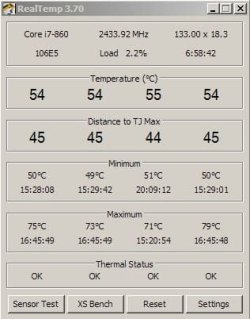
What cpu cooler are you using and what method do you monitor your temps?
I use RealTemp.

When I was having some serious fan-racing problems in January, I took the heat sink apart, cleaned the dried compound from the heat sink and the CPU, and replaced it. Unfortunately, I used the cheaper silicone-based compound. I have since purchased ArctiClean and Arctic Silver 5 thermal compound, and I will soon do that process again. I'm guessing that the better-quality compound will improve things greatly. I'll get to this in a few days.
 

Attachments

  • realtemp.jpg
    realtemp.jpg
    47.2 KB · Views: 6

My Computer

Computer type
PC/Desktop
Computer Manufacturer/Model Number
Dell Studio XPS 8100, Dell XPS 15 laptop
OS
Windows 10 Home, 64 bit
CPU
Intel Core i7 860 @ 2.8 GHz
Motherboard
Dell 0T568R (CPU1)
Memory
8.0 GB Dual Channel DDR3 @ 664 MHz (9-9-9-24)
Graphics Card(s)
nVidia GeForce GTS 240
Sound Card
M-Audio Delta Audiophile 2496
Monitor(s) Displays
Dell 2407WFP
Screen Resolution
1920x1200
Hard Drives
977 GB Western Digital WDC WD1001FAES-75W7A0 (SCSI)
Antivirus
Windows Defender, MalwareBytes Anti-Malware, AdwCleaner
Browser
Firefox, occasionally IE and Edge
Other Info
Mozilla Firefox, Mozilla Thunderbird. Western Digital Passport 250 GB external HD, two Mushkin Enhanced Mulholland 32GB USB flash drives, AKG K240 Studio headphones, Asus AC-1900 dual band wireless router.
Take a read through this for methods from Arctic Silver.

Arctic Silver, Inc. - Intel® Application Methods

Idle or low load temp really don't concern me.
My i7-960 always read in the 50c using programs to read them but with a quick boot into bios (35 to 40 sec) shows that 50c in those programs is 30 to 32c in bios.
Concern should be when you system is under load. I'm thinking that Intel isn't concerned what the temps are until they go up to some point. The temp chips in the cpu are designed to be more accurate towards the higher temps.

Your cpu and my cpu are know-en to run hot when running stock. (no over clock).
I recommend with these chips using a quality after market cpu cooler even if their is no over clock.
 
Last edited:

My Computer

Computer type
PC/Desktop
Computer Manufacturer/Model Number
Home made Desktop
OS
Windows 10 Pro. 64/ version 1709 Windows 7 Pro/64
CPU
Intel i7-6800K @ 4.3
Motherboard
ASUS X-99 Deluxe II
Memory
Corsair Platinum 16 gig @2400
Graphics Card(s)
EVGA GTX 1070 OC
Monitor(s) Displays
Asus 27" LED LCD/VE278Q
Screen Resolution
1920-1080 or 1280-720 HDMI
Hard Drives
INTEL SSD 730-240 Gb Sata 3.0/
PSU
EVGA Platium 1200W
Case
Phanteks Luxe Tempered Glass 8 fans/ one radiator
Cooling
XSPC/ Water Cooled CPU
Keyboard
Das 4 Professional
Mouse
Logitech M705/MX Anywhere 2-S
Internet Speed
100 mbits
Antivirus
Microsoft Security Essentials/ Malwarebytes Premium 3.0/ SAS
Browser
I.E. 11 default/Firefox/ ISP Time Warner Cable/Spectrum
Other Info
LG BluRay Burner/
Sound system-KLipsch-THX/
Icy Dock ssd Hot Swap bays.
a quality after market cpu cooler
Interesting. By CPU cooler, does that mean the heatsink and fan? Which one(s) do you suggest?

Thank you, Layback Bear.
 

My Computer

Computer type
PC/Desktop
Computer Manufacturer/Model Number
Dell Studio XPS 8100, Dell XPS 15 laptop
OS
Windows 10 Home, 64 bit
CPU
Intel Core i7 860 @ 2.8 GHz
Motherboard
Dell 0T568R (CPU1)
Memory
8.0 GB Dual Channel DDR3 @ 664 MHz (9-9-9-24)
Graphics Card(s)
nVidia GeForce GTS 240
Sound Card
M-Audio Delta Audiophile 2496
Monitor(s) Displays
Dell 2407WFP
Screen Resolution
1920x1200
Hard Drives
977 GB Western Digital WDC WD1001FAES-75W7A0 (SCSI)
Antivirus
Windows Defender, MalwareBytes Anti-Malware, AdwCleaner
Browser
Firefox, occasionally IE and Edge
Other Info
Mozilla Firefox, Mozilla Thunderbird. Western Digital Passport 250 GB external HD, two Mushkin Enhanced Mulholland 32GB USB flash drives, AKG K240 Studio headphones, Asus AC-1900 dual band wireless router.
Yes the heat sink and fan is call a cpu cooler. Their is many choices. I like the Corsair H series of coolers and Noctua fans and coolers.

http://www.corsair.com/cpu-cooling-kits/hydro-series-water-cooling-cpu-cooler.html

https://www.google.com/search?q=Noc...42,d.dmg&fp=ddc6cc60d8ab9254&biw=1280&bih=628

There are many new brand brands and models that I haven't researched. One would just have to Google or Bing cpu coolers and get all kinds of reviews.

Note: When doing your search keep in mind how much room you have to install a cooler.
 

My Computer

Computer type
PC/Desktop
Computer Manufacturer/Model Number
Home made Desktop
OS
Windows 10 Pro. 64/ version 1709 Windows 7 Pro/64
CPU
Intel i7-6800K @ 4.3
Motherboard
ASUS X-99 Deluxe II
Memory
Corsair Platinum 16 gig @2400
Graphics Card(s)
EVGA GTX 1070 OC
Monitor(s) Displays
Asus 27" LED LCD/VE278Q
Screen Resolution
1920-1080 or 1280-720 HDMI
Hard Drives
INTEL SSD 730-240 Gb Sata 3.0/
PSU
EVGA Platium 1200W
Case
Phanteks Luxe Tempered Glass 8 fans/ one radiator
Cooling
XSPC/ Water Cooled CPU
Keyboard
Das 4 Professional
Mouse
Logitech M705/MX Anywhere 2-S
Internet Speed
100 mbits
Antivirus
Microsoft Security Essentials/ Malwarebytes Premium 3.0/ SAS
Browser
I.E. 11 default/Firefox/ ISP Time Warner Cable/Spectrum
Other Info
LG BluRay Burner/
Sound system-KLipsch-THX/
Icy Dock ssd Hot Swap bays.
Replacing the heat sink and fan is an option, but first I'm going to replace the heat sink compound and see what happens to the temps. Haven't had an opportunity to do that yet, though.
 

My Computer

Computer type
PC/Desktop
Computer Manufacturer/Model Number
Dell Studio XPS 8100, Dell XPS 15 laptop
OS
Windows 10 Home, 64 bit
CPU
Intel Core i7 860 @ 2.8 GHz
Motherboard
Dell 0T568R (CPU1)
Memory
8.0 GB Dual Channel DDR3 @ 664 MHz (9-9-9-24)
Graphics Card(s)
nVidia GeForce GTS 240
Sound Card
M-Audio Delta Audiophile 2496
Monitor(s) Displays
Dell 2407WFP
Screen Resolution
1920x1200
Hard Drives
977 GB Western Digital WDC WD1001FAES-75W7A0 (SCSI)
Antivirus
Windows Defender, MalwareBytes Anti-Malware, AdwCleaner
Browser
Firefox, occasionally IE and Edge
Other Info
Mozilla Firefox, Mozilla Thunderbird. Western Digital Passport 250 GB external HD, two Mushkin Enhanced Mulholland 32GB USB flash drives, AKG K240 Studio headphones, Asus AC-1900 dual band wireless router.
Barman58 said:
If there is no untoward processor use then it is possible It may be a fault in the fan or controller .
Which controller would I replace? I'm looking into this option, among others.

Thanks.
 

My Computer

Computer type
PC/Desktop
Computer Manufacturer/Model Number
Dell Studio XPS 8100, Dell XPS 15 laptop
OS
Windows 10 Home, 64 bit
CPU
Intel Core i7 860 @ 2.8 GHz
Motherboard
Dell 0T568R (CPU1)
Memory
8.0 GB Dual Channel DDR3 @ 664 MHz (9-9-9-24)
Graphics Card(s)
nVidia GeForce GTS 240
Sound Card
M-Audio Delta Audiophile 2496
Monitor(s) Displays
Dell 2407WFP
Screen Resolution
1920x1200
Hard Drives
977 GB Western Digital WDC WD1001FAES-75W7A0 (SCSI)
Antivirus
Windows Defender, MalwareBytes Anti-Malware, AdwCleaner
Browser
Firefox, occasionally IE and Edge
Other Info
Mozilla Firefox, Mozilla Thunderbird. Western Digital Passport 250 GB external HD, two Mushkin Enhanced Mulholland 32GB USB flash drives, AKG K240 Studio headphones, Asus AC-1900 dual band wireless router.
Back
Top