TaskScheduler: can one specify a task's priority?

mmo

New member
Member
Local time
6:44 PM
Messages
55
I am starting a couple of tasks each time I log in. However, since the number of these tasks keeps growing they are slowing down my startup more and more and so I rather would like to schedule them to run with low priority and/or delayed (like a minute AFTER startup has completed...).

It seems, that TaskScheduler has no option to specify something like that (except to start things when the system has been idle for a specific time, but my experience with that is, that this never seems to happen...).

Any idea? Is there a way to specify that a scheduled task should run with a specific priority?

Michael
 

My Computer

Computer Manufacturer/Model Number
Lenovo T60p & Motion Computing LE1700
OS
2x Windows 7

My Computer

Computer type
PC/Desktop
Computer Manufacturer/Model Number
Self Built
OS
Windows 7 Ultimate 64bit
CPU
AMD Phenom Quad core 9950 black edition
Motherboard
Gigabyte
Memory
16Gb
Graphics Card(s)
2x XFX Radeon 5850
Sound Card
PCI Express X-Fi Titanium / Logitech G35
Monitor(s) Displays
2x HP 2410i
Screen Resolution
1920x1080
Hard Drives
2x 500Gb Seagate
1x 300Gb Seagate
1x 1Tb Seagate
2x 1Tb Hitatchi
PSU
Jean Tech Storm 700W
Case
Cooler Master COSMOS S
Cooling
Akasa Evo Blue Pro
Keyboard
Logitech G15
Mouse
Mad Catz M.M.O. 7
Internet Speed
12mb
Thanks for the pointer. Alas, it doesn't really solve my "problem".
Schtasks seems to offer all the options that the Task Scheduler UI does but not more. In particular I found no option or switch re. priority of the process being started.

M.
 

My Computer

Computer Manufacturer/Model Number
Lenovo T60p & Motion Computing LE1700
OS
2x Windows 7
You need to export the task, edit the priority, then import it again. The default is 7. 8 is the lowest, 1 the highest. -fm
 

My Computer

OS
Windows 7 Ultimate x64
You need to export the task, edit the priority, then import it again. The default is 7. 8 is the lowest, 1 the highest. -fm
You did notice the last post in this thread was over 3 years old?

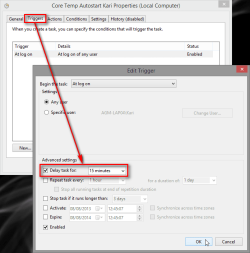
That being said, you do not need export tasks to set delay. Simply edit the Trigger to set delay (Task Properties > Triggers tab):

2013-08-08_124713.png

You can set any value there or select a pre-set value from drop down list.

Kari
 

My Computer

Computer type
Laptop
Computer Manufacturer/Model Number
HP ENVY 17-1150eg
OS
Windows 10 Pro x64 EN-GB
CPU
1.6 GHz Intel Core i7-720QM Processor
Memory
6 GB
Graphics Card(s)
ATI Mobility Radeon HD 5850 Graphics
Sound Card
Beats sound system with integrated subwoofer
Monitor(s) Displays
17" laptop display, 22" LED and 32" Full HD TV through HDMI
Screen Resolution
1600*900 (1), 1920*1080 (2&3)
Hard Drives
Internal: 2 x 500 GB SATA Hard Disk Drive 7200 rpm
External: 2TB for backups, 3TB USB3 network drive for media
Cooling
As Envy runs a bit warm, I have it on a Cooler Master pad
Keyboard
Logitech diNovo Media Desktop Laser (bluetooth)
Mouse
Logitech Performance Mouse MX
Internet Speed
50/10 Mbps VDSL
Antivirus
Windows Defender 4.3.9431.0
Browser
Maxthon 3.5.2., IE11
Back
Top