Team Fortress 2

Id stick with the WU version then.
 

My Computer My Computer

At a glance

Windows 7 Professional 64-bitIntel E8400 3GHzKingston PC3-10700H 4GbXFX Radeon HD 5850 BlackEd.
Computer Manufacturer/Model Number
self built
OS
Windows 7 Professional 64-bit
CPU
Intel E8400 3GHz
Motherboard
Intel DX48BT2
Memory
Kingston PC3-10700H 4Gb
Graphics Card(s)
XFX Radeon HD 5850 BlackEd.
Sound Card
Asus Xonar DG
Monitor(s) Displays
2x Samsung SM-T220HD 22"
Screen Resolution
1680x1050 on two monitors
Hard Drives
OCZ Vertex 2 120gb 3.5" (OS)
Seagate Momentus XT 500gb
Samsung F3 1Tb (games)
2x Samsung F1 1Tb
PSU
Thermaltake ToughPower 850w
Case
Thermaltake Armor
Cooling
Scythe Mugen II
Keyboard
Microsoft Comfort Curve USB
Mouse
Razer Diamondback 3G
Internet Speed
8128/443
Mine works alright, just about decent enough to play.
It's really smooth when I'm only in the room/area, but when many players are around, it gets fairly choppy. Doesn't matter what my screen resolution, or other settings are at, it still does it. I have the latest driver and all.

I can still play, but has a scout. It makes everything more of a challenge.
 

My Computer My Computer

At a glance

Windows 7 Ultimate 64xIntel Core 2 Duo Mobile T5750 @ 2000 MHz3072 MBNVIDIA GeForce 8600M GS
Computer Manufacturer/Model Number
LG R500
OS
Windows 7 Ultimate 64x
CPU
Intel Core 2 Duo Mobile T5750 @ 2000 MHz
Motherboard
LG Electronics COLUMBIA
Memory
3072 MB
Graphics Card(s)
NVIDIA GeForce 8600M GS
Sound Card
Speakers (Realtek High Definition Audio)
Monitor(s) Displays
15.4" WXGA with Fine Bright Technology
Screen Resolution
12800 x 800
Hard Drives
Internal: 250 GB
External: 250 GB
Mouse
Logitech G5 Laser Gaming Mouse
Id stick with the WU version then.

i dont know now i backrolled to the Win vista driver form the site, Nvidia, exept im running games like off a calculator, TF2 - Lags and is a frigging Slideshow, COD4,Cod5 - Lagathon with slideshow effects,
ETQW - too slow to moove

its okay to play games in "small rooms" - small maps
with 10 ppl on the server

What happened, i tryed everything and new driver (BSOD again),
Old driver that worked -181.22_geforce_winvista_32bit_english_whql - slideshow
and the 17x.xx - version slideshow
and even when the settings of the game are set to Minimal, Lags and chops like playing on a Pentium 1,

i even re-installed, now its A bit better but im geting like 4-15 FPS (slideshow)
and about 20-30 at low pop servers,


if i run WINxp - no problems im flying like a maclaren F1
there seems to be some retarded glich with the updates on the Nvidia 8800 ... series, 2 of my frinds with the 8th series are getting the same troubles and with the bluescreens
 
Last edited by a moderator:

My Computer My Computer

At a glance

windows 7Intel Core 2 Quad Q6600 2.40GHz x42Gb x 28800 GTX 768 mb
Computer Manufacturer/Model Number
My Hands
OS
windows 7
CPU
Intel Core 2 Quad Q6600 2.40GHz x4
Motherboard
Asus p6t
Memory
2Gb x 2
Graphics Card(s)
8800 GTX 768 mb
Monitor(s) Displays
24" Samsung 244T and 24" Acer (there is not Sn on it :)
Screen Resolution
1920 x 1200
Hard Drives
seagate barracuda 1TB HDD,
Samasung 500 GB
PSU
its crappy
Case
from an old Pentuim3 i put LED lights to make it look better
Cooling
ZALMAN what else ?
Keyboard
Logitech G15,
Mouse
A4tech x-750BF, Logitech G5 , and mx518,death adder
Internet Speed
Very Fast
Other Info
I like pizza, rice and diet coke with teachers whiskey
Check your BIOS for an option called HPET (High Precision <random OEM name here> Timer) Its usally under the Power management settings... It can cause the exact symptoms your describing with games and the BSODs ;)
 
Unfortuantly for you, the only problem i had for TF2 that i had was carried over from my Windows XP x64, Failure to locate background.

All i can really suggest is trying to delete your Team Fortress 2 File under
X:\Program Files\Valve\Steam\SteamApps\Username\
Delete team fortress 2
and try again.

Another thing, Basic stuff, Open up steam
Right click on Team Fortress 2
Defrag Game Files and Verify Game Cache.

And for good measures, delete clientregistry.blob from X:/Program Files/Valve/Steam/
 

My Computer My Computer

At a glance

Windows 7 x64 Build 7100 RCIntel Core 2 Quad Q9400 @ 2.677GB Total DDR2 800 KingstonnVidia GeForce 9800GT
Computer Manufacturer/Model Number
Custom Built
OS
Windows 7 x64 Build 7100 RC
CPU
Intel Core 2 Quad Q9400 @ 2.67
Motherboard
Gigabyte EP45-UD3
Memory
7GB Total DDR2 800 Kingston
Graphics Card(s)
nVidia GeForce 9800GT
Sound Card
Realtek HD Audio/C-Media "Sound Like Device"
Monitor(s) Displays
22" AOC LCD + 20" BenQ LCD
Screen Resolution
Both Screen At 1680 x 1050
Hard Drives
80GB System Drive
500GB
PSU
Gigabyte 550 Watt
Case
Lame cream machine
Cooling
Air...
Keyboard
A4Tech
Mouse
A4Tech BatteryFree Wireless Optical Mouse
Internet Speed
ADSL 1, 1.5Mb/s
Other Info
AudioFX 5+1 Gaming Headset w/ Force Feedback -> 5.1 Surround Sound Headphones with Virtual 7.1.

Logitech 5.1 Surround Sound

My Rig Cost Me Less Than $450 and still runs the latest games with close to 100FPS on Maximum
hey guys.
first of all, nice forum. really interesting stuff to read and nice people! good work :D

i also have this problem with tf2. and it is a network problem.
my net settings are fine and the pings on different servers are alright. but nevertheless it feels like i would be having a ping of 200ms or something.
i have to say, without wanting to attack anyone, i think this will only be noticed by more advanced players who move quickly and are usually on top of the scoreboard ;) here, take a look at these two screenshots of my net_graph:
dammoaabl.jpg

dammgaabl.jpg


i have absolutely no clue what causes this. again - this is a lag / connection problem, not an fps issue :p

hi sevenforums.com,
i've go exactly the same problem like saibot ... and its realy bothering.

disabled the visual styles, cleaned the cache, deleted the config, etc. pp ...
but nothing helps.

any solutions for this problem now?
regards, weltraum


system specs:
amd athlon 64 x2 dual core 4200+ 2,20Ghz,
2gb ram, nvidia geforce 7600 gt


My Computer My Computer

At a glance

windows 7
OS
windows 7
hi sevenforums.com,
i've go exactly the same problem like saibot ... and its realy bothering.

disabled the visual styles, cleaned the cache, deleted the config, etc. pp ...
but nothing helps.

any solutions for this problem now?
regards, weltraum


system specs:
amd athlon 64 x2 dual core 4200+ 2,20Ghz,
2gb ram, nvidia geforce 7600 gt


Copy/paste this steam url address into your FF or IE addressbar and press enter, it will run the Steam Diagnostics and output a report identifying any codecs/drivers or other configuration causing Steam to crash ;)

steam://support/?Issues=*

If Steam continues to crash after trying the recommendations shown on the Diagnostics report, please exit from Steam and then try deleting all files and folders in the Steam directory except for steam.exe and the SteamApps folder.

Let me know how you go.

Steven
 
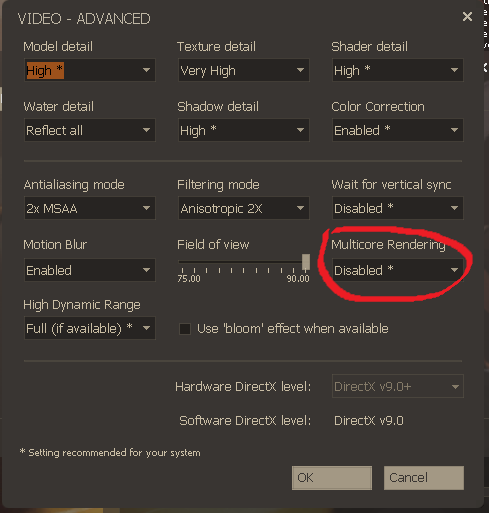
i fixed the laggy issue by deactivating the multi threading in the video settings


My Computer My Computer

At a glance

Windows 7
OS
Windows 7
Hey guys, hopefully someone here can help me.

I just installed my windows 7 and I am having some ms problems with my TF2.
When I am at the base I get 299 fps and 70~80ms (wich is normal), but in the heat of the battle my fps goes down to 150 (again, normal) and my ms goes to 150~200!!! (NOT normal at all!!)
I have installed the lan drivers from evga (my motherboard) and nothing changes, if its possible, even gets worse. :confused:
So I am using the latest driver avaible for windows 7.
Its not a problem with the internet, since my brother has vista and he doesnt have this problem playing TF2.
I have no idea what to do, and I really dont wanna go back to vista. =/

And for me, doing what 1nsane did, turning off the multicore option, its no good since I have a gtx 295.

Please, someone help mee!! :cry:
 

My Computer My Computer

At a glance

Windows 7 Ultimate 64
OS
Windows 7 Ultimate 64
Multi Core rendering means that tf2 will use 2 CPU Threads instead of 1. so it has nothing to do with your sli mode.
 

My Computer My Computer

At a glance

Windows 7
OS
Windows 7
Hello again, Seven Forums.

This time, TF2 (And L4D) seem to be getting very low FPS, 12ish when there's a lot of action going on. No settings change seems to affect it, and it doesn't appear to be the network. I was thinking driver issues, but I could be wrong.

Specs are in the profile.

Thanks for any help you can give me!
 

My Computer My Computer

At a glance

Windows 7 Professional x64 Build 7600Intel Core 2 Quad Processor Q93004GB G.Skill Speed: 1066Visiontek Radeon HD 4870
Computer Manufacturer/Model Number
Custom Built
OS
Windows 7 Professional x64 Build 7600
CPU
Intel Core 2 Quad Processor Q9300
Motherboard
ASUS P5Q Deluxe
Memory
4GB G.Skill Speed: 1066
Graphics Card(s)
Visiontek Radeon HD 4870
Sound Card
HT|Omega Striker 7.1 Sound Card
Monitor(s) Displays
Acer P243WAid Black-Silver 24" & DELL 20" Widescreen Monitor
Hard Drives
Seagate Barracuda 7200.11 500GB
Western Digital My Book 320GB External HDD
PSU
CORSAIR CMPSU-650TX 650W
Case
DYNAPOWER USA Hachiman
Cooling
Stock
Keyboard
Logitech G15 Gaming Keyboard (Flip Screen)
Mouse
Logitech G5 Laser Mouse (Blue Design)
Internet Speed
15Mbps
Other Info
Been working and playing with computers for about 15 or so years, now. Little by little, my interest growing until I decided to just build my own. I'll never buy pre-built again, knowing what goes into my system.
Make sure you have vsync off and AA and AF set to low values.
 

My Computer My Computer

At a glance

Windows 7 Professional 64-bitIntel E8400 3GHzKingston PC3-10700H 4GbXFX Radeon HD 5850 BlackEd.
Computer Manufacturer/Model Number
self built
OS
Windows 7 Professional 64-bit
CPU
Intel E8400 3GHz
Motherboard
Intel DX48BT2
Memory
Kingston PC3-10700H 4Gb
Graphics Card(s)
XFX Radeon HD 5850 BlackEd.
Sound Card
Asus Xonar DG
Monitor(s) Displays
2x Samsung SM-T220HD 22"
Screen Resolution
1680x1050 on two monitors
Hard Drives
OCZ Vertex 2 120gb 3.5" (OS)
Seagate Momentus XT 500gb
Samsung F3 1Tb (games)
2x Samsung F1 1Tb
PSU
Thermaltake ToughPower 850w
Case
Thermaltake Armor
Cooling
Scythe Mugen II
Keyboard
Microsoft Comfort Curve USB
Mouse
Razer Diamondback 3G
Internet Speed
8128/443
Drivers?

I find it kind of funny that everyone with a Nvidia card said that the game plays great. But everyone with an ATI card says it is choppy, including myself. That is because ATI's 7 drivers are not totally unbugged yet. Or at least this is the conclusion I have com up with, I have use both my ATI x1650 pro which works fine with vista and TF2 and my friends Nvidia card...not sure of the model. But they are similar cards. With the ATI it was sort of choppy. With the Nvidia card it was clear and better than XP or Vista. So the only thing I could think of is the ATI drivers aren't working the greatest yet.
 

My Computer My Computer

At a glance

XP - Vista - 7 - OS X3 GBATI Radeon X1650 Pro
OS
XP - Vista - 7 - OS X
Memory
3 GB
Graphics Card(s)
ATI Radeon X1650 Pro
Sound Card
HT OMEGA CLARO
I find it kind of funny that everyone with a Nvidia card said that the game plays great. But everyone with an ATI card says it is choppy, including myself. That is because ATI's 7 drivers are not totally unbugged yet. Or at least this is the conclusion I have com up with, I have use both my ATI x1650 pro which works fine with vista and TF2 and my friends Nvidia card...not sure of the model. But they are similar cards. With the ATI it was sort of choppy. With the Nvidia card it was clear and better than XP or Vista. So the only thing I could think of is the ATI drivers aren't working the greatest yet.
Im running an ATi card and I play alot of TF2, I have no problems at all. All settings maxed out, rarely go below 50fps. Look at My System Specs if you want hardware details.
 

My Computer My Computer

At a glance

Windows 7 RC 7100 x64Intel E8400 @ 3.0GHz2 x 2GB DDR2 800MHz Corsair1GB GigaByte ATi Radeon HD4870 PCI-e
Computer Manufacturer/Model Number
Home made
OS
Windows 7 RC 7100 x64
CPU
Intel E8400 @ 3.0GHz
Motherboard
GA EP35-DS3
Memory
2 x 2GB DDR2 800MHz Corsair
Graphics Card(s)
1GB GigaByte ATi Radeon HD4870 PCI-e
Sound Card
Creative Sound Blaster XF-i XtremeGamer
Monitor(s) Displays
AOC 22" LCD
Screen Resolution
1650*1080
Hard Drives
1 x WD 200GB sata I (primary)
1 x Seagate 200GB IDE
1 x WD 500GB sata II
PSU
500watt Basiq
Case
iCute - 0408SL Series
Cooling
1 x 12cm front intake fan, 1 x 8cm side intake fan
Keyboard
Logitech G15 (blue)
Mouse
Logitech MX518
Internet Speed
Cable (12MB down <--good!, 256k up <--sucks!)
I like the Name and avatar Otacon. A fan of MGS, myself. Sorry to go off topic lol
 

My Computer My Computer

At a glance

Windows 7 7600RTM X64AMD Phenom(tm) 9600 Quad-Core Processor4GB 1066 DDR2 OCZ Gold EditionNVIDIA GeForce 8600 GT
Computer Manufacturer/Model Number
Custom
OS
Windows 7 7600RTM X64
CPU
AMD Phenom(tm) 9600 Quad-Core Processor
Motherboard
ASUS M4A78 PRO
Memory
4GB 1066 DDR2 OCZ Gold Edition
Graphics Card(s)
NVIDIA GeForce 8600 GT
Sound Card
On board
Monitor(s) Displays
42" RCA LCD TV
Screen Resolution
1920x1080
Hard Drives
500GB 7200 RPM SATA
PSU
400W
Case
Crappy
Cooling
Fans
Keyboard
Logitech Wireless Keyboard W/Integrated Touchpad
Internet Speed
10Mbps DL
Just got done running a benchmark and my score was really low. I've never really understood any of the numbers and such and was wondering if someone could maybe point out something that may be wrong that im doing.

Edit: Forgot the important figures:
FPS:9.1
Scores:229


Binary:Windows 32bit Visual C++ 1500 Release Oct 22 2009
Operating system:Windows 7 (build 7600) 64bit
CPU model:Intel(R) Core(TM) i7 CPU 920 @ 2.67GHz
CPU flags:2653MHz MMX SSE SSE2 SSE3 SSSE3 SSE41 SSE42 HTT
GPU model:NVIDIA GeForce GTX 260 8.16.11.9107 896Mb
Settings

Render:direct3d11
Mode:1024x768 windowed
Shaders:high
Textures:high
Filter:trilinear
Anisotropy:4x
Occlusion:enabled
Refraction:enabled
Volumetric:enabled

I flashed my bios with the latest, I've updated my video drivers with the latest. and I've tried to disable that Physx thing and it still runs pretty bad. I also have frozen about 5 times while trying to test stuff out in TF2 (3 times on default settings)
 

My Computer My Computer

At a glance

Windows 7 64bit
OS
Windows 7 64bit
Try lowering your Anisotropy to x2 or even 0 for that matter.
Can you post up all your Graphic settings for TF2?
 

My Computer My Computer

At a glance

Windows 7 RC 7100 x64Intel E8400 @ 3.0GHz2 x 2GB DDR2 800MHz Corsair1GB GigaByte ATi Radeon HD4870 PCI-e
Computer Manufacturer/Model Number
Home made
OS
Windows 7 RC 7100 x64
CPU
Intel E8400 @ 3.0GHz
Motherboard
GA EP35-DS3
Memory
2 x 2GB DDR2 800MHz Corsair
Graphics Card(s)
1GB GigaByte ATi Radeon HD4870 PCI-e
Sound Card
Creative Sound Blaster XF-i XtremeGamer
Monitor(s) Displays
AOC 22" LCD
Screen Resolution
1650*1080
Hard Drives
1 x WD 200GB sata I (primary)
1 x Seagate 200GB IDE
1 x WD 500GB sata II
PSU
500watt Basiq
Case
iCute - 0408SL Series
Cooling
1 x 12cm front intake fan, 1 x 8cm side intake fan
Keyboard
Logitech G15 (blue)
Mouse
Logitech MX518
Internet Speed
Cable (12MB down <--good!, 256k up <--sucks!)
I also seem to be having issues with Team Fortress 2 under Windows 7. I can run the game just fine, until I connect to a server. After is sends all the information and whatnot, when it shows the the server's home page or whatever, the game will soon freeze up, and I'll have to shut it down using task manager. I've tried a lot of things people have said, and they all either confuse me or don't work. Here's some of my specs:

Windows 7 (32-bit Home Premium)
2 GB RAM
NVIDIA GeForce 8400 GS (PCI)
Intel Pentium 4 2.66 GHz

If there's any other specs you guys need to help me, I'll be happy to give them to you.
 

My Computer My Computer

At a glance

Windows 7 Home Premium Edition, 64-bitIntel Core i5-2500k, 2nd generation8 GB CorsairEVGA NVIDIA GeForce GTX 570
OS
Windows 7 Home Premium Edition, 64-bit
CPU
Intel Core i5-2500k, 2nd generation
Motherboard
GIGABYTE GA-Z68-UD3H-B3
Memory
8 GB Corsair
Graphics Card(s)
EVGA NVIDIA GeForce GTX 570
Monitor(s) Displays
LG Flatron Wide
Screen Resolution
1440x900
Hard Drives
1.5 TB Samsung HDD, 5200 RPM
PSU
Antec 620w
Case
BitFēnix Survivor
Cooling
BitFēnix Spectre (2)
Keyboard
Logitech K-270
Mouse
Microsoft Optical Wheel Mouse USB
Internet Speed
20 MB/s download, 5 MB/s upload
What graphic setting are you running in TF2??

" I can run the game just fine, until I connect to a server." This would indicate you can run the game just fine...

Your system seems to be kind of low spec for the game, its quite CPU and GPU intensive, a 2.6GHz Pentium 4 would struggle I would imagine..
 

My Computer My Computer

At a glance

Windows 7 RC 7100 x64Intel E8400 @ 3.0GHz2 x 2GB DDR2 800MHz Corsair1GB GigaByte ATi Radeon HD4870 PCI-e
Computer Manufacturer/Model Number
Home made
OS
Windows 7 RC 7100 x64
CPU
Intel E8400 @ 3.0GHz
Motherboard
GA EP35-DS3
Memory
2 x 2GB DDR2 800MHz Corsair
Graphics Card(s)
1GB GigaByte ATi Radeon HD4870 PCI-e
Sound Card
Creative Sound Blaster XF-i XtremeGamer
Monitor(s) Displays
AOC 22" LCD
Screen Resolution
1650*1080
Hard Drives
1 x WD 200GB sata I (primary)
1 x Seagate 200GB IDE
1 x WD 500GB sata II
PSU
500watt Basiq
Case
iCute - 0408SL Series
Cooling
1 x 12cm front intake fan, 1 x 8cm side intake fan
Keyboard
Logitech G15 (blue)
Mouse
Logitech MX518
Internet Speed
Cable (12MB down <--good!, 256k up <--sucks!)
I'm not sure. I'll check later.

I've played the game on an even worse CPU just fine, so I don't think that's the issue.
 

My Computer My Computer

At a glance

Windows 7 Home Premium Edition, 64-bitIntel Core i5-2500k, 2nd generation8 GB CorsairEVGA NVIDIA GeForce GTX 570
OS
Windows 7 Home Premium Edition, 64-bit
CPU
Intel Core i5-2500k, 2nd generation
Motherboard
GIGABYTE GA-Z68-UD3H-B3
Memory
8 GB Corsair
Graphics Card(s)
EVGA NVIDIA GeForce GTX 570
Monitor(s) Displays
LG Flatron Wide
Screen Resolution
1440x900
Hard Drives
1.5 TB Samsung HDD, 5200 RPM
PSU
Antec 620w
Case
BitFēnix Survivor
Cooling
BitFēnix Spectre (2)
Keyboard
Logitech K-270
Mouse
Microsoft Optical Wheel Mouse USB
Internet Speed
20 MB/s download, 5 MB/s upload
Back
Top