Solved Techbrowsing adware

I'm so sorry that I'm late to this topic!!
I didn't get the email that I should have from Barman58 :confused:

Please Download DDS from one of these links:
DDS.com

DDS.pif
  • Disable any script blocking protection
  • Double click the dds icon to run the tool.
  • When done, DDS will open two (2) logs:
    1. DDS.txt
    2. Attach.txt <--- will be minimized in the task tray
  • Save both reports to your desktop.
Include the contents of both logs in your next post.
 

My Computer

Computer type
PC/Desktop
Computer Manufacturer/Model Number
Bruce ... somewhere in his 40's
OS
Windows 7 Ultimate 32bit SP1
CPU
Intel(R) Core(TM)2 Quad CPU @ 2.40GHz, 2400 MHz
Motherboard
INTEL/D975XBX2
Memory
4 GB
Graphics Card(s)
ATI Radeon HD 2600 Pro
Monitor(s) Displays
Samsung SyncMaster 914v
Screen Resolution
1280 x 1024
Hard Drives
2/500GB each ... ST3500630AS ATA Device.
One is not connected
PSU
Rocketfish 700 W
Case
G.Skill Gigabyte Chassis
Keyboard
Standard PS/2 Keyboard
Mouse
Microsoft PS/2 Mouse
Internet Speed
DSL
Antivirus
Avira Internet Security
Browser
IE 11
Other Info
ATI HDMI Audio
I'm so sorry that I'm late to this topic!!
I didn't get the email that I should have from Barman58 :confused:

Please Download DDS from one of these links:
DDS.com

DDS.pif
  • Disable any script blocking protection
  • Double click the dds icon to run the tool.
  • When done, DDS will open two (2) logs:
    1. DDS.txt
    2. Attach.txt <--- will be minimized in the task tray
  • Save both reports to your desktop.
Include the contents of both logs in your next post.
Will run later or tomorrow, its doing scans and will take the day. Im sorry to keep you waiting but its caught up right now
 

My Computer

OS
Windows 7 pro x64 (or win 10 pro)
I am not running anything for the meantime as i was using youtube on the first pc and i opened and started rougekiller, chrome crashed and things went unresponsive for a few mins. Rougekiller found chrome had hooks but when i looked it up it was legit, i will post that log later, but more worryingly i have a log from a second run of rouge killer and explorer.exe has hooks:
RogueKiller V11.0.9.0 (x64) [Jan 24 2016] (Free) by Adlice Software

mail : Contact - Adlice Software

Feedback : Adlice forum

Website : RogueKiller Anti-Malware free download

Blog : Adlice Software - malware analysis


Operating System : Windows 7 (6.1.7601 Service Pack 1) 64 bits version

Started in : Normal mode

User : MY USERNAME [Administrator]

Started from : C:\Program Files\RogueKiller\RogueKiller64.exe

Mode : Scan -- Date : 01/27/2016 21:45:42


¤¤¤ Processes : 0 ¤¤¤


¤¤¤ Registry : 0 ¤¤¤


¤¤¤ Tasks : 0 ¤¤¤


¤¤¤ Files : 0 ¤¤¤


¤¤¤ Hosts File : 0 [Too big!] ¤¤¤


¤¤¤ Antirootkit : 30 (Driver: Not loaded [0x10000]) ¤¤¤

[IAT:Inl(Hook.IEAT)] (explorer.exe) ntdll!NtSetSystemInformation : Unknown @ 0x701e0 (jmp 0xffffffff884d1140|jmp 0xfffffffffffffe19|jmp 0x19b)

[IAT:Inl(Hook.IEAT)] (explorer.exe @ kernel32.dll) ntdll!NtWriteVirtualMemory : Unknown @ 0x703a0 (jmp 0xffffffff884d2650|jmp 0xfffffffffffffc59|jmp 0x19b)

[IAT:Inl(Hook.IEAT)] (explorer.exe @ kernel32.dll) ntdll!NtDuplicateObject : Unknown @ 0x70380 (jmp 0xffffffff884d2610|jmp 0xfffffffffffffc79|jmp 0x19b)

[IAT:Inl(Hook.IEAT)] (explorer.exe @ kernel32.dll) ntdll!NtCreateEvent : Unknown @ 0x702c0 (jmp 0xffffffff884d2490|jmp 0xfffffffffffffd39|jmp 0x19b)

[IAT:Inl(Hook.IEAT)] (explorer.exe @ kernel32.dll) ntdll!NtNotifyChangeKey : Unknown @ 0x70480 (jmp 0xffffffff884d1bf0|jmp 0xfffffffffffffb79|jmp 0x19b)

[IAT:Inl(Hook.IEAT)] (explorer.exe @ kernel32.dll) ntdll!NtTerminateProcess : Unknown @ 0x703d0 (jmp 0xffffffff884d2760|jmp 0xfffffffffffffc29|jmp 0x19b)

[IAT:Inl(Hook.IEAT)] (explorer.exe @ kernel32.dll) ntdll!NtOpenEvent : Unknown @ 0x702d0 (jmp 0xffffffff884d2520|jmp 0xfffffffffffffd29|jmp 0x19b)

[IAT:Inl(Hook.IEAT)] (explorer.exe @ kernel32.dll) ntdll!NtAssignProcessToJobObject : Unknown @ 0x70390 (jmp 0xffffffff884d2160|jmp 0xfffffffffffffc69|jmp 0x19b)

[IAT:Inl(Hook.IEAT)] (explorer.exe @ kernel32.dll) ntdll!NtSetContextThread : Unknown @ 0x703f0 (jmp 0xffffffff884d1510|jmp 0xfffffffffffffc09|jmp 0x19b)

[IAT:Inl(Hook.IEAT)] (explorer.exe @ kernel32.dll) ntdll!NtCreateSection : Unknown @ 0x70300 (jmp 0xffffffff884d24b0|jmp 0xfffffffffffffcf9|jmp 0x19b)

[IAT:Inl(Hook.IEAT)] (explorer.exe @ kernel32.dll) ntdll!NtOpenProcess : Unknown @ 0x70360 (jmp 0xffffffff884d2750|jmp 0xfffffffffffffc99|jmp 0x19b)

[IAT:Inl(Hook.IEAT)] (explorer.exe @ kernel32.dll) ntdll!NtNotifyChangeMultipleKeys : Unknown @ 0x70490 (jmp 0xffffffff884d1bf0|jmp 0xfffffffffffffb69|jmp 0x19b)

[IAT:Inl(Hook.IEAT)] (explorer.exe @ kernel32.dll) ntdll!NtQueryObject : Unknown @ 0x70440 (jmp 0xffffffff884d2990|jmp 0xfffffffffffffbb9|jmp 0x19b)

[IAT:Inl(Hook.IEAT)] (explorer.exe @ KERNELBASE.dll) ntdll!NtCreateIoCompletion : Unknown @ 0x70340 (jmp 0xffffffff884d2020|jmp 0xfffffffffffffcb9|jmp 0x19b)

[IAT:Inl(Hook.IEAT)] (explorer.exe @ KERNELBASE.dll) ntdll!NtOpenSection : Unknown @ 0x70310 (jmp 0xffffffff884d25f0|jmp 0xfffffffffffffce9|jmp 0x19b)

[IAT:Inl(Hook.IEAT)] (explorer.exe @ KERNELBASE.dll) ntdll!NtCreateSemaphore : Unknown @ 0x702a0 (jmp 0xffffffff884d1e90|jmp 0xfffffffffffffd59|jmp 0x19b)

[IAT:Inl(Hook.IEAT)] (explorer.exe @ KERNELBASE.dll) ntdll!NtOpenSemaphore : Unknown @ 0x702b0 (jmp 0xffffffff884d1920|jmp 0xfffffffffffffd49|jmp 0x19b)

[IAT:Inl(Hook.IEAT)] (explorer.exe @ KERNELBASE.dll) ntdll!NtCreateMutant : Unknown @ 0x70280 (jmp 0xffffffff884d1f00|jmp 0xfffffffffffffd79|jmp 0x19b)

[IAT:Inl(Hook.IEAT)] (explorer.exe @ KERNELBASE.dll) ntdll!NtOpenMutant : Unknown @ 0x70290 (jmp 0xffffffff884d1950|jmp 0xfffffffffffffd69|jmp 0x19b)

[IAT:Inl(Hook.IEAT)] (explorer.exe @ KERNELBASE.dll) ntdll!NtCreateTimer : Unknown @ 0x70320 (jmp 0xffffffff884d1ee0|jmp 0xfffffffffffffcd9|jmp 0x19b)

[IAT:Inl(Hook.IEAT)] (explorer.exe @ KERNELBASE.dll) ntdll!NtOpenTimer : Unknown @ 0x70330 (jmp 0xffffffff884d1960|jmp 0xfffffffffffffcc9|jmp 0x19b)

[IAT:Inl(Hook.IEAT)] (explorer.exe @ KERNELBASE.dll) ntdll!NtCreateThreadEx : Unknown @ 0x703c0 (jmp 0xffffffff884d1f90|jmp 0xfffffffffffffc39|jmp 0x19b)

[IAT:Inl(Hook.IEAT)] (explorer.exe @ KERNELBASE.dll) ntdll!NtTerminateThread : Unknown @ 0x703e0 (jmp 0xffffffff884d2500|jmp 0xfffffffffffffc19|jmp 0x19b)

[IAT:Inl(Hook.IEAT)] (explorer.exe @ KERNELBASE.dll) ntdll!NtOpenThread : Unknown @ 0x70370 (jmp 0xffffffff884d19b0|jmp 0xfffffffffffffc89|jmp 0x19b)

[IAT:Inl(Hook.IEAT)] (explorer.exe @ KERNELBASE.dll) ntdll!NtSuspendThread : Unknown @ 0x70420 (jmp 0xffffffff884d1290|jmp 0xfffffffffffffbd9|jmp 0x19b)

[IAT:Inl(Hook.IEAT)] (explorer.exe @ rpcrt4.dll) ntdll!NtAlpcSendWaitReceivePort : Unknown @ 0x70470 (jmp 0xffffffff884d2270|jmp 0xfffffffffffffb89|jmp 0x19b)

[IAT:Inl(Hook.IEAT)] (explorer.exe @ rpcrt4.dll) ntdll!NtQueueApcThreadEx : Unknown @ 0x70430 (jmp 0xffffffff884d1770|jmp 0xfffffffffffffbc9|jmp 0x19b)

[IAT:Inl(Hook.IEAT)] (explorer.exe @ gdi32.dll) ntdll!NtVdmControl : Unknown @ 0x70270 (jmp 0xffffffff884d0ff0|jmp 0xfffffffffffffd89|jmp 0x19b)

[IAT:Inl(Hook.IEAT)] (explorer.exe @ ws2_32.dll) ntdll!NtLoadDriver : Unknown @ 0x701d0 (jmp 0xffffffff884d1a30|jmp 0xfffffffffffffe29|jmp 0x19b)

[IAT:Inl(Hook.IEAT)] (explorer.exe @ ntmarta.dll) ntdll!NtOpenEventPair : Unknown @ 0x702f0 (jmp 0xffffffff884d1a20|jmp 0xfffffffffffffd09|jmp 0x19b)


¤¤¤ Web browsers : 0 ¤¤¤


¤¤¤ MBR Check : ¤¤¤

Not needed in post ^

 

My Computer

OS
Windows 7 pro x64 (or win 10 pro)
I'm so sorry that I'm late to this topic!!
I didn't get the email that I should have from Barman58 :confused:

Please Download DDS from one of these links:
DDS.com

DDS.pif
  • Disable any script blocking protection
  • Double click the dds icon to run the tool.
  • When done, DDS will open two (2) logs:
    1. DDS.txt
    2. Attach.txt <--- will be minimized in the task tray
  • Save both reports to your desktop.
Include the contents of both logs in your next post.
Before i follow your instructions can you look at the above log
 

My Computer

OS
Windows 7 pro x64 (or win 10 pro)
My solution to this strange infection, since its not in files or programs, is a inplace upgrade repair install tp remove nastys from the registry and windows files.
 

My Computer

OS
Windows 7 pro x64 (or win 10 pro)

My Computer

Computer type
PC/Desktop
Computer Manufacturer/Model Number
Custom assembled by me :}
OS
Win-7-Pro64bit 7-H-Prem-64bit
CPU
i7-5930K 2nd i9-9940x both water blocked VRM's too
Motherboard
ASUS SABERTOOTH X99 2nd ASUS x299 Apex
Memory
Trident-z 3200C14 2nd Trident-z 3600C16
Graphics Card(s)
EVGA 1080ti ftw3 2nd Titan Xp both water blocked
Sound Card
Built-in Realtek
Monitor(s) Displays
1-AOC G2460PG 24"G-Sync 144Hz/ 2nd 1-ASUS VG248QE 24" 144Hz
Screen Resolution
1920 x 1080 144Hz
Hard Drives
2-Samsung M.2 Evo & Evo Plus
2-Samsung 850 EVO 500GB SSD's/ 3-2.5 W.D. Black 1tb-&3-1tb/3-3.5 WD Black 1tb hdd's
PSU
EVGA SuperNOVA 1000-P2 2nd 1200-P2
Case
2-Corsair Obsidian Series 450D Black ATX Mid Tower
Cooling
Custom water loops
Keyboard
Logitech G710+/ 2nd Logitech G910
Mouse
2-RedDragon M901 Perdition 16400 dpi Gaming mouse = wired
Internet Speed
Comcast Ping 19ms 89.31mbps download speed 6.12mbps upload
Antivirus
Malwarebytes Pro/ Superantispyware Pro
Browser
FireFox & Pale moon
Other Info
2nd ASUS X299 Apex/Intel i9-9940x with Custom water loop/7H-Prem-x64/Corsair 450D case/Ram Trident-z 3600C16 4x8gb / Samsung970Evo plus 500gb SSD/Dual ssd EZ swap evo/PSU EVGA SuperNova 1200w-P2 80+Platinum/GPU Titan Xp /8-ML-140 on push-pull on 2-280GTX rads
I was just posting it out there. It is possible that i have ZeroAccess rootkit hiding this malware but i dont know for sure as i only researched. Tdsskiller comes back with nothing and id run follow the experts advice but its not advisable to boot a system and let a rootkit run round when i have no recent backup. Also tdsskiller driver fails to install or is blocked from doing so, rougekiller driver also failed to install a driver, yet normal drivers install for my mouse and gpu.
 

My Computer

OS
Windows 7 pro x64 (or win 10 pro)
a inplace upgrade repair install .
Hi,
Never heard of one of those :/
Basiclly like upgrading from 7 to 10 but im "upgrading" from 7 to 7. This replaces windows files and could remove the infection or at least stump it back a bit. Im not ignoring the expert but i do not feel at all safe booting into the os. If i had a backup it just screw it and format on the spot but for me to get my data off without the infection coming with it i need to minimize how much it does, and it already looks like its done more than i was wanting to let it. Running kespersky rescue disk 10
 

My Computer

OS
Windows 7 pro x64 (or win 10 pro)
So sorry we can't help you if you insist on running your own scans with no knowledge of the scan results. :(
 

My Computer

Computer type
PC/Desktop
Computer Manufacturer/Model Number
Bruce ... somewhere in his 40's
OS
Windows 7 Ultimate 32bit SP1
CPU
Intel(R) Core(TM)2 Quad CPU @ 2.40GHz, 2400 MHz
Motherboard
INTEL/D975XBX2
Memory
4 GB
Graphics Card(s)
ATI Radeon HD 2600 Pro
Monitor(s) Displays
Samsung SyncMaster 914v
Screen Resolution
1280 x 1024
Hard Drives
2/500GB each ... ST3500630AS ATA Device.
One is not connected
PSU
Rocketfish 700 W
Case
G.Skill Gigabyte Chassis
Keyboard
Standard PS/2 Keyboard
Mouse
Microsoft PS/2 Mouse
Internet Speed
DSL
Antivirus
Avira Internet Security
Browser
IE 11
Other Info
ATI HDMI Audio
So sorry we can't help you if you insist on running your own scans with no knowledge of the scan results. :(
Oh, well is it safe to start the system for this as ive been experiencing access denied for things like resource monitor and C:\Windows\temp. If you think its safe and will not ruin my data from the virus being active then ill do what you say. My other option was to just pull my stuff off and Nuke the drive, but if you think my files will be ok there during your help then im all ears :D
 

My Computer

OS
Windows 7 pro x64 (or win 10 pro)
But there isnt much scan results bc they come back clean :(
 

My Computer

OS
Windows 7 pro x64 (or win 10 pro)
I will run DDS in safemode tomorrow :)
 

My Computer

OS
Windows 7 pro x64 (or win 10 pro)
Yep a clean install will fix most issues
Your data should already be backed up but then again you may have also backed up the corruption too :/
 

My Computer

Computer type
PC/Desktop
Computer Manufacturer/Model Number
Custom assembled by me :}
OS
Win-7-Pro64bit 7-H-Prem-64bit
CPU
i7-5930K 2nd i9-9940x both water blocked VRM's too
Motherboard
ASUS SABERTOOTH X99 2nd ASUS x299 Apex
Memory
Trident-z 3200C14 2nd Trident-z 3600C16
Graphics Card(s)
EVGA 1080ti ftw3 2nd Titan Xp both water blocked
Sound Card
Built-in Realtek
Monitor(s) Displays
1-AOC G2460PG 24"G-Sync 144Hz/ 2nd 1-ASUS VG248QE 24" 144Hz
Screen Resolution
1920 x 1080 144Hz
Hard Drives
2-Samsung M.2 Evo & Evo Plus
2-Samsung 850 EVO 500GB SSD's/ 3-2.5 W.D. Black 1tb-&3-1tb/3-3.5 WD Black 1tb hdd's
PSU
EVGA SuperNOVA 1000-P2 2nd 1200-P2
Case
2-Corsair Obsidian Series 450D Black ATX Mid Tower
Cooling
Custom water loops
Keyboard
Logitech G710+/ 2nd Logitech G910
Mouse
2-RedDragon M901 Perdition 16400 dpi Gaming mouse = wired
Internet Speed
Comcast Ping 19ms 89.31mbps download speed 6.12mbps upload
Antivirus
Malwarebytes Pro/ Superantispyware Pro
Browser
FireFox & Pale moon
Other Info
2nd ASUS X299 Apex/Intel i9-9940x with Custom water loop/7H-Prem-x64/Corsair 450D case/Ram Trident-z 3600C16 4x8gb / Samsung970Evo plus 500gb SSD/Dual ssd EZ swap evo/PSU EVGA SuperNova 1200w-P2 80+Platinum/GPU Titan Xp /8-ML-140 on push-pull on 2-280GTX rads
Yep a clean install will fix most issues
Your data should already be backed up but then again you may have also backed up the corruption too :/
I have a 5 month old backup so im going to pull my documents off and some downloads i need, but no programs as they havent changed much in 5 months so i can pull them from the old backup. But i will follow the steps here beforehand and before trying a clean install ill try inplace upgrade, but not before ive followed the pros here
 

My Computer

OS
Windows 7 pro x64 (or win 10 pro)
You might start with page one on your thread because quite frankly you haven't posted any scan results
I'm not even sure you scanned for rootkits using Malwarebytes :/
 

My Computer

Computer type
PC/Desktop
Computer Manufacturer/Model Number
Custom assembled by me :}
OS
Win-7-Pro64bit 7-H-Prem-64bit
CPU
i7-5930K 2nd i9-9940x both water blocked VRM's too
Motherboard
ASUS SABERTOOTH X99 2nd ASUS x299 Apex
Memory
Trident-z 3200C14 2nd Trident-z 3600C16
Graphics Card(s)
EVGA 1080ti ftw3 2nd Titan Xp both water blocked
Sound Card
Built-in Realtek
Monitor(s) Displays
1-AOC G2460PG 24"G-Sync 144Hz/ 2nd 1-ASUS VG248QE 24" 144Hz
Screen Resolution
1920 x 1080 144Hz
Hard Drives
2-Samsung M.2 Evo & Evo Plus
2-Samsung 850 EVO 500GB SSD's/ 3-2.5 W.D. Black 1tb-&3-1tb/3-3.5 WD Black 1tb hdd's
PSU
EVGA SuperNOVA 1000-P2 2nd 1200-P2
Case
2-Corsair Obsidian Series 450D Black ATX Mid Tower
Cooling
Custom water loops
Keyboard
Logitech G710+/ 2nd Logitech G910
Mouse
2-RedDragon M901 Perdition 16400 dpi Gaming mouse = wired
Internet Speed
Comcast Ping 19ms 89.31mbps download speed 6.12mbps upload
Antivirus
Malwarebytes Pro/ Superantispyware Pro
Browser
FireFox & Pale moon
Other Info
2nd ASUS X299 Apex/Intel i9-9940x with Custom water loop/7H-Prem-x64/Corsair 450D case/Ram Trident-z 3600C16 4x8gb / Samsung970Evo plus 500gb SSD/Dual ssd EZ swap evo/PSU EVGA SuperNova 1200w-P2 80+Platinum/GPU Titan Xp /8-ML-140 on push-pull on 2-280GTX rads
DDS just scans and shows me what's running ... it stands for 'doesn't do squat'. I need to see what is running in regular mode, not safe mode.
 

My Computer

Computer type
PC/Desktop
Computer Manufacturer/Model Number
Bruce ... somewhere in his 40's
OS
Windows 7 Ultimate 32bit SP1
CPU
Intel(R) Core(TM)2 Quad CPU @ 2.40GHz, 2400 MHz
Motherboard
INTEL/D975XBX2
Memory
4 GB
Graphics Card(s)
ATI Radeon HD 2600 Pro
Monitor(s) Displays
Samsung SyncMaster 914v
Screen Resolution
1280 x 1024
Hard Drives
2/500GB each ... ST3500630AS ATA Device.
One is not connected
PSU
Rocketfish 700 W
Case
G.Skill Gigabyte Chassis
Keyboard
Standard PS/2 Keyboard
Mouse
Microsoft PS/2 Mouse
Internet Speed
DSL
Antivirus
Avira Internet Security
Browser
IE 11
Other Info
ATI HDMI Audio
DDS just scans and shows me what's running ... it stands for 'doesn't do squat'. I need to see what is running in regular mode, not safe mode.
Im scared of normal mode now since its screwing with things but ill run it in normal and shut down after
 

My Computer

OS
Windows 7 pro x64 (or win 10 pro)
We can look at a couple of things before running DDS.. first see if you are running a 'proxy' not known to you:

Disable the proxy settings in Internet Explorer:
1) Under “Tools” in the browser tool bar select “Internet Options”.
2) In the “Internet Options” window that pops up, click the “Connections” tab at the top.
3) Click “LAN Settings” near the bottom of the “Connections” section.
4) If the “Proxy server” checkbox is marked with a check, click it to deselect/uncheck it.
5) Click “Ok” to close the “Local Area Network (LAN) Settings” window.
6) Click “Ok” to close the “Internet Options” window.
Reboot
Make sure "Proxy server" is still disabled under your LAN Settings.
Test whether internet connectivity is restored.

Next flush your DNS cache and restore MS's Host's file ......
Copy and paste these lines in *Note pad*.

@Echo on
pushd\windows\system32\drivers\etc
attrib -h -s -r hosts
echo 127.0.0.1 localhost>HOSTS
attrib +r +h +s hosts
popd
ipconfig /release
ipconfig /renew
ipconfig /flushdns
netsh winsock reset all
netsh int ip reset all
shutdown -r -t 1
del %0

Save as flush.bat to your desktop.
Right click on the flush.bat file to run it as Administrator.

Your computer will reboot itself.

Now let me know if you are still having any problems.
 

My Computer

Computer type
PC/Desktop
Computer Manufacturer/Model Number
Bruce ... somewhere in his 40's
OS
Windows 7 Ultimate 32bit SP1
CPU
Intel(R) Core(TM)2 Quad CPU @ 2.40GHz, 2400 MHz
Motherboard
INTEL/D975XBX2
Memory
4 GB
Graphics Card(s)
ATI Radeon HD 2600 Pro
Monitor(s) Displays
Samsung SyncMaster 914v
Screen Resolution
1280 x 1024
Hard Drives
2/500GB each ... ST3500630AS ATA Device.
One is not connected
PSU
Rocketfish 700 W
Case
G.Skill Gigabyte Chassis
Keyboard
Standard PS/2 Keyboard
Mouse
Microsoft PS/2 Mouse
Internet Speed
DSL
Antivirus
Avira Internet Security
Browser
IE 11
Other Info
ATI HDMI Audio
We can look at a couple of things before running DDS.. first see if you are running a 'proxy' not known to you:

Disable the proxy settings in Internet Explorer:
1) Under “Tools” in the browser tool bar select “Internet Options”.
2) In the “Internet Options” window that pops up, click the “Connections” tab at the top.
3) Click “LAN Settings” near the bottom of the “Connections” section.
4) If the “Proxy server” checkbox is marked with a check, click it to deselect/uncheck it.
5) Click “Ok” to close the “Local Area Network (LAN) Settings” window.
6) Click “Ok” to close the “Internet Options” window.
Reboot
Make sure "Proxy server" is still disabled under your LAN Settings.
Test whether internet connectivity is restored.

Next flush your DNS cache and restore MS's Host's file ......
Copy and paste these lines in *Note pad*.

@Echo on
pushd\windows\system32\drivers\etc
attrib -h -s -r hosts
echo 127.0.0.1 localhost>HOSTS
attrib +r +h +s hosts
popd
ipconfig /release
ipconfig /renew
ipconfig /flushdns
netsh winsock reset all
netsh int ip reset all
shutdown -r -t 1
del %0

Save as flush.bat to your desktop.
Right click on the flush.bat file to run it as Administrator.

Your computer will reboot itself.

Now let me know if you are still having any problems.
I have no proxy :D
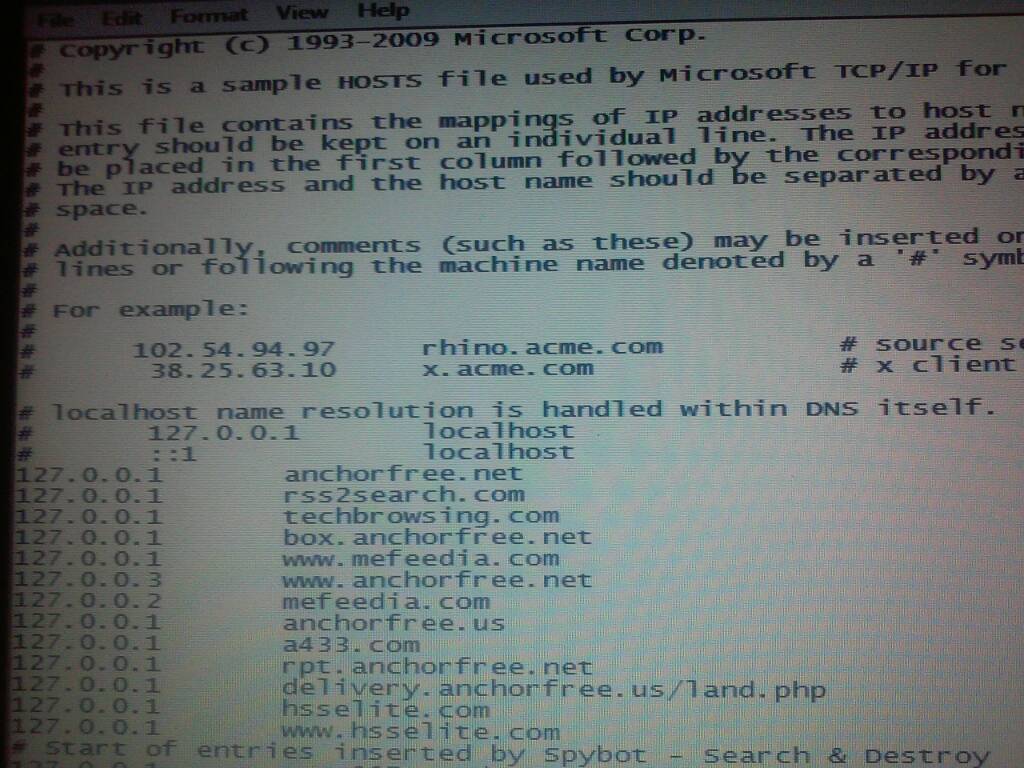
Ok so i got to resetting the host file and decided to check it, there are over 1000 malicious sites in there that correspond to 127.0.0.1. This is spybot S&D's way of blocking these sites, but what concerns me is there are some non spybot entries im not sure about. I will reset the host file and re-enter the spybot entries but below ive attached the non spybot entries as id like some insight on why techbrowsing.com is blocked by redirecting to local host (i didn't do it so why would a virus want to block the site its aims to display) also if you have an idea for the presence of some of the others i really want to know (i know why ancorfree is there btw dont worry about those ones). After i have heard back i will complete the instructions and move onto DDS
35d73756bc7aa9b95438ae3209c879cc.jpg
 

My Computer

OS
Windows 7 pro x64 (or win 10 pro)
Back
Top