Technical hitch with partitions

awrightUK

New member
Local time
6:45 AM
Messages
23
Location
Essex, UK
Hi,

Having successfully done lots of partitioning on our 2 Acer Timeline laptops (with Partition Wizard 4.2) I tried to do the same with our HP Pavilion laptop. I have not had a blue screen since using Win2000, but when Partition Wizard had finished its tasks, that's what I got :shock:.

Luckily the machine seemed to boot so I hope everything will be fine but I noticed that my reserved system partition was 200mb rather than the 100mb on the other two machines. Seeing as only 25mb is used, that seemed rather a waste of space.

I loaded the Windows Disk Manager and thought it would be a good idea to reduce the partition to 100mb but then I immediately got 100mb of unallocated space sitting between the reserved system partition and the OS partition. :o

"No problem" I thought as I had not committed any changes. Wrong! On subsequently viewing the disks in both Windows Disk Manager & Partition Wizard I still have unallocated space that I can't seem to do anything with. What is even more confusing is that when I look at the properties of the reserved partition, it still shows 200mb, but that's not what the disk manager shows in it's graphical representation of the drives.

So my questions are:

a) Should I have not tried to reduce the 200mb to 100mb and is this likely to cause any problems?

b) How can I re-allocate the space somewhere? Even in Partition Wizard I can't seem to do anything with it and that includes trying to extend the reserved system partition back into it.

I am a bit nervous now as I don't want to corrupt the reserved system partition in case the whole thing stops booting.

Andrew
 

My Computer

Computer Manufacturer/Model Number
Acer 1810TZ
OS
Windows 7 Home Premium x64
CPU
Intel® Pentium® Dual Core ULV SU4100, 1.3Ghz
Motherboard
Mobile Intel GS45 Express
Memory
3GB
Graphics Card(s)
Intel® GMA X4500MHD
Monitor(s) Displays
11.6" (WXGA LED)
Screen Resolution
1366 x 768

My Computers

System One System Two

  • Computer type
    PC/Desktop
    OS
    7 X64
    CPU
    i5 8400
    Motherboard
    gigabyte b365m ds3h
    Memory
    2x8gb 3200mhz
    Hard Drives
    various
    PSU
    pure power 11 400w cm
    Case
    Coolermaster
    Cooling
    cryorig m9i
  • Computer type
    PC/Desktop
    OS
    7x64
    CPU
    g5400
    Motherboard
    ga b365m ds3h
    Memory
    8gb ddr4 2400
    PSU
    xfx pro 450w
Hi,

Having successfully done lots of partitioning on our 2 Acer Timeline laptops (with Partition Wizard 4.2) I tried to do the same with our HP Pavilion laptop. I have not had a blue screen since using Win2000, but when Partition Wizard had finished its tasks, that's what I got :shock:.

Luckily the machine seemed to boot so I hope everything will be fine but I noticed that my reserved system partition was 200mb rather than the 100mb on the other two machines. Seeing as only 25mb is used, that seemed rather a waste of space.

I loaded the Windows Disk Manager and thought it would be a good idea to reduce the partition to 100mb but then I immediately got 100mb of unallocated space sitting between the reserved system partition and the OS partition. :o

"No problem" I thought as I had not committed any changes. Wrong! On subsequently viewing the disks in both Windows Disk Manager & Partition Wizard I still have unallocated space that I can't seem to do anything with. What is even more confusing is that when I look at the properties of the reserved partition, it still shows 200mb, but that's not what the disk manager shows in it's graphical representation of the drives.

So my questions are:

a) Should I have not tried to reduce the 200mb to 100mb and is this likely to cause any problems?

b) How can I re-allocate the space somewhere? Even in Partition Wizard I can't seem to do anything with it and that includes trying to extend the reserved system partition back into it.

I am a bit nervous now as I don't want to corrupt the reserved system partition in case the whole thing stops booting.

Andrew
Andrew;

It does not sound like you have damaged anything so I think you can relax a bit. The default Windows Disk Management software has one limitation: You cannot extend a partition to the LEFT. So you will need to use other software (like the Partition Wizard you mentioned) to use the now unallocated 100MB. My Win 7 Beta installed a 200MB partition, but the RC 7 only used 100MB and as you noted only about 25MB is actually used. It will not hurt anything to leave it like it is.

You say Partition Wizard cannot manage the 100MB? Maybe it is too small? I would suggest if you just have to have it, you could shrink the OS partition leaving the unallocated space at the front of the partition, then extend it using all the unallocated space?

You might try other software. Acronis is well liked by some here. I have success using Gparted and there is a tutorial for that under my sig.

Cheers!
Robert
 

My Computer

OS
...
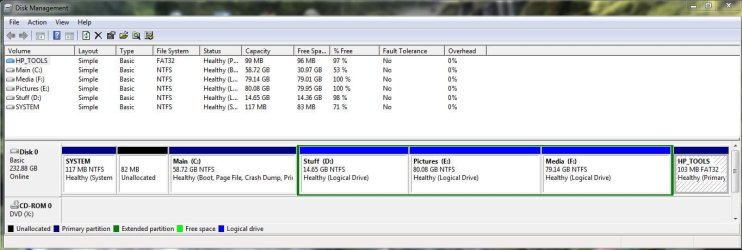
Here is the Windows one. PW shows exactly the same:

Capture1.JPG

What I need to do is somehow move the 82mb shown as unallocated and add it to one of the other partitions. I can't even seem to get it back how it was in the first place either!
 

My Computer

Computer Manufacturer/Model Number
Acer 1810TZ
OS
Windows 7 Home Premium x64
CPU
Intel® Pentium® Dual Core ULV SU4100, 1.3Ghz
Motherboard
Mobile Intel GS45 Express
Memory
3GB
Graphics Card(s)
Intel® GMA X4500MHD
Monitor(s) Displays
11.6" (WXGA LED)
Screen Resolution
1366 x 768
What would you like to do?

Are you trying to get rid of the 100mb altogether - I haven't got one.

OR do you want to extend C 100mb to the Left?
 

My Computers

System One System Two

  • Computer type
    PC/Desktop
    OS
    7 X64
    CPU
    i5 8400
    Motherboard
    gigabyte b365m ds3h
    Memory
    2x8gb 3200mhz
    Hard Drives
    various
    PSU
    pure power 11 400w cm
    Case
    Coolermaster
    Cooling
    cryorig m9i
  • Computer type
    PC/Desktop
    OS
    7x64
    CPU
    g5400
    Motherboard
    ga b365m ds3h
    Memory
    8gb ddr4 2400
    PSU
    xfx pro 450w
What would you like to do?

Are you trying to get rid of the 100mb altogether - I haven't got one.

OR do you want to extend C 100mb to the Left?

I thought the 100mb reserved partition was a "must keep" so just extend C to the left I think.
 

My Computer

Computer Manufacturer/Model Number
Acer 1810TZ
OS
Windows 7 Home Premium x64
CPU
Intel® Pentium® Dual Core ULV SU4100, 1.3Ghz
Motherboard
Mobile Intel GS45 Express
Memory
3GB
Graphics Card(s)
Intel® GMA X4500MHD
Monitor(s) Displays
11.6" (WXGA LED)
Screen Resolution
1366 x 768
OK . You shouldn't have any trouble doing that by booting PW cd.

It will warn you that you won't be able to boot after moving the start sector of that partition.

That is corrrect. You just need to run startup repair from the 7 dvd afterwards. That will update the bcd entry for you.
 

My Computers

System One System Two

  • Computer type
    PC/Desktop
    OS
    7 X64
    CPU
    i5 8400
    Motherboard
    gigabyte b365m ds3h
    Memory
    2x8gb 3200mhz
    Hard Drives
    various
    PSU
    pure power 11 400w cm
    Case
    Coolermaster
    Cooling
    cryorig m9i
  • Computer type
    PC/Desktop
    OS
    7x64
    CPU
    g5400
    Motherboard
    ga b365m ds3h
    Memory
    8gb ddr4 2400
    PSU
    xfx pro 450w
OK . You shouldn't have any trouble doing that by booting PW cd.

It will warn you that you won't be able to boot after moving the start sector of that partition.
Is this why the instructions for PW cd specifically note that you should not use it to move a system partition?

You just need to run startup repair from the 7 dvd afterwards. That will update the bcd entry for you.
Unfortunately I have no Win7 dvd as it was all pre-installed on the laptop. All I have now is a set of recovery DVDs.

I should have just left it alone shouldn't I!

Andrew
 

My Computer

Computer Manufacturer/Model Number
Acer 1810TZ
OS
Windows 7 Home Premium x64
CPU
Intel® Pentium® Dual Core ULV SU4100, 1.3Ghz
Motherboard
Mobile Intel GS45 Express
Memory
3GB
Graphics Card(s)
Intel® GMA X4500MHD
Monitor(s) Displays
11.6" (WXGA LED)
Screen Resolution
1366 x 768
Is this why the instructions for PW cd specifically note that you should not use it to move a system partition?

Yes - if you change the start of an o/s partition - bootmgr won't find it, unless you also update the bcd entry.

That is easily done via startup repair, or the command prompt.

Probably a good idea to get a proper Win 7 dvd.
 

My Computers

System One System Two

  • Computer type
    PC/Desktop
    OS
    7 X64
    CPU
    i5 8400
    Motherboard
    gigabyte b365m ds3h
    Memory
    2x8gb 3200mhz
    Hard Drives
    various
    PSU
    pure power 11 400w cm
    Case
    Coolermaster
    Cooling
    cryorig m9i
  • Computer type
    PC/Desktop
    OS
    7x64
    CPU
    g5400
    Motherboard
    ga b365m ds3h
    Memory
    8gb ddr4 2400
    PSU
    xfx pro 450w
Unfortunately I have no Win7 dvd as it was all pre-installed on the laptop. All I have now is a set of recovery DVDs.
Andrew;

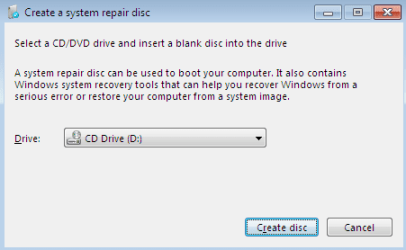
If you have a CD / DVD burner, Windows 7 will create and burn a bootable "System Repair Disk" you can use to follow SIW2's instructions.


start_repair_cd.png


.
 

My Computer

OS
...
Thanks for all the helpful comments... I seem to have sorted things now and I have the other partitions I want. I shall now make an image of the whole thing and leave well alone!

Andrew
 

My Computer

Computer Manufacturer/Model Number
Acer 1810TZ
OS
Windows 7 Home Premium x64
CPU
Intel® Pentium® Dual Core ULV SU4100, 1.3Ghz
Motherboard
Mobile Intel GS45 Express
Memory
3GB
Graphics Card(s)
Intel® GMA X4500MHD
Monitor(s) Displays
11.6" (WXGA LED)
Screen Resolution
1366 x 768
Thanks for all the helpful comments... I seem to have sorted things now and I have the other partitions I want. I shall now make an image of the whole thing and leave well alone!

Andrew
Glad you got it sorted out to your satisfaction!

Happy surfing!
Robert
 

My Computer

OS
...
Back
Top