temp directory

JasonY

New member
Local time
4:49 PM
Messages
3

Question about new temp location for Windows 7 (C:\Users\isco202\AppData\Local\Temp)


This could be a problem for very often we use the %temp% folder in our scripts to put files there temporary. If no user logged on or we are distributing it via SMS, I wonder what is the %Temp% environment is defined?

Thanks
Jason
 

My Computer

OS
Windows 7 Enterprise
hi JasonY, welcome to sevenforums,

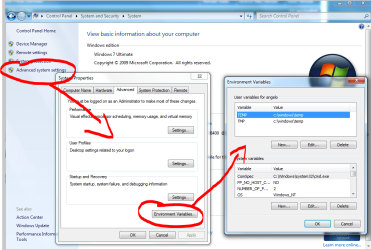
you can manually set the location in 'advanced system settings' - see below - is this what you mean?

it's something i've always set on a new windows install for a long time now, but i've always wondered about the difference between TEMP and TMP.
 

Attachments

  • here2.PNG
    here2.PNG
    66.8 KB · Views: 251

My Computer

Computer Manufacturer/Model Number
mickey megabyte 1234
OS
ultimate 64 sp1
CPU
i5 2500K [email protected]
Motherboard
MSI P67A-GD53
Memory
8 gigs GSkill Ripjaws 1600
Graphics Card(s)
amd hd6950
Sound Card
creative x-fi gamer
Monitor(s) Displays
samsung 24"
Screen Resolution
1920x1080
Hard Drives
ocz vertex 2e 60 gig, samsung f3 1tb, buffalo 2tb ext
PSU
antec 550
Case
antec three hundred
Cooling
i'm a cooling fan
Keyboard
saitek eclipse ii
Mouse
logitech g3
Internet Speed
about 4 Mbps
Other Info
i love win7
hi JasonY, welcome to sevenforums,

you can manually set the location in 'advanced system settings' - see below - is this what you mean?

it's something i've always set on a new windows install for a long time now, but i've always wondered about the difference between TEMP and TMP.

Theres no difference.
But it does mean you can have two temp locations (or as many as you want, for that matter), and its easy to recognise it as TEMP and TMP.

Also, following Mickey's guide, you can use the command prompt (start > run > cmd.exe)

1.) type: set
This will list all your environment variables and values.

2.) type: set temp
This will list just the temp variable and value.

3.) type: set temp "C:\temp"
This will SET the temp variable to C:\temp

Of course, you can replace temp with whatever variable in particular you're after, and set the variable to whatever you want.

Its probably best to use Mickey's way, as you can append (or prepend) values.
My way will replace it, which wouldn't be good if you wanted to add an extra location to PATH.
 

My Computer

OS
Windows 7 Enterprise
CPU
Intel Pentium Dual E2200 @2.2GHz
Motherboard
Gigabyte II-G31
Memory
4GB
Graphics Card(s)
Palit GForce 9500GT 1GB
Sound Card
onBoard
Hard Drives
WesternDigital: 250GB + 1TB + 1TB + 2TB
PSU
450W
Case
CoolerMaster CM690
Cooling
Corsair H50
Mouse
Logitech MX518
Thanks guys. I'm aware of HOW to change variables on a system. In fact, I would likely use Group Policy Preferences to set these if I need to. the question I'm really asking is the impact of the location and what kind affect the new location will have to my scripts. We have many many scripts and have used a global temp location in the past rather than a per user temp location. I guess I'll just have to start testing .. .
 

My Computer

OS
Windows 7 Enterprise
Oh of course.
In that case, the only implication is that the directory will need read write access for all users.
 

My Computer

OS
Windows 7 Enterprise
CPU
Intel Pentium Dual E2200 @2.2GHz
Motherboard
Gigabyte II-G31
Memory
4GB
Graphics Card(s)
Palit GForce 9500GT 1GB
Sound Card
onBoard
Hard Drives
WesternDigital: 250GB + 1TB + 1TB + 2TB
PSU
450W
Case
CoolerMaster CM690
Cooling
Corsair H50
Mouse
Logitech MX518
Good point. thanks
 

My Computer

OS
Windows 7 Enterprise
Back
Top