Solved Temporary Profile - Registry

Shafski

New member
Local time
12:59 PM
Messages
34
Hi, my computer randomly switched off yesterday and when I switched it on, I was lead to start-up repair.

I carried it out, and upon re-starting, it took me to 'preparing your desktop' and I was logged into a temporary profile. After being completely stressed that I had lost all my files and encountering this issue for the first time, I realised that they were actually still at C:\Users\Shafiq with a locked icon. I could still access these files going through them.

I'm more of a self-fixer, and fix most problems myself, however - this one I just can't seem to get my head around.

I've read around, and anyone familiar with this issue may understand the fixes I've tried which I'll refer to in short hand form. I'll also list a few more principles with my problem. Compared to all the countless threads and fixes i've tried/read on the issue, mine seems to be really different in a few ways.


  1. I ran a chkdsk of C:/ which took about 6 hours
  2. I ran a sfc /scannow before & after the chkdsk
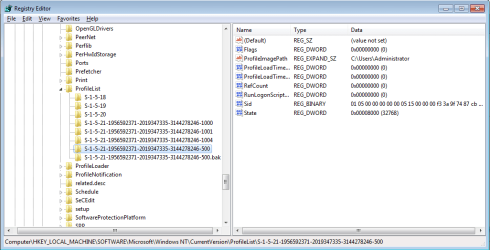
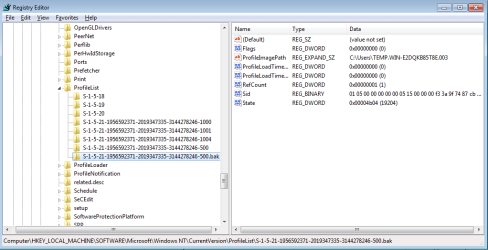
  3. I tried changing the registry SID's of the profiles, removing .bak from one and adding .temp to the other.
  4. I tried a system restore on a couple of occasions
  5. I tried to go to the management console to view the event logs, which worked before the system restore, but now isn't working.
  6. I had 2 users before, one was for uni work and one was my main user. They were named WORK and SHAFIQ. C:\users\work and c:\users\shafiq respectively. In all problems I've read about, the .bak file has a profileimagepath to the user that is inaccessible, such as the above 2. However, mine is to C:\Users\Administrator

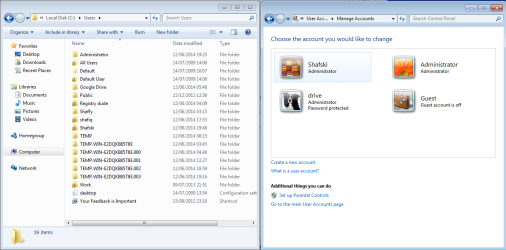
In the images at the end of the post there'll be quite a few irrelevant user profiles, some of which I creatted when trying to fix the problem myself, so it's just one big mess now with a bunch of profiles that don't even show up on the log on screen anyway.

Yes maybe I can just make a new user and transfer, but I don't think that will restore my computer to the way it was. Some things have changed in the sense that when I am on the log in screen. There is an "Administrator" account (which is the temp profile) and "Other Accounts". If I make a new account, I have to go to other accounts and manually type in the username and leave the password field blank to log in. Same with the administrator account - It asks me for a password, which I have to leave blank to log in. Why is it even asking me for a password?

Also, on control panel user/accounts section, my old accounts don't appear anywhere at all, where-as in the guides it says to delete your old account from there.

I managed to change the "ProfileImagePath" of a new admin account I created to one of my old accounts, and now when I log in it loads the old account. But I still have to click "Other Account" from the login screen and manually type in a username and password of the administrator account I made.

I honestly think my registry is messed up - and is there any way to fix the user profile keys or set them default. Will a windows 7 repair installation do this or does it not fix the registry keys.

Thanks ahead for any assistance, and also - I can provide any screenshots or whatever if needed, just ask.
 

Attachments
  • temp1.png
    temp1.png
    44.9 KB · Views: 3
  • temp2.png
    temp2.png
    20.3 KB · Views: 0
  • temp3.png
    temp3.png
    19.7 KB · Views: 1

My Computer

Computer type
PC/Desktop
Computer Manufacturer/Model Number
Custom build
OS
windows 7 Home premium x64
Motherboard
MSI A78M-E35 M-ATX Motherboard
Graphics Card(s)
AMD Radeon HD 8570D
Browser
Chrome

My Computer

Computer type
PC/Desktop
Computer Manufacturer/Model Number
Self built custom
OS
64-bit Windows 11 Pro for Workstations
CPU
Intel i7-8700K OC'd to 5 GHz
Motherboard
ASUS ROG Maximus XI Formula Z390
Memory
64 GB (4x16GB) G.SKILL TridentZ RGB DDR4 3600 MHz
Graphics Card(s)
ASUS ROG-STRIX-GTX1080TI-O11G-GAMING
Sound Card
Integrated
Monitor(s) Displays
2 x Samsung Odyssey G7 27"
Screen Resolution
2560x1440
Hard Drives
1TB Samsung 990 PRO M.2,
4TB Samsung 990 PRO PRO M.2,
TerraMaster F8 SSD Plus NAS
PSU
Seasonic Prime Titanium 850W
Case
Thermaltake Core P3
Cooling
Corsair Hydro H115i
Keyboard
Logitech wireless K800
Mouse
Logitech MX Master 4
Internet Speed
2 Gb/s Download and 100 Mb/s Upload
Antivirus
Malwarebyte Anti-Malware Premium
Browser
Google Chrome
Other Info
Logitech Z625 speaker system,
Logitech BRIO 4K Pro webcam,
HP Color LaserJet Pro MFP M477fdn,
APC SMART-UPS RT 1000 XL - SURT1000XLI,
Galaxy S23 Plus phone
Hello Shafski, and welcome to Seven Forum.

You might see if the tutorial below may be able to help with this error for you. :)

User Profile Error - Logged on with a Temporary Profile

ThIs is where my situation differs from other similar issues I've seen

A) In the right pane, look at the ProfileImagePath to see if this is the same user account that you deleted in step 1 above.

As shown in the screenshot above, it links to c: users/Administrator rather than my old profile. What do I do instead?
 

My Computer

Computer type
PC/Desktop
Computer Manufacturer/Model Number
Custom build
OS
windows 7 Home premium x64
Motherboard
MSI A78M-E35 M-ATX Motherboard
Graphics Card(s)
AMD Radeon HD 8570D
Browser
Chrome
You should be able to log in to any other administrator account on the computer, then delete both keys with S-1-5-21-...-500 and S-1-5-21-...-500.bak.
 

My Computer

Computer type
PC/Desktop
Computer Manufacturer/Model Number
Self built custom
OS
64-bit Windows 11 Pro for Workstations
CPU
Intel i7-8700K OC'd to 5 GHz
Motherboard
ASUS ROG Maximus XI Formula Z390
Memory
64 GB (4x16GB) G.SKILL TridentZ RGB DDR4 3600 MHz
Graphics Card(s)
ASUS ROG-STRIX-GTX1080TI-O11G-GAMING
Sound Card
Integrated
Monitor(s) Displays
2 x Samsung Odyssey G7 27"
Screen Resolution
2560x1440
Hard Drives
1TB Samsung 990 PRO M.2,
4TB Samsung 990 PRO PRO M.2,
TerraMaster F8 SSD Plus NAS
PSU
Seasonic Prime Titanium 850W
Case
Thermaltake Core P3
Cooling
Corsair Hydro H115i
Keyboard
Logitech wireless K800
Mouse
Logitech MX Master 4
Internet Speed
2 Gb/s Download and 100 Mb/s Upload
Antivirus
Malwarebyte Anti-Malware Premium
Browser
Google Chrome
Other Info
Logitech Z625 speaker system,
Logitech BRIO 4K Pro webcam,
HP Color LaserJet Pro MFP M477fdn,
APC SMART-UPS RT 1000 XL - SURT1000XLI,
Galaxy S23 Plus phone
Just to update you on the situation, as I posted this thread I was running a repair of Windows 7. That completed a bit after and it seemed to fix the admin account being a temporary profile. Now I had 3 accounts with functioning profiles (Including the root admin account), and then my old folders in C:\users of my old files.

I tried moving the 150gb of data from one of my old user profiles from c:\users onto the new functioning one, and voila - within a few minutes 150GB was transferred. Wait.. what? Yep, too good to be true.

When I logged on the account, everything was giving me permission errors, including my computer/control panel - which I couldn't even open! I couldn't do a thing! Anyways, I thought I'd restart.

When I restarted, chkdsk ran, and so I let it run thinking maybe it would fix that.

But no - it made the new profile I made a temporary profile too now, and so yeh.. Im stuck. I got a bunch of error messages about invalid security rule and setting to default rule (which made me think maybe it was correcting the problem and fixing permissions) but instead it made it a temp profile. So yeh..

Any ideas?
 

My Computer

Computer type
PC/Desktop
Computer Manufacturer/Model Number
Custom build
OS
windows 7 Home premium x64
Motherboard
MSI A78M-E35 M-ATX Motherboard
Graphics Card(s)
AMD Radeon HD 8570D
Browser
Chrome
Moving the data like that is what's messing it up. :(
 

My Computer

Computer type
PC/Desktop
Computer Manufacturer/Model Number
Self built custom
OS
64-bit Windows 11 Pro for Workstations
CPU
Intel i7-8700K OC'd to 5 GHz
Motherboard
ASUS ROG Maximus XI Formula Z390
Memory
64 GB (4x16GB) G.SKILL TridentZ RGB DDR4 3600 MHz
Graphics Card(s)
ASUS ROG-STRIX-GTX1080TI-O11G-GAMING
Sound Card
Integrated
Monitor(s) Displays
2 x Samsung Odyssey G7 27"
Screen Resolution
2560x1440
Hard Drives
1TB Samsung 990 PRO M.2,
4TB Samsung 990 PRO PRO M.2,
TerraMaster F8 SSD Plus NAS
PSU
Seasonic Prime Titanium 850W
Case
Thermaltake Core P3
Cooling
Corsair Hydro H115i
Keyboard
Logitech wireless K800
Mouse
Logitech MX Master 4
Internet Speed
2 Gb/s Download and 100 Mb/s Upload
Antivirus
Malwarebyte Anti-Malware Premium
Browser
Google Chrome
Other Info
Logitech Z625 speaker system,
Logitech BRIO 4K Pro webcam,
HP Color LaserJet Pro MFP M477fdn,
APC SMART-UPS RT 1000 XL - SURT1000XLI,
Galaxy S23 Plus phone
Moving the data like that is what's messing it up. :(

Ah so how should I move it? I think I have an idea but the quote in your signature prompted me to ask.

EDIT: ah now I'm having a new problem after moving all the files to a different hard drive for back up and deleting the old user profiles.

On start-up.. I log in fine but then my task bar at the bottom freezes after a bit and I can't do anything. I can move the mouse still and use keyboard but can't do any processes including opening task manager with ctrl shift ESC.

If I create a new user and try to log in then after preparing the desktop I'm just lead to a black screen

The problem doesn't occur in safe mode.. And I ran an SFC scan in safe mode but it said corrupt files were found but could not be fixed
 
Last edited:

My Computer

Computer type
PC/Desktop
Computer Manufacturer/Model Number
Custom build
OS
windows 7 Home premium x64
Motherboard
MSI A78M-E35 M-ATX Motherboard
Graphics Card(s)
AMD Radeon HD 8570D
Browser
Chrome
The only thing that you should copy over from another used account are files in the Music, Documents, etc.. folders. All others will mess the profile up.
 

My Computer

Computer type
PC/Desktop
Computer Manufacturer/Model Number
Self built custom
OS
64-bit Windows 11 Pro for Workstations
CPU
Intel i7-8700K OC'd to 5 GHz
Motherboard
ASUS ROG Maximus XI Formula Z390
Memory
64 GB (4x16GB) G.SKILL TridentZ RGB DDR4 3600 MHz
Graphics Card(s)
ASUS ROG-STRIX-GTX1080TI-O11G-GAMING
Sound Card
Integrated
Monitor(s) Displays
2 x Samsung Odyssey G7 27"
Screen Resolution
2560x1440
Hard Drives
1TB Samsung 990 PRO M.2,
4TB Samsung 990 PRO PRO M.2,
TerraMaster F8 SSD Plus NAS
PSU
Seasonic Prime Titanium 850W
Case
Thermaltake Core P3
Cooling
Corsair Hydro H115i
Keyboard
Logitech wireless K800
Mouse
Logitech MX Master 4
Internet Speed
2 Gb/s Download and 100 Mb/s Upload
Antivirus
Malwarebyte Anti-Malware Premium
Browser
Google Chrome
Other Info
Logitech Z625 speaker system,
Logitech BRIO 4K Pro webcam,
HP Color LaserJet Pro MFP M477fdn,
APC SMART-UPS RT 1000 XL - SURT1000XLI,
Galaxy S23 Plus phone
The only thing that you should copy over from another used account are files in the Music, Documents, etc.. folders. All others will mess the profile up.
But what about appdata? For programmes I downloaded with settings on my old user
 

My Computer

Computer type
PC/Desktop
Computer Manufacturer/Model Number
Custom build
OS
windows 7 Home premium x64
Motherboard
MSI A78M-E35 M-ATX Motherboard
Graphics Card(s)
AMD Radeon HD 8570D
Browser
Chrome
Doing so will get you results that you are having now.
 

My Computer

Computer type
PC/Desktop
Computer Manufacturer/Model Number
Self built custom
OS
64-bit Windows 11 Pro for Workstations
CPU
Intel i7-8700K OC'd to 5 GHz
Motherboard
ASUS ROG Maximus XI Formula Z390
Memory
64 GB (4x16GB) G.SKILL TridentZ RGB DDR4 3600 MHz
Graphics Card(s)
ASUS ROG-STRIX-GTX1080TI-O11G-GAMING
Sound Card
Integrated
Monitor(s) Displays
2 x Samsung Odyssey G7 27"
Screen Resolution
2560x1440
Hard Drives
1TB Samsung 990 PRO M.2,
4TB Samsung 990 PRO PRO M.2,
TerraMaster F8 SSD Plus NAS
PSU
Seasonic Prime Titanium 850W
Case
Thermaltake Core P3
Cooling
Corsair Hydro H115i
Keyboard
Logitech wireless K800
Mouse
Logitech MX Master 4
Internet Speed
2 Gb/s Download and 100 Mb/s Upload
Antivirus
Malwarebyte Anti-Malware Premium
Browser
Google Chrome
Other Info
Logitech Z625 speaker system,
Logitech BRIO 4K Pro webcam,
HP Color LaserJet Pro MFP M477fdn,
APC SMART-UPS RT 1000 XL - SURT1000XLI,
Galaxy S23 Plus phone
Doing so will get you results that you are having now.


But right now my old files are just in a normal folder on c:\ drive (not users folder). I have no user profiles as I deleted them all in safe mode. How come the root admin account with nothing on it is giving me problems like this. Also, do you know what I could do?

Thanks for the help by the way it honestly means a lot and if there's anything I can do for you let me know, please!
 

My Computer

Computer type
PC/Desktop
Computer Manufacturer/Model Number
Custom build
OS
windows 7 Home premium x64
Motherboard
MSI A78M-E35 M-ATX Motherboard
Graphics Card(s)
AMD Radeon HD 8570D
Browser
Chrome
It may have been corrupted when moving the files like that.

I would recommend to do a clean install of Windows. :(
 

My Computer

Computer type
PC/Desktop
Computer Manufacturer/Model Number
Self built custom
OS
64-bit Windows 11 Pro for Workstations
CPU
Intel i7-8700K OC'd to 5 GHz
Motherboard
ASUS ROG Maximus XI Formula Z390
Memory
64 GB (4x16GB) G.SKILL TridentZ RGB DDR4 3600 MHz
Graphics Card(s)
ASUS ROG-STRIX-GTX1080TI-O11G-GAMING
Sound Card
Integrated
Monitor(s) Displays
2 x Samsung Odyssey G7 27"
Screen Resolution
2560x1440
Hard Drives
1TB Samsung 990 PRO M.2,
4TB Samsung 990 PRO PRO M.2,
TerraMaster F8 SSD Plus NAS
PSU
Seasonic Prime Titanium 850W
Case
Thermaltake Core P3
Cooling
Corsair Hydro H115i
Keyboard
Logitech wireless K800
Mouse
Logitech MX Master 4
Internet Speed
2 Gb/s Download and 100 Mb/s Upload
Antivirus
Malwarebyte Anti-Malware Premium
Browser
Google Chrome
Other Info
Logitech Z625 speaker system,
Logitech BRIO 4K Pro webcam,
HP Color LaserJet Pro MFP M477fdn,
APC SMART-UPS RT 1000 XL - SURT1000XLI,
Galaxy S23 Plus phone
It may have been corrupted when moving the files like that.

I would recommend to do a clean install of Windows. :(

Could I do a repair install?

Also.. Is that completely necessary is there no suggest able fix? I mean, everything works fine in safe mode
 

My Computer

Computer type
PC/Desktop
Computer Manufacturer/Model Number
Custom build
OS
windows 7 Home premium x64
Motherboard
MSI A78M-E35 M-ATX Motherboard
Graphics Card(s)
AMD Radeon HD 8570D
Browser
Chrome
You could try a repair install, but since user profiles are not affected by it, I don't think it will help.

Once you have multiple user profiles corrupted like that, it's almost impossible to straighten them out. :(
 

My Computer

Computer type
PC/Desktop
Computer Manufacturer/Model Number
Self built custom
OS
64-bit Windows 11 Pro for Workstations
CPU
Intel i7-8700K OC'd to 5 GHz
Motherboard
ASUS ROG Maximus XI Formula Z390
Memory
64 GB (4x16GB) G.SKILL TridentZ RGB DDR4 3600 MHz
Graphics Card(s)
ASUS ROG-STRIX-GTX1080TI-O11G-GAMING
Sound Card
Integrated
Monitor(s) Displays
2 x Samsung Odyssey G7 27"
Screen Resolution
2560x1440
Hard Drives
1TB Samsung 990 PRO M.2,
4TB Samsung 990 PRO PRO M.2,
TerraMaster F8 SSD Plus NAS
PSU
Seasonic Prime Titanium 850W
Case
Thermaltake Core P3
Cooling
Corsair Hydro H115i
Keyboard
Logitech wireless K800
Mouse
Logitech MX Master 4
Internet Speed
2 Gb/s Download and 100 Mb/s Upload
Antivirus
Malwarebyte Anti-Malware Premium
Browser
Google Chrome
Other Info
Logitech Z625 speaker system,
Logitech BRIO 4K Pro webcam,
HP Color LaserJet Pro MFP M477fdn,
APC SMART-UPS RT 1000 XL - SURT1000XLI,
Galaxy S23 Plus phone
You could try a repair install, but since user profiles are not affected by it, I don't think it will help.

Once you have multiple user profiles corrupted like that, it's almost impossible to straighten them out. :(

But i only have one user profile ATM and its the admin one. Making fresh users gives the same problem which makes Mr think its more of a corruption in the system files rather than user profiles itself. Because the users log on and all its just explorer.exe freezes and stops everything working.
Sorry to seem a bit like an annoyance but its just a fresh install is a last option for me as I currently have nowhere to back up my 120gb old user profile and the files on it which I need, other than on my laptop itself
 

My Computer

Computer type
PC/Desktop
Computer Manufacturer/Model Number
Custom build
OS
windows 7 Home premium x64
Motherboard
MSI A78M-E35 M-ATX Motherboard
Graphics Card(s)
AMD Radeon HD 8570D
Browser
Chrome
Sorry, but when it's that corrupted, usually only a clean install will help.

If needed, external hard drives are pretty cheap these days to use to back up to. :(
 

My Computer

Computer type
PC/Desktop
Computer Manufacturer/Model Number
Self built custom
OS
64-bit Windows 11 Pro for Workstations
CPU
Intel i7-8700K OC'd to 5 GHz
Motherboard
ASUS ROG Maximus XI Formula Z390
Memory
64 GB (4x16GB) G.SKILL TridentZ RGB DDR4 3600 MHz
Graphics Card(s)
ASUS ROG-STRIX-GTX1080TI-O11G-GAMING
Sound Card
Integrated
Monitor(s) Displays
2 x Samsung Odyssey G7 27"
Screen Resolution
2560x1440
Hard Drives
1TB Samsung 990 PRO M.2,
4TB Samsung 990 PRO PRO M.2,
TerraMaster F8 SSD Plus NAS
PSU
Seasonic Prime Titanium 850W
Case
Thermaltake Core P3
Cooling
Corsair Hydro H115i
Keyboard
Logitech wireless K800
Mouse
Logitech MX Master 4
Internet Speed
2 Gb/s Download and 100 Mb/s Upload
Antivirus
Malwarebyte Anti-Malware Premium
Browser
Google Chrome
Other Info
Logitech Z625 speaker system,
Logitech BRIO 4K Pro webcam,
HP Color LaserJet Pro MFP M477fdn,
APC SMART-UPS RT 1000 XL - SURT1000XLI,
Galaxy S23 Plus phone
Sorry, but when it's that corrupted, usually only a clean install will help.

If needed, external hard drives are pretty cheap these days to use to back up to. :(

OK well.. I restarted with configuring msconfig to start the same services as safe mode and it logs in fine on normal boot and everything is functioning. Does this change anything and help you narrow down the problem?
 

My Computer

Computer type
PC/Desktop
Computer Manufacturer/Model Number
Custom build
OS
windows 7 Home premium x64
Motherboard
MSI A78M-E35 M-ATX Motherboard
Graphics Card(s)
AMD Radeon HD 8570D
Browser
Chrome

My Computer

Computer type
PC/Desktop
Computer Manufacturer/Model Number
Self built custom
OS
64-bit Windows 11 Pro for Workstations
CPU
Intel i7-8700K OC'd to 5 GHz
Motherboard
ASUS ROG Maximus XI Formula Z390
Memory
64 GB (4x16GB) G.SKILL TridentZ RGB DDR4 3600 MHz
Graphics Card(s)
ASUS ROG-STRIX-GTX1080TI-O11G-GAMING
Sound Card
Integrated
Monitor(s) Displays
2 x Samsung Odyssey G7 27"
Screen Resolution
2560x1440
Hard Drives
1TB Samsung 990 PRO M.2,
4TB Samsung 990 PRO PRO M.2,
TerraMaster F8 SSD Plus NAS
PSU
Seasonic Prime Titanium 850W
Case
Thermaltake Core P3
Cooling
Corsair Hydro H115i
Keyboard
Logitech wireless K800
Mouse
Logitech MX Master 4
Internet Speed
2 Gb/s Download and 100 Mb/s Upload
Antivirus
Malwarebyte Anti-Malware Premium
Browser
Google Chrome
Other Info
Logitech Z625 speaker system,
Logitech BRIO 4K Pro webcam,
HP Color LaserJet Pro MFP M477fdn,
APC SMART-UPS RT 1000 XL - SURT1000XLI,
Galaxy S23 Plus phone
Hey - update.

So I had football for a few hours and since once the repair process is started no additional dialogs form, I thought I'd just try a windows repair.
y
Success - everythings fine now.

Now I just need to transfer the files over. I've transferred slowly bits by bits from C:\ drive to C:\Users\{User}

So far everything's transferred fine and I logged in after transferring all my old files except AppData - Everything seems to be working a charm with no permission errors or anything so far.

However, my application data and folders meant a lot so I really need to transfer those, so I'm going to try transferring the AppData folder now.

If that causes problems, I'll know it's definitely appdata at the root of my problems and I can do the whole process over once more just having to give up my application data and start over.

I'll update! :) Thanks for the help so far.
 

My Computer

Computer type
PC/Desktop
Computer Manufacturer/Model Number
Custom build
OS
windows 7 Home premium x64
Motherboard
MSI A78M-E35 M-ATX Motherboard
Graphics Card(s)
AMD Radeon HD 8570D
Browser
Chrome
Great news so far. I hope it goes smoothly.
 

My Computer

Computer type
PC/Desktop
Computer Manufacturer/Model Number
Self built custom
OS
64-bit Windows 11 Pro for Workstations
CPU
Intel i7-8700K OC'd to 5 GHz
Motherboard
ASUS ROG Maximus XI Formula Z390
Memory
64 GB (4x16GB) G.SKILL TridentZ RGB DDR4 3600 MHz
Graphics Card(s)
ASUS ROG-STRIX-GTX1080TI-O11G-GAMING
Sound Card
Integrated
Monitor(s) Displays
2 x Samsung Odyssey G7 27"
Screen Resolution
2560x1440
Hard Drives
1TB Samsung 990 PRO M.2,
4TB Samsung 990 PRO PRO M.2,
TerraMaster F8 SSD Plus NAS
PSU
Seasonic Prime Titanium 850W
Case
Thermaltake Core P3
Cooling
Corsair Hydro H115i
Keyboard
Logitech wireless K800
Mouse
Logitech MX Master 4
Internet Speed
2 Gb/s Download and 100 Mb/s Upload
Antivirus
Malwarebyte Anti-Malware Premium
Browser
Google Chrome
Other Info
Logitech Z625 speaker system,
Logitech BRIO 4K Pro webcam,
HP Color LaserJet Pro MFP M477fdn,
APC SMART-UPS RT 1000 XL - SURT1000XLI,
Galaxy S23 Plus phone
Back
Top