
Hi,
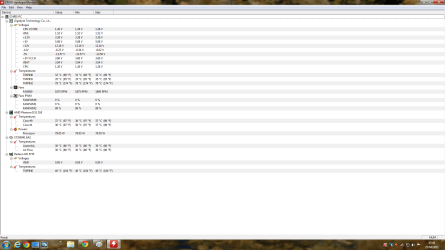
I have just installed HWmonitor on one of my computers to monitor the temps I have attached a screenshot of what is displayed I know that TMP 0 is the motherboard and that TMP 1 is the CPU. But I am not sure what the TMP 2 is for and its running at 79c which seems on the hot side.
The specs for this systems are as follows:
XFX ATI Radeon 5770 1024MB GDDR5
AMD Phenom II X2 555 Processor running at stock speeds 3.20Ghz
OCZ Fatal1ty 550w Silent SLI Ready ATX2 Power Supply
Corsair XMS3 TwinX 4GB (2x2GB) DDR3 PC3-10666C9 1333MHz Dual Channel Kit Code TW3X4G1333C9A
Gigabyte GA-MA770T-UD3.
Any help would be appreciated
I have just installed HWmonitor on one of my computers to monitor the temps I have attached a screenshot of what is displayed I know that TMP 0 is the motherboard and that TMP 1 is the CPU. But I am not sure what the TMP 2 is for and its running at 79c which seems on the hot side.
The specs for this systems are as follows:
XFX ATI Radeon 5770 1024MB GDDR5
AMD Phenom II X2 555 Processor running at stock speeds 3.20Ghz
OCZ Fatal1ty 550w Silent SLI Ready ATX2 Power Supply
Corsair XMS3 TwinX 4GB (2x2GB) DDR3 PC3-10666C9 1333MHz Dual Channel Kit Code TW3X4G1333C9A
Gigabyte GA-MA770T-UD3.
Any help would be appreciated
Attachments
My Computer
- Computer type
- Laptop
- Computer Manufacturer/Model Number
- HP
- OS
- Windows 7
