TeraCopy has trouble working with some Macrium Reflect mounted images

Callender,

Do you know whether PC Hunter uses Windows Explorer copy function ? Or does it have its own copy routine ?
 

My Computer My Computer

At a glance

Windows 7 Home Premium 64-bit (OEM)AMD Athlon II X4 640 (3 GHz, 4 cores)Patriot 16Gb DDR3 1600 (2 kits of 2)ATI Radeon HD 4290 (integrated)
Computer type
PC/Desktop
Computer Manufacturer/Model Number
Custom build
OS
Windows 7 Home Premium 64-bit (OEM)
CPU
AMD Athlon II X4 640 (3 GHz, 4 cores)
Motherboard
Asus M4A 89 GTD Pro/USB3
Memory
Patriot 16Gb DDR3 1600 (2 kits of 2)
Graphics Card(s)
ATI Radeon HD 4290 (integrated)
Sound Card
AMD + Realtek HD Audio (integrated)
Monitor(s) Displays
Hewlett-Packard ZR2440w (24")
Screen Resolution
1920 x 1200
Hard Drives
Internal : Samsung SSD 860 EVO 250 Gb (system), Seagate Barrcuda 1 Tb (data), Western Digital Caviar Blue 500 Gb (archives).
External (USB) : 2 x 1 Tb 2,5" Seagate Barracuda (backups).
PSU
Corsair VX 450 W
Case
Antec Solo
Cooling
Cooler Master Hyper 212 Plus, 2 Nexus Real Silent Case fans
Keyboard
Cherry KC 1000
Mouse
Logitech M 90
Internet Speed
Fiber, 300 Mbit/s down, 200 Mbit/s up
Antivirus
Microsoft Security Essentials
Browser
Vivaldi, Tor
Other Info
BIOS Date: 07/18/11 Ver: 08.00.15.
Modem-router : provided by ISP
The only thing I moved from my C: drive to E: were my Documents, Music, and Pictures folders. That might have caused a problem if I wqs using Windows Backup but I don't and it hasn't been a problem for me when using Macrium Reflect and FFS.
I had a look at the Free File Sync site, and the amount of praise heaped upon it is impressive. How do you use it with Macrium ? Mount image / Restore select folders with Free File Sync ?

Just for fun, jumping from the FFS site I found this discussion, which tends to say you can't verify the integrity of a file after it's copied, and what do you mean by "verify", anyway ? Not that I understood the finer points of it, but it's the sort of thing that makes you think what the hell, let's copy the lot and be done with it.
 
Last edited:

My Computer My Computer

At a glance

Windows 7 Home Premium 64-bit (OEM)AMD Athlon II X4 640 (3 GHz, 4 cores)Patriot 16Gb DDR3 1600 (2 kits of 2)ATI Radeon HD 4290 (integrated)
Computer type
PC/Desktop
Computer Manufacturer/Model Number
Custom build
OS
Windows 7 Home Premium 64-bit (OEM)
CPU
AMD Athlon II X4 640 (3 GHz, 4 cores)
Motherboard
Asus M4A 89 GTD Pro/USB3
Memory
Patriot 16Gb DDR3 1600 (2 kits of 2)
Graphics Card(s)
ATI Radeon HD 4290 (integrated)
Sound Card
AMD + Realtek HD Audio (integrated)
Monitor(s) Displays
Hewlett-Packard ZR2440w (24")
Screen Resolution
1920 x 1200
Hard Drives
Internal : Samsung SSD 860 EVO 250 Gb (system), Seagate Barrcuda 1 Tb (data), Western Digital Caviar Blue 500 Gb (archives).
External (USB) : 2 x 1 Tb 2,5" Seagate Barracuda (backups).
PSU
Corsair VX 450 W
Case
Antec Solo
Cooling
Cooler Master Hyper 212 Plus, 2 Nexus Real Silent Case fans
Keyboard
Cherry KC 1000
Mouse
Logitech M 90
Internet Speed
Fiber, 300 Mbit/s down, 200 Mbit/s up
Antivirus
Microsoft Security Essentials
Browser
Vivaldi, Tor
Other Info
BIOS Date: 07/18/11 Ver: 08.00.15.
Modem-router : provided by ISP
-- sources recommend not splitting Windows Prime [such as OS and/or Users and/or My Documents] into C-partition and D-partition operations. I left My Documents alone, and have been for years "tellling" each program to save its stuff onto D-partition.
There has been a loooong discussion over that in 7-Forums (and also elsewhere) verging to religious wars -- search for something like Kari + Tutorials + Sysprep -- and I've finally settled on this conclusion (not through personal technical knowledge, mind you, just trying to evaluate other people's opinion, adding it to my own, admittedly limited, user experience) :

  • Those recommending against moving User profiles and ProgramData from C: to D: refer to a now obsolete technical note by Microsoft, which was true in Vista times but not anymore. This note is probably still online and is probably still misleading, in that it does not explicitly say that Windows 7, 8 and 10 have made this warning obsolete.
  • Microsoft supports such a setup in practice even if it does not say so, since it provides tools to implement it, and has even eased the process as time went by.
  • Setups with ProgramData and Users moved on D: work without a hitch (in spite of the Microsoft paper saying it's for "test environments" only).
  • The only problem with such a configuration is you won't be able to upgrade from one Windows version to the other -- not to be confused with Windows Updates within your own version which work perfectly.
  • This site (and probably others) provide instructions to undo the move, do the upgrade and redo the move if you really need to go from W7 to 8 -- or, God forbid, to 10 -- without reinstalling from scratch. This is a bit of a pain, but it can be done.
For what it's worth...
 

My Computer My Computer

At a glance

Windows 7 Home Premium 64-bit (OEM)AMD Athlon II X4 640 (3 GHz, 4 cores)Patriot 16Gb DDR3 1600 (2 kits of 2)ATI Radeon HD 4290 (integrated)
Computer type
PC/Desktop
Computer Manufacturer/Model Number
Custom build
OS
Windows 7 Home Premium 64-bit (OEM)
CPU
AMD Athlon II X4 640 (3 GHz, 4 cores)
Motherboard
Asus M4A 89 GTD Pro/USB3
Memory
Patriot 16Gb DDR3 1600 (2 kits of 2)
Graphics Card(s)
ATI Radeon HD 4290 (integrated)
Sound Card
AMD + Realtek HD Audio (integrated)
Monitor(s) Displays
Hewlett-Packard ZR2440w (24")
Screen Resolution
1920 x 1200
Hard Drives
Internal : Samsung SSD 860 EVO 250 Gb (system), Seagate Barrcuda 1 Tb (data), Western Digital Caviar Blue 500 Gb (archives).
External (USB) : 2 x 1 Tb 2,5" Seagate Barracuda (backups).
PSU
Corsair VX 450 W
Case
Antec Solo
Cooling
Cooler Master Hyper 212 Plus, 2 Nexus Real Silent Case fans
Keyboard
Cherry KC 1000
Mouse
Logitech M 90
Internet Speed
Fiber, 300 Mbit/s down, 200 Mbit/s up
Antivirus
Microsoft Security Essentials
Browser
Vivaldi, Tor
Other Info
BIOS Date: 07/18/11 Ver: 08.00.15.
Modem-router : provided by ISP
Callender,

Do you know whether PC Hunter uses Windows Explorer copy function ? Or does it have its own copy routine ?

I have to confess that I don't know. As far as I can work out it uses it's own copy function. However I tested it on locked system files without success.

Example:

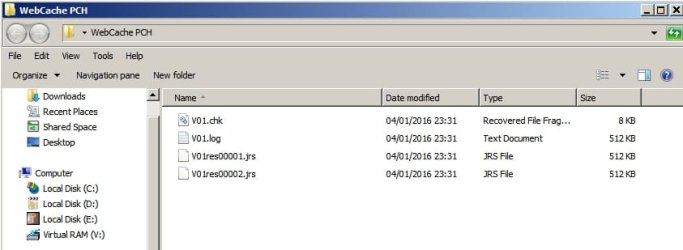
Attempted to copy folder (C:\Users\Chris\AppData\Local\Microsoft\Windows\WebCache) containing locked system files using PCHunter:

Result:

PCH.jpg

It fails to copy locked system files Webcachev01.dat and Webcachev01.tmp even if those files are selected for copy individually.

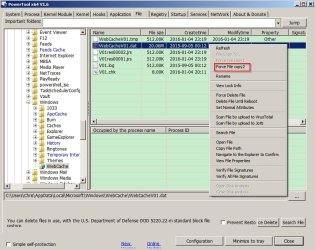
Using another tool to force copy the same folder gives the desired results:

PowerTool x64.jpg

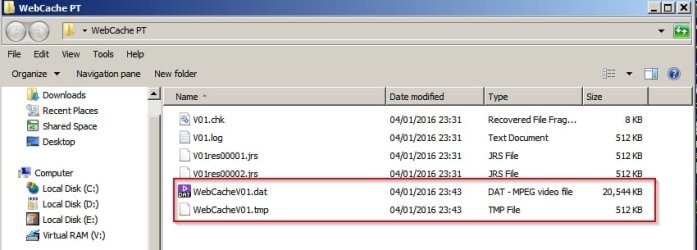
The folder copies but without the locked Webcachev01.dat and Webcachev01.tmp files. However they can be force copied.

Result:

PowerTool x64 2.jpg
 

My Computer My Computer

At a glance

Microsoft Windows 7 Home Premium 64-bit 7601 ...AMD C-60 APU with Radeon(tm) HD Graphics4.00 GBAMD Radeon HD 6290 Graphics
Computer type
Laptop
Computer Manufacturer/Model Number
ASUS
OS
Microsoft Windows 7 Home Premium 64-bit 7601 Multiprocessor Free Service Pack 1
CPU
AMD C-60 APU with Radeon(tm) HD Graphics
Motherboard
ASUSTeK COMPUTER INC. X501U
Memory
4.00 GB
Graphics Card(s)
AMD Radeon HD 6290 Graphics
Sound Card
(1) AMD High Definition Audio Device (2) Realtek High Defi
Screen Resolution
1366 x 768 x 32 bits (4294967296 colors) @ 60 Hz
Hard Drives
Hitachi HTS545050A7E380 SATA Disk Device
Antivirus
Comodo CIS & FW, SecureAplus App Whitelisting, Threatfire
Browser
Cyberfox 64bit, Opera 64bit, Airfox
Other Info
Spy-The-Spy, HitmanPro.Alert, Norton Connect Safe, MJRegWatcher, BitDefender TrafficLight, Voodoo Shield, Zemana AntiMalware
I use an Admin account with UAC disabled (UAC has been replaced by something else)
Nominated for über-geek award of the year.
 

My Computer My Computer

At a glance

Windows 7 Home Premium 64-bit (OEM)AMD Athlon II X4 640 (3 GHz, 4 cores)Patriot 16Gb DDR3 1600 (2 kits of 2)ATI Radeon HD 4290 (integrated)
Computer type
PC/Desktop
Computer Manufacturer/Model Number
Custom build
OS
Windows 7 Home Premium 64-bit (OEM)
CPU
AMD Athlon II X4 640 (3 GHz, 4 cores)
Motherboard
Asus M4A 89 GTD Pro/USB3
Memory
Patriot 16Gb DDR3 1600 (2 kits of 2)
Graphics Card(s)
ATI Radeon HD 4290 (integrated)
Sound Card
AMD + Realtek HD Audio (integrated)
Monitor(s) Displays
Hewlett-Packard ZR2440w (24")
Screen Resolution
1920 x 1200
Hard Drives
Internal : Samsung SSD 860 EVO 250 Gb (system), Seagate Barrcuda 1 Tb (data), Western Digital Caviar Blue 500 Gb (archives).
External (USB) : 2 x 1 Tb 2,5" Seagate Barracuda (backups).
PSU
Corsair VX 450 W
Case
Antec Solo
Cooling
Cooler Master Hyper 212 Plus, 2 Nexus Real Silent Case fans
Keyboard
Cherry KC 1000
Mouse
Logitech M 90
Internet Speed
Fiber, 300 Mbit/s down, 200 Mbit/s up
Antivirus
Microsoft Security Essentials
Browser
Vivaldi, Tor
Other Info
BIOS Date: 07/18/11 Ver: 08.00.15.
Modem-router : provided by ISP
I should explain that it's best to leave UAC enabled on it's highest level. Personally I use security software that doesn't let any new executable that does not already exist on my system run. It then scans the file and gives a report before prompting to allow, block or sandbox. It suits me. Once whitelisted I won't get bothered again by prompts when I run the file.
 

My Computer My Computer

At a glance

Microsoft Windows 7 Home Premium 64-bit 7601 ...AMD C-60 APU with Radeon(tm) HD Graphics4.00 GBAMD Radeon HD 6290 Graphics
Computer type
Laptop
Computer Manufacturer/Model Number
ASUS
OS
Microsoft Windows 7 Home Premium 64-bit 7601 Multiprocessor Free Service Pack 1
CPU
AMD C-60 APU with Radeon(tm) HD Graphics
Motherboard
ASUSTeK COMPUTER INC. X501U
Memory
4.00 GB
Graphics Card(s)
AMD Radeon HD 6290 Graphics
Sound Card
(1) AMD High Definition Audio Device (2) Realtek High Defi
Screen Resolution
1366 x 768 x 32 bits (4294967296 colors) @ 60 Hz
Hard Drives
Hitachi HTS545050A7E380 SATA Disk Device
Antivirus
Comodo CIS & FW, SecureAplus App Whitelisting, Threatfire
Browser
Cyberfox 64bit, Opera 64bit, Airfox
Other Info
Spy-The-Spy, HitmanPro.Alert, Norton Connect Safe, MJRegWatcher, BitDefender TrafficLight, Voodoo Shield, Zemana AntiMalware
RE: moving User profiles and ProgramData from C: to D:

Well I used to do that and it does make sense. If windows won't boot you can restore your windows partition without loosing personal files right?
 

My Computer My Computer

At a glance

Microsoft Windows 7 Home Premium 64-bit 7601 ...AMD C-60 APU with Radeon(tm) HD Graphics4.00 GBAMD Radeon HD 6290 Graphics
Computer type
Laptop
Computer Manufacturer/Model Number
ASUS
OS
Microsoft Windows 7 Home Premium 64-bit 7601 Multiprocessor Free Service Pack 1
CPU
AMD C-60 APU with Radeon(tm) HD Graphics
Motherboard
ASUSTeK COMPUTER INC. X501U
Memory
4.00 GB
Graphics Card(s)
AMD Radeon HD 6290 Graphics
Sound Card
(1) AMD High Definition Audio Device (2) Realtek High Defi
Screen Resolution
1366 x 768 x 32 bits (4294967296 colors) @ 60 Hz
Hard Drives
Hitachi HTS545050A7E380 SATA Disk Device
Antivirus
Comodo CIS & FW, SecureAplus App Whitelisting, Threatfire
Browser
Cyberfox 64bit, Opera 64bit, Airfox
Other Info
Spy-The-Spy, HitmanPro.Alert, Norton Connect Safe, MJRegWatcher, BitDefender TrafficLight, Voodoo Shield, Zemana AntiMalware
The only thing I moved from my C: drive to E: were my Documents, Music, and Pictures folders. That might have caused a problem if I wqs using Windows Backup but I don't and it hasn't been a problem for me when using Macrium Reflect and FFS.
I had a look at the Free File Sync site, and the amount of praise heaped upon it is impressive. How do you use it with Macrium ? Mount image / Restore select folders with Free File Sync ?

Just for fun, jumping from the FFS site I found this discussion, which tends to say you can't verify the integrity of a file after it's copied, and what do you mean by "verify", anyway ? Not that I understood the finer points of it, but it's the sort of thing that makes you think what the hell, let's copy the lot and be done with it.


Strictly speaking, I do not use Macrium Reflect (MR) with FFS. Both are used independently. I use MR to image my C: drive to back it up. Imaging is the only practical way to back up System (OS) files. However, imaging is very inefficient for backing up most data files. It takes too long and requires much too much storage space.

I keep my data segregated from my System. When I set up my desktop machine, I dragged my Documents, Music, and Pictures folders from my User folder on the C: drive (a 128GB Samsung 840 SSD) to my E: drive (a 2TB WD Black HDD). I have yet to mount an image since there is nothing there that I need to get at separately.

To back up my data on the E: drive (and the F: drive, another 2TB WD Black HDD), I use FFS and save the backup on 2TB WD Green HDDs that I use as external HDDs (I have a 3.5" HDD dock built into my computer). Normally, it is bad practice to save backups (in this case, images) on a drive that is installed in the machine being backed up but, since I backup my E: drive separately, I save my images to the E: drive to make restoring an image more convenient. The images get becked up whe the E: drive gets backed up.

FFS, when set to Mirror Mode, essentially makes a copy of the drive onto another drive. When updating the backup, FFS will compare the source drive to the backup drive to see what has changed, then will copy and paste changed and added files from the source drive to the backup drive and delete files on the backup drive that are no longer on the source drive.

I also have a Versioning drive (a 4TB WD Black HDD) in my machine. FFS has a feature, called Versioning, that will save data that gets deleted from a backup drive to a designated Versioning folder or drive. Versioning allows you to recover data that was deleted during a backup or earlier versions of changed files.

Another thing I use FFS for is to automatically backup my Favorites folder on my C: drive. I save the backup to a folder on the E: drive, which then gets backed up when the E: drive gets backed up. I also need to back up my App Data folder the same way but I haven't gotten around to setting it up (yet).

The FFS Verify hack I mentioned isn't officially sanctioned because it apparently caused problems on some systems but I haven't any problems with it. "Verify" means the program will check the file that was just copied to make sure the copy is identical to the original file.

Macrium Reflect has a similar function, only here it is sanctioned, where it will verify that an image just created doesn't have any errors in it.

 

My Computer My Computer

At a glance

Win 7 Ultimate 64 bitIntel i7-3930KKingston HyperX Genesis 32GB Kit (8x4GB Modul...MSI R7850 Twin Frozr 2GD5/OC Radeon HD 7850 2...
Computer type
PC/Desktop
Computer Manufacturer/Model Number
Custom Build
OS
Win 7 Ultimate 64 bit
CPU
Intel i7-3930K
Motherboard
ASUS P9X79 WS
Memory
Kingston HyperX Genesis 32GB Kit (8x4GB Modules) 1600MHz DDR
Graphics Card(s)
MSI R7850 Twin Frozr 2GD5/OC Radeon HD 7850 2GB 256-bit GDDR
Sound Card
Asus Xonar Essence STX
Monitor(s) Displays
3x Asus VG248QE 24", Vizio 32" TV
Screen Resolution
1920 x 1080, ?
Hard Drives
Samsung 128GB 840 Pro SSD (1),
Samsung 4TB 850 EVO SSDs (4)
Samsung 4TB 850 EVO SSDs (16) external backup drives used in 2.5" hot swap bays in the computer.
PSU
Corsair HX750w
Case
Antec Two Hundred v2 (modified)
Cooling
Cooler Master GeminII S524 120mm (fan replaced with a 140mm)
Keyboard
Logitech G510s
Mouse
Logitech M525 (two in use)
Internet Speed
=< 32Mbps down, 8Mbps up
Antivirus
AVAST!, MBAM, SAS, Spybot S&D (all but MBAM free) Glary Util
Browser
IE11
Other Info
LSI 9211-8i HBA card (8 SATA III ports), 2.5" & 3.5" Hot Swap Bays, HooToo HT-CR001 PCI-E to USB 3.0 Internal Hub + 6 Slot Card Reader, and LG Model CH12LS28 BD-ROM Optical Drive. Also, ScanSnap S1500 ADF duplexing scanner, Canon 9000F flat bed scanner, Corsair SP2500 2.1 speakers, Samsung CLP 415nw laser color printer, Cyberpower PP2200SW UPS
There has been a loooong discussion over that in 7-Forums (and also elsewhere) verging to religious wars -- search for something like Kari + Tutorials + Sysprep -- and I've finally settled on this conclusion (not through personal technical knowledge, mind you, just trying to evaluate other people's opinion, adding it to my own, admittedly limited, user experience) :

  • Those recommending against moving User profiles and ProgramData from C: to D: refer to a now obsolete technical note by Microsoft, which was true in Vista times but not anymore. This note is probably still online and is probably still misleading, in that it does not explicitly say that Windows 7, 8 and 10 have made this warning obsolete.
  • Microsoft supports such a setup in practice even if it does not say so, since it provides tools to implement it, and has even eased the process as time went by.
  • Setups with ProgramData and Users moved on D: work without a hitch (in spite of the Microsoft paper saying it's for "test environments" only).
  • The only problem with such a configuration is you won't be able to upgrade from one Windows version to the other -- not to be confused with Windows Updates within your own version which work perfectly.
  • This site (and probably others) provide instructions to undo the move, do the upgrade and redo the move if you really need to go from W7 to 8 -- or, God forbid, to 10 -- without reinstalling from scratch. This is a bit of a pain, but it can be done.
For what it's worth...

RE: moving User profiles and ProgramData from C: to D:

Well I used to do that and it does make sense. If windows won't boot you can restore your windows partition without loosing personal files right?
This thread caught my eye because I have used TeraCopy for years, but I found this sidebar discussion to be very useful indeed so thanks fellas.

There are a couple of tutorials here on this subject, though it does seem that if all you want to do is move say a large Music or Pictures folder, then right-click, Properties, Location, Move may be all that is needed.
 

My Computer My Computer

At a glance

Windows 7 Professional 64bitIntel Core i7 4600M @ 2.90GHz16.0GB Dual-Channel DDR3 @ 797MHz (11-11-11-28)Intel HD Graphics 4600 (Dell) 2048MB ATI AMD ...
Computer type
Laptop
Computer Manufacturer/Model Number
Dell Latitude E6540 Laptop
OS
Windows 7 Professional 64bit
CPU
Intel Core i7 4600M @ 2.90GHz
Motherboard
Dell Inc. 0CYT5F (SOCKET 0)
Memory
16.0GB Dual-Channel DDR3 @ 797MHz (11-11-11-28)
Graphics Card(s)
Intel HD Graphics 4600 (Dell) 2048MB ATI AMD Radeon HD 8790M
Sound Card
Realtek High Definition Audio
Monitor(s) Displays
HP ZR30w (2560x1600@60Hz)
Hard Drives
256GB LITEONIT LMT-256M6M-41 mm SATA (SSD)
1TB Samsung SSD 860 EVO mSATA SATA (SSD)
2TB USB 3.0 USB Device
115GB SanDisk Ultra Fit USB
Other Info
Multiple Dell E-Port Plus II Port Replicator/Docking Stations 0Y72NH USB 3.0 + 130W AC Adapters
Strictly speaking, I do not use Macrium Reflect (MR) with FFS [...]
Thanks, Lady Fitzgerald. I caught up with your post right now.

I've experimented with Free File Sync, and it's indeed an interesting piece of software. Too bad the help is rather thin on the ground. From the point of view of features and user interface, I find it's a draw between Free File Sync and Sync Back Free (paid version of the latter has more features). Both have their advantages. Free File Sync is better if you want to be able to compare source files and destination files visually at all times.
The FFS Verify hack I mentioned isn't officially sanctioned because it apparently caused problems on some systems but I haven't any problems with it.
Apparently it's sanctioned now. At least it's mentioned in the online help with no specific warning, among other options only accessible by modifying a file manually.
 

My Computer My Computer

At a glance

Windows 7 Home Premium 64-bit (OEM)AMD Athlon II X4 640 (3 GHz, 4 cores)Patriot 16Gb DDR3 1600 (2 kits of 2)ATI Radeon HD 4290 (integrated)
Computer type
PC/Desktop
Computer Manufacturer/Model Number
Custom build
OS
Windows 7 Home Premium 64-bit (OEM)
CPU
AMD Athlon II X4 640 (3 GHz, 4 cores)
Motherboard
Asus M4A 89 GTD Pro/USB3
Memory
Patriot 16Gb DDR3 1600 (2 kits of 2)
Graphics Card(s)
ATI Radeon HD 4290 (integrated)
Sound Card
AMD + Realtek HD Audio (integrated)
Monitor(s) Displays
Hewlett-Packard ZR2440w (24")
Screen Resolution
1920 x 1200
Hard Drives
Internal : Samsung SSD 860 EVO 250 Gb (system), Seagate Barrcuda 1 Tb (data), Western Digital Caviar Blue 500 Gb (archives).
External (USB) : 2 x 1 Tb 2,5" Seagate Barracuda (backups).
PSU
Corsair VX 450 W
Case
Antec Solo
Cooling
Cooler Master Hyper 212 Plus, 2 Nexus Real Silent Case fans
Keyboard
Cherry KC 1000
Mouse
Logitech M 90
Internet Speed
Fiber, 300 Mbit/s down, 200 Mbit/s up
Antivirus
Microsoft Security Essentials
Browser
Vivaldi, Tor
Other Info
BIOS Date: 07/18/11 Ver: 08.00.15.
Modem-router : provided by ISP
Back
Top