Teredo Missing

ejscharf

New member
Local time
7:07 PM
Messages
10
I've been trying to add computers to a homegroup, without success. The homegroup troubleshooter tells me that Teredo tunneling has been turned off. When I check Device Manager, the Teredo Tunneling adapter does not appear. I have checked the network connection, and it shows that IPv6 is turned on. I've tried uninstalling it and re-installing it, but that does not solve the problem. I've also tried using netsh commands to activate it. Finally, I changed to zero the value of the following registry key, also without success: HKEY_LOCAL_MACHINE\SYSTEM\CurrentControlSet\services\TCPIP6\Parameters\DisabledComponents.

Any help will be appreciated. Thanks
 

My Computer

Computer Manufacturer/Model Number
Dell XPS 420
OS
windows 7 ultimate
CPU
Intel Q9400 @ 2.66 Hz
Memory
6G
Password Problems - Enable IPv6
HomeGroup uses IPv6 for multicast discovery. If you get error code 0x80632094 when you try and enter a valid password, then check that the IPv6 protocol is checked in the NIC properties. Network and Sharing Center, Change adapter connections, right click and examine Properties for IPv6. You could also try this registry method: Try doing it as described below, restarting after then edit again and reset to 0.

Some very old routers do not have IPv6 functionality.

HKEY_LOCAL_MACHINE\SYSTEM\CurrentControlSet\Services\Tcpip6\Parameters\
Add a DWORD, DisabledComponents with a value 0xffffffff, this disables all IPv6 components. Restart the computer now edit 0xffffffff to 0. This enables IPv6.

Make sure these settings are enabled also after you do that.

More info about this particular problem.
http://social.technet.microsoft.com...g/thread/e24b20ba-b1f1-48f0-880b-2288cdd837de
 

Attachments

  • services peer networking enabled set to automatic.PNG
    services peer networking enabled set to automatic.PNG
    26.6 KB · Views: 467
Last edited:

My Computer

Computer type
PC/Desktop
Computer Manufacturer/Model Number
Home built
OS
Windows 7 Ult, Windows 8.1 Pro,
CPU
Q9650-4.275GHz, E8600 4.5GHz, E6750-3.8GHz
Motherboard
Evga 780i FTW
Memory
G.Skill PC2 9600 1200Mhz 5 5 5 15 2T
Graphics Card(s)
GTX480
Sound Card
Asus Xonar D2
Monitor(s) Displays
HannsG
Screen Resolution
1680X1050
Hard Drives
GSkill Phoenix Pro 120GB SSD
PSU
ThermalTake Toughpower 1000Watt modular
Case
ThermalTake XaserV
Cooling
Xigmatek S1283
Keyboard
Logitech G15
Mouse
Logitech G9
Internet Speed
T1
Thanks for the suggestions. I'm familiar with the link you included in your message; I tried its recommendation before posting my request for help, as it didn't work. I get a different error code: 0x80630801. I think the problem is that the Teredo adapter is missing, as opposed to turned off.

Any more suggestions would also be appreciated. Thanks.
 

My Computer

Computer Manufacturer/Model Number
Dell XPS 420
OS
windows 7 ultimate
CPU
Intel Q9400 @ 2.66 Hz
Memory
6G
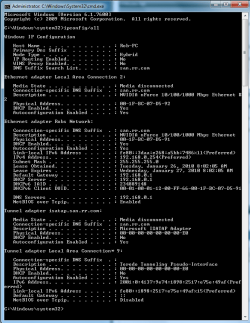
Can you type ip/config then hit enter into the command prompt and post a screen shot of that please.

Looks like this.
 

Attachments

  • IPCONFIG.PNG
    IPCONFIG.PNG
    24.2 KB · Views: 344

My Computer

Computer type
PC/Desktop
Computer Manufacturer/Model Number
Home built
OS
Windows 7 Ult, Windows 8.1 Pro,
CPU
Q9650-4.275GHz, E8600 4.5GHz, E6750-3.8GHz
Motherboard
Evga 780i FTW
Memory
G.Skill PC2 9600 1200Mhz 5 5 5 15 2T
Graphics Card(s)
GTX480
Sound Card
Asus Xonar D2
Monitor(s) Displays
HannsG
Screen Resolution
1680X1050
Hard Drives
GSkill Phoenix Pro 120GB SSD
PSU
ThermalTake Toughpower 1000Watt modular
Case
ThermalTake XaserV
Cooling
Xigmatek S1283
Keyboard
Logitech G15
Mouse
Logitech G9
Internet Speed
T1
Sure. For some reason, it wouldn't paste into this message, so I dropped it into a Word document, which hopefully, is attached.

Thanks for your continued help.
 

Attachments

My Computer

Computer Manufacturer/Model Number
Dell XPS 420
OS
windows 7 ultimate
CPU
Intel Q9400 @ 2.66 Hz
Memory
6G
Just click where it says "Go Advanced" then below click on "Manage Attachments" and then browse for the picture attach and upload.
 

My Computer

Computer type
PC/Desktop
Computer Manufacturer/Model Number
Home built
OS
Windows 7 Ult, Windows 8.1 Pro,
CPU
Q9650-4.275GHz, E8600 4.5GHz, E6750-3.8GHz
Motherboard
Evga 780i FTW
Memory
G.Skill PC2 9600 1200Mhz 5 5 5 15 2T
Graphics Card(s)
GTX480
Sound Card
Asus Xonar D2
Monitor(s) Displays
HannsG
Screen Resolution
1680X1050
Hard Drives
GSkill Phoenix Pro 120GB SSD
PSU
ThermalTake Toughpower 1000Watt modular
Case
ThermalTake XaserV
Cooling
Xigmatek S1283
Keyboard
Logitech G15
Mouse
Logitech G9
Internet Speed
T1
Hopefully, the pdf is now attached. Thanks again for your help
moz-screenshot-1.png
 

Attachments

My Computer

Computer Manufacturer/Model Number
Dell XPS 420
OS
windows 7 ultimate
CPU
Intel Q9400 @ 2.66 Hz
Memory
6G
Sorry I had to help the wife make dinner last night, was working here all day.
Thanks for posting in pdf, I can open those, I didn't have word installed.

It looks to me that your router is not creating the tunnel as required, pretty much what you suspected and what I needed a picture of to confirm. What brand,model of router are you using? It must be an old one maybe?

Do you have any type of firewall or A/V software installed?
 

My Computer

Computer type
PC/Desktop
Computer Manufacturer/Model Number
Home built
OS
Windows 7 Ult, Windows 8.1 Pro,
CPU
Q9650-4.275GHz, E8600 4.5GHz, E6750-3.8GHz
Motherboard
Evga 780i FTW
Memory
G.Skill PC2 9600 1200Mhz 5 5 5 15 2T
Graphics Card(s)
GTX480
Sound Card
Asus Xonar D2
Monitor(s) Displays
HannsG
Screen Resolution
1680X1050
Hard Drives
GSkill Phoenix Pro 120GB SSD
PSU
ThermalTake Toughpower 1000Watt modular
Case
ThermalTake XaserV
Cooling
Xigmatek S1283
Keyboard
Logitech G15
Mouse
Logitech G9
Internet Speed
T1
Yeah, it's a pretty old router - Linksys WRT54G. It's never given me a bit of trouble, and I'd hate to change it, although now that the "n" protocol is finally finished, I may do so eventually.

I use ZoneAlarm and Avira antivirus. I don't think it's either of them, because I've killed them both as I've gone through the troubleshooting process.

Thanks for your continuing help.
 

My Computer

Computer Manufacturer/Model Number
Dell XPS 420
OS
windows 7 ultimate
CPU
Intel Q9400 @ 2.66 Hz
Memory
6G
Ok Zone Alarm will cause problems with Ipv6 functionality "toredo tunnel" and running two anti virus's is just asking for problems. When you say you killed them both does that mean disabled or uninstalled? In Zone Alarm's case disabling won't be enough, you will need to uninstall it completely.

As for your Linksys WRT54G, some settings may need to be changed for it to work correctly with Windows 7. That particular router seems to have problems in certain network set ups so you may need to enable the Mac clone function for it to work properly with Windows 7. Try using the procedure below to set your router up correctly for Windows 7. :)

1) Turn off the modem (Unplug it)
2) Then take the router (Linksys WRT54G) reset it and hold the reset button for 30 seconds.
3) Then open the control page (Internet browser, type in 192.168.1.1, the login and password are set as a default Login: admin Password: admin)
4) Once inside click the MAC Address Clone tab under Setup, enable it then save settings, then switch back to the Basic Setup under Setup. Make sure you are set for Automatic Configuration - DHCP, then change the Local IP Address from 192.168.1.1 to 192.168.2.1 save your settings then close the page.
5) Now turn off the router (unplug it) and turn off the pc (shutdown then unplug it).
6) Your modem should still be off if you forgot to turn it off unplug it and wait 60 seconds, then plug the modem back in, wait till it is completely on and ready to go.
7) Then turn on the router (plug it back in) wait 10 seconds.
8) Then reboot the computer (plug in the power supply and press power on).

After you get your router back up and you are online again, perform an ip/config at the command prompt and check to see if toredo is there.

 

My Computer

Computer type
PC/Desktop
Computer Manufacturer/Model Number
Home built
OS
Windows 7 Ult, Windows 8.1 Pro,
CPU
Q9650-4.275GHz, E8600 4.5GHz, E6750-3.8GHz
Motherboard
Evga 780i FTW
Memory
G.Skill PC2 9600 1200Mhz 5 5 5 15 2T
Graphics Card(s)
GTX480
Sound Card
Asus Xonar D2
Monitor(s) Displays
HannsG
Screen Resolution
1680X1050
Hard Drives
GSkill Phoenix Pro 120GB SSD
PSU
ThermalTake Toughpower 1000Watt modular
Case
ThermalTake XaserV
Cooling
Xigmatek S1283
Keyboard
Logitech G15
Mouse
Logitech G9
Internet Speed
T1
Thanks for the detailed instructions. It'll be a few days before I can try them, as I'm the family's network admin, and if I take everyone in my family off line on a weekend, when they're all doing their thing on the network, I may never be heard from again.
:D
I really appreciate your patience with this.
 

My Computer

Computer Manufacturer/Model Number
Dell XPS 420
OS
windows 7 ultimate
CPU
Intel Q9400 @ 2.66 Hz
Memory
6G
No problem ejscharf, let me know how it goes and report back in when you can.
 

My Computer

Computer type
PC/Desktop
Computer Manufacturer/Model Number
Home built
OS
Windows 7 Ult, Windows 8.1 Pro,
CPU
Q9650-4.275GHz, E8600 4.5GHz, E6750-3.8GHz
Motherboard
Evga 780i FTW
Memory
G.Skill PC2 9600 1200Mhz 5 5 5 15 2T
Graphics Card(s)
GTX480
Sound Card
Asus Xonar D2
Monitor(s) Displays
HannsG
Screen Resolution
1680X1050
Hard Drives
GSkill Phoenix Pro 120GB SSD
PSU
ThermalTake Toughpower 1000Watt modular
Case
ThermalTake XaserV
Cooling
Xigmatek S1283
Keyboard
Logitech G15
Mouse
Logitech G9
Internet Speed
T1
Back
Top