So I accidently uninstalled this device and I have no idea how to get it back. I think I need it (and can someone confirm) for networking my laptop to my desktop?
can someone help
thanks
sharkman
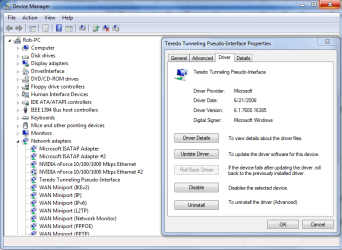
There is another way to reinstall this. Open up the Device Manager and click on the
view button upper left, then choose the "
show hidden devices" tab,this will allow you to see more options.
"if you can't seem to update your Teredo driver and have
ZoneAlarm Security Suite, you may want to check whether the Enable IPv6 box in Firewall | Main | Advanced is ticked or not (the last box in the dialog) - if not, tick it and update the driver from the Device Manager." (- from
http://social.answers.microsoft.com/Forums/en-US/w7hardware/thread/c022478f-17cb-44de-8b85-fd021371eab3)
You might also need to perform the registry fix listed in this Technet thread.
http://social.answers.microsoft.com...k/thread/754c8f29-3a87-4e77-babd-a69c8910e17e
Click on network adaptors then scroll down till you see the
Teredo Tunneling Pseudo-Interface, right click it then choose to
update the driver "you can do this through the properties tab also". You will have the options to browse my computer for the driver software,
or seach automatically < choose this one.
I'm not too clear on what you did to cause this problem but if you uninstalled this driver then reinstalling it should hopefully fix the problem.

Reboot the machine. It should be fixed now.
You can type,
ipconfig /all into the command prompt then hit enter, to confirm if IPv6 is working or not. You should be able to set up a Homegroup if IPv6 is working.




 I'm beyond frustrated, this is the third computer this year. I'm wondering if I have any defense?