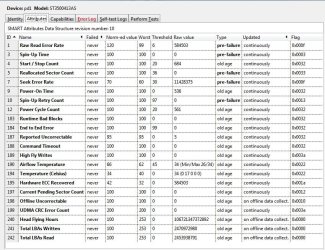
I have four drives in my PC. One is a 3 year old Seagate 1TB ST31000528AS SATA II.
About a year ago, I was using an ASrock motherboard. I started having the drive vanish from Windows Explorer, and there were a lot of unexpected drive disconnect errors in Event Viewer. A new latching-type cable from Newegg solved my problem.
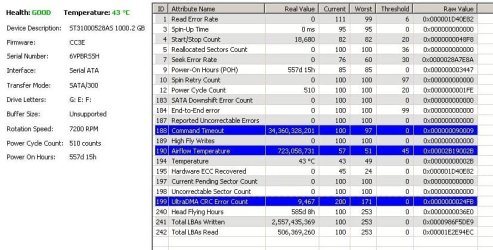
This afternoon, I happened to click the Health tab in Defraggler, and the pic below made my jaw drop.
Attribute 188 Command Timeout shouldn't be in the 34 billion range so far as I know.
Attribute 190 Airflow Temperature seems to be hotter than a thousand suns.
Attribute 199 CRC Error Count and Attribute 7 Read Error Rate are both known to me.. these were going up fast before I replaced my cable.
I tested my drive with SeaTools for Windows and it passed. Using CHKDSK comes up clean. Using a tool called DriveInfo shows the Command Timeout at 'green' and 100% okay. Windows Event Viewer hasn't shown any drive read or write errors since I got this new Gigabyte mobo and installed Win 7 fresh in June 2013.
I can't afford any data loss.. I've got over 700GB of movies, TV shows, and Macrium backup images on this thing and nowhere else to store it. My computer does run pretty much 24/7 for Folding@Home, but this particular drive is used for storage. Any input here? I'd appreciate it.
About a year ago, I was using an ASrock motherboard. I started having the drive vanish from Windows Explorer, and there were a lot of unexpected drive disconnect errors in Event Viewer. A new latching-type cable from Newegg solved my problem.
This afternoon, I happened to click the Health tab in Defraggler, and the pic below made my jaw drop.
Attribute 188 Command Timeout shouldn't be in the 34 billion range so far as I know.
Attribute 190 Airflow Temperature seems to be hotter than a thousand suns.
Attribute 199 CRC Error Count and Attribute 7 Read Error Rate are both known to me.. these were going up fast before I replaced my cable.
I tested my drive with SeaTools for Windows and it passed. Using CHKDSK comes up clean. Using a tool called DriveInfo shows the Command Timeout at 'green' and 100% okay. Windows Event Viewer hasn't shown any drive read or write errors since I got this new Gigabyte mobo and installed Win 7 fresh in June 2013.
I can't afford any data loss.. I've got over 700GB of movies, TV shows, and Macrium backup images on this thing and nowhere else to store it. My computer does run pretty much 24/7 for Folding@Home, but this particular drive is used for storage. Any input here? I'd appreciate it.
Attachments
Last edited:
My Computer
- Computer type
- PC/Desktop
- Computer Manufacturer/Model Number
- Self-Built
- OS
- Win10 Pro 64-bit
- CPU
- AMD Ryzen 7 3800X
- Motherboard
- Gigabyte X570 UD
- Memory
- 32 GB Kingston DDR4-2666
- Graphics Card(s)
- MSI nVidia GT 710 (2GB)
- Sound Card
- Creative Audigy FX 5.1
- Monitor(s) Displays
- ViewSonic VG2439Smh 24"
- Screen Resolution
- 1920x1080
- Hard Drives
- 3xWD1TB; 1xSeagate 1TB... all spinning rust
- PSU
- EVGA 100-W1-0500-KR (500w)
- Case
- SilverStone PS10 (modified)
- Cooling
- CPU:AMD Wraith Prism. Case:3x Noctua 120mm
- Keyboard
- Compaq Professional PS/2
- Mouse
- Microsoft Basic Optical Mouse 2.0
- Internet Speed
- Fiber 1Gbit/sec down/up
- Antivirus
- Avast Free
- Browser
- FF, Chrome
- Other Info
- 2x LG GH24NSC0 DVD burners, Mackie CR3 monitor speakers