TES4 Oblivion problems.

BlackSparrow

The Crazy One
Power User
Local time
5:08 AM
Messages
1,282
Location
Canberra, ACT
Hello again.

I have been having a problem with The Elder Scrolls IV Oblivion. Every time i patch the game to version 1.2.0412 (or something close to that) it works, but at the end of the patching procedure it says that it can't find the game, but finds a different one. This isn't most of the problem, the problem is that when I look at the grass when I get out of the tutorial level it shows the map instead of the grass. I tried re-installing it, but it doesn't fix anything. I have also tried the pause/break and winkey key trick, still doesn't turn it back to normal.

Please help me with this!

Cheers.
 

My Computer

Computer Manufacturer/Model Number
Hewlett-Packard
OS
Windows 7 Professional 32-bit (6.1, Build 7600)
Memory
4096MB RAM
Graphics Card(s)
Radeon ATI HD4870
Monitor(s) Displays
NVIDIA GeForce GT220
Screen Resolution
1680 x 1050
those patches are tricky - you gotta suss out which version you got, before you apply 'em..
- in later editions, they incorporated some of the earlier patches


- the version shows on the loading screen/intro thingy..
 

My Computer

Computer type
PC/Desktop
Computer Manufacturer/Model Number
benchtec, built to personal specs
OS
Windows10 Pro - 64Bit vs.10547
CPU
i7-965 Extreme Edition (8 Cores) at 3.3GHz (no OC)
Motherboard
BloodRageX58 (Socket1366)
Memory
12G Corsair Dominator DDR3 - tripled
Graphics Card(s)
2xAMD SapphireNITRO R9 380(4G) crossfire
Sound Card
Sonar(SB)X-Fi onboard
Monitor(s) Displays
SyncMaster P2050 20"
Screen Resolution
1600x900 (widescreen)
Hard Drives
480G\OCZSolid3SSD, 64G\OCZVertex3SSD,60G\OCZVertex2SSD, 1TB\spinpointF1SATAHDD
PSU
1200w Power Station Gold
Case
ANTEC 900/2 all blue lights, etc..
Cooling
Noctua SE1366 NH-U12P - a tight fit, but a monster cooler!!
Keyboard
Logitech G19 (wired)
Mouse
Logitech G9 Laser (wired)
Internet Speed
150mb unlimited
Browser
IE11(RP)
Other Info
Xbox One, Nokia735 Windows10 mobile, LG HD/DVD/Blu-Ray r/w, CyberlinkPowerDVD15, LogitechZ5500-SS(5.1), LogitechG35Phones-SS(7.1),MSOffice 2007,CorelDrawX7,Painter2016, Wacom Intuos Pro-SE
I have done that.

When i first installed Oblivion, it showed version 1.0.214, which is a earlier version from the one I have. The map does not show for that version as grass, but when i patch it, the map shows again.

Thanks for the help as well Bug.
 

My Computer

Computer Manufacturer/Model Number
Hewlett-Packard
OS
Windows 7 Professional 32-bit (6.1, Build 7600)
Memory
4096MB RAM
Graphics Card(s)
Radeon ATI HD4870
Monitor(s) Displays
NVIDIA GeForce GT220
Screen Resolution
1680 x 1050
check out this page:
Oblivion:Patch - UESPWiki

read the article carefully, and make sure you are using the correct patch..
in some cases a re-install is needed - bit of a nuisance..

- but the game's definitely worth the effort..
 

My Computer

Computer type
PC/Desktop
Computer Manufacturer/Model Number
benchtec, built to personal specs
OS
Windows10 Pro - 64Bit vs.10547
CPU
i7-965 Extreme Edition (8 Cores) at 3.3GHz (no OC)
Motherboard
BloodRageX58 (Socket1366)
Memory
12G Corsair Dominator DDR3 - tripled
Graphics Card(s)
2xAMD SapphireNITRO R9 380(4G) crossfire
Sound Card
Sonar(SB)X-Fi onboard
Monitor(s) Displays
SyncMaster P2050 20"
Screen Resolution
1600x900 (widescreen)
Hard Drives
480G\OCZSolid3SSD, 64G\OCZVertex3SSD,60G\OCZVertex2SSD, 1TB\spinpointF1SATAHDD
PSU
1200w Power Station Gold
Case
ANTEC 900/2 all blue lights, etc..
Cooling
Noctua SE1366 NH-U12P - a tight fit, but a monster cooler!!
Keyboard
Logitech G19 (wired)
Mouse
Logitech G9 Laser (wired)
Internet Speed
150mb unlimited
Browser
IE11(RP)
Other Info
Xbox One, Nokia735 Windows10 mobile, LG HD/DVD/Blu-Ray r/w, CyberlinkPowerDVD15, LogitechZ5500-SS(5.1), LogitechG35Phones-SS(7.1),MSOffice 2007,CorelDrawX7,Painter2016, Wacom Intuos Pro-SE
I'd also recommend reinstalling and then trying to apply the patch again.

I've been having some patch problems myself... the latest for shivering isles, the very same file I used the last time, simply refuses to install on the false grounds that it can't locate some file (that it had absolutely no problem detecting on previous installs). However, everything - including DLC - works, so I guess it's not so important of a patch with the GOTY version. :huh:

That's just Oblivion for you... it's a finicky little minx. One install it all works, the next it won't...

In any event, I hope you can fix yours. Sounds like a very annoying problem...
 

My Computer

Computer Manufacturer/Model Number
Acer Aspire 5738PG-6306
OS
7 Ultimate x64 SP1
CPU
Core 2 Duo T6600 @ 2.20GHz
Motherboard
Acer JV50 | Intel PM45 Chipset | BIOS Phoenix v1.21
Memory
4GB SDRAM DDR2 667
Graphics Card(s)
ATI Mobility Radeon 4570HD 512MB VDDR3 (2.25GB HyperMemory)
Sound Card
Integrated Dolby Home Theater HD Audio Support
Monitor(s) Displays
15.6" LED backlight HD/WS CineCrystal w/ Multi-Touch
Screen Resolution
Notebook: 1366x768 | Syncmaster P2370HD: 1920x1080
Hard Drives
Primary internal: 320GB WD3200BEVT-22ZCT0 @ 5400 RPM | Secondary external 1: 2TB Cavalry CAXB3702T0 @7200 RPM (USB 2.0) | Secondary external 2: 500GB Calvary CAUM @7200 RPM (USB 2.0).
PSU
AC Adapter
Case
Blue Clam shell
Cooling
OEM Bult-in.
Keyboard
Microsoft Wireless 3000 (USB)
Mouse
Logitech V220 (USB)
Internet Speed
31Mbps DL/25Mbps UL - Verizon fiOs/Netgear WNDR37AV
Other Info
EXTERNAL DISPLAY: 23" Samsung Syncmaster P2370HD | EXTERNAL SOUND: 300 Watt MX-KB30 JVC Stereo (AUX) | ROUTER: Netgear WNDR37AV 802.11a/b/g/n Dual-Band Gigabit | Satechi 12-Port USB 2.0 Hub | GAME PAD: SteelSeries 3GC USB 2.0 (JoyToKey Mapping) | DETAILED SYSTEM SPECIFICATIONS: http://www.tigerdirect.com/applications/SearchTools/item-details.asp?EdpNo=5265887&CatId=4938
check out this page:
Oblivion:Patch - UESPWiki

read the article carefully, and make sure you are using the correct patch..
in some cases a re-install is needed - bit of a nuisance..

- but the game's definitely worth the effort..
Thanks for the page, i'll try that one later on today.
 

My Computer

Computer Manufacturer/Model Number
Hewlett-Packard
OS
Windows 7 Professional 32-bit (6.1, Build 7600)
Memory
4096MB RAM
Graphics Card(s)
Radeon ATI HD4870
Monitor(s) Displays
NVIDIA GeForce GT220
Screen Resolution
1680 x 1050
I'd also recommend reinstalling and then trying to apply the patch again.

I've been having some patch problems myself... the latest for shivering isles, the very same file I used the last time, simply refuses to install on the false grounds that it can't locate some file (that it had absolutely no problem detecting on previous installs). However, everything - including DLC - works, so I guess it's not so important of a patch with the GOTY version. :huh:

That's just Oblivion for you... it's a finicky little minx. One install it all works, the next it won't...

In any event, I hope you can fix yours. Sounds like a very annoying problem...

I've been doing that for the patch I have and it didn't work. I'm also using an Unofficial Patch to see if the problem still happens, which it only does outside towns instead of inside now. It is still really really annoying!!!
 

My Computer

Computer Manufacturer/Model Number
Hewlett-Packard
OS
Windows 7 Professional 32-bit (6.1, Build 7600)
Memory
4096MB RAM
Graphics Card(s)
Radeon ATI HD4870
Monitor(s) Displays
NVIDIA GeForce GT220
Screen Resolution
1680 x 1050
Ok, i tried what both of you suggested, but it still happens. The patch that you gave me Meister is the same one i've been using, and the same one keeps doing the glitch. I also tried re-installing it, as you suggested EvilOzzmess but it just keeps happening when the patch is installed, yet when it isn't it doesn't happen. The game does lag a bit when I start it up, but that's nothing that I can't fix, it happens to me all the time...

Thanks to both of you. I will be checking other forums if someone else has had this problem tomorrow.

Ciao.
 

My Computer

Computer Manufacturer/Model Number
Hewlett-Packard
OS
Windows 7 Professional 32-bit (6.1, Build 7600)
Memory
4096MB RAM
Graphics Card(s)
Radeon ATI HD4870
Monitor(s) Displays
NVIDIA GeForce GT220
Screen Resolution
1680 x 1050
Here's an idea.....

I purchased Oblivion GOTY Edition Deluxe off of Steam a week ago - http://www.sevenforums.com/gaming/174201-elder-scrolls-iv-oblivion-game-year-edition-deluxe.html

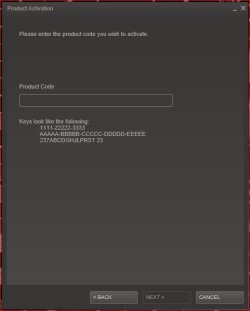
Anyway if you have a valid activation code you could load that through steam and the game will be downloaded through Steam for free.

Capture.JPG

The game will download with the latest patch, and will automatically update (if you allow it) anytime a patch is released - it does this with all games through Steam. My game was already patched to 1.2.0416 when the download completed.

Here's the instructions..... Activating a Product on Steam

Don't have Steam - Steam, The Ultimate Online Game Platform - It's free.

Just a suggestion.
 

My Computer

Computer type
PC/Desktop
Computer Manufacturer/Model Number
Custom built by me.
OS
Windows 10 Pro
CPU
Intel Core i7-4770K (3.5Ghz)
Motherboard
Gigabyte G1 Sniper 5 (F10 Bios)
Memory
32 gig Corsair Dominator Platinum (4x8Gig)
Graphics Card(s)
Sapphire Tri-X R9 Fury
Sound Card
Soundblaster ZXR
Monitor(s) Displays
NEC PA242W 24" LCD Monitor
Screen Resolution
1920 x 1200
Hard Drives
Primary - Samsung 850 Pro (512gig), Samsung 840 Pro (256gig), 2TB WD Caviar Black.
PSU
EVGA Supernova 1000 G2
Case
Cooler Master HAF X
Cooling
Corsair H100i with Corsair Air Series SP120 Quiet Fans
Keyboard
Logitech Wireless Wave
Mouse
Logitech Performance MX
Internet Speed
High Speed Cable
Antivirus
Norton Security
Browser
IE11
Other Info
Memory Timings - 1866MHz @ 9-9-9-27-1T @ 1.5 volts
PS. a word of warning..:D

the Steam folder can get very BIG on your computer, if you're not careful..

- mine's currently holding 35 gigs worth of games..

:cool:
 

My Computer

Computer type
PC/Desktop
Computer Manufacturer/Model Number
benchtec, built to personal specs
OS
Windows10 Pro - 64Bit vs.10547
CPU
i7-965 Extreme Edition (8 Cores) at 3.3GHz (no OC)
Motherboard
BloodRageX58 (Socket1366)
Memory
12G Corsair Dominator DDR3 - tripled
Graphics Card(s)
2xAMD SapphireNITRO R9 380(4G) crossfire
Sound Card
Sonar(SB)X-Fi onboard
Monitor(s) Displays
SyncMaster P2050 20"
Screen Resolution
1600x900 (widescreen)
Hard Drives
480G\OCZSolid3SSD, 64G\OCZVertex3SSD,60G\OCZVertex2SSD, 1TB\spinpointF1SATAHDD
PSU
1200w Power Station Gold
Case
ANTEC 900/2 all blue lights, etc..
Cooling
Noctua SE1366 NH-U12P - a tight fit, but a monster cooler!!
Keyboard
Logitech G19 (wired)
Mouse
Logitech G9 Laser (wired)
Internet Speed
150mb unlimited
Browser
IE11(RP)
Other Info
Xbox One, Nokia735 Windows10 mobile, LG HD/DVD/Blu-Ray r/w, CyberlinkPowerDVD15, LogitechZ5500-SS(5.1), LogitechG35Phones-SS(7.1),MSOffice 2007,CorelDrawX7,Painter2016, Wacom Intuos Pro-SE
PS. a word of warning..:D

the Steam folder can get very BIG on your computer, if you're not careful..

- mine's currently holding 35 gigs worth of games..

:cool:

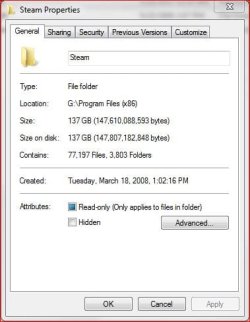
meh..... :sleepy: try a 137gig :o

Steam Folder.JPG

My games drive currently has 333 gigs of game stuff :)
 

My Computer

Computer type
PC/Desktop
Computer Manufacturer/Model Number
Custom built by me.
OS
Windows 10 Pro
CPU
Intel Core i7-4770K (3.5Ghz)
Motherboard
Gigabyte G1 Sniper 5 (F10 Bios)
Memory
32 gig Corsair Dominator Platinum (4x8Gig)
Graphics Card(s)
Sapphire Tri-X R9 Fury
Sound Card
Soundblaster ZXR
Monitor(s) Displays
NEC PA242W 24" LCD Monitor
Screen Resolution
1920 x 1200
Hard Drives
Primary - Samsung 850 Pro (512gig), Samsung 840 Pro (256gig), 2TB WD Caviar Black.
PSU
EVGA Supernova 1000 G2
Case
Cooler Master HAF X
Cooling
Corsair H100i with Corsair Air Series SP120 Quiet Fans
Keyboard
Logitech Wireless Wave
Mouse
Logitech Performance MX
Internet Speed
High Speed Cable
Antivirus
Norton Security
Browser
IE11
Other Info
Memory Timings - 1866MHz @ 9-9-9-27-1T @ 1.5 volts
PS. a word of warning..:D

the Steam folder can get very BIG on your computer, if you're not careful..

- mine's currently holding 35 gigs worth of games..

:cool:


My games drive currently has 333 gigs of game stuff :)

That's around the same for my second hard drive as well, and Steam takes up 197GB of that, lol. No wonder that drive was at 40% fragmentation last night.
 

My Computer

Computer type
PC/Desktop
Computer Manufacturer/Model Number
Custom Built
OS
Windows 8.1 Pro x64
CPU
Intel Core i7 4790k
Motherboard
MSI Z97S Krait Edition
Memory
8GB Corsair Dominator 1600MHz
Graphics Card(s)
MSI TwinFrozr GeForce GTX770
Sound Card
ASUS Xonar DX/XD 7.1
Monitor(s) Displays
Dell 24" S2409W + Dell 20" E207WFP
Screen Resolution
1920x1080 + 1680x1050
Hard Drives
1x 120GB OCZ Agility 3, 1x 750GB Western Digital Caviar Black, 1x 1TB Western Digital Caviar Blue
PSU
Corsair HX850 modular
Case
Fractal Design Define R4
Cooling
Corsair H60 w/ twin Corsair SP120 fans
Keyboard
Logitech G510S Keyboard
Mouse
Logitech G500S Laser Mouse
Internet Speed
40Mbps
Antivirus
Microsoft Security Essentials
Browser
Google Chrome
Other Info
LG Blu-Ray player
Thanks sygnus, I'll have a look at it once the download rate for the internet is back into the green zone.

I also knew about it taking up alot of space Meister, I used to have it before my computer was reset to WINDOWS 7. I used to play Americas Army 2 and 3 through STEAM. It took up around 15 gigs worth of memory in my old disk.

Thank you both!
 

My Computer

Computer Manufacturer/Model Number
Hewlett-Packard
OS
Windows 7 Professional 32-bit (6.1, Build 7600)
Memory
4096MB RAM
Graphics Card(s)
Radeon ATI HD4870
Monitor(s) Displays
NVIDIA GeForce GT220
Screen Resolution
1680 x 1050
Back
Top