Testing AntiVirus and AntiMalware programs?

DavidE

____________
Guru
Gold Member
VIP
Local time
5:48 PM
Messages
6,330
Location
NC, USA
How can I test AntiVirus and AntiMalware programs?
Are there any sites with safe TEST files like EICAR, but with more test files (malware types)?
I'm testing different AV realtime programs right now and would like to see what happens when a malware/virus file tries to infect the PC.
- Does the program detect the malicious file?
- If it is detected, what happens?

A couple of MBAM threads I found with a similar question:
https://forums.malwarebytes.org/index.php?showtopic=18097
https://forums.malwarebytes.org/index.php?showtopic=16006
 

My Computer

Computer type
PC/Desktop
Computer Manufacturer/Model Number
home built
OS
Multi-Boot W7_Pro_x64 W8.1_Pro_x64 W10_Pro_x64 +Linux_VMs +Chromium_VM
CPU
AMD Athlon II x4 620
Motherboard
Gigabyte GA-MA785G-UD3H
Memory
6GB GSkill DDR2 800
Graphics Card(s)
AMD 4670 GPU + AMD 4200 IGP
Sound Card
on board Realtek ALC889A
Monitor(s) Displays
RCA 40" LCD TV, Insignia 32" LCD TV, HP 15" LCD monitor
Screen Resolution
1680 x 1050
Hard Drives
OCZ Vertex 3 120GB,
Samsung F3 1TB (3),
Several others - WD, Seagate, Hitachi, ...
PSU
Corsair 500 W
Case
Rosewill mid tower
Cooling
CM 90mm rifle
Keyboard
Gyration wireless, Logitech wireless, Dell USB wired
Mouse
Gyration wireless, Logitech wireless, V7 USB wired
Internet Speed
Spectrum - 100Mbps D / 10Mbps U
Antivirus
Avast, MBAM3, EMET, WinPatrol
Browser
Pale Moon, Firefox, IE
Other Info
2 multi-boot PC's
Mainly HTPC/Office/Gen purpose (no gaming).
Trendnet USB KVM.
LG DVD burner/Blue Ray Player.
Tray system for removable SATA backup drives.

Not currently OCd, under-volted.
I use Hybrid sleep, rarely re-boot or shutdown.

Hauppauge HD-PVR, Avermedia PCIe TV Tuner, Hauppauge PCI TV Tuner.
I don't know of any safe websites that offer test infections... but I will comment on your post in this other thread where you mention Avira.

One of the couples that I support had Conduit and about a dozen other bits of malware. (This computer was "protected" by MSE.) I had not made up my mind yet between Avira, Bitdefender, Panda or some other free AV. So I installed Avira into a virtual machine and then tried to install Conduit. Avira happily allowed the install :-(

Panda killed the Conduit installer as soon as the download completed :-)

I've played around (inside an isolated VM) with real infected files - testing them against various AV tools, but there is no clear winner. Panda allowed several things that it should have stopped.

There is a setup aspect of Panda that I'm not too thrilled about. It boasts about preventing the ransom-ware stuff by white listing apps for certain file extensions for certain folders. I'm just not sure that I want to add all of the extensions that are missing by default. Also, I have no idea if there will be a performance hit if the list of extensions becomes massive and the root of the system drive is listed instead of select folders.
 

My Computer

Computer type
Laptop
Computer Manufacturer/Model Number
Employer provided Dell Latitude
OS
W7 Pro SP1 64bit
CPU
i7
Memory
8GB
Graphics Card(s)
Intel HD Graphics
Hard Drives
crappy SSD
Antivirus
Employer mandated Symantec Endpoint Protection
Browser
Pale Moon 64bit, IE11 64bit & Chrome 64bit
Thanks for the info.
Yea, there is no clear winner, that's why there is so many opinions and choices ...
 

My Computer

Computer type
PC/Desktop
Computer Manufacturer/Model Number
home built
OS
Multi-Boot W7_Pro_x64 W8.1_Pro_x64 W10_Pro_x64 +Linux_VMs +Chromium_VM
CPU
AMD Athlon II x4 620
Motherboard
Gigabyte GA-MA785G-UD3H
Memory
6GB GSkill DDR2 800
Graphics Card(s)
AMD 4670 GPU + AMD 4200 IGP
Sound Card
on board Realtek ALC889A
Monitor(s) Displays
RCA 40" LCD TV, Insignia 32" LCD TV, HP 15" LCD monitor
Screen Resolution
1680 x 1050
Hard Drives
OCZ Vertex 3 120GB,
Samsung F3 1TB (3),
Several others - WD, Seagate, Hitachi, ...
PSU
Corsair 500 W
Case
Rosewill mid tower
Cooling
CM 90mm rifle
Keyboard
Gyration wireless, Logitech wireless, Dell USB wired
Mouse
Gyration wireless, Logitech wireless, V7 USB wired
Internet Speed
Spectrum - 100Mbps D / 10Mbps U
Antivirus
Avast, MBAM3, EMET, WinPatrol
Browser
Pale Moon, Firefox, IE
Other Info
2 multi-boot PC's
Mainly HTPC/Office/Gen purpose (no gaming).
Trendnet USB KVM.
LG DVD burner/Blue Ray Player.
Tray system for removable SATA backup drives.

Not currently OCd, under-volted.
I use Hybrid sleep, rarely re-boot or shutdown.

Hauppauge HD-PVR, Avermedia PCIe TV Tuner, Hauppauge PCI TV Tuner.
Spyshelter

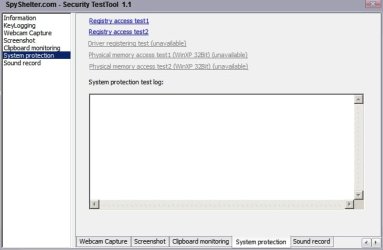
I can recommend running the keylogger test and other tests available from:

SpyShelter Stop-Logger - World's Best Anti-Keylogging Software. Detect And Remove All Kinds Of Keyloggers.

Test security of your PC

Check if your security software really protects you against unknown keyloggers and spyware.


It does a decent job of testing your defences without doing any harm. Download link is near the bottom of the page or directly download from the link below.

Download

SpyShelter.com - Security TestTool  1.jpg

Also see the following tests:

http://www.pcflank.com/

A few more: (Ignore the Eicar tests but try the others).

http://www.amtso.org/feature-settings-check.html

Also it's worth noting that no matter how good the security that you have in place is - if your security software fails to scan an email attachment for any reason you will still be able to open the attachment and thus potentially introduce a virus or worm. Windows can be set to block attachments from opening if the security software didn't scan the attachment but this is not enabled by default in Windows 7. The feature needs to be enabled by the user.
 
Last edited:

My Computer

Computer type
Laptop
Computer Manufacturer/Model Number
ASUS
OS
Microsoft Windows 7 Home Premium 64-bit 7601 Multiprocessor Free Service Pack 1
CPU
AMD C-60 APU with Radeon(tm) HD Graphics
Motherboard
ASUSTeK COMPUTER INC. X501U
Memory
4.00 GB
Graphics Card(s)
AMD Radeon HD 6290 Graphics
Sound Card
(1) AMD High Definition Audio Device (2) Realtek High Defi
Screen Resolution
1366 x 768 x 32 bits (4294967296 colors) @ 60 Hz
Hard Drives
Hitachi HTS545050A7E380 SATA Disk Device
Antivirus
Comodo CIS & FW, SecureAplus App Whitelisting, Threatfire
Browser
Cyberfox 64bit, Opera 64bit, Airfox
Other Info
Spy-The-Spy, HitmanPro.Alert, Norton Connect Safe, MJRegWatcher, BitDefender TrafficLight, Voodoo Shield, Zemana AntiMalware
Blocking toolbar installation

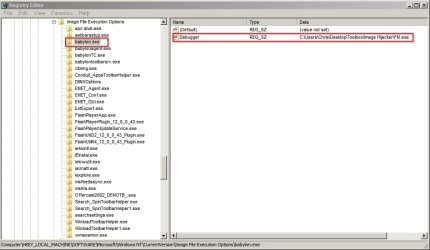
I block unwanted toolbars and the like that sometimes don't get detected by my security software (especially those toolbar installers that come bundled with free software with no chance to opt out of the install) by adding the executable file names to Image Hijacker. If I ever get caught out - I'll remove the toolbar then add it to the block list. Using this method it's possible to clean install software that comes bundled with toolbars.

When a program tries to run you can use Image Hijacker to run a safe program in it's place instead. In this case it displays a user defined message.

Image Hijacker Free Download

It makes use of Image File Execution Options that is normally used to launch the debugger but instead it creates registry entries to launch a safe program in place of the nasty file that attempted to launch.

HKEY_LOCAL_MACHINE\Software\Microsoft\Windows NT\currentversion\image file execution options.

In this example - if babylon.exe tries to run then fm.exe will be launched in it's place. fm.exe is the program that simply displays the user defined message - in this case "Babylon Toolbar Installation Blocked".
 

Attachments

  • Debugger.jpg
    Debugger.jpg
    56 KB · Views: 6

My Computer

Computer type
Laptop
Computer Manufacturer/Model Number
ASUS
OS
Microsoft Windows 7 Home Premium 64-bit 7601 Multiprocessor Free Service Pack 1
CPU
AMD C-60 APU with Radeon(tm) HD Graphics
Motherboard
ASUSTeK COMPUTER INC. X501U
Memory
4.00 GB
Graphics Card(s)
AMD Radeon HD 6290 Graphics
Sound Card
(1) AMD High Definition Audio Device (2) Realtek High Defi
Screen Resolution
1366 x 768 x 32 bits (4294967296 colors) @ 60 Hz
Hard Drives
Hitachi HTS545050A7E380 SATA Disk Device
Antivirus
Comodo CIS & FW, SecureAplus App Whitelisting, Threatfire
Browser
Cyberfox 64bit, Opera 64bit, Airfox
Other Info
Spy-The-Spy, HitmanPro.Alert, Norton Connect Safe, MJRegWatcher, BitDefender TrafficLight, Voodoo Shield, Zemana AntiMalware
@Callender nice. tutorials its so great i didnt want to make delete from Registry edit. some case is so sensitive. ehehe i want to try so the virus cant expand there ehehe i try malwarebytes too its nice. :D
 

My Computer

Computer type
Laptop
Computer Manufacturer/Model Number
Dell,N4050
OS
windows 7 64bit, windows 7 ultimate 64bit
CPU
B970
Motherboard
Dell inc
Memory
8gb
Graphics Card(s)
intel R graphics Family
Hard Drives
500gb, western digital
Antivirus
Microsoft Essentials
Browser
Google Chrome
Remember folks that things we don't want like Conduit, browser add on's, PUP's are not viruses.
That is why many anti virus don't block them.
The anti virus program doesn't know whether you want them or not but presumes that you do or you wouldn't of accepted them. Their are security programs that will hunt them out if you care to use them.
 

My Computer

Computer type
PC/Desktop
Computer Manufacturer/Model Number
Home made Desktop
OS
Windows 10 Pro. 64/ version 1709 Windows 7 Pro/64
CPU
Intel i7-6800K @ 4.3
Motherboard
ASUS X-99 Deluxe II
Memory
Corsair Platinum 16 gig @2400
Graphics Card(s)
EVGA GTX 1070 OC
Monitor(s) Displays
Asus 27" LED LCD/VE278Q
Screen Resolution
1920-1080 or 1280-720 HDMI
Hard Drives
INTEL SSD 730-240 Gb Sata 3.0/
PSU
EVGA Platium 1200W
Case
Phanteks Luxe Tempered Glass 8 fans/ one radiator
Cooling
XSPC/ Water Cooled CPU
Keyboard
Das 4 Professional
Mouse
Logitech M705/MX Anywhere 2-S
Internet Speed
100 mbits
Antivirus
Microsoft Security Essentials/ Malwarebytes Premium 3.0/ SAS
Browser
I.E. 11 default/Firefox/ ISP Time Warner Cable/Spectrum
Other Info
LG BluRay Burner/
Sound system-KLipsch-THX/
Icy Dock ssd Hot Swap bays.
How can I test AntiVirus and AntiMalware programs?
Are there any sites with safe TEST files like EICAR, but with more test files (malware types)?
I'm testing different AV realtime programs right now and would like to see what happens when a malware/virus file tries to infect the PC.
- Does the program detect the malicious file?
- If it is detected, what happens?

A couple of MBAM threads I found with a similar question:
https://forums.malwarebytes.org/index.php?showtopic=18097
https://forums.malwarebytes.org/index.php?showtopic=16006

you can pop open a VM and run some crazy malware I know of some good malware domain sites pm me if you are interested :)
 

My Computer

Computer type
PC/Desktop
Computer Manufacturer/Model Number
Hp Pavillion Model #p7-1120
OS
Windows 7 Home Premium 64 bit
CPU
I3 Cpu 2130 Core
Motherboard
Pegatron Carmel2
Memory
8GB PC3-10600 MB/sec DDR3-1333
Graphics Card(s)
NVidia Gt 610 2GB
Monitor(s) Displays
Dual Monitors
Hard Drives
Western Digital 1.5Tb SATA RPM:5400
Antivirus
EAM,AVG Link Scanner,Sandboxie,Private Firewall
Browser
Comodo Dragon
Other Info
Moderate knowledge to Advanced on protecting a computer from malware and bad websites :) I clean computers whenever i can
Thanks for the offer, but I'm not able to test real malware "safely"...
I tried using VMs a while ago, but my test box is an old AMD dual core and the performance hit alone made it "too unusable" for me. :(
The box works fine for what it is and how I use it ... so I will keep using it "as-is" until ...
 

My Computer

Computer type
PC/Desktop
Computer Manufacturer/Model Number
home built
OS
Multi-Boot W7_Pro_x64 W8.1_Pro_x64 W10_Pro_x64 +Linux_VMs +Chromium_VM
CPU
AMD Athlon II x4 620
Motherboard
Gigabyte GA-MA785G-UD3H
Memory
6GB GSkill DDR2 800
Graphics Card(s)
AMD 4670 GPU + AMD 4200 IGP
Sound Card
on board Realtek ALC889A
Monitor(s) Displays
RCA 40" LCD TV, Insignia 32" LCD TV, HP 15" LCD monitor
Screen Resolution
1680 x 1050
Hard Drives
OCZ Vertex 3 120GB,
Samsung F3 1TB (3),
Several others - WD, Seagate, Hitachi, ...
PSU
Corsair 500 W
Case
Rosewill mid tower
Cooling
CM 90mm rifle
Keyboard
Gyration wireless, Logitech wireless, Dell USB wired
Mouse
Gyration wireless, Logitech wireless, V7 USB wired
Internet Speed
Spectrum - 100Mbps D / 10Mbps U
Antivirus
Avast, MBAM3, EMET, WinPatrol
Browser
Pale Moon, Firefox, IE
Other Info
2 multi-boot PC's
Mainly HTPC/Office/Gen purpose (no gaming).
Trendnet USB KVM.
LG DVD burner/Blue Ray Player.
Tray system for removable SATA backup drives.

Not currently OCd, under-volted.
I use Hybrid sleep, rarely re-boot or shutdown.

Hauppauge HD-PVR, Avermedia PCIe TV Tuner, Hauppauge PCI TV Tuner.
Oh alright your welcome
 

My Computer

Computer type
PC/Desktop
Computer Manufacturer/Model Number
Hp Pavillion Model #p7-1120
OS
Windows 7 Home Premium 64 bit
CPU
I3 Cpu 2130 Core
Motherboard
Pegatron Carmel2
Memory
8GB PC3-10600 MB/sec DDR3-1333
Graphics Card(s)
NVidia Gt 610 2GB
Monitor(s) Displays
Dual Monitors
Hard Drives
Western Digital 1.5Tb SATA RPM:5400
Antivirus
EAM,AVG Link Scanner,Sandboxie,Private Firewall
Browser
Comodo Dragon
Other Info
Moderate knowledge to Advanced on protecting a computer from malware and bad websites :) I clean computers whenever i can
I wanted the same thing David when I was testing Mbam beta.

I cam across http://www.testmypcsecurity.com/securitytests/spycar_suite.html which seems similar to what CallEnder posted.

I had some difficulty downloading for a number of reasons. The download link itself might be broken or intermittent... and then there's the issue with downloading malware tests. Avast and or Defender or SmartFilter blocked the download - haha - that itself was a good test.

I had the suite on my system for a while but never executed the tests inside the zip. Again, my protection blocked me from opening the zip and I said - screw it. Note that while the zip existing only a few scanners (sorry, I forget which ones) flagged it or the flagged the files inside (I scan archives with every scanner being used/tested)

Good luck, post what you find as useful (and safe to use);)

Bill
.
 

My Computer

Computer type
Laptop
Computer Manufacturer/Model Number
HP Pavilion dv6-6c10us
OS
x64 (6.3.9600) Win8.1 Pro & soon dual boot x64 (6.1.7601) Win7_SP1 HomePrem
CPU
AMD A6-3420M APU with Radeon(tm) HD Graphics
Motherboard
Hewlett-Packard 1805
Memory
6.00 GB
Graphics Card(s)
AMD Radeon(TM) HD 6520G
Sound Card
(1) AMD High Definition Audio Device (2) IDT High Definiti
Monitor(s) Displays
HP W2072a 20" LCD (1600 x 900) @ 60 Hz
Screen Resolution
1366 x 768 x 32 bits (4294967296 colors) @ 60 Hz
Hard Drives
ST640LM0 00 HM641JI SATA Disk Device
Keyboard
Logitech k520 wireless KB
Mouse
Logitech m320 wireless mouse (bundled with KB)
Internet Speed
15/5 | 54 MB Wireless 'n'
Antivirus
Realtime: Defender or Avast | On-demand: Malwarebytes, ESET
Browser
IE 11 on Win8, IE 10 on win 7
Other Info
Media: [Gimp, Audacity, VLC] || Comm: [WEmail 2012, Skype] || Productivity: [OpenOffice,| Textpad] || Utils: [Sysinternals, cCleaner, Speccy, Defraggler]
Back
Top