Testing Legacy Apps for Compatibility with Windows 7

johnstd2

New member
Local time
9:46 PM
Messages
4
Having spent a while checking which of my existing applications will run under Windows 7 I have now learned enough to realise that my conclusions may have been affected by XP Mode which I believe exists only in Windows 7 Professional & Ultimate.

My current copy of Windows 7 is the Windows 7 Release Candidate which I believe is W7 Ultimate, but the PC I hope to buy after Christmas will most likely be W7 Home Premium.

Can anyone advise how I inhibit XP mode so I can test compatibility with Home Premium and/or how I can tell whether a legacy applications is running in Windows 7 Ultimate courtesy of XP mode, and therefore may not run under W7 Home Premium?

Thanks in anticipation.
 

My Computer

Computer Manufacturer/Model Number
Sony Vaio AW41ZF/B
OS
Windows 7 Home Premium 64 bit
Windows Virtual PC and the mentioned "XP Mode" is available on Home Premium. What you do not get with Home Premium is a licensed copy of Windows XP. You must use/install your own.
 

My Computer

Computer type
PC/Desktop
Computer Manufacturer/Model Number
Alienware Aurora ALX R4
OS
Windows 10 Pro (x64)
CPU
Intel Core i7-3930K (3.2GHz - 4.5GHz)
Motherboard
Alienware Aurora-R4 x79
Memory
4x Samsung 4GB PC3-12800 DDR3 (16GB 1600MHz)
Graphics Card(s)
Nvidia Geforce GTX 690
Sound Card
SteelSeries Siberia Elite
Monitor(s) Displays
Dell UltraSharp U3011
Screen Resolution
2560x1600
Hard Drives
Samsung 850 Pro 256 GB, Seagate 1TB Desktop Hybrid HDD, 2x Western Digital 4TB Green HDD
PSU
875W Some Dell PSU <.<
Case
Alienware Aurora ALX
Cooling
Custom Liquid Cooling (EK CPU & GPU blocks) dual EK 480RAD
Keyboard
Logitech G710+ Mechanical
Mouse
Logitech G700s
Internet Speed
Verizon Fios (50 mbps average)
Other Info
Server: Intel NUC D54250WYK: i5-4250U, 16GB, 256 GB mSATA, Windows Server 2012 R2
Having spent a while checking which of my existing applications will run under Windows 7 I have now learned enough to realise that my conclusions may have been affected by XP Mode which I believe exists only in Windows 7 Professional & Ultimate.

My current copy of Windows 7 is the Windows 7 Release Candidate which I believe is W7 Ultimate, but the PC I hope to buy after Christmas will most likely be W7 Home Premium.

Can anyone advise how I inhibit XP mode so I can test compatibility with Home Premium and/or how I can tell whether a legacy applications is running in Windows 7 Ultimate courtesy of XP mode, and therefore may not run under W7 Home Premium?

Thanks in anticipation.

Generall speaking, you dont have to disable or inhibit anything to determine whether or not a program is compatible with Windows 7.

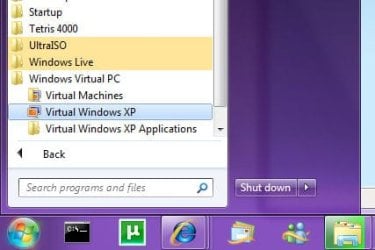
XP Mode is only available, as you have said, to Professional and Ultimate user of Windows 7, but I suppose if you have installed Windows Virtual PC you can get it on other editions as well. XP Mode works differently to the usual "Right-Click, Properties, Compatibility" options for resolving compatibility issues. A program will only run in XP Mode if you have installed it into the XP Mode Virtual Computer by starting Windows Virtual PC on the Windows 7 start menu:
xpmode2.jpg

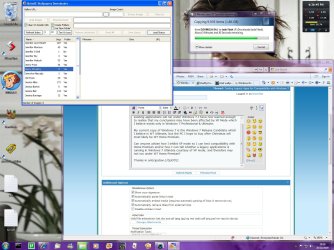
The following screenshot shows also that when a program is running in XP Mode, it looks like it is running in XP, and does not share the Windows Aero interface elements:
xpmode.jpg

So if you want to check if a program will run on Windows 7 (Any Edition), just install it normally. In many, if not all, cases, if there are compatibility issues, Windows itself will warn you first before allowing the installation. Anything that install drivers (like Alcohol 52, UltraISO, etc), it's usually best to first check the manufactures website for an update, just in case.
 

My Computer

Computer type
PC/Desktop
Computer Manufacturer/Model Number
Virtual Machine
OS
Windows 7 Professional 32-bit SP1
CPU
AMD A4/A6
Motherboard
Intel Corporation 440BX Desktop Reference Platform
Memory
3.00GB EDO
Graphics Card(s)
VMware SVGA 3D
Sound Card
High Definition Audio Device
Monitor(s) Displays
Generic Non-PnP Monitor on VMware SVGA 3D
Screen Resolution
1440x900
Hard Drives
1 x 60GB VMware Virtual SATA Hard Drive ATA Device
Antivirus
Kaspersky Total Security
Thanks guys; I see the error of my ways! I don't have Windows Virtual PC installed, and when I tested my apps I was in the Aero and not in XP interface, so I think I have proved that all the apps which loaded and ran successfuly in Ultimate will be OK in W7 Home Premium.

Thanks again.
 

My Computer

Computer Manufacturer/Model Number
Sony Vaio AW41ZF/B
OS
Windows 7 Home Premium 64 bit
Back
Top