
Testing my image backup?

Miranova23

3D Artist in Training
Pro User
Local time
11:59 AM
Messages
352
Location
Philadelphia
Okay, I've finally decided how to setup my User Folder (on C:/ aka FlyingDutchman) and data (D:/ aka The Chest)- symlinks. More on those folders after this is taken care of.

So, I followed pparks1 pattern from "Advice/help with my backup strategy" (not my thread), and right now I have 2 image backups done. I'm trying to test them.
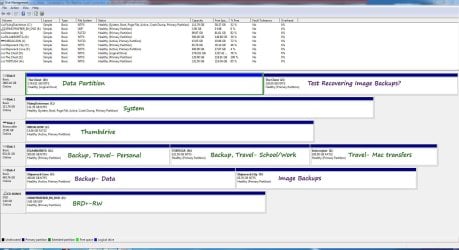
Disks.jpg
(I wouldn't mind altering the purple-labeled ones.)

#1 I created on external Maxtor OneTouch 4, partition aka Shipwreck City(Y:/), via firewire. This is just the plain OS, activated, with all updates.
#2, for fear of the 30% rule, I created on my internal data partition, aka The Chest(D:/), and moved to Shipwreck City(Y:/). This one has all of my drivers installed and configured.
Now I would like to test them...
Tries thus far:

A. I tried testing in VMWare player, on a 40GB virtual machine located on C:/. I remembered later that I would have to make a virtual machine at least the size of my C:/ drive. (~118GB). Will I be able to test this image on a virtual machine if I create a virtual machine on The Chest D:/ or partition Z:/ that is the same size as C:/?

B. I tried rebooting to the install DVD & installing the image directly to Z:/. However, I couldn't get Windows to let me choose any backups from Maxtor/Shipwreck City(Y:/) (firewire). My only option was the #2 image I'd initially created on The Chest(D:/), (but later moved to Maxtor/Shipwreck City(Y:/)) as the folder WindowsImageBackup. I found & tried to load the drivers for the Maxtor OneTouch, and could see the hard drive listed & could explore it. But any drivers I tried choosing failed. I even tried picking them out of my DriverBackup backups. Since installing from an image backup on an external hard drive is such a good idea, why won't this work for me?

C. Haven't tried this yet, but another idea I have would be to split TheChest(D:/) into 3 partitions: Data, Image Backups, and a testing partition (virtual or real?). (Currently the Image Backups are on firewire external Maxtor/Shipwreck City(Y:/).)

Which of these can/should I do? (& maybe how...?)
Just looking for a convenient place to save image backups to (since moving them takes forever!), that will also be easy to use to recover from. :) I am using Windows Image Backup.
Thanks in advance =)

P.S.- Think I'm a PoTC fan much lol :D
 

My Computer

Computer type
PC/Desktop
OS
Windows 7 Pro x64 SP1
CPU
AMD Phenom II x6 1090T Black Edition 3.2GHz
Motherboard
ASUS M4A88TD-V EVO/USB3
Memory
Patriot G ‘Sector 5’ Edition 8GB (2 x 4GB) 1600MHz
Sound Card
(onboard) Realtek® ALC 892 8-Channel High Definition Audio
Monitor(s) Displays
ViewSonic VX2253 22"
Screen Resolution
1920x1080
Hard Drives
Transcend SSD720 2.5" SATAIII 64GB SSD; Western Digital Caviar Green WD20EARS 2TB 64MB 3.5" HDD
LG WH10LS30 10X Blu-ray Burner with LightScribe
PSU
CORSAIR TX Series 950W ATX12V 80 Plus Bronze
Case
Cooler Master HAF X NVidia Edition; 5 Green LED Fans!
Cooling
CORSAIR A70 120mm Dual-Fan
Keyboard
Verbatim 97472 Mini Wireless Slim
Mouse
bundled Verbatim 97472 Wireless
Antivirus
Avast
Browser
Chrome
Other Info
Ultraportable/Desktop Replacement Laptop:
circa Oct 2006,
Dell XPS M1210,
Windows 7 Professional 32-bit,
Intel Core 2 Duo T7200 2.0GHz,
3.25 (4) GB of RAM,
NVidia GeForce Go 7400,
500GB Seagate Momentus 7200RPM HDD
Found this in another thread...
http://www.sevenforums.com/backup-r...ystem-images-incremental-not.html#post1302222
By default Windows Imaging will reserve 30% (I think) of your backup drive and store as many images in it as it can before deleting the oldest. The way I get around that is to limit the space management to one image. Before taking the next image manually I rename the existing WindowsSystemImage folder to something else (I stick a date at the end) Image backup will then create a new folder for you.

Please note however that you need to rename the image folder back to what it was before you can restore from it.

I had renamed my #1 backup "1 - OS, Activated, Updated," and #2 backup "2 - Drivers" on the external Maxtor/Shipwreck City(Y:/). The only backup I was able to see was the unmoved & unrenamed copy of #2, "WindowsImageBackup" on The Chest(D:/). Given what Kado clarified, this now makes sense. I will rename the one I want to test back to "WindowsImageBackup," and try to recover again. :huh:

Still, please suggest what would be the best/easiest/most reliable backup & test location! :)
Also I doubt this will go off without any other hitches...
 

My Computer

Computer type
PC/Desktop
OS
Windows 7 Pro x64 SP1
CPU
AMD Phenom II x6 1090T Black Edition 3.2GHz
Motherboard
ASUS M4A88TD-V EVO/USB3
Memory
Patriot G ‘Sector 5’ Edition 8GB (2 x 4GB) 1600MHz
Sound Card
(onboard) Realtek® ALC 892 8-Channel High Definition Audio
Monitor(s) Displays
ViewSonic VX2253 22"
Screen Resolution
1920x1080
Hard Drives
Transcend SSD720 2.5" SATAIII 64GB SSD; Western Digital Caviar Green WD20EARS 2TB 64MB 3.5" HDD
LG WH10LS30 10X Blu-ray Burner with LightScribe
PSU
CORSAIR TX Series 950W ATX12V 80 Plus Bronze
Case
Cooler Master HAF X NVidia Edition; 5 Green LED Fans!
Cooling
CORSAIR A70 120mm Dual-Fan
Keyboard
Verbatim 97472 Mini Wireless Slim
Mouse
bundled Verbatim 97472 Wireless
Antivirus
Avast
Browser
Chrome
Other Info
Ultraportable/Desktop Replacement Laptop:
circa Oct 2006,
Dell XPS M1210,
Windows 7 Professional 32-bit,
Intel Core 2 Duo T7200 2.0GHz,
3.25 (4) GB of RAM,
NVidia GeForce Go 7400,
500GB Seagate Momentus 7200RPM HDD
Found this in another thread...
http://www.sevenforums.com/backup-r...ystem-images-incremental-not.html#post1302222
By default Windows Imaging will reserve 30% (I think) of your backup drive and store as many images in it as it can before deleting the oldest. The way I get around that is to limit the space management to one image. Before taking the next image manually I rename the existing WindowsSystemImage folder to something else (I stick a date at the end) Image backup will then create a new folder for you.

Please note however that you need to rename the image folder back to what it was before you can restore from it.

I had renamed my #1 backup "1 - OS, Activated, Updated," and #2 backup "2 - Drivers" on the external Maxtor/Shipwreck City(Y:/). The only backup I was able to see was the unmoved & unrenamed copy of #2, "WindowsImageBackup" on The Chest(D:/). Given what Kado clarified, this now makes sense. I will rename the one I want to test back to "WindowsImageBackup," and try to recover again. :huh:

Still, please suggest what would be the best/easiest/most reliable backup & test location! :)
Also I doubt this will go off without any other hitches...

Unless you want to risk trashing your system if anything goes wrong you realy need to do this on a small test partition as is shown in this tutorial for Macrium. http://www.sevenforums.com/tutorials/73828-imaging-free-macrium.html?filter[2]=Backup%20Restore Just substitute a Windows Image backup for the Macrium one.
 

My Computer

Computer type
Laptop
Computer Manufacturer/Model Number
Hewlett-Packard/G62-107SA Notebook
OS
Microsoft Windows 7 Home Premium 64-bit Service Pack 1
CPU
Intel(R) Core(TM) i3 CPU M 330 @ 2.13GHz
Motherboard
Hewlett-Packard 1425
Memory
8 GB DDR3
Graphics Card(s)
Intel(R) HD Graphics
Sound Card
Realtek High Definition Audio
Monitor(s) Displays
Builtin
Screen Resolution
1366 x 768 x 32 bits (4294967296 colors) @ 60 Hz
Hard Drives
250 GB SATA Hard Disk Drive 7200 rpm
2TB Seagate GoFlex USB 2 Drive
1TB Iomega Prestige USB 2 Drive
1.5TB Iomega Prestige USB 2 Drive (Samsung)
2TB WD MyBook Live NAS.
Mouse
Logitech Anywhere MX
Internet Speed
152 Mbs download 10 Mbs upload
Antivirus
Norton 360
Browser
Chrome
I am recovering to a test partition... Am I not? (Z:/)
Should I create a virtual machine on (Z:/) and then try recovering to there?

Also, a couple questions about this Macrium...
1. Does it create .vhd files? Or at least compatible with Windows Recovery? (I have my retail Windows Installation Disc, not a separate Recovery Disc- though I could make one.)
2. Does it care about the "30% of free space" limit, as Windows does?

I've tried Acronis as well. All these methods seem equally easy & convenient to me. Although, if one of the 3rd party programs will let me not worry about that 30% rule, that would be great. :)

(Forgive me if the answers are later in the vid. It's very long & I'm still watching. ^__^)
 

My Computer

Computer type
PC/Desktop
OS
Windows 7 Pro x64 SP1
CPU
AMD Phenom II x6 1090T Black Edition 3.2GHz
Motherboard
ASUS M4A88TD-V EVO/USB3
Memory
Patriot G ‘Sector 5’ Edition 8GB (2 x 4GB) 1600MHz
Sound Card
(onboard) Realtek® ALC 892 8-Channel High Definition Audio
Monitor(s) Displays
ViewSonic VX2253 22"
Screen Resolution
1920x1080
Hard Drives
Transcend SSD720 2.5" SATAIII 64GB SSD; Western Digital Caviar Green WD20EARS 2TB 64MB 3.5" HDD
LG WH10LS30 10X Blu-ray Burner with LightScribe
PSU
CORSAIR TX Series 950W ATX12V 80 Plus Bronze
Case
Cooler Master HAF X NVidia Edition; 5 Green LED Fans!
Cooling
CORSAIR A70 120mm Dual-Fan
Keyboard
Verbatim 97472 Mini Wireless Slim
Mouse
bundled Verbatim 97472 Wireless
Antivirus
Avast
Browser
Chrome
Other Info
Ultraportable/Desktop Replacement Laptop:
circa Oct 2006,
Dell XPS M1210,
Windows 7 Professional 32-bit,
Intel Core 2 Duo T7200 2.0GHz,
3.25 (4) GB of RAM,
NVidia GeForce Go 7400,
500GB Seagate Momentus 7200RPM HDD
A test partition on your PC will be fine. Macrium Image files are not compatible with Windows Backup. They are an entirely different format.
 

My Computer

Computer type
Laptop
Computer Manufacturer/Model Number
Hewlett-Packard/G62-107SA Notebook
OS
Microsoft Windows 7 Home Premium 64-bit Service Pack 1
CPU
Intel(R) Core(TM) i3 CPU M 330 @ 2.13GHz
Motherboard
Hewlett-Packard 1425
Memory
8 GB DDR3
Graphics Card(s)
Intel(R) HD Graphics
Sound Card
Realtek High Definition Audio
Monitor(s) Displays
Builtin
Screen Resolution
1366 x 768 x 32 bits (4294967296 colors) @ 60 Hz
Hard Drives
250 GB SATA Hard Disk Drive 7200 rpm
2TB Seagate GoFlex USB 2 Drive
1TB Iomega Prestige USB 2 Drive
1.5TB Iomega Prestige USB 2 Drive (Samsung)
2TB WD MyBook Live NAS.
Mouse
Logitech Anywhere MX
Internet Speed
152 Mbs download 10 Mbs upload
Antivirus
Norton 360
Browser
Chrome
I think I'm understanding now.

So, this Macrium recovery disc runs its own program to recover it's own kind of backups.
And these backups can be named anything you want? That would be great rather than having to rename the files before using them to recover.
 

My Computer

Computer type
PC/Desktop
OS
Windows 7 Pro x64 SP1
CPU
AMD Phenom II x6 1090T Black Edition 3.2GHz
Motherboard
ASUS M4A88TD-V EVO/USB3
Memory
Patriot G ‘Sector 5’ Edition 8GB (2 x 4GB) 1600MHz
Sound Card
(onboard) Realtek® ALC 892 8-Channel High Definition Audio
Monitor(s) Displays
ViewSonic VX2253 22"
Screen Resolution
1920x1080
Hard Drives
Transcend SSD720 2.5" SATAIII 64GB SSD; Western Digital Caviar Green WD20EARS 2TB 64MB 3.5" HDD
LG WH10LS30 10X Blu-ray Burner with LightScribe
PSU
CORSAIR TX Series 950W ATX12V 80 Plus Bronze
Case
Cooler Master HAF X NVidia Edition; 5 Green LED Fans!
Cooling
CORSAIR A70 120mm Dual-Fan
Keyboard
Verbatim 97472 Mini Wireless Slim
Mouse
bundled Verbatim 97472 Wireless
Antivirus
Avast
Browser
Chrome
Other Info
Ultraportable/Desktop Replacement Laptop:
circa Oct 2006,
Dell XPS M1210,
Windows 7 Professional 32-bit,
Intel Core 2 Duo T7200 2.0GHz,
3.25 (4) GB of RAM,
NVidia GeForce Go 7400,
500GB Seagate Momentus 7200RPM HDD
Yes that's right. To windows Macrium images are just files. Unlike Windows Images they don't have to be in the root of the drive and they can be called anything. It is a good idea to use the names Macrium suggests if you are using the pro version and doing incremental or differential backups but you don't have to and you can organize your backup drive by putting them in any folder structure you like.
 

My Computer

Computer type
Laptop
Computer Manufacturer/Model Number
Hewlett-Packard/G62-107SA Notebook
OS
Microsoft Windows 7 Home Premium 64-bit Service Pack 1
CPU
Intel(R) Core(TM) i3 CPU M 330 @ 2.13GHz
Motherboard
Hewlett-Packard 1425
Memory
8 GB DDR3
Graphics Card(s)
Intel(R) HD Graphics
Sound Card
Realtek High Definition Audio
Monitor(s) Displays
Builtin
Screen Resolution
1366 x 768 x 32 bits (4294967296 colors) @ 60 Hz
Hard Drives
250 GB SATA Hard Disk Drive 7200 rpm
2TB Seagate GoFlex USB 2 Drive
1TB Iomega Prestige USB 2 Drive
1.5TB Iomega Prestige USB 2 Drive (Samsung)
2TB WD MyBook Live NAS.
Mouse
Logitech Anywhere MX
Internet Speed
152 Mbs download 10 Mbs upload
Antivirus
Norton 360
Browser
Chrome
Well, that definitely seems easier than Windows' built in Backup & Recovery then. :) Thank you very much!

Would it be viable to do say this...
1. Create a virtual machine on Z:/ that is exactly the same size as C:/.
2. Rename the #1 image backup I already have, and recover it there.
3. Install Macrium on this recovered virtual machine, and take a new image with Macrium.
In effect it would be like "converting" my image backups. :D

Is there anything else I should know for recovering on a virtual machine? I am using VMware Player, creating blank Windows 7 x64 hard disks & then booting it from the Win7 install disc & locating a recovery image.
 

My Computer

Computer type
PC/Desktop
OS
Windows 7 Pro x64 SP1
CPU
AMD Phenom II x6 1090T Black Edition 3.2GHz
Motherboard
ASUS M4A88TD-V EVO/USB3
Memory
Patriot G ‘Sector 5’ Edition 8GB (2 x 4GB) 1600MHz
Sound Card
(onboard) Realtek® ALC 892 8-Channel High Definition Audio
Monitor(s) Displays
ViewSonic VX2253 22"
Screen Resolution
1920x1080
Hard Drives
Transcend SSD720 2.5" SATAIII 64GB SSD; Western Digital Caviar Green WD20EARS 2TB 64MB 3.5" HDD
LG WH10LS30 10X Blu-ray Burner with LightScribe
PSU
CORSAIR TX Series 950W ATX12V 80 Plus Bronze
Case
Cooler Master HAF X NVidia Edition; 5 Green LED Fans!
Cooling
CORSAIR A70 120mm Dual-Fan
Keyboard
Verbatim 97472 Mini Wireless Slim
Mouse
bundled Verbatim 97472 Wireless
Antivirus
Avast
Browser
Chrome
Other Info
Ultraportable/Desktop Replacement Laptop:
circa Oct 2006,
Dell XPS M1210,
Windows 7 Professional 32-bit,
Intel Core 2 Duo T7200 2.0GHz,
3.25 (4) GB of RAM,
NVidia GeForce Go 7400,
500GB Seagate Momentus 7200RPM HDD
You don't need a virtual machine. You just need to create a small test partion on one of your disks. Image that partition to somewhere else. Make some changes to the test partition. Then boot from your recovery disk/usb into the recovery environment. Locate your image of the test partition and restore it. Then boot your PC and check that the test partition has changed back to the way it was when you imaged it.

It is all in the tutorial I linked to earlier.


I think you may be confused about what a virtual machine is. A virtual machine is a "PC" that runs within windows. A recovery environment is separate operating system which runs on your real hardware instead of Windows. It is from a recovery environment that you do your restores.
 
Last edited:

My Computer

Computer type
Laptop
Computer Manufacturer/Model Number
Hewlett-Packard/G62-107SA Notebook
OS
Microsoft Windows 7 Home Premium 64-bit Service Pack 1
CPU
Intel(R) Core(TM) i3 CPU M 330 @ 2.13GHz
Motherboard
Hewlett-Packard 1425
Memory
8 GB DDR3
Graphics Card(s)
Intel(R) HD Graphics
Sound Card
Realtek High Definition Audio
Monitor(s) Displays
Builtin
Screen Resolution
1366 x 768 x 32 bits (4294967296 colors) @ 60 Hz
Hard Drives
250 GB SATA Hard Disk Drive 7200 rpm
2TB Seagate GoFlex USB 2 Drive
1TB Iomega Prestige USB 2 Drive
1.5TB Iomega Prestige USB 2 Drive (Samsung)
2TB WD MyBook Live NAS.
Mouse
Logitech Anywhere MX
Internet Speed
152 Mbs download 10 Mbs upload
Antivirus
Norton 360
Browser
Chrome
Oh no, I gotcha. It would just be nice to be able to test all this inside 1 little window so I'm not interrupting other work. :)

1 thing I realized though- I rounded and made Z:/ 120GB. My C:/ (the system the image is actually of) actually reports 111.79GB. If I use Macrium to then reimage Z:/, will it then want to recover to a hard drive that is 120GB or larger? Mind you my system only took up 30GB at the time of imaging.
 

My Computer

Computer type
PC/Desktop
OS
Windows 7 Pro x64 SP1
CPU
AMD Phenom II x6 1090T Black Edition 3.2GHz
Motherboard
ASUS M4A88TD-V EVO/USB3
Memory
Patriot G ‘Sector 5’ Edition 8GB (2 x 4GB) 1600MHz
Sound Card
(onboard) Realtek® ALC 892 8-Channel High Definition Audio
Monitor(s) Displays
ViewSonic VX2253 22"
Screen Resolution
1920x1080
Hard Drives
Transcend SSD720 2.5" SATAIII 64GB SSD; Western Digital Caviar Green WD20EARS 2TB 64MB 3.5" HDD
LG WH10LS30 10X Blu-ray Burner with LightScribe
PSU
CORSAIR TX Series 950W ATX12V 80 Plus Bronze
Case
Cooler Master HAF X NVidia Edition; 5 Green LED Fans!
Cooling
CORSAIR A70 120mm Dual-Fan
Keyboard
Verbatim 97472 Mini Wireless Slim
Mouse
bundled Verbatim 97472 Wireless
Antivirus
Avast
Browser
Chrome
Other Info
Ultraportable/Desktop Replacement Laptop:
circa Oct 2006,
Dell XPS M1210,
Windows 7 Professional 32-bit,
Intel Core 2 Duo T7200 2.0GHz,
3.25 (4) GB of RAM,
NVidia GeForce Go 7400,
500GB Seagate Momentus 7200RPM HDD
I think you can restore to a larger partition with Macrium Free. I use the pro version and you definitely can there. However if you do the test with a small partition the whole operation can be done in half an hour and it will make sure that the recovery disk can see all your real drives. I know it is not the same as restoring a full OS but but you just have to take some things on trust and Macrium is very reliable. It is just the Linux boot disk that can be a problem on some systems. I have restored the full OS with Macrium so I know it works.
 

My Computer

Computer type
Laptop
Computer Manufacturer/Model Number
Hewlett-Packard/G62-107SA Notebook
OS
Microsoft Windows 7 Home Premium 64-bit Service Pack 1
CPU
Intel(R) Core(TM) i3 CPU M 330 @ 2.13GHz
Motherboard
Hewlett-Packard 1425
Memory
8 GB DDR3
Graphics Card(s)
Intel(R) HD Graphics
Sound Card
Realtek High Definition Audio
Monitor(s) Displays
Builtin
Screen Resolution
1366 x 768 x 32 bits (4294967296 colors) @ 60 Hz
Hard Drives
250 GB SATA Hard Disk Drive 7200 rpm
2TB Seagate GoFlex USB 2 Drive
1TB Iomega Prestige USB 2 Drive
1.5TB Iomega Prestige USB 2 Drive (Samsung)
2TB WD MyBook Live NAS.
Mouse
Logitech Anywhere MX
Internet Speed
152 Mbs download 10 Mbs upload
Antivirus
Norton 360
Browser
Chrome
I just tried booting through the Win7 disc, chose to repair, recovery image... I can finally see the backup image on the external Maxtor/Shipwreck City (Y:/). But now I don't see how I can get that to install onto (Z:/) since it contains an image of (C:/). Can I? I thought I'd be able to basically pop this open (without destroying the real C:/) and check out to make sure it's all correct.

If not, I suppose this is pretty good anyway. I know I can access the backup images no problem! :)
 

My Computer

Computer type
PC/Desktop
OS
Windows 7 Pro x64 SP1
CPU
AMD Phenom II x6 1090T Black Edition 3.2GHz
Motherboard
ASUS M4A88TD-V EVO/USB3
Memory
Patriot G ‘Sector 5’ Edition 8GB (2 x 4GB) 1600MHz
Sound Card
(onboard) Realtek® ALC 892 8-Channel High Definition Audio
Monitor(s) Displays
ViewSonic VX2253 22"
Screen Resolution
1920x1080
Hard Drives
Transcend SSD720 2.5" SATAIII 64GB SSD; Western Digital Caviar Green WD20EARS 2TB 64MB 3.5" HDD
LG WH10LS30 10X Blu-ray Burner with LightScribe
PSU
CORSAIR TX Series 950W ATX12V 80 Plus Bronze
Case
Cooler Master HAF X NVidia Edition; 5 Green LED Fans!
Cooling
CORSAIR A70 120mm Dual-Fan
Keyboard
Verbatim 97472 Mini Wireless Slim
Mouse
bundled Verbatim 97472 Wireless
Antivirus
Avast
Browser
Chrome
Other Info
Ultraportable/Desktop Replacement Laptop:
circa Oct 2006,
Dell XPS M1210,
Windows 7 Professional 32-bit,
Intel Core 2 Duo T7200 2.0GHz,
3.25 (4) GB of RAM,
NVidia GeForce Go 7400,
500GB Seagate Momentus 7200RPM HDD
I don't know enough about windows image restore to give an answer on that one. I think you can but I am not sure. perhaps someone else will know. The main thing is that since you can boot into the recovery environment and see your backups you have a very good chance that the rest will work..
 

My Computer

Computer type
Laptop
Computer Manufacturer/Model Number
Hewlett-Packard/G62-107SA Notebook
OS
Microsoft Windows 7 Home Premium 64-bit Service Pack 1
CPU
Intel(R) Core(TM) i3 CPU M 330 @ 2.13GHz
Motherboard
Hewlett-Packard 1425
Memory
8 GB DDR3
Graphics Card(s)
Intel(R) HD Graphics
Sound Card
Realtek High Definition Audio
Monitor(s) Displays
Builtin
Screen Resolution
1366 x 768 x 32 bits (4294967296 colors) @ 60 Hz
Hard Drives
250 GB SATA Hard Disk Drive 7200 rpm
2TB Seagate GoFlex USB 2 Drive
1TB Iomega Prestige USB 2 Drive
1.5TB Iomega Prestige USB 2 Drive (Samsung)
2TB WD MyBook Live NAS.
Mouse
Logitech Anywhere MX
Internet Speed
152 Mbs download 10 Mbs upload
Antivirus
Norton 360
Browser
Chrome
Good enough for now. All future backups will be with this Macrium though. Looks awesome. =) Thank you so much for all your help! Even your older post helped me a lot. ^.^"
 

My Computer

Computer type
PC/Desktop
OS
Windows 7 Pro x64 SP1
CPU
AMD Phenom II x6 1090T Black Edition 3.2GHz
Motherboard
ASUS M4A88TD-V EVO/USB3
Memory
Patriot G ‘Sector 5’ Edition 8GB (2 x 4GB) 1600MHz
Sound Card
(onboard) Realtek® ALC 892 8-Channel High Definition Audio
Monitor(s) Displays
ViewSonic VX2253 22"
Screen Resolution
1920x1080
Hard Drives
Transcend SSD720 2.5" SATAIII 64GB SSD; Western Digital Caviar Green WD20EARS 2TB 64MB 3.5" HDD
LG WH10LS30 10X Blu-ray Burner with LightScribe
PSU
CORSAIR TX Series 950W ATX12V 80 Plus Bronze
Case
Cooler Master HAF X NVidia Edition; 5 Green LED Fans!
Cooling
CORSAIR A70 120mm Dual-Fan
Keyboard
Verbatim 97472 Mini Wireless Slim
Mouse
bundled Verbatim 97472 Wireless
Antivirus
Avast
Browser
Chrome
Other Info
Ultraportable/Desktop Replacement Laptop:
circa Oct 2006,
Dell XPS M1210,
Windows 7 Professional 32-bit,
Intel Core 2 Duo T7200 2.0GHz,
3.25 (4) GB of RAM,
NVidia GeForce Go 7400,
500GB Seagate Momentus 7200RPM HDD
Thanks Miranaova. Got to grab some shuteye now. It's been a long day.
 

My Computer

Computer type
Laptop
Computer Manufacturer/Model Number
Hewlett-Packard/G62-107SA Notebook
OS
Microsoft Windows 7 Home Premium 64-bit Service Pack 1
CPU
Intel(R) Core(TM) i3 CPU M 330 @ 2.13GHz
Motherboard
Hewlett-Packard 1425
Memory
8 GB DDR3
Graphics Card(s)
Intel(R) HD Graphics
Sound Card
Realtek High Definition Audio
Monitor(s) Displays
Builtin
Screen Resolution
1366 x 768 x 32 bits (4294967296 colors) @ 60 Hz
Hard Drives
250 GB SATA Hard Disk Drive 7200 rpm
2TB Seagate GoFlex USB 2 Drive
1TB Iomega Prestige USB 2 Drive
1.5TB Iomega Prestige USB 2 Drive (Samsung)
2TB WD MyBook Live NAS.
Mouse
Logitech Anywhere MX
Internet Speed
152 Mbs download 10 Mbs upload
Antivirus
Norton 360
Browser
Chrome
Back
Top