Testing new programs

motim

New member
Local time
6:15 PM
Messages
109
Hello Forum,
1 ) Sometimes when I look for a program, I often find more then one, to test if it suits me I have to install it, learn how to use it and test it - if suits me it stays installed, if not I have to uninstall it. So with another and another, in the meantime the system becomes crowded, heavy and remains left in the registry.
Once I had another old xp pc doing all the tests there, but now I have only this one and want to keep it clean as possible. What I am thinking is to keep a good full (macrium) backup, and after some installations and uninstallations to restore from that backup. Is there some easier / shorter way to do it ?

2 ) Again about music : Can you recommend a program where I can record music played with the speakers while being online - say music from internet radios. Asking friends they recommended to make a loop from the output audio port to the input, making mess with wires.

Answers will be appreciated.
Thanks
Motim
 

My Computer

Computer type
PC/Desktop
Computer Manufacturer/Model Number
custom built
OS
Windows 7 Pro 32 bit
CPU
intel celeron 2.66GH 2.56GH
Memory
2.00 GB
Graphics Card(s)
Nvidia fx5500
Hard Drives
Western digital
Antivirus
AVG
Browser
firefox
The experts here will weigh-in with better recommendations than I can give, but here is what I do..

For short term testing programs, I use Time Freeze (a free sandbox type program). I active Time Freeze, install the test program, play with it to see if it is a keeper. When you turn Time Freeze off, all the parts of the test program are lost (it actually uses a virtual registry where changes are not kept). If I want the program, I then download and install it as normal. If I don't want it, I turn Time Freeze off and nothing is kept. This will not work for test programs I play with over several days, since Time Freeze will not save ANYTHING while it is turned on.

For long term testing, I install the test program and play with it. If I decide to not keep it, I use Geek Uninstaller (free) which will uninstall both 32 bit and 64 bit programs including any registry left overs.

For your music issue, Audacity may be something to look at. It will do what you are talking about without any extra wires.
 

My Computer

Computer type
PC/Desktop
OS
Windows 7 Professional
Audacity is among the first to come to mind.

You can also explore free Linux distribution specialized in multimedia creation. Just Google "Linux for multimedia creation"

Also we have a Sound and Audio section - http://www.sevenforums.com/sound-audio/ for better answers
 

My Computer

Computer type
PC/Desktop
Computer Manufacturer/Model Number
Custom Build
OS
Windows 7 Ultimate x64 SP1
CPU
AMD Phenom 2 1090T
Motherboard
Gigabyte GA-890FXA-UD5
Memory
2x8GB Kingston HyperX Fury Black 1600Mhz Unganged
Graphics Card(s)
MSI GTX 970 Gaming 4G
Sound Card
Realtek On-Board HD 7.1 Audio / Logitech G35
Monitor(s) Displays
3xAcer GD245HQ
Screen Resolution
1920x1080
Hard Drives
Samsung 850 Pro 512GB SSD - OS /
WD Caviar Black SATA 3 - 1 TBx2 - Dynamic RAID 0 /
WD Caviar Green SATA 2 - 640GBx2 - Dynamic RAID 0 /
WD Caviar Green SATA 2 - 640GB - Internal Backup /
Seagate Barracude SATA 3 - 3TB - External Backup/ Sync
PSU
HighPower 1000W
Case
Cooler Master HAF 932
Cooling
Noctua NH-D14
Keyboard
Logitech G19
Mouse
Logitech G500
Internet Speed
100/4 Mbit Cable (100GB quota)
Antivirus
ZoneAlarm Extreme Security / MBAM Pro / MBAE Free / SAS Free
Browser
IE 11 - Firefox - Chrome
Other Info
Logitech F710/ G27/ G940/ Z5500 // TrackIR 5 // Nvidia 3D Surround Vision
I have to state that recording from internet Radio is, in some countries treated as illegal ;)

Audacity is the way to go although there is a potential issue, some recent sound cards do not have the What I Hear or Stereo mix recording option, which allows digital recording of any source into the sound card, this is due to pressure from the performing rights lobby in the US, so a cable feedback as you described may be the only way to record the output, but of course quality will be reduced as you have to go Digital-Analog-Digital rather than the Digital-Digital of the Stereo Mix option to get the sound recorded.

I use Comodo Internet Security an the free version comes with an optional auto sandbox which can allow you the run programs isolated from the rest of the system, if you do not like them they have not affected your system. The only downside is the big ugly green border around the windows :)
 

My Computers

System One System Two

  • Computer type
    PC/Desktop
    Computer Manufacturer/Model Number
    ChillBlast - Custom to my design
    OS
    Windows 11 Pro x64 [Latest Release and Release Preview]
    CPU
    Ryzen 9 5950X, 3.8 - 5.2 MHz
    Motherboard
    Asus Prime X570-Pro
    Memory
    64GB [2 x 32GB] DDR4 3200MHz
    Graphics Card(s)
    4GB NVIDIA GEFORCE GTX 1650 Ti
    Sound Card
    On-board SPDIF to 5.1 System + HDMI [5.1 system]
    Monitor(s) Displays
    32" UHD 32 Bit HDR Monitor + 43" UHD 4K 32Bit HDR TV
    Screen Resolution
    2 x 3840 x 2160 @60Hz
    Hard Drives
    1TB M2 SSD OS, 500GB Fast Access SSD, 2 x 8TB Data + Various Externals from 1TB to 4TB, 10TB NAS
    PSU
    NZXT C750 80 PLUS Gold 750W Modular PSU
    Case
    Workstation Case [Matt Black]
    Cooling
    NZXT Kraken X63 280mm CPU Cooler +2x Quiet Case fans
    Keyboard
    Logitech Wireless MX Keys & K400 + others
    Mouse
    Logitech Wireless MX Master 3S
    Internet Speed
    920 MB Down 50 MB Up
    Antivirus
    BitDefender Total Security Pro
    Browser
    Chrome (always run latest Non-Beta)
    Other Info
    Also run ...
    Laptop - Quad 8GB - Windows 10 Pro x64
    Nexus 7 Android tablet x2
    Samsung 10.2" tablet
    Blackview TAB 8 4G Android Tablet c/w Keyboard
    Wacom Intuos Pro Medium Pen Pad
    Wacom Intuos Pro Small Pen Pad
    Wacom Expresskeys Remote
    Loopdeck+ Graphics Controller
    Shuttle Pro v2 Control
  • Computer type
    Laptop
    System Manufacturer/Model Number
    Dell XPS 17 10750H
    OS
    Windows 11 Pro x64 Latest RP
    CPU
    Intel I7 10750H 5.0GHz
    Motherboard
    Dell XPS
    Memory
    32GB [2x16GB] DDR4 2933 MHz
    Graphics Card(s)
    nVidia GTX1650Ti 4 GB GDDR6
    Sound Card
    Stock [Realtek] 4 Speaker
    Monitor(s) Displays
    17" IPS UHD+ Infinity Edge Touchscreen
    Screen Resolution
    3840 x 2400
    Hard Drives
    2TB M2 NVMe, 4TB External + various 500GB & 1TB External NVMe (also have access to spinner HDD from
    PSU
    Stock
    Case
    Stock XPS Aluminium & Carbon Fibre
    Cooling
    Stock - Active Fan Control
    Keyboard
    Backlit + Various Logitech
    Mouse
    Stock Track Pad + Logitech MX Trackball
    Internet Speed
    72 MB Down 18MB Up
    Browser
    Chrome
    Other Info
    Also run ...
    Laptop - Quad 8GB - Windows 10 Pro x64
    Nexus 7 Android tablet x2
    10.2" tablet
    Sony Z3 Android Smartphone
    Wacom Intuos Pro Medium Pen Pad
    Wacom Intuos Pro Small Pen Pad
    Wacom Expresskeys Remote
    Loopdeck+ Graphics Controller
    Shuttle Pro v2 Control Pad
    10TB NAS
Hello,
Thanks for all the answers.
Would like to have some more details about this "Time Freeze" program, do I have to install it permanently,
(what if I do not like it - joking), for how long it is effective, does it stay 'active' until turned off.

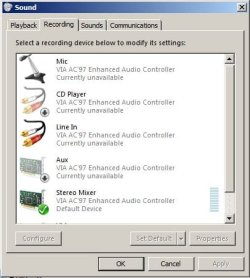
And about recording, if on the "sound recording devices" stereo mixer is default device (as on attached screenshot), I tried the windows built-in sound recorder while some internet radio was playing - nothing was recorded (stupid question ?) ?
Thanks for answers
Motim
 

Attachments

  • StereoMixer.JPG
    StereoMixer.JPG
    34.7 KB · Views: 22

My Computer

Computer type
PC/Desktop
Computer Manufacturer/Model Number
custom built
OS
Windows 7 Pro 32 bit
CPU
intel celeron 2.66GH 2.56GH
Memory
2.00 GB
Graphics Card(s)
Nvidia fx5500
Hard Drives
Western digital
Antivirus
AVG
Browser
firefox
Here are some details about Time Freeze where most of your questions will be answered:

Time Freeze Review ? Better than System Restore

"And about recording"... it appears that since you can set Stereo Mixer as your default device, Audacity should work (it works using the Stereo Mixer as default device). You can only install Audacity and try it to see if it will work.
 

My Computer

Computer type
PC/Desktop
OS
Windows 7 Professional
Back
Top