Text services and input cannot save changes

btr999

New member
Local time
6:04 PM
Messages
9
hi guys,
I have another input language installed other than english itself. I tried to change the hotkeys to switch to the specific ime but whenever I clicked apply and exit, it will switch back to its original hotkeys the next time I re-enter and check.

I am running windows 7 ultimate 64bit. Any idea how should I fix this?
 

My Computer

Computer type
PC/Desktop
OS
Windows 7 64bit
The system does not accept all key combinations. Selected combo cannot be used by another Windows feature (when changed from registry or using third party tool).

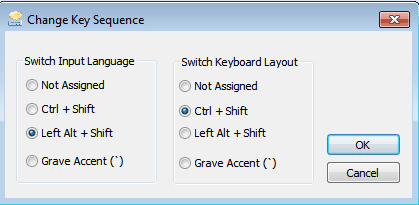
Using the Properties window you can only set key combo as one of the listed:

SwitchInputLanguage..png

Kari
 

My Computer

Computer type
Laptop
Computer Manufacturer/Model Number
HP ENVY 17-1150eg
OS
Windows 10 Pro x64 EN-GB
CPU
1.6 GHz Intel Core i7-720QM Processor
Memory
6 GB
Graphics Card(s)
ATI Mobility Radeon HD 5850 Graphics
Sound Card
Beats sound system with integrated subwoofer
Monitor(s) Displays
17" laptop display, 22" LED and 32" Full HD TV through HDMI
Screen Resolution
1600*900 (1), 1920*1080 (2&3)
Hard Drives
Internal: 2 x 500 GB SATA Hard Disk Drive 7200 rpm
External: 2TB for backups, 3TB USB3 network drive for media
Cooling
As Envy runs a bit warm, I have it on a Cooler Master pad
Keyboard
Logitech diNovo Media Desktop Laser (bluetooth)
Mouse
Logitech Performance Mouse MX
Internet Speed
50/10 Mbps VDSL
Antivirus
Windows Defender 4.3.9431.0
Browser
Maxthon 3.5.2., IE11
The system does not accept all key combinations. Selected combo cannot be used by another Windows feature (when changed from registry or using third party tool).

Using the Properties window you can only set key combo as one of the listed:


Kari

I don't understand. I choose the key combination in the drop down list itself. I used the same hotkey for the same third party input for a year before I formatted the harddrive. It had no problem before.
 

My Computer

Computer type
PC/Desktop
OS
Windows 7 64bit
How and with which app you are trying to change the key combo, and what combo you are trying to use?
 

My Computer

Computer type
Laptop
Computer Manufacturer/Model Number
HP ENVY 17-1150eg
OS
Windows 10 Pro x64 EN-GB
CPU
1.6 GHz Intel Core i7-720QM Processor
Memory
6 GB
Graphics Card(s)
ATI Mobility Radeon HD 5850 Graphics
Sound Card
Beats sound system with integrated subwoofer
Monitor(s) Displays
17" laptop display, 22" LED and 32" Full HD TV through HDMI
Screen Resolution
1600*900 (1), 1920*1080 (2&3)
Hard Drives
Internal: 2 x 500 GB SATA Hard Disk Drive 7200 rpm
External: 2TB for backups, 3TB USB3 network drive for media
Cooling
As Envy runs a bit warm, I have it on a Cooler Master pad
Keyboard
Logitech diNovo Media Desktop Laser (bluetooth)
Mouse
Logitech Performance Mouse MX
Internet Speed
50/10 Mbps VDSL
Antivirus
Windows Defender 4.3.9431.0
Browser
Maxthon 3.5.2., IE11
How and with which app you are trying to change the key combo, and what combo you are trying to use?

it is a third party input software called google pinyin and the key i used all the time was ctrl+left shift+0 to swich to it immediately. I have never had problem to change it before.
 

My Computer

Computer type
PC/Desktop
OS
Windows 7 64bit
Back
Top