
Hello:
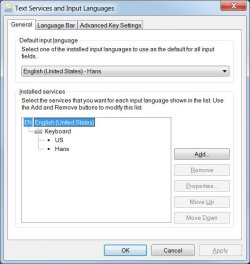
I have the settings shown in the attached file. I believe the second Kyeboard is installed by my app "Keyboard Layout Manager". However, I want to start from scratch, and go back to only one keyboard (and reinstall KLM). But I can only delete keyboard US, not keyboard Hans. I feel I should be able to delete either one of them, even if I have to leave one 'active'. Any comments on that?
Also, is there any way to change the names of "US" or "Hans". I cannot see any way to do this here. Maybe somewhere else?
Regards,
Hans L
I have the settings shown in the attached file. I believe the second Kyeboard is installed by my app "Keyboard Layout Manager". However, I want to start from scratch, and go back to only one keyboard (and reinstall KLM). But I can only delete keyboard US, not keyboard Hans. I feel I should be able to delete either one of them, even if I have to leave one 'active'. Any comments on that?
Also, is there any way to change the names of "US" or "Hans". I cannot see any way to do this here. Maybe somewhere else?
Regards,
Hans L
Attachments
My Computer
- Computer Manufacturer/Model Number
- BIOS American MegaTrend 1238
- OS
- Windows 7 Ultimate
- CPU
- Intel Core Duo E6600 @ 2.40 GHz
- Motherboard
- ASUS P5B-Deluxe
- Memory
- 3 GB
- Graphics Card(s)
- Nvidia eVGA GeForce 8600 GTS & 7600 GT
- Monitor(s) Displays
- Iiyama PLE431S/PLH431S

