Tfght is compressed

sundevilrach

New member
Local time
12:08 AM
Messages
26
In a moment of unknown stupidity, whilst try to solve another problem, I seem to have partially compressed my C drive. I only let it happen for a few mins then cancelled but now my PC won't start at all and is just coming up with a black screen and TFGHT is compressed, please hit Ctrl + Alt + Del in a constant Loop. I press it and it looks like it's going to start up then doesn't.

I have my windows installation disc and naively thought that might help but it doesn't!

Any ideas?
 

My Computer

Computer type
PC/Desktop
Computer Manufacturer/Model Number
Dell
OS
Windows 7
I have tried to reboot from my installation disc by selecting F12 and boot menu. I've selected cd rom from there and can hear the cd rom doing something but it justsays 'no boot available, press enter key to retry' which I do but no joy!
 

My Computer

Computer type
PC/Desktop
Computer Manufacturer/Model Number
Dell
OS
Windows 7
Where did you get the install DVD?

You can download a legal copy with SP1 integrated from here:

Windows 7 Direct Download Links

Make sure you get the same version you have, Home Premium, Pro or Ultimate and 32 or 64 bit. Note that Basic or Starter is not available.

I recommend using ImgBurn at 4X speed (or the slowest available) to create the DVD from the downloaded .iso file. Just be careful during the install not to accidentally install some of the bundled junk that comes with it. Always take The Custom Install option.

You can do this on any computer capable of burning a DVD.

YOU MUST HAVE A VALID KEY TO INSTALL THIS .ISO.
The one on the COA sticker on your computer will work.

If you are just using the Recovery Console you do not need a key.

You can also create a bootable USB Flash drive (4GB or larger) to install Windows 7 from.
  1. Download and run Universal USB Installer Easy as 1 2 3[/*]
  2. Select Windows 7 from the first drop down list, all the way to the bottom[/*]
  3. Select the downloaded Windows 7 iso file[/*]
  4. Select your USB flash drive[/*]
  5. Click Create[/*]
For techies or folks who work on computers:

Create Windows 7 Universal ISO With All Editions Selection On Install with ei.cfg Removal Utility.

This will fit on a 6GB flash drive or can be burned to a DVD.

Once you have that, see here for how to fix this: Unable to boot - TFGHT is compressed - Microsoft Community
 

My Computer

Computer type
PC/Desktop
Computer Manufacturer/Model Number
Lenovo IdeaCenter 450
OS
Windows 10 Pro X64
CPU
Intel Quad Core i7-4770 @ 3.4Ghz
Memory
16.0GB PC3-12800 DDR3 SDRAM 1600 MHz
Graphics Card(s)
Intel Integrated HD Graphics
Sound Card
Realtek HD Audio
Monitor(s) Displays
HP 22" LCD
Screen Resolution
1680 x 1050
Hard Drives
250GB Samsung EVO SATA-3 SSD
2TB Seagate ST2000DM001 SATA-2
1.5TB Seagate ST3150041AS SATA
Keyboard
Dell USB
Mouse
Lenovo USB
Internet Speed
Cable via Road Runner 3MB Upload, 30MB Download
Antivirus
Windows Defender, MBAM Pro, MBAE
Browser
Seamonkey
Other Info
UEFI/GPT
PLDS DVD-RW DH16AERSH
I have the home enterprise edition as we were able to get them cheaper through work through some tie in deal. I think I'm going to have yo admit defeat and take it to a shop, think it's above and beyond what I can do. This was all from me trying to fix driver issues!
 

My Computer

Computer type
PC/Desktop
Computer Manufacturer/Model Number
Dell
OS
Windows 7
Because I'm a total novice and it a quest to fix my drivers (which is a different thread) I've managed to totally goose the whole thing. I've went from trying reinstall drivers to having a pc that doesn't switch on.

I appreciate the help but I know when to not push my luck any further. My menus were not coming up as described, the pc repair shop is very cheap.
 

My Computer

Computer type
PC/Desktop
Computer Manufacturer/Model Number
Dell
OS
Windows 7
What PC repair shop is cheap? :shock:

Often System Restore can take you back to a point before you started working on it, then we can help you resolve it if you want to work with us.

System Restore may be available without the disk by tapping the F8 key at boot to access System Recovery Options but if not it will be on the disk recovery options.
 
Boot menu was only giving me F2 or F12. I tried F8 and nothing happened. My system restores dates had vanished. Was the first thing I tried Friday when my problems began. I've had the pc 5 years and system restored many times but yet no dates were available.

The little polish man is charging £30. I'm losing money the more it's out of action as I have a part time job I do online and the more the pc was out of action the more earnings I lose.

I appreciate the eagerness to help. I really do but when I need it for work I didn't want to risk making things worse :-)
 

My Computer

Computer type
PC/Desktop
Computer Manufacturer/Model Number
Dell
OS
Windows 7
Thanks and will do :-)
 

My Computer

Computer type
PC/Desktop
Computer Manufacturer/Model Number
Dell
OS
Windows 7
A little update on my problem, pc shop reinstalled windows and Pc ok now. Seems my whole problem with usbs that lead to this sorry mess was my media player needing reinstalled!!


Now the pc repair shop told me he had installed windows vista, however I'm pretty sure it's windows 7. It's plastered everywhere, it's what I had before and the updates it's detecting are for windows 7! Before I had 33 bit windows 7 system, now it's 64 bit.

Now I might need to open a new thread for this but my goodness my system is so slow now!!! Super slow. Not just with the Internet, just simple things like opening the start menu take forever.

Any ideas as to why it can be going slow. Lots of room on my hardwire, anti virus up to date!
 

My Computer

Computer type
PC/Desktop
Computer Manufacturer/Model Number
Dell
OS
Windows 7
How much RAM do you have? For less than 4gb RAM I'd run 32 bit for best performance. But 64 bit can be made to run decently on 4gb RAM.

Why would the PC Repair shop install Windows Vista if your PC came with a Win7 license? How much did you pay to end up with a slow system?

So are you ready to do a perfect Clean Reinstall of the licensed version with our help which was offered before? If you work with us to get through the steps in Clean Reinstall - Factory OEM Windows 7 and stick only with the tools and methods given, you will end up with a perfect install just like tens of thousands of others we've helped do this without a single complaint.
 
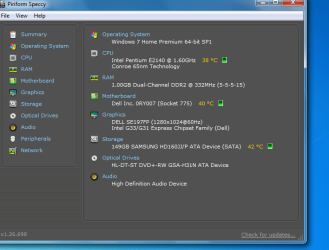
Capture.PNG


As you will see I only have 1GB ram (I think) - I am a novice.

It is an old PC but never had any problems with speed until post this trip.

All that I can see that has changed is that I had Windows 7 Ultimate 32 bit before (provided by my work on licence) and now I have Windows 7 Home 64 bit.

Is this the problem with my very low RAM?
 

My Computer

Computer type
PC/Desktop
Computer Manufacturer/Model Number
Dell
OS
Windows 7
Why do your specs here on the forums say you have 32 bit Win7 Home premium?

If you have an Ultimate license as you say then why would the shop reinstall a different version that you don't even own? How was Home Premium paid for or activated?

You'd need to upgrade the RAM or else I'd reinstall 32 bit of the Win7 version which you actually own.
 
My specs say that because that's what I thought I had before I was introduced to the tool I've used above. I had another thread under the drivers section where I first used the tool. I've just not edited my profile as I was busy trying to fix the problems. I knew it was 32 bit and 32 bit premium home is one of the two example given by the profile spec settings. As I've said several times I'm a total novice and thought the two examples given were the only options!!

I'm not sure if your post is just not translating well across the Atlantic but you seem to suggest I'm telling mistruths about having licensed products. Not quite sure what that would achieve but anyway I have a licensed product bought through my government employer. It's part of the Microsoft home use programme and has the certificate of authenticity across the box seal with a code number. There is a 14 digit number which I assume is the unique series number of my copy!

Why the shop have put a different version on I don't really know. My partner dropped the pc off and I was more concerned the thing was ever going to switch on again.

Anyway back to the issue in hand, the pc ia operating show because it's been upgraded to 64 bit? So I should just reinstall using the original licenced copy I have? The 32 bit ultimate?

I won't lose things on my pc as a result?
 

My Computer

Computer type
PC/Desktop
Computer Manufacturer/Model Number
Dell
OS
Windows 7
Sorry I see my product key inside my software now, it's a long time since I installed it :-/
 

My Computer

Computer type
PC/Desktop
Computer Manufacturer/Model Number
Dell
OS
Windows 7
You will lose everything so backup first.

You definitely need to add more ram. 1GB is just not enough. 2GB is the absolute minimum and 4GB is far better.
 

My Computer

Computer type
PC/Desktop
Computer Manufacturer/Model Number
Lenovo IdeaCenter 450
OS
Windows 10 Pro X64
CPU
Intel Quad Core i7-4770 @ 3.4Ghz
Memory
16.0GB PC3-12800 DDR3 SDRAM 1600 MHz
Graphics Card(s)
Intel Integrated HD Graphics
Sound Card
Realtek HD Audio
Monitor(s) Displays
HP 22" LCD
Screen Resolution
1680 x 1050
Hard Drives
250GB Samsung EVO SATA-3 SSD
2TB Seagate ST2000DM001 SATA-2
1.5TB Seagate ST3150041AS SATA
Keyboard
Dell USB
Mouse
Lenovo USB
Internet Speed
Cable via Road Runner 3MB Upload, 30MB Download
Antivirus
Windows Defender, MBAM Pro, MBAE
Browser
Seamonkey
Other Info
UEFI/GPT
PLDS DVD-RW DH16AERSH
If you want to upgrade to 4gb RAM then you can keep the 64 bit install you have if it then performs better, otherwise you should have 2gb RAM to run 32 bit smoothly.

If you want our help to achieve a perfect Win7 reinstall as we've helped tens of thousands of others do here, then we need to understand better what license you own since you just told us that a copy of Win7 was installed which you do not own. Did you show the shop which did the reinstall the license you own on there? If so why would they install another version and how was it activated without collecting a large amount of money for a legal license?

Is there a 25 character Product Key on the disk packaging COA sticker which is readable, and what is the name of the version printed on the sticker? If the packaging confirms it has SP1 then you can use the 32-bit disk media that came with it, otherwise you should download the latest official 32 bit installer from Win7 Home Premium x86 SP1 English Official ISO download and burn to disk or flash stick with Windows 7 USB-DVD Download Tool .

Look over the steps in Clean Reinstall - Factory OEM Windows 7 which cover everything that must not be forgotten preparation, the actual install, and the tools and methods which work best to keep a perfect install. Ask back all the questions you have.
 
I'll check out my product key tomorrow (it's on a yellow sticker on the inside of the box) but there isn't a lot of information. I assume this is because it was a deal with my employer, I know I paid not a lot of money for it and it was deducted from my salary. I wish I could remember how much now. But either way it's certainly legit just the packaging is different as employer linked.

As for the shop, my pc has a licence sticker on it from when it was originally bought and had vista. I changed to windows 7 at a later date. No idea why they didn't ask as my partner took the pc in.
 
Last edited:

My Computer

Computer type
PC/Desktop
Computer Manufacturer/Model Number
Dell
OS
Windows 7
He probably thought Basic was best for such low RAM. But the question is how it was activated, since for what you said he charged it could not have included the true cost of the OS and was likely pirated which is worse than undesirable. This was entirely unnecessary since Ultimate will default to run without Aero on lower RAM just as easily.

However there are some optimizations like editing out Visual Effects to make it run better on only 2gb RAM which is the minimum.

If you had it running on 1gb RAM were you using an AV? Was it hanging a lot?
 
Back
Top