
I have a serious need to install VC++ 2015 (or preferably later) on a win7-64 SP1 machine.
Up to Microsoft dropping win7 auto updates, one got VC++ up to 2017 or even 2019 via the auto updates, but on this machine that didn't happen...
The reason I need VC++ 2015 or later is because I have a specific app (ST Cube IDE development system) which silently changed its requirements earlier this year and no longer runs in later versions.
Obviously I have googled on this error and followed a lot of the many hundreds of hits but they are all useless. For example this does nothing
0x80240017 error and how to fix it | HiTech Service
I can post the error log here which I get when trying to install it...
I have two win7-64 machines which have VC++ 2017 installed and one with 2019, so the sites claiming the Windows version is outdated are simply wrong.
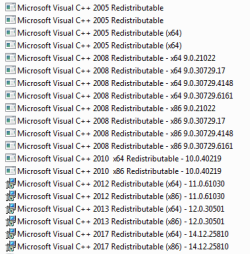
Up to Microsoft dropping win7 auto updates, one got VC++ up to 2017 or even 2019 via the auto updates, but on this machine that didn't happen...
The reason I need VC++ 2015 or later is because I have a specific app (ST Cube IDE development system) which silently changed its requirements earlier this year and no longer runs in later versions.
Obviously I have googled on this error and followed a lot of the many hundreds of hits but they are all useless. For example this does nothing
0x80240017 error and how to fix it | HiTech Service
I can post the error log here which I get when trying to install it...
I have two win7-64 machines which have VC++ 2017 installed and one with 2019, so the sites claiming the Windows version is outdated are simply wrong.
My Computers
-
At a glance
7-64 EnterpriseQC I724GBNvidia- Computer type
- PC/Desktop
- Computer Manufacturer/Model Number
- custom build
- OS
- 7-64 Enterprise
- CPU
- QC I7
- Motherboard
- Gigabyte
- Memory
- 24GB
- Graphics Card(s)
- Nvidia
- Hard Drives
- 2TB SATA
-
- Computer type
- PC/Desktop