Solved The default gateway is not available problem

Protozoa

New member
Hello,

I've been having this problem for months now where my connection drops and when I go to network and sharing and let windows 7 fix it automatically, it does and says the problem was "The default gateway is not available."

This usually occurs when I start having multiple connections like playing a game and having youtube or p2p program on at the same time.

How does one go about fixing this? I've just about had enough..
 

My Computer

Computer type
PC/Desktop
OS
Windows 7 Ultimate 64bit
CPU
i5 3570k 3.4ghz
Motherboard
Asus P8Z77-V
Memory
8GB DDR3 1600mhz
Graphics Card(s)
Asus GTX670 Directcu II
Sound Card
Asus Xonar ST
Monitor(s) Displays
1920x1080 120hz + 1920x1200 60hz
Hard Drives
Crucial M4 128gb
3x WD Black 1tb
1x WD Green 640gb
PSU
Corsair HX650W
Case
Antec 902
Cooling
Hyper 212
I don't, but it still drops me occasionally. This problem did not exist a month ago..

What I most hate about it is that I can't listen to streaming internet radio anymore, I used to, just fine.
 

My Computer

Computer type
PC/Desktop
OS
Windows 7 Ultimate 64bit
CPU
i5 3570k 3.4ghz
Motherboard
Asus P8Z77-V
Memory
8GB DDR3 1600mhz
Graphics Card(s)
Asus GTX670 Directcu II
Sound Card
Asus Xonar ST
Monitor(s) Displays
1920x1080 120hz + 1920x1200 60hz
Hard Drives
Crucial M4 128gb
3x WD Black 1tb
1x WD Green 640gb
PSU
Corsair HX650W
Case
Antec 902
Cooling
Hyper 212
I don't, but it still drops me occasionally. This problem did not exist a month ago..

What I most hate about it is that I can't listen to streaming internet radio anymore, I used to, just fine.

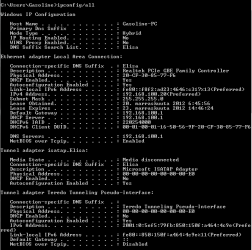
If you can post a screen shot of the ipconfig/all from this machine it would be helpful. :)

Do you have iTunes or Adobe photo shop installed on this system?
 

My Computer

Computer type
PC/Desktop
Computer Manufacturer/Model Number
Home built
OS
Windows 7 Ult, Windows 8.1 Pro,
CPU
Q9650-4.275GHz, E8600 4.5GHz, E6750-3.8GHz
Motherboard
Evga 780i FTW
Memory
G.Skill PC2 9600 1200Mhz 5 5 5 15 2T
Graphics Card(s)
GTX480
Sound Card
Asus Xonar D2
Monitor(s) Displays
HannsG
Screen Resolution
1680X1050
Hard Drives
GSkill Phoenix Pro 120GB SSD
PSU
ThermalTake Toughpower 1000Watt modular
Case
ThermalTake XaserV
Cooling
Xigmatek S1283
Keyboard
Logitech G15
Mouse
Logitech G9
Internet Speed
T1
I don't, but it still drops me occasionally. This problem did not exist a month ago..

What I most hate about it is that I can't listen to streaming internet radio anymore, I used to, just fine.

If you can post a screen shot of the ipconfig/all from this machine it would be helpful. :)

Do you have iTunes or Adobe photo shop installed on this system?
I attached the screenshot

And yes I have Photoshop CS5 installed.
 

Attachments

  • ipp.png
    ipp.png
    32.6 KB · Views: 32

My Computer

Computer type
PC/Desktop
OS
Windows 7 Ultimate 64bit
CPU
i5 3570k 3.4ghz
Motherboard
Asus P8Z77-V
Memory
8GB DDR3 1600mhz
Graphics Card(s)
Asus GTX670 Directcu II
Sound Card
Asus Xonar ST
Monitor(s) Displays
1920x1080 120hz + 1920x1200 60hz
Hard Drives
Crucial M4 128gb
3x WD Black 1tb
1x WD Green 640gb
PSU
Corsair HX650W
Case
Antec 902
Cooling
Hyper 212
The ipconfig looks good. Photoshop installs something called bonjour service which is a secondary connection which causes problems with Windows systems on a regular basis.

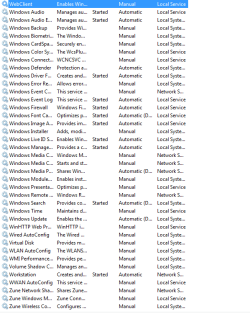
If you can look in Windows services there may be one called Bonjour or it may show up as IDstring followed by a bunch of numbers, should be near the top of the page, you will want to disable that in services then reboot the machine and see if the problem occurs again or not.
 

My Computer

Computer type
PC/Desktop
Computer Manufacturer/Model Number
Home built
OS
Windows 7 Ult, Windows 8.1 Pro,
CPU
Q9650-4.275GHz, E8600 4.5GHz, E6750-3.8GHz
Motherboard
Evga 780i FTW
Memory
G.Skill PC2 9600 1200Mhz 5 5 5 15 2T
Graphics Card(s)
GTX480
Sound Card
Asus Xonar D2
Monitor(s) Displays
HannsG
Screen Resolution
1680X1050
Hard Drives
GSkill Phoenix Pro 120GB SSD
PSU
ThermalTake Toughpower 1000Watt modular
Case
ThermalTake XaserV
Cooling
Xigmatek S1283
Keyboard
Logitech G15
Mouse
Logitech G9
Internet Speed
T1
I did not find "bonjour" in the service lists. Anything else it might be?
 

My Computer

Computer type
PC/Desktop
OS
Windows 7 Ultimate 64bit
CPU
i5 3570k 3.4ghz
Motherboard
Asus P8Z77-V
Memory
8GB DDR3 1600mhz
Graphics Card(s)
Asus GTX670 Directcu II
Sound Card
Asus Xonar ST
Monitor(s) Displays
1920x1080 120hz + 1920x1200 60hz
Hard Drives
Crucial M4 128gb
3x WD Black 1tb
1x WD Green 640gb
PSU
Corsair HX650W
Case
Antec 902
Cooling
Hyper 212
I did not find "bonjour" in the service lists. Anything else it might be?

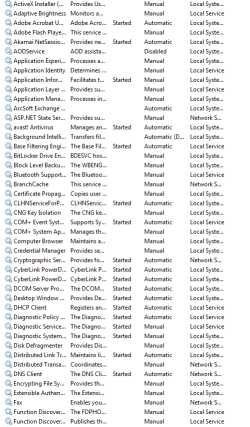
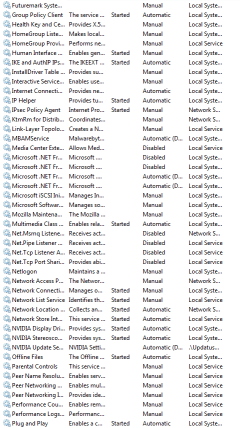
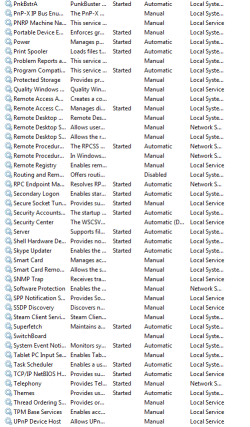
If you can show me a screen shot of your Windows services page I may be able to spot it. It's not easy to see for most people but it is the most likely problem.

According to the ipconfig you should be online, the default gateway shows up.
 

My Computer

Computer type
PC/Desktop
Computer Manufacturer/Model Number
Home built
OS
Windows 7 Ult, Windows 8.1 Pro,
CPU
Q9650-4.275GHz, E8600 4.5GHz, E6750-3.8GHz
Motherboard
Evga 780i FTW
Memory
G.Skill PC2 9600 1200Mhz 5 5 5 15 2T
Graphics Card(s)
GTX480
Sound Card
Asus Xonar D2
Monitor(s) Displays
HannsG
Screen Resolution
1680X1050
Hard Drives
GSkill Phoenix Pro 120GB SSD
PSU
ThermalTake Toughpower 1000Watt modular
Case
ThermalTake XaserV
Cooling
Xigmatek S1283
Keyboard
Logitech G15
Mouse
Logitech G9
Internet Speed
T1
Sorry for the absence, I had a problem with bsoding and this issue didn't bother me much but it started again even more frequently.

Here's the services. I couldn't identify anything but hopefully you can.
 

Attachments

  • ac1.png
    ac1.png
    51.2 KB · Views: 10
  • ac2.png
    ac2.png
    47.7 KB · Views: 10
  • ac3.png
    ac3.png
    50.2 KB · Views: 8
  • ac4.png
    ac4.png
    73.4 KB · Views: 8

My Computer

Computer type
PC/Desktop
OS
Windows 7 Ultimate 64bit
CPU
i5 3570k 3.4ghz
Motherboard
Asus P8Z77-V
Memory
8GB DDR3 1600mhz
Graphics Card(s)
Asus GTX670 Directcu II
Sound Card
Asus Xonar ST
Monitor(s) Displays
1920x1080 120hz + 1920x1200 60hz
Hard Drives
Crucial M4 128gb
3x WD Black 1tb
1x WD Green 640gb
PSU
Corsair HX650W
Case
Antec 902
Cooling
Hyper 212
I don't see the bonjour service however, Avast has been known to cause wireless connection problem due to it's special wireless filter. You should try to find that wireless filter in the Avast settings and turn it off.
 

My Computer

Computer type
PC/Desktop
Computer Manufacturer/Model Number
Home built
OS
Windows 7 Ult, Windows 8.1 Pro,
CPU
Q9650-4.275GHz, E8600 4.5GHz, E6750-3.8GHz
Motherboard
Evga 780i FTW
Memory
G.Skill PC2 9600 1200Mhz 5 5 5 15 2T
Graphics Card(s)
GTX480
Sound Card
Asus Xonar D2
Monitor(s) Displays
HannsG
Screen Resolution
1680X1050
Hard Drives
GSkill Phoenix Pro 120GB SSD
PSU
ThermalTake Toughpower 1000Watt modular
Case
ThermalTake XaserV
Cooling
Xigmatek S1283
Keyboard
Logitech G15
Mouse
Logitech G9
Internet Speed
T1
I am not wireless though, everything is hooked up.
 

My Computer

Computer type
PC/Desktop
OS
Windows 7 Ultimate 64bit
CPU
i5 3570k 3.4ghz
Motherboard
Asus P8Z77-V
Memory
8GB DDR3 1600mhz
Graphics Card(s)
Asus GTX670 Directcu II
Sound Card
Asus Xonar ST
Monitor(s) Displays
1920x1080 120hz + 1920x1200 60hz
Hard Drives
Crucial M4 128gb
3x WD Black 1tb
1x WD Green 640gb
PSU
Corsair HX650W
Case
Antec 902
Cooling
Hyper 212
I am not wireless though, everything is hooked up.

The default gateway is showing up and the IP is valid and shows you as online so something appears to be blocking the connection. Could be Avast or something else.

If you can start up in safe mode with networking you may be able to determine if this problem is caused by an installed program or A/V software.

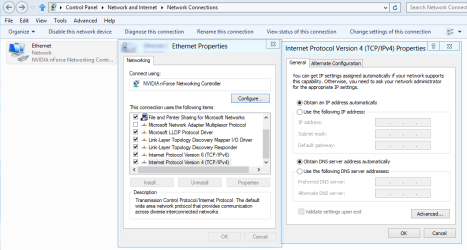
It sometimes helps to type in the default gateway into the IPv4 settings which in your case would be 192.168.100.1

The link below talks about this common problem and shows that there are many different causes and solutions which are talked about further down the page. You should go down the list and see if someone else's solution works for you. :)

http://pocketpccentral.net/blog/200...cess-no-internet-connection-problem-resolved/
 

My Computer

Computer type
PC/Desktop
Computer Manufacturer/Model Number
Home built
OS
Windows 7 Ult, Windows 8.1 Pro,
CPU
Q9650-4.275GHz, E8600 4.5GHz, E6750-3.8GHz
Motherboard
Evga 780i FTW
Memory
G.Skill PC2 9600 1200Mhz 5 5 5 15 2T
Graphics Card(s)
GTX480
Sound Card
Asus Xonar D2
Monitor(s) Displays
HannsG
Screen Resolution
1680X1050
Hard Drives
GSkill Phoenix Pro 120GB SSD
PSU
ThermalTake Toughpower 1000Watt modular
Case
ThermalTake XaserV
Cooling
Xigmatek S1283
Keyboard
Logitech G15
Mouse
Logitech G9
Internet Speed
T1
How do I do that Ipv4 setting thing exactly?

And would you recommend me reinstalling avast in this case or checking something about windows's own firewall?

Thanks.
 

My Computer

Computer type
PC/Desktop
OS
Windows 7 Ultimate 64bit
CPU
i5 3570k 3.4ghz
Motherboard
Asus P8Z77-V
Memory
8GB DDR3 1600mhz
Graphics Card(s)
Asus GTX670 Directcu II
Sound Card
Asus Xonar ST
Monitor(s) Displays
1920x1080 120hz + 1920x1200 60hz
Hard Drives
Crucial M4 128gb
3x WD Black 1tb
1x WD Green 640gb
PSU
Corsair HX650W
Case
Antec 902
Cooling
Hyper 212
Now I'm losing my connection and getting it back all the time! my god this is annoying..

Edit: Ok I tried a couple of things and removing avast fixed it (for now, I still need to stress my connection to make sure). You think reinstalling will bring it back or might it have been just something corrupted in the programs settings?

Edit2: just got it again and avast was still uninstalled
 
Last edited:

My Computer

Computer type
PC/Desktop
OS
Windows 7 Ultimate 64bit
CPU
i5 3570k 3.4ghz
Motherboard
Asus P8Z77-V
Memory
8GB DDR3 1600mhz
Graphics Card(s)
Asus GTX670 Directcu II
Sound Card
Asus Xonar ST
Monitor(s) Displays
1920x1080 120hz + 1920x1200 60hz
Hard Drives
Crucial M4 128gb
3x WD Black 1tb
1x WD Green 640gb
PSU
Corsair HX650W
Case
Antec 902
Cooling
Hyper 212
Now I'm losing my connection and getting it back all the time! my god this is annoying..

Edit: Ok I tried a couple of things and removing avast fixed it (for now, I still need to stress my connection to make sure). You think reinstalling will bring it back or might it have been just something corrupted in the programs settings?

Edit2: just got it again and avast was still uninstalled

It seems that Avast or just about any A/V software can and will destroy your internet connection, and they do so on a regular basis around here, wired or wireless doesn't seem to matter. I would uninstall Avast using it's special uninstall tool. Very frustrating for me as well. :confused:
http://www.avast.com/uninstall-utility

The link I posted shows where you would type in the Default Gateway, it might help although it shouldn't be required it has been known to fix this problem. I'll post a picture of where to type it, it's the same thing as setting a static IP, just switch to "Use the following IP" then type in the gateway, subnet, and IP which should be outside the DHCP range.

I would go with Msoft security essentials and use Malware Bytes for running scans.

If you are still having the connection problem, Type or copy each command one at a time into an elevated command prompt then hit "enter" after each one, then reboot your machine.


netsh winsock reset catalog (reset winsock entries)

netsh int ip reset reset.log hit (reset TCP/IP stack)

If uninstalling Avast doesn't work then try reading down the list in the link I posted to see if some of those solutions work for you, this is not a one size fits all type of problem, it can be many different causes.
http://pocketpccentral.net/blog/200...cess-no-internet-connection-problem-resolved/
 

Attachments

  • IPv4 properties.PNG
    IPv4 properties.PNG
    62.5 KB · Views: 15

My Computer

Computer type
PC/Desktop
Computer Manufacturer/Model Number
Home built
OS
Windows 7 Ult, Windows 8.1 Pro,
CPU
Q9650-4.275GHz, E8600 4.5GHz, E6750-3.8GHz
Motherboard
Evga 780i FTW
Memory
G.Skill PC2 9600 1200Mhz 5 5 5 15 2T
Graphics Card(s)
GTX480
Sound Card
Asus Xonar D2
Monitor(s) Displays
HannsG
Screen Resolution
1680X1050
Hard Drives
GSkill Phoenix Pro 120GB SSD
PSU
ThermalTake Toughpower 1000Watt modular
Case
ThermalTake XaserV
Cooling
Xigmatek S1283
Keyboard
Logitech G15
Mouse
Logitech G9
Internet Speed
T1
Thanks a lot for your help and it does indeed seem that avast was the culprit. I've now only had this problem 3 times(very random, no pattern to it) since I uninstalled it. I can't believe that such a legit software can do so much damage.
 

My Computer

Computer type
PC/Desktop
OS
Windows 7 Ultimate 64bit
CPU
i5 3570k 3.4ghz
Motherboard
Asus P8Z77-V
Memory
8GB DDR3 1600mhz
Graphics Card(s)
Asus GTX670 Directcu II
Sound Card
Asus Xonar ST
Monitor(s) Displays
1920x1080 120hz + 1920x1200 60hz
Hard Drives
Crucial M4 128gb
3x WD Black 1tb
1x WD Green 640gb
PSU
Corsair HX650W
Case
Antec 902
Cooling
Hyper 212
Thanks a lot for your help and it does indeed seem that avast was the culprit. I've now only had this problem 3 times(very random, no pattern to it) since I uninstalled it. I can't believe that such a legit software can do so much damage.

This type of problem occurs with startling frequency using just about ANY third party A/V software.

I highly recommend using Windows defender or Windows security essentials.
 

My Computer

Computer type
PC/Desktop
Computer Manufacturer/Model Number
Home built
OS
Windows 7 Ult, Windows 8.1 Pro,
CPU
Q9650-4.275GHz, E8600 4.5GHz, E6750-3.8GHz
Motherboard
Evga 780i FTW
Memory
G.Skill PC2 9600 1200Mhz 5 5 5 15 2T
Graphics Card(s)
GTX480
Sound Card
Asus Xonar D2
Monitor(s) Displays
HannsG
Screen Resolution
1680X1050
Hard Drives
GSkill Phoenix Pro 120GB SSD
PSU
ThermalTake Toughpower 1000Watt modular
Case
ThermalTake XaserV
Cooling
Xigmatek S1283
Keyboard
Logitech G15
Mouse
Logitech G9
Internet Speed
T1
Back
Top